
Introduction
This manual provides essential instructions for the safe and efficient use of your Absaar Evo 8.0 Battery Charger. Please read all instructions carefully before operating the device. Keep this manual for future reference.
Safety Warning:
- Always wear eye protection and protective gloves when working with batteries.
- Ensure adequate ventilation when charging batteries to prevent the accumulation of explosive gases.
- Do not expose the charger to rain or excessive moisture.
- Never attempt to charge a frozen or damaged battery.
- Keep out of reach of children.
Setup and Connection
Follow these steps to properly set up and connect your Absaar Evo 8.0 Battery Charger.
- Unpacking: Carefully remove the charger and all accessories from the packaging. Inspect for any signs of damage.
- Identify Components: Familiarize yourself with the charger unit, AC power cord, and battery clamps (red for positive, black for negative).
- Prepare the Battery: Ensure the battery terminals are clean and free of corrosion. If necessary, clean them with a wire brush.
- Connect to Battery:
- Connect the red positive (+) clamp to the positive (+) battery terminal.
- Connect the black negative (-) clamp to the negative (-) battery terminal. For vehicles, if the battery is still in the vehicle, connect the black clamp to the vehicle chassis away from the battery and fuel line.
- Connect to Power: Plug the AC power cord into a standard electrical outlet (220-240V AC). The charger will power on and begin its charging sequence.

Figure 1: The Absaar Evo 8.0 Battery Charger showing the main unit, AC power cord, and battery clamps.
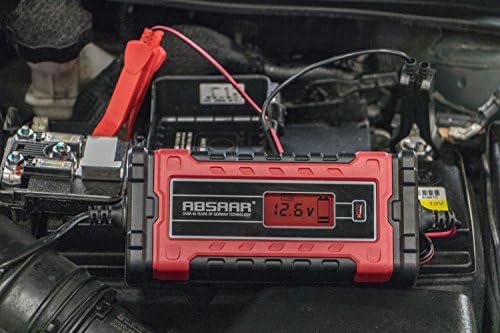
Figure 2: The Absaar Evo 8.0 Battery Charger properly connected to a vehicle battery.
Operating Instructions
The Absaar Evo 8.0 is an automatic charger designed for 12V and 24V batteries. It features an intelligent charging process.
- Automatic Voltage Detection: Once connected to a battery and power, the charger automatically detects whether it is a 12V or 24V battery. The display will show the detected voltage.
- Charging Modes: The charger automatically selects the appropriate charging current (8A or 4A) based on the battery's state and voltage. The display will indicate the charging status and current voltage.
- Monitoring: The digital display provides real-time information on the battery voltage. The charger will automatically switch to a maintenance (float) charge mode once the battery is fully charged to prevent overcharging.
- Disconnecting: To disconnect the charger, first unplug the AC power cord from the electrical outlet. Then, remove the black negative (-) clamp from the battery (or chassis), followed by the red positive (+) clamp from the battery terminal.
Maintenance and Storage
Proper maintenance ensures the longevity and performance of your charger.
- Cleaning: Disconnect the charger from all power sources and batteries before cleaning. Wipe the exterior with a soft, dry cloth. Do not use abrasive cleaners or solvents.
- Cable Inspection: Regularly inspect the AC power cord and battery cables for any cuts, fraying, or damage. Do not use the charger if cables are damaged.
- Storage: Store the charger in a cool, dry place, away from direct sunlight and extreme temperatures. Ensure cables are neatly coiled to prevent damage.
Troubleshooting
If you encounter issues with your Absaar Evo 8.0 Battery Charger, refer to the following common problems and solutions:
| Problem | Possible Cause | Solution |
|---|---|---|
| Charger does not turn on. | No power from outlet; faulty connection. | Check the power outlet with another device. Ensure the AC power cord is securely plugged into both the charger and the outlet. |
| Charger connected but not charging. | Incorrect battery connection; battery is severely discharged or damaged. | Verify that the positive and negative clamps are correctly connected. Ensure battery terminals are clean. The charger may not initiate if the battery voltage is extremely low or if the battery is faulty. |
| Display shows an error code. | Specific error condition (e.g., reverse polarity, short circuit). | Refer to the charger's display for the specific error. Disconnect and reconnect the battery clamps, ensuring correct polarity. If the error persists, the battery or charger may be faulty. |
| Charger gets warm during operation. | Normal operation; poor ventilation. | It is normal for the charger to get warm during charging. Ensure it is placed in a well-ventilated area and not covered. If it becomes excessively hot, disconnect immediately. |
If the problem persists after attempting these solutions, please contact customer support.
Specifications
Key technical specifications for the Absaar Evo 8.0 Battery Charger:
- Model Number: 158003
- Input Voltage: 220-240V AC, 50/60Hz
- Output Voltage: 12V DC / 24V DC (Automatic Detection)
- Current Rating: 8 Amps (for 12V), 4 Amps (for 24V)
- Product Dimensions: 30 x 18.5 x 7.2 cm
- Weight: 874 g
- Color: Red/Black
- Certifications: CE, RoHS
- Manufacturer: Absaar
Warranty and Support
Your Absaar Evo 8.0 Battery Charger is covered by a manufacturer's warranty against defects in materials and workmanship. Please retain your proof of purchase for warranty claims.
For technical support, warranty inquiries, or service, please contact your retailer or visit the official Absaar website for contact information.
Website: www.absaar.com (Example link, please verify actual website)


