1. Product Overview
The KINGBOLEN EL-50448 is a dedicated tool designed for performing the Tire Pressure Monitoring System (TPMS) sensor relearn procedure on GM series vehicles. This procedure is necessary after events such as tire rotations, replacement of the remote door lock receiver module, or replacement of a tire pressure sensor.
This tool facilitates the activation of 315MHz or 433 MHz TPMS sensors, ensuring proper communication with the vehicle's monitoring system. Its single-button operation simplifies the process for users.

Image: Front view of the KINGBOLEN EL-50448 TPMS Relearn Tool.
2. Product Contents
The product package includes the following item:
- EL-50448 Main unit
Note: A 9V battery is required for operation and is not included in the package.
3. Specifications
| Specification | Detail |
|---|---|
| Brand | KINGBOLEN |
| Model | EL-50448 |
| Material | Plastic |
| Maximum Supply Voltage | 9 Volts (DC) |
| Mounting Type | Tire Mount |
| Sensing Distance | 5 Centimeters |
| Item Weight | 5.3 ounces |
| Package Dimensions | 6.42 x 2.6 x 1.65 inches |
| UPC | 724190794326 |
4. Compatibility
The EL-50448 TPMS Relearn Tool is compatible with GM series vehicles (including Opel, Buick, Cadillac, Chevrolet, GMC) manufactured between 2006 and 2023 that are equipped with an original 315MHz or 433 MHz TPMS. It is designed to quickly enter TPMS learning mode and display real-time pressure data for all four tires.
Important Note: This tool is not compatible with heavy trucks or external TPMS systems. Please verify your vehicle's compatibility before use. If your vehicle model is not explicitly listed in the provided compatibility charts, it may not be compatible.

Image: The EL-50448 tool shown with various compatible GM vehicle types (car, SUV, pickup, light truck).
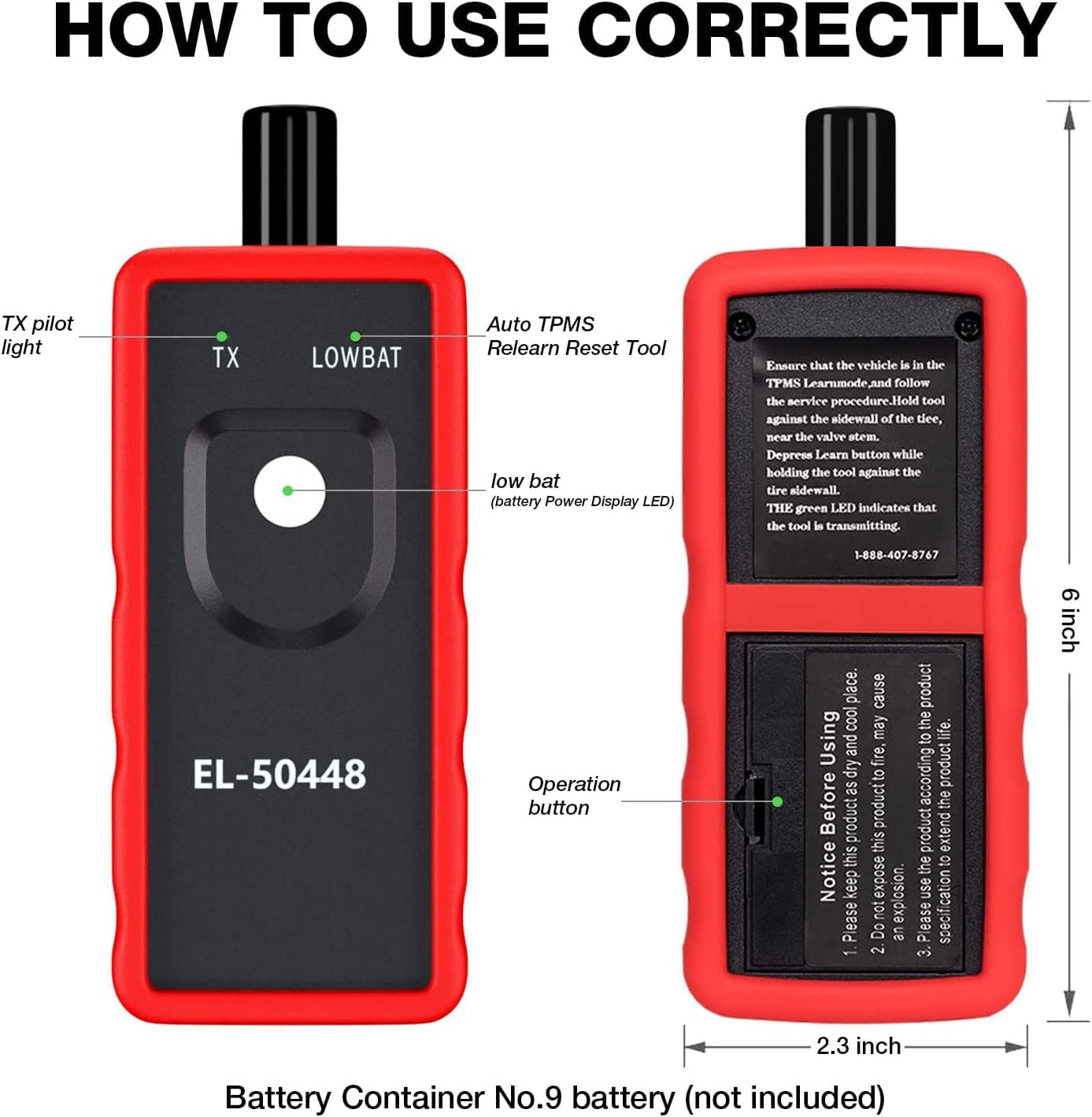
Image: Detailed tables listing factory tested and customer model compatibility for GM vehicles from 2006-2018.
5. Setup
5.1 Battery Installation
The EL-50448 tool requires a 9V battery for operation. To install the battery:
- Locate the battery compartment on the back of the EL-50448 unit.
- Open the battery compartment cover.
- Insert a new 9V battery, ensuring correct polarity.
- Close the battery compartment cover securely.
The 'LOWBAT' indicator light on the tool will illuminate if the battery level is low, indicating that the battery needs replacement.

Image: Rear view of the EL-50448 tool, highlighting the 9V battery compartment.
6. Operating Instructions
Follow these steps to perform the TPMS relearn procedure using the KINGBOLEN EL-50448 tool:
- Prepare the Vehicle: Ensure your vehicle is in TPMS learning mode. This is typically initiated through the vehicle's dashboard menu or by following specific manufacturer instructions (e.g., turning the ignition on, setting the dashboard to 'tire pressure learning screen'). The vehicle horn may beep twice to confirm entry into learning mode.
- Position the Tool: Hold the EL-50448 tool against the tire sidewall, close to the valve stem. Ensure the antenna of the tool is in the correct position, parallel to the valve stem.
- Activate the Sensor: Press the operation button on the EL-50448 tool. Continue pressing the tool against the tire sidewall until the car horn beeps once, indicating successful sensor activation. The green 'TX' LED on the tool will light up when it is transmitting.
- Repeat for Remaining Tires: Follow the vehicle's recommended sequence for relearning (e.g., left front, right front, right rear, left rear). Repeat steps 2 and 3 for each tire until all four sensors have been activated.
- Complete Procedure: Once all sensors are activated, the vehicle's horn may beep twice to confirm the completion of the relearn procedure. Turn off the ignition. It is recommended to set the tire pressure to the manufacturer's specifications after the relearn process.
The sensor activation process typically takes 1-2 minutes per tire. The time required may vary slightly depending on the vehicle model.

Image: Proper positioning of the EL-50448 tool near the tire valve stem for activation.

Image: Visual representation of the four-step TPMS relearn process, showing the sequence for activating each tire sensor.
7. Maintenance
The KINGBOLEN EL-50448 is constructed from high-quality PVC material, offering dust-proof, wear-resistant, and impact-resistant properties to protect its internal components. Regular maintenance is minimal.
7.1 Cleaning
Wipe the tool with a soft, dry cloth to remove dust or debris. Avoid using harsh chemicals or abrasive cleaners.
7.2 Storage
Store the tool in a dry, cool place, away from direct sunlight and extreme temperatures. It is lightweight and portable, designed for easy storage in a car or toolbox.
7.3 Battery Replacement
Replace the 9V battery when the 'LOWBAT' indicator light illuminates to ensure optimal performance. Refer to Section 5.1 for battery installation instructions.
8. Troubleshooting
8.1 Tool Not Activating Sensor
- Check Vehicle Mode: Ensure the vehicle is correctly in TPMS learning mode. Refer to your vehicle's owner's manual for specific instructions.
- Tool Positioning: Verify that the tool's antenna is positioned correctly against the tire sidewall, close to the valve stem.
- Battery Level: Check the 'LOWBAT' indicator. If it's on, replace the 9V battery.
- Sensor Condition: If a sensor is faulty or incompatible, the tool may not be able to activate it.
8.2 Inconsistent Relearn Times
Different vehicle models may require varying amounts of time to reset all tire sensors after rotation. If the process seems longer than expected, ensure all steps are followed precisely and the tool is held steadily in place during activation.
9. Warranty and Support Information
9.1 Warranty
The KINGBOLEN EL-50448 TPMS Relearn Tool comes with a 1-year warranty and a 30-day unconditional return policy. This ensures product reliability and customer satisfaction.
9.2 Software Updates
The product includes lifetime free software upgrades, ensuring access to the newest software and vehicle model data packets. Initial connection to Wi-Fi may be required for the first installation and auto-update of new car model data packets. Offline use is supported after the update is complete.
9.3 Customer Support
For any vehicle issues or product-related inquiries, please contact KINGBOLEN customer support. You can send a message via Amazon or email Support@kingbolen.com for a prompt response.


