
1. Introduction
The FRACARRO CT3-GSM is a sophisticated 3-channel GSM telephone combiner designed for integration into security and automation systems. It allows for remote control and notification via the GSM network, providing reliable communication for various applications. This manual provides detailed instructions for the proper installation, configuration, operation, and maintenance of your CT3-GSM unit.
2. Safety Information
- Read all instructions carefully before installation and operation.
- Installation should only be performed by qualified personnel.
- Disconnect power before making any wiring connections.
- Ensure the power supply voltage matches the specifications of the device.
- Do not expose the device to moisture, extreme temperatures, or direct sunlight.
- Use only original FRACARRO accessories and spare parts.
3. Package Contents
Verify that all items are present in the package:
- FRACARRO CT3-GSM Unit
- GSM Antenna
- Mounting Screws and Wall Plugs
- This User Manual
If any items are missing or damaged, please contact your supplier immediately.
4. Product Overview
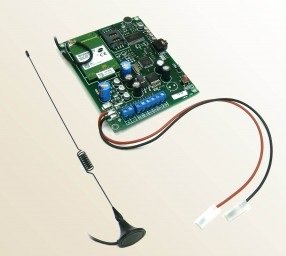
Figure 1: Front view of the FRACARRO CT3-GSM unit. This image shows the compact design and various connection ports and indicator LEDs on the front panel.
The CT3-GSM unit features three independent input channels, allowing it to monitor different events or zones. Upon activation of an input, the device can dial pre-programmed telephone numbers and/or send SMS messages to alert users. It also supports remote control functionalities via SMS commands.
4.1. Main Components
- SIM Card Slot: For inserting the GSM SIM card.
- Antenna Connector: For connecting the external GSM antenna.
- Input Terminals (IN1, IN2, IN3): For connecting external triggers (e.g., alarm contacts, sensors).
- Output Terminals (OUT1, OUT2): For controlling external devices (e.g., relays, lights).
- Power Input: For connecting the DC power supply.
- Status LEDs: Indicators for power, GSM signal strength, and channel status.
- Programming Button: For entering programming mode.
5. Installation and Setup
5.1. SIM Card Installation
- Ensure the CT3-GSM unit is powered off.
- Open the SIM card slot cover.
- Insert a standard size (2FF) activated GSM SIM card into the slot, ensuring correct orientation. The SIM card must have credit and be able to send SMS and make calls. Disable PIN code request on the SIM card using a mobile phone before inserting it into the CT3-GSM.
- Close the SIM card slot cover securely.
5.2. Antenna Connection
Screw the provided GSM antenna onto the antenna connector on the CT3-GSM unit. Position the antenna vertically for optimal signal reception.
5.3. Wiring Connections
Refer to the wiring diagram provided with the unit for specific connections. Below are general guidelines:
- Power Supply: Connect a stable DC power supply (typically 12V DC) to the power input terminals. Observe polarity.
- Input Triggers: Connect your alarm contacts, sensors, or other trigger devices to the IN1, IN2, and IN3 terminals. These inputs are typically activated by a contact closure to ground or a voltage change, depending on configuration.
- Output Control: If using the output relays, connect the devices to be controlled (e.g., siren, light) to the OUT1 and OUT2 terminals. Ensure the connected devices do not exceed the relay's maximum current rating.
5.4. Powering On
After all connections are made, apply power to the CT3-GSM unit. The power LED should illuminate. The GSM status LED will flash, indicating it is searching for the network. Once connected, it will typically flash slowly or remain steady, depending on the model's specific indication.
6. Operation and Configuration
The CT3-GSM is primarily configured via SMS commands or a dedicated programming interface (if available). Refer to the detailed programming guide for a complete list of commands.
6.1. Entering Programming Mode
Typically, programming mode is entered by pressing and holding the programming button for a few seconds, or by sending a specific SMS command from a master phone number.
6.2. Adding Master Phone Numbers
The first step is to program one or more master phone numbers. These numbers will have full control over the device and receive all notifications. Example SMS command (consult manual for exact syntax):
#ADDMASTER#+39123456789#
6.3. Configuring Input Channels (IN1, IN2, IN3)
Each input channel can be configured independently to trigger calls, SMS messages, or both, to specific phone numbers. You can also define the type of trigger (e.g., normally open, normally closed, voltage level).
- Assigning Numbers: Program up to X phone numbers for each input channel to receive alerts.
- Message Customization: Customize the SMS message text for each input trigger.
- Call Sequence: Define the sequence and number of call attempts for each input.
6.4. Remote Control via SMS
The CT3-GSM allows for remote control of its outputs (OUT1, OUT2) by sending specific SMS commands from a programmed master number. Example command to activate output 1:
#OUT1ON#
Consult the full programming manual for all available commands.
7. Maintenance
7.1. Cleaning
Clean the exterior of the unit with a soft, dry cloth. Do not use liquid cleaners or solvents, as they may damage the casing or internal components.
7.2. SIM Card Management
Periodically check the credit balance of the SIM card to ensure continuous operation. Recharge as necessary. Ensure the SIM card remains active with your mobile network provider.
7.3. Firmware Updates
FRACARRO may release firmware updates to improve performance or add new features. Consult the FRACARRO website or your supplier for information on available updates and the procedure for applying them. Firmware updates should only be performed by experienced technicians.
8. Troubleshooting
| Problem | Possible Cause | Solution |
|---|---|---|
| No Power LED indication. | No power supply, incorrect wiring, faulty power adapter. | Check power connections, verify power adapter functionality, ensure correct voltage and polarity. |
| GSM LED not flashing/steady. | No SIM card, inactive SIM, no network coverage, incorrect SIM orientation, PIN code enabled on SIM. | Ensure SIM is inserted correctly and active. Check network coverage. Disable SIM PIN. Try SIM in a mobile phone to verify functionality. |
| Unit not sending SMS/making calls. | Incorrectly programmed phone numbers, insufficient SIM credit, network issues, incorrect input configuration. | Verify programmed numbers and SMS syntax. Check SIM credit. Confirm network signal. Review input channel settings. |
| Remote control commands not working. | Command sent from non-master number, incorrect command syntax, network delay. | Ensure command is sent from a programmed master number. Verify command syntax. Wait for network response. |
If the problem persists after attempting these solutions, please contact FRACARRO customer support.
9. Specifications
| Feature | Specification |
|---|---|
| Model | CT3-GSM (999638) |
| Power Supply | 12V DC (Nominal) |
| GSM Frequency Bands | Quad-band (850/900/1800/1900 MHz) |
| Number of Inputs | 3 (Configurable) |
| Number of Outputs | 2 (Relay, Configurable) |
| SIM Card Type | Standard (2FF) |
| Operating Temperature | -10°C to +50°C |
| Dimensions (approx.) | [Insert specific dimensions if available, e.g., 100 x 70 x 30 mm] |
10. Warranty Information
FRACARRO products are covered by a limited warranty against defects in materials and workmanship. The warranty period typically begins from the date of purchase. Please retain your proof of purchase for warranty claims. For specific warranty terms and conditions, refer to the warranty card included with your product or visit the official FRACARRO website.
This warranty does not cover damage caused by improper installation, misuse, unauthorized modifications, natural disasters, or normal wear and tear.
11. Customer Support
For technical assistance, troubleshooting, or product inquiries, please contact FRACARRO customer support:
- Website: www.fracarro.com (Check for local support contacts)
- Email: Refer to the website for specific contact emails.
- Phone: Refer to the website for local support phone numbers.
When contacting support, please have your product model (CT3-GSM) and serial number ready.