
1. Introduction
Thank you for choosing the Commercial Chef Food Dehydrator. This appliance is designed to efficiently remove moisture from various foods, preserving their natural flavors and nutrients. With its adjustable thermostat and five spacious trays, you can easily create healthy and delicious dried fruits, vegetables, meats, and herbs at home. Please read this manual thoroughly before operation to ensure safe and optimal use of your dehydrator.
2. Important Safeguards
When using electrical appliances, basic safety precautions should always be followed to reduce the risk of fire, electric shock, and/or injury to persons, including the following:
- Read all instructions before operating the appliance.
- Do not touch hot surfaces. Use handles or knobs.
- To protect against electrical shock, do not immerse cord, plugs, or appliance in water or other liquid.
- Close supervision is necessary when any appliance is used by or near children.
- Unplug from outlet when not in use and before cleaning. Allow to cool before putting on or taking off parts.
- Do not operate any appliance with a damaged cord or plug or after the appliance malfunctions or has been damaged in any manner.
- The use of accessory attachments not recommended by the appliance manufacturer may cause injuries.
- Do not use outdoors.
- Do not let cord hang over edge of table or counter, or touch hot surfaces.
- Do not place on or near a hot gas or electric burner, or in a heated oven.
- Always attach plug to appliance first, then plug cord into the wall outlet. To disconnect, turn any control to 'off', then remove plug from wall outlet.
- Do not use appliance for other than intended use.
Proposition 65 Warning:
This product contains chemicals known to the State of California to cause cancer and birth defects or other reproductive harm.
3. Product Overview
Key Features:
- Five 9.25" BPA-Free Plastic Trays: Accommodates a range of food items for dehydration.
- Adjustable Thermostat: Temperature range of 104°F - 158°F for precise drying control.
- 280W Dehydration Machine: Efficiently removes moisture from food.
- Compact Design: Easy to store in kitchen pantry or cupboard.
- Food Safe Material: Constructed with food-safe plastic for peace of mind.
Specifications:
| Specification | Value |
|---|---|
| Brand | Commercial CHEF |
| Model Number | CCD100W6 |
| Material | Plastic (Food Safe) |
| Color | White |
| Wattage | 280 watts |
| Product Dimensions | 9.43"D x 9.92"W x 7.01"H |
| Voltage | 120 Volts |
| Item Weight | 3.3 Pounds |
| Number of Trays | 5 |
| Temperature Range | 104°F – 158°F |
| Dishwasher Safe Trays | No (Hand wash only) |
Product Components:

The Commercial Chef Food Dehydrator features a white base with a rotary temperature control knob and five clear, stackable drying trays, topped with a clear lid.
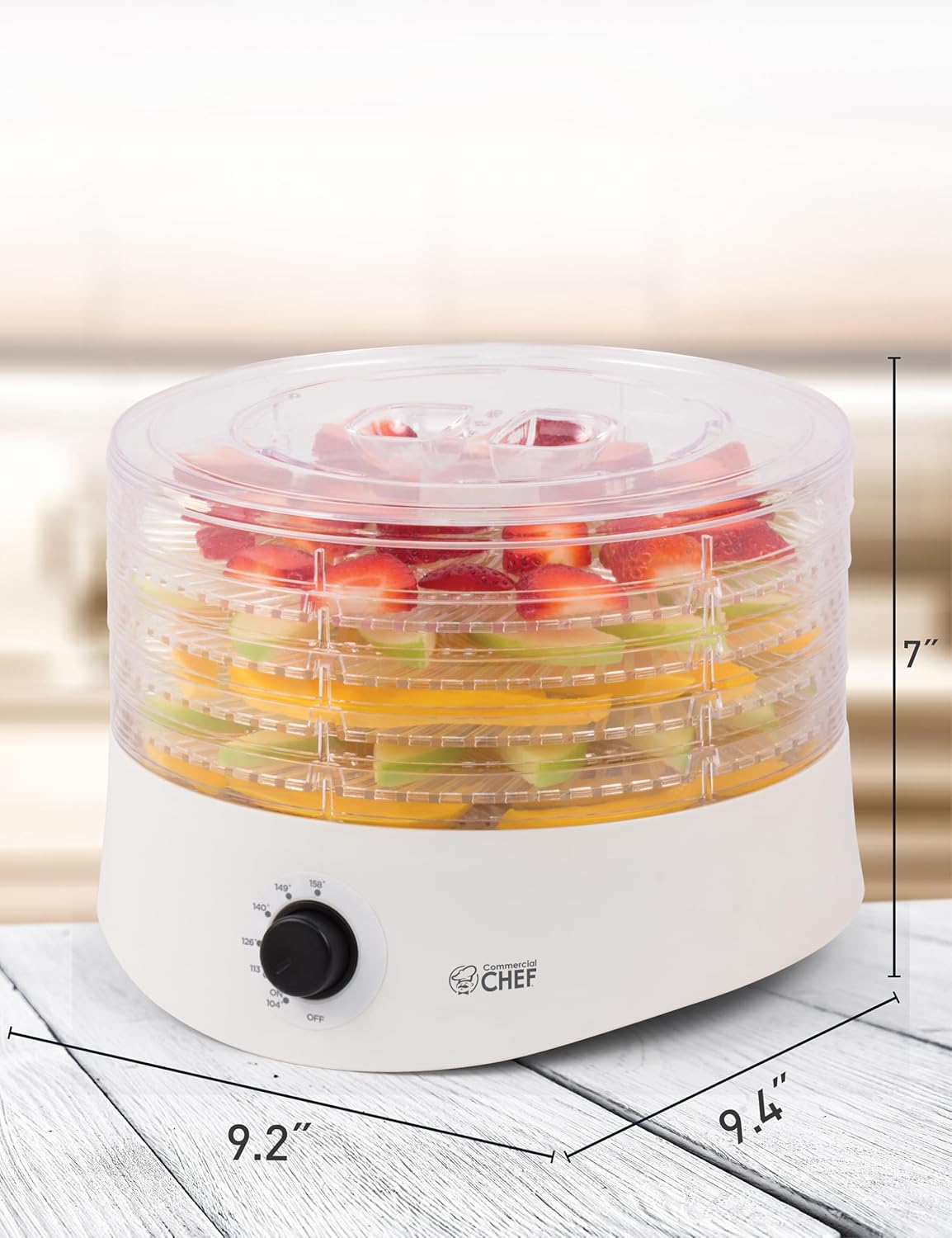
This image illustrates the compact dimensions of the dehydrator, making it suitable for various kitchen spaces.
4. Setup
Unpacking and Initial Cleaning:
- Carefully remove the dehydrator and all its components from the packaging.
- Wash the five drying trays and the lid in warm, soapy water. Rinse thoroughly and dry completely before first use. The trays are not dishwasher safe.
- Wipe the base unit with a damp cloth. Do not immerse the base unit in water or any other liquid.
Assembly:
- Place the base unit on a clean, dry, and stable surface.
- Stack the desired number of drying trays onto the base. Ensure they are properly aligned.
- Place the lid securely on top of the uppermost tray.
Cord Storage:
The power cord can be conveniently stored in a dedicated cavity underneath the base unit when the dehydrator is not in use, promoting tidy storage.
This video demonstrates the compact design and cord storage feature of the Commercial Chef Food Dehydrator, highlighting its ease of setup and storage.
5. Operating Instructions
Preparing Food for Dehydration:
- Wash fruits and vegetables thoroughly.
- Peel, core, or pit as necessary.
- Slice food into uniform thickness (approximately 1/4 inch) for even drying.
- Arrange food in a single layer on the drying trays, ensuring air can circulate freely. Do not overlap food.
Temperature Control:
The dehydrator features an adjustable thermostat with a rotary knob, allowing you to select a temperature between 104°F and 158°F. Different foods require different temperatures for optimal drying.

This image highlights the easy-to-use rotary knob for adjusting the drying temperature.
Drying Guidelines:
The optimal drying time and temperature can vary based on the type of food, its thickness, and ambient humidity. Refer to the table below for general recommendations. Always check food for desired dryness.
| Food Type | Recommended Temperature | Approximate Drying Time |
|---|---|---|
| Herbs / Nuts | 104°F - 110°F | 4 - 12 hours |
| Fruits | 130°F - 140°F | 6 - 24 hours |
| Vegetables | 130°F - 140°F | 4 - 18 hours |
| Meat / Jerky | 140°F - 158°F | 4 - 15 hours |
Note: These times are approximate. Always ensure food is thoroughly dried to prevent spoilage.

This image shows the dehydrator in action, drying various fruits on its multiple trays.
This video provides a concise overview of the Commercial Chef Dehydrator, demonstrating its features and ease of use for drying various foods.
6. Maintenance and Cleaning
Cleaning:
- Always unplug the dehydrator from the power outlet and allow it to cool completely before cleaning.
- The drying trays and lid should be washed by hand in warm, soapy water. Rinse thoroughly and dry immediately. Do not place trays or lid in a dishwasher.
- Wipe the base unit with a soft, damp cloth. Do not use abrasive cleaners or scourers, as they may damage the surface. Never immerse the base unit in water.
Storage:
Once clean and dry, store the dehydrator in a cool, dry place. The compact design and integrated cord storage make it easy to put away when not in use.
7. Troubleshooting
If your Commercial Chef Food Dehydrator is not operating as expected, please refer to the following common issues and solutions:
- Appliance not turning on: Ensure the power cord is securely plugged into a working electrical outlet and the temperature knob is turned to an 'ON' setting.
- Uneven drying: Ensure food is sliced uniformly and arranged in a single layer without overlapping. Rotate trays periodically for more consistent results.
- Food not drying: Verify that the selected temperature is appropriate for the food type and that the drying time is sufficient. Humidity levels can affect drying time.
For further assistance or issues not listed here, please contact customer support.
8. Warranty and Support
The Commercial Chef Food Dehydrator comes with a manufacturer's warranty. For details regarding warranty coverage, terms, and conditions, please refer to the warranty card included in your product packaging. You may also have the option to extend your warranty; check the included documentation for more information.
For product support, inquiries, or to register your product, please visit the official Commercial Chef website or contact their customer service department using the information provided in your product documentation.


