1. Introduction
The Hantek 6254BD is a high-performance PC USB Oscilloscope and Arbitrary Waveform Generator (AWG) designed for a wide range of applications including electrical engineering, education, electronics development, and automotive diagnostics. This device features four independent analog channels, a 1GSa/s real-time sampling rate, and a 250MHz bandwidth, offering capabilities comparable to traditional benchtop oscilloscopes. The integrated AWG provides a 200MSa/s DDS with 12-bit vertical resolution for generating various waveforms.
This manual provides essential information for the proper setup, operation, and maintenance of your Hantek 6254BD device. Please read it thoroughly before use.
2. Safety Information
To ensure safe operation and to prevent damage to the product or injury to personnel, observe the following safety precautions:
- Power Source: Use only the specified USB power source (5V, 1A) to power the device.
- Environment: Operate the device in a dry environment, away from moisture, dust, and direct sunlight. Avoid extreme temperatures.
- Ventilation: Ensure adequate ventilation around the device to prevent overheating.
- Probes and Cables: Use only probes and cables supplied or recommended by Hantek. Ensure all connections are secure before operation.
- Servicing: Do not attempt to service the device yourself. Refer all servicing to qualified service personnel.
- Input Voltage: Do not exceed the maximum input voltage ratings specified for each channel.
3. Package Contents
Verify that all items listed below are included in your package. If any items are missing or damaged, contact your supplier.
- Hantek 6254BD PC USB Oscilloscope Unit
- 2 x Oscilloscope Probes
- 2 x Gator Clip Lines
- 1 x BNC to BNC Cord
- 1 x USB Cable
- Software CD (or download link)
- User Manual (this document)

Figure 3.1: All included accessories for the Hantek 6254BD, including the main unit, probes, gator clip lines, BNC cable, and USB cable.
4. Product Overview
The Hantek 6254BD is a compact and robust device. Familiarize yourself with its physical components.

Figure 4.1: The Hantek 6254BD PC USB Oscilloscope unit, showcasing its compact design and brand logo.
4.1 Front Panel
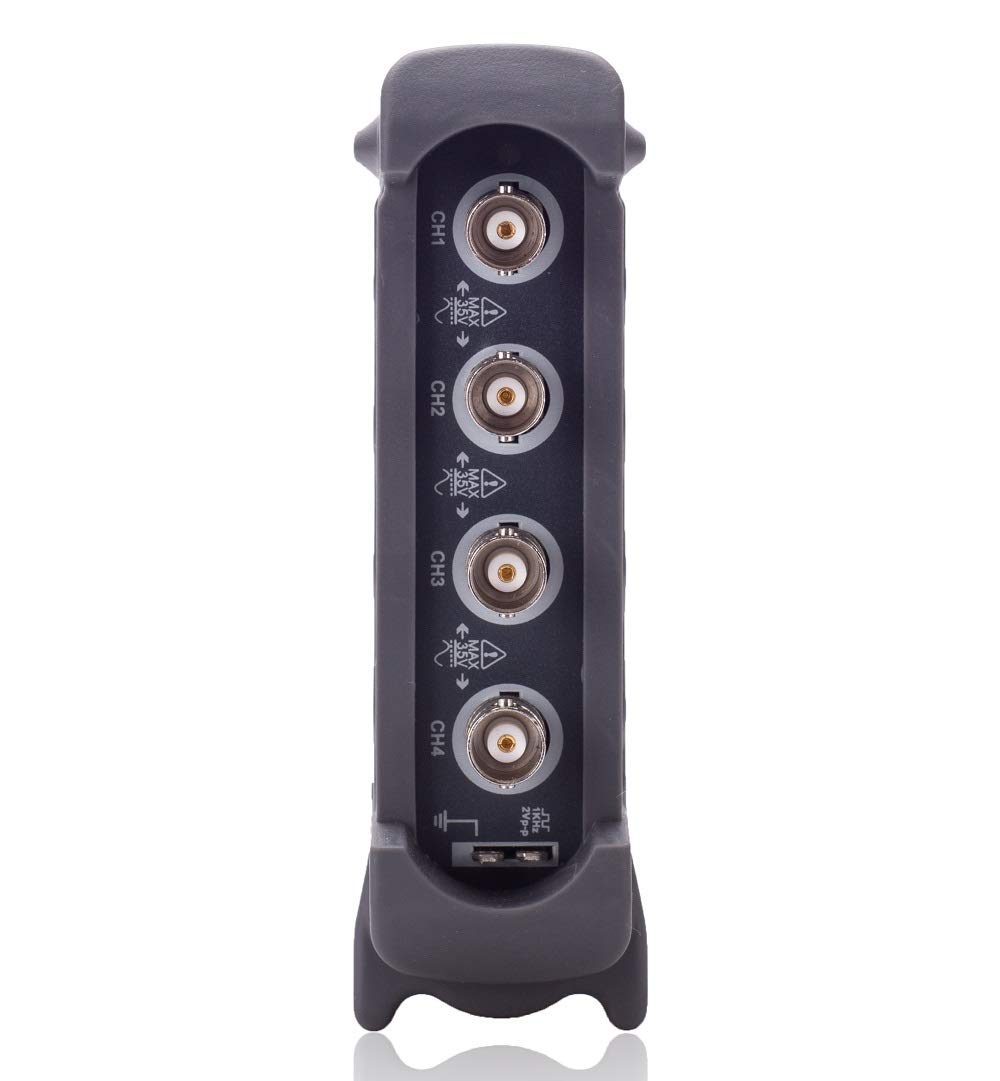
Figure 4.2: Close-up view of the Hantek 6254BD's front panel, featuring four BNC input connectors labeled CH1, CH2, CH3, and CH4, along with a ground connection.
- CH1-CH4 (BNC Connectors): These are the four analog input channels for connecting oscilloscope probes or other signal sources.
- Ground Terminal: Provides a common ground reference for measurements.
4.2 Rear Panel

Figure 4.3: Close-up view of the Hantek 6254BD's rear panel, showing the AWG output, USBXI ports, and USB power input.
- GEN OUT (BNC Connector): Output for the Arbitrary Waveform Generator.
- USBXI Ports: For connecting to a PC via USB.
- 5V–1A (USB Port): Power input for the device. Connect to a standard USB 2.0 port on your computer or a compatible USB power adapter.
- PRG Indicator: Program indicator light.
- CE Marking: Indicates compliance with European health, safety, and environmental protection standards.
5. Setup
5.1 Software Installation
- Insert the provided software CD into your computer's optical drive, or download the latest software from the official Hantek website.
- Run the installer executable and follow the on-screen instructions. The software is compatible with Windows 7, Windows 8, and Windows 10.
- During installation, ensure that all necessary drivers are installed. Restart your computer if prompted.
5.2 Hardware Connection
- Connect the Hantek 6254BD to your computer using the supplied USB cable. Plug one end into the 5V–1A USB port on the rear panel of the device and the other end into an available USB 2.0 port on your computer.
- Connect oscilloscope probes to the desired BNC input channels (CH1-CH4) on the front panel. Ensure a secure connection by twisting the BNC connector until it locks.
- If using the Arbitrary Waveform Generator, connect a BNC cable from the GEN OUT port to your desired load or measurement device.

Figure 5.1: The Hantek 6254BD connected to a computer, displaying the oscilloscope software interface with active waveform measurements.
6. Operating Instructions
6.1 Starting the Software
After successful installation and hardware connection, launch the Hantek oscilloscope software from your desktop shortcut or Start menu. The software interface is designed to be intuitive, similar to a benchtop oscilloscope.
6.2 Oscilloscope Functions
- Channel Configuration: Select and enable the desired input channels (CH1-CH4). Adjust vertical sensitivity (2mV to 10V/DIV) and coupling (AC/DC/GND) for each channel.
- Time Base: Set the horizontal time base to control the sweep speed and view different time scales of your signal.
- Triggering: Configure the trigger source, type (edge, pulse, video, etc.), and level to stabilize waveforms. The device supports resourceful trigger functions.
- Measurements: Utilize automated measurements for parameters like Vpp, Vmax, Vmin, Freq, Period, etc. Dynamic cursor tracking is also available for manual measurements.
- Waveform Record and Replay: Capture and store waveforms for later analysis and replay.
- Pass/Fail Test: Set up masks to automatically check if waveforms fall within specified limits.
- Advanced Features: Explore functions such as FFT spectrum analysis, waveform averaging, afterglow, lightness control, reverse, add, subtract, multiply, divide, and X-Y display. Serial bus triggering and decoding are also supported.
6.3 Arbitrary Waveform Generator (AWG)
- Waveform Selection: Choose from built-in standard waveforms (sine, square, triangle, etc.) or create custom arbitrary waveforms.
- Frequency and Amplitude: Adjust the output frequency and amplitude of the generated waveform. The DDS operates at 200MSa/s with 12-bit vertical resolution.
- Output Control: Enable or disable the AWG output via the software interface.
6.4 Data Export
Waveform data and screenshots can be easily exported to various formats, including Excel, BMP, and JPEG, for further analysis or documentation.
7. Maintenance
- Cleaning: Use a soft, dry cloth to clean the exterior of the device. Do not use abrasive cleaners or solvents.
- Storage: When not in use, store the device in a cool, dry place, protected from dust and physical impact.
- Probe Care: Handle oscilloscope probes carefully. Avoid bending or stressing the probe tips and cables.
- Software Updates: Regularly check the Hantek website for software and firmware updates to ensure optimal performance and access to new features.
8. Troubleshooting
If you encounter issues with your Hantek 6254BD, refer to the following common problems and solutions:
| Problem | Possible Cause | Solution |
|---|---|---|
| Device not recognized by PC | USB cable not connected properly; Driver not installed; Faulty USB port. | Ensure USB cable is securely connected. Reinstall drivers. Try a different USB port on your computer. |
| No waveform displayed | Probe not connected; Channel disabled; Incorrect trigger settings; Signal too small or too large. | Check probe connections. Enable the channel in software. Adjust trigger level and type. Adjust vertical sensitivity (V/DIV) and horizontal time base (S/DIV). |
| AWG output not working | AWG output disabled in software; Cable not connected to GEN OUT. | Ensure AWG output is enabled in the software. Verify cable connection from GEN OUT to the load. |
| Software crashes or freezes | Outdated software; System resource conflict. | Update software to the latest version. Close other demanding applications. Ensure your PC meets minimum system requirements. |
If the problem persists after attempting these solutions, please contact Hantek customer support.
9. Specifications
The following table outlines the key technical specifications of the Hantek 6254BD:
| Feature | Specification |
|---|---|
| Model | 6254BD |
| Channels | 4 Analog Channels |
| Bandwidth | 250 MHz |
| Real-time Sampling Rate | 1 GSa/s |
| Input Sensitivity | 2mV/DIV to 10V/DIV |
| Vertical Resolution | 8 bits |
| AWG DDS Rate | 200 MSa/s |
| AWG Vertical Resolution | 12 bits |
| Interface | USB 2.0 |
| Operating System Compatibility | Windows 7, Windows 8, Windows 10 |
| Product Dimensions | 7 x 4.2 x 1 inches |
| Weight | 2 Pounds |
10. Warranty and Support
For warranty information, technical support, or service inquiries, please refer to the documentation included with your product or visit the official Hantek website. Keep your purchase receipt as proof of purchase for warranty claims.


