Introduction
Thank you for purchasing the Sony WH-H900N Wireless Noise Cancelling Headphones. This manual provides essential information for the safe and effective use of your headphones. Please read it thoroughly before use and retain it for future reference.

Image: Front view of the Sony WH-H900N Wireless Noise Cancelling Headphones.
What's in the Box
Verify that all items are present in the packaging:
- Sony WH-H900N Wireless Noise Cancelling Headphones
- Carrying Pouch
- Connection Cable (audio cable)
- USB Cable (for charging)
- Warranty Card
- Operating Instructions (this manual)
- Reference Guide

Image: The Sony WH-H900N headphones, carrying pouch, audio cable, and USB charging cable.
Controls and Indicators
Familiarize yourself with the physical controls and indicators on your headphones.
Left Earcup Controls
- NC/AMBIENT Button: Toggles between Noise Cancelling and Ambient Sound modes.
- Power Button: Powers the headphones on/off.
- USB Port: For charging the headphones.
- Audio Input Jack: For wired connection using the supplied audio cable.
Right Earcup Touch Panel
- Swipe Up/Down: Adjust volume.
- Swipe Forward/Backward: Skip tracks.
- Double Tap: Play/Pause music, Answer/End calls.
- Cover with Hand: Activate Quick Attention Mode (temporarily lowers music volume and lets in ambient sound).
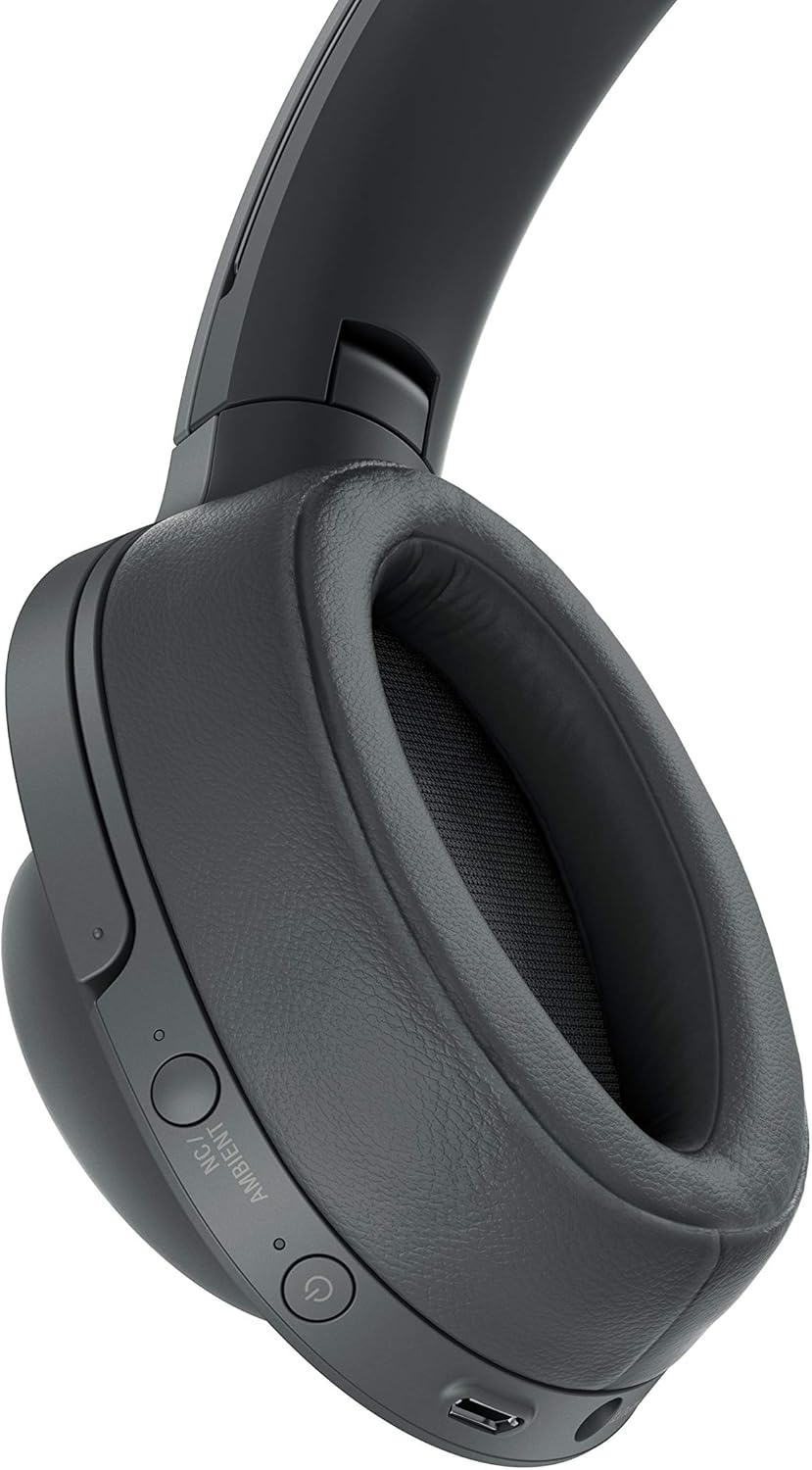
Image: Detailed view of the left earcup controls.

Image: User interacting with the touch sensor control panel on the right earcup.
Setup
Charging the Headphones
Before initial use, fully charge the headphones. A full charge provides up to 28 hours of wireless playback with Noise Cancelling enabled. A 10-minute quick charge provides approximately 65 minutes of playback.
- Connect the supplied USB cable to the USB port on the left earcup.
- Connect the other end of the USB cable to a powered USB AC adapter (not supplied) or a computer.
- The indicator light will illuminate red during charging and turn off when charging is complete.
Bluetooth Pairing
Pair your headphones with your Bluetooth device (smartphone, tablet, etc.) to enjoy wireless audio.
- Ensure the headphones are turned off.
- Press and hold the Power button for approximately 7 seconds until the indicator flashes blue rapidly. This indicates pairing mode.
- On your Bluetooth device, go to Bluetooth settings and enable Bluetooth.
- Select "WH-H900N" from the list of available devices.
- Once connected, the indicator will flash blue slowly.
NFC One-touch Connection
For NFC-compatible devices, you can establish a connection with a single touch.
- Ensure NFC is enabled on your smartphone.
- Touch your smartphone to the N-Mark on the left earcup of the headphones.
- Follow the on-screen prompts on your smartphone to complete the connection.
Operating the Headphones
Power On/Off
- To Power On: Press and hold the Power button for about 2 seconds until the blue indicator flashes.
- To Power Off: Press and hold the Power button for about 2 seconds until the red indicator flashes, then turns off.
Noise Cancelling and Ambient Sound Mode
Press the NC/AMBIENT button on the left earcup to cycle through the following modes:
- Noise Cancelling: Reduces ambient noise for an immersive listening experience.
- Ambient Sound Mode: Allows you to hear surrounding sounds while listening to music, enhancing awareness.
- Off: Disables both Noise Cancelling and Ambient Sound modes.
Music Playback (Touch Controls)
Use the touch sensor panel on the right earcup for music control:
- Play/Pause: Double-tap the center of the touch panel.
- Volume Up: Swipe up on the touch panel.
- Volume Down: Swipe down on the touch panel.
- Next Track: Swipe forward (right) on the touch panel.
- Previous Track: Swipe backward (left) on the touch panel.
Making and Receiving Calls
When connected to a smartphone via Bluetooth:
- Answer a Call: Double-tap the center of the touch panel.
- End a Call: Double-tap the center of the touch panel during a call.
- Reject a Call: Press and hold the center of the touch panel for about 2 seconds.
Using the Sony | Headphones Connect App
Download the free Sony | Headphones Connect app from your device's app store to customize sound settings, adjust Noise Cancelling levels, and access other advanced features. The app allows you to fine-tune your listening experience.
Video: An overview of the Sony WH-H900N Wireless Noise Cancelling Headphones, highlighting key features and design.
Maintenance
Proper maintenance ensures the longevity and performance of your headphones.
- Cleaning: Wipe the headphones with a soft, dry cloth. Do not use alcohol, benzene, thinner, or other chemical cleaners.
- Ear Pads: The ear pads are designed for comfort and sound isolation. If they become worn or damaged, contact Sony customer support for replacements.
- Storage: When not in use, store the headphones in the supplied carrying pouch to protect them from dust and scratches. Avoid storing in direct sunlight or high temperatures.
- Water Resistance: These headphones are not waterproof. Avoid exposure to water or excessive moisture.
Troubleshooting
If you encounter issues with your headphones, refer to the table below for common problems and solutions.
| Problem | Solution |
|---|---|
| No power | Charge the headphones using the supplied USB cable. |
| Cannot pair via Bluetooth | Ensure headphones are in pairing mode (rapid blue flashing). Check Bluetooth settings on your device. Move headphones closer to the device. |
| No sound or low volume | Check volume levels on both headphones and connected device. Ensure headphones are properly connected via Bluetooth or wired. |
| Noise Cancelling not effective | Ensure Noise Cancelling mode is active. Adjust the headphones for a snug fit over your ears. |
| Touch controls unresponsive | Ensure your fingers are clean and dry. Restart the headphones and try again. |
Specifications
Key technical specifications for the Sony WH-H900N headphones:
| Feature | Detail |
|---|---|
| Model Name | WH-H900N |
| Connectivity Technology | Bluetooth, Wired, NFC |
| Wireless Communication Technology | Bluetooth 4.1 |
| Noise Control Features | Active Noise Cancellation |
| Control Type | Touch Control |
| Battery Life | Up to 28 Hours (wireless playback with NC) |
| Audio Driver Type | Dynamic Driver |
| Supported Audio Formats | SBC, AAC, aptX, aptX HD, LDAC |
| Content Protection | SCMS-T |
| Item Weight | 12 Ounces (approx. 340g) |
| Product Dimensions | 1.3 x 3.5 x 2.9 inches |
| Material | Aluminum, Plastic |
Warranty and Support
Your Sony WH-H900N headphones come with a manufacturer's warranty. Please refer to the included Warranty Card for detailed terms and conditions, including coverage period and service procedures.
For technical support, product registration, or further inquiries, please visit the official Sony support website or contact Sony customer service in your region. Keep your proof of purchase for warranty claims.


