
Beurer 574.00
Contents
Beurer MP 42 Manicure/Pedicure Set Instruction Manual
Model: MP 42 | Brand: Beurer
1. Introduction
The Beurer MP 42 Manicure/Pedicure Set is designed for professional nail care in the comfort of your home. This comprehensive set helps you achieve well-groomed hands and feet with its versatile features and high-quality attachments. It offers continuous speed adjustment and dual rotation directions for precise and effective treatment.
This manual provides essential information on the safe and proper use, setup, operation, and maintenance of your Beurer MP 42 device.
2. Safety Information
WARNINGS:
- Use the device carefully to avoid injuries.
- Do not use the device on damaged skin or nails.
- Keep the device away from children.
- Disconnect the device from the mains when not in use.
- Store the device in a dry and clean place to avoid damage.
3. Package Contents
The Beurer MP 42 Manicure/Pedicure Set includes the following components:
- 1x Manicure/Pedicure Station (main device)
- 7x High-quality Attachments (detailed below)
- 1x Storage Bag

Image: The Beurer MP 42 device and its various attachments, along with the power adapter, are shown organized within the included storage case, highlighting its portability and neat storage solution.
4. Product Features
- Professional nail care set with seven high-quality sapphire and felt attachments.
- Designed for shortening, filing, shaping, and polishing nails, as well as removing calluses and cuticles.
- Suitable for special nail care needs such as corns, ingrown nails, or particularly thick calluses. Note: Not suitable for gel nails, artificial nails, or shellac.
- Ergonomic design prevents slipping during treatment, ensuring comfortable use.
- Bright LED light illuminates the treatment area for improved visibility and precision.
- Powerful motor with a speed of up to 4,600 RPM.
- Continuously adjustable speed control for customized treatment.
- Clockwise and counter-clockwise rotation for versatile application.
- Includes a practical storage bag for easy transport and organization of all accessories.
5. Components and Attachments
The Beurer MP 42 comes with seven high-quality attachments made of sapphire and felt, each designed for specific nail and skin care tasks:
- Coarse Sapphire Cone: Used for removing dry skin, calluses, or corns on the sole of the foot and heel, and for general nail processing.
- Fine Sapphire Disc: For filing and processing nails with a fine grit, ideal for delicate shaping.
- Coarse Sapphire Disc: For filing and processing nails with a coarse grit, suitable for more robust shaping.
- Sapphire Callus Grinder: Designed for quick removal of thick calluses or large corns on the sole of the foot or heel.
- Flame Cutter: Specifically used for carefully loosening ingrown nails.
- Cylindrical Cutter: For grinding and roughly smoothing woody toenail surfaces.
- Felt Cone: Used for smoothing and polishing the nail edge after filing, and for cleaning the nail surface to achieve a shiny finish.

Image: The Beurer MP 42 main unit is displayed alongside its complete set of seven distinct attachments, showcasing the variety of tools available for comprehensive manicure and pedicure treatments.
6. Setup
- Unpack: Carefully remove all components from the packaging.
- Inspect: Check the device and all attachments for any signs of damage. Do not use if damaged.
- Connect Power: Plug the power adapter into the device and then into a suitable electrical outlet. Ensure the voltage matches your local power supply.
- Select Attachment: Choose the appropriate attachment for your desired treatment.
- Attach: Firmly insert the chosen attachment into the head of the device until it clicks into place.
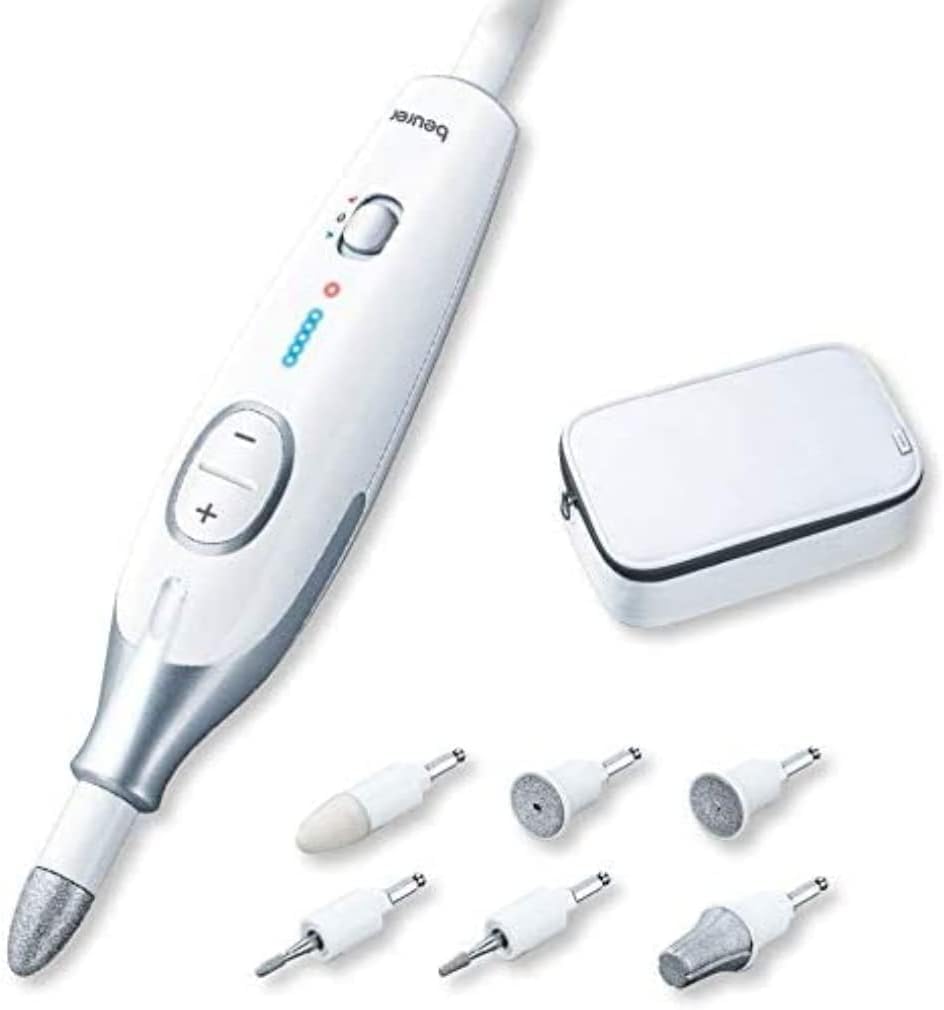
Image: The Beurer MP 42 device is shown with its various attachments and the compact storage case, illustrating the complete set ready for use.
7. Operating Instructions
Follow these steps for effective and safe operation of your Beurer MP 42:
- Power On: Press the power button to turn on the device. The LED light will illuminate the treatment area.
- Adjust Speed: Use the '+' and '-' buttons to adjust the rotation speed. The device offers continuous speed adjustment from 2500 to 4600 RPM. Start with a lower speed and gradually increase as needed.
- Change Rotation Direction: The device supports both clockwise and counter-clockwise rotation. Use the dedicated switch (often labeled with arrows or 'R/L') to change the direction as required for different applications or user preference.
- Application: Gently guide the rotating attachment over the nail or skin area you wish to treat. Apply light pressure. Avoid prolonged contact with one spot to prevent overheating or irritation.
- Monitor LED Light: The integrated LED light helps you clearly see the area being treated, enhancing precision and safety.
- Power Off: After use, press the power button to turn off the device.
- Remove Attachment: Carefully remove the attachment by pulling it straight out from the device head.

Image: A close-up view of the Beurer MP 42 device being held, demonstrating how the integrated LED light illuminates the fingernail area during use, enhancing visibility and precision.

Image: The Beurer MP 42 device is shown in use on a foot, illustrating its application for pedicure treatments and highlighting its ergonomic design for comfortable handling.
8. Maintenance and Cleaning
Regular cleaning and maintenance will ensure the longevity and optimal performance of your device:
- Disconnect: Always unplug the device from the power outlet before cleaning.
- Clean Attachments: After each use, clean the attachments with a brush or a damp cloth to remove nail dust and skin particles. For thorough cleaning, some attachments may be rinsed under running water, but ensure they are completely dry before storage. Refer to specific attachment care instructions if provided.
- Clean Device: Wipe the main unit with a soft, slightly damp cloth. Do not use abrasive cleaners or immerse the device in water.
- Storage: Store the device and all attachments in the provided storage bag in a dry, clean place, away from direct sunlight and extreme temperatures.
9. Troubleshooting
If you encounter issues with your Beurer MP 42, refer to the following common troubleshooting tips:
| Problem | Possible Cause | Solution |
|---|---|---|
| Device does not turn on. | Not plugged in correctly; Power outlet issue; Device malfunction. | Ensure power adapter is securely plugged into device and wall outlet. Test outlet with another appliance. If problem persists, contact customer support. |
| Attachments are not rotating or rotating weakly. | Attachment not properly secured; Low speed setting; Excessive pressure. | Ensure attachment is firmly inserted. Increase speed setting. Reduce pressure applied to the nail/skin. |
| Device feels hot during use. | Prolonged continuous use; Blocked ventilation. | Allow the device to cool down. Ensure ventilation openings are not blocked. Avoid using for extended periods without breaks. |
| Unsatisfactory results. | Incorrect attachment used; Insufficient speed; Improper technique. | Refer to Section 5 for correct attachment usage. Adjust speed. Practice technique with light pressure and even movements. |
10. Specifications
| Feature | Detail |
|---|---|
| Model Number | 574.00 |
| Brand | Beurer |
| Product Dimensions | 17L x 3W x 1H cm (Device) |
| Product Weight | Approx. 107 grams |
| Speed Range | 2500 - 4600 RPM (revolutions per minute) ± 14% |
| Power Source | Mains operated (240 Volt) |
| Rotation | Clockwise / Counter-clockwise |
| Number of Attachments | 7 (Sapphire and Felt) |
| Country of Origin | China |
11. Warranty and Support
For information regarding warranty coverage, terms, and conditions, please refer to the warranty card included with your product packaging or visit the official Beurer website. For technical support, spare parts, or service inquiries, please contact Beurer customer service through their official channels.
Documents and downloads
Ask a question about this manual
Ask about setup, troubleshooting, compatibility, parts, safety, or missing instructions. Manuals+ will review the question and use this page’s manual context to help answer it.