
Invoxia LWT1_IVX_001
Contents
Invoxia GPS Tracker Classic User Manual
Model: LWT1_IVX_001
1. Introduction
This manual provides comprehensive instructions for the Invoxia GPS Tracker Classic. It covers device setup, operational procedures, maintenance guidelines, troubleshooting tips, and detailed product specifications. Please read this manual thoroughly to ensure optimal performance and longevity of your device.
The Invoxia GPS Tracker Classic is a long-range GPS tracking device designed for real-time location monitoring of various assets such as vehicles, bicycles, luggage, and other valuables. It features anti-theft capabilities, including movement alerts and geofencing, and offers an extended battery life of up to 6 months.
2. What's in the Box
Verify that all the following components are included in your package:
- Invoxia GPS Tracker Classic (with integrated battery and SIM card)
- USB Charging Cable
- Quick Start Guide (this manual serves as the detailed user guide)
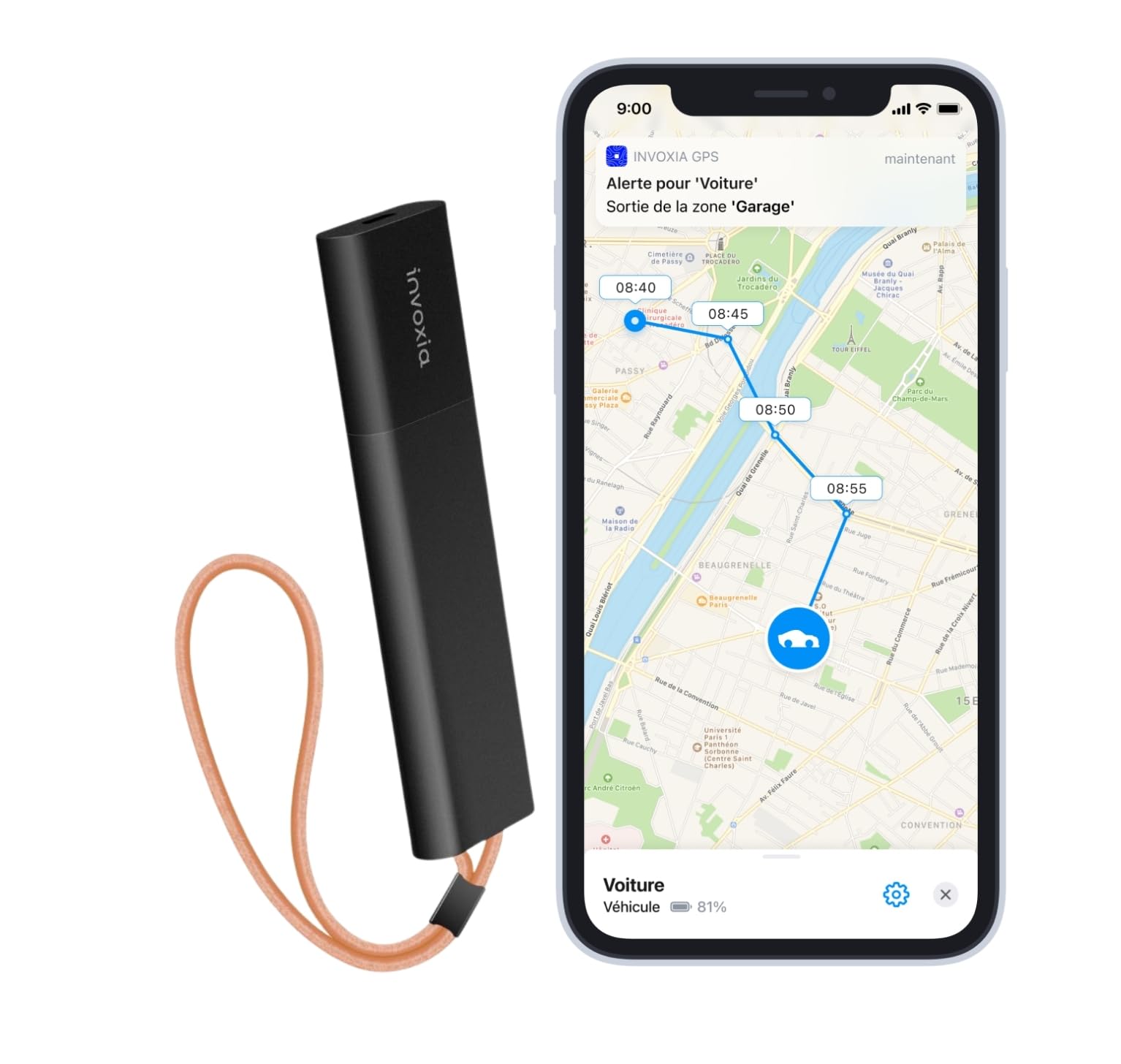
Image: Invoxia GPS Tracker Classic and its USB charging cable.
3. Setup Guide
Follow these steps to set up your Invoxia GPS Tracker Classic:
- Charge the Device: Before initial use, fully charge your Invoxia GPS Tracker using the provided USB cable. Connect the cable to the tracker and a standard USB power source. A full charge typically takes approximately 90 minutes.
- Download the App: Download the official Invoxia GPS application from the Google Play Store (for Android devices) or the Apple App Store (for iOS devices).

Image: Screenshot showing the Invoxia GPS app available for download on mobile app stores.
- Create an Account: Open the Invoxia GPS app and follow the on-screen instructions to create a new user account or log in if you already have one.
- Activate and Pair the Tracker: Within the app, select the option to add a new device. The app will guide you through the activation process and pairing your smartphone with the tracker via Bluetooth. Ensure your tracker is nearby and powered on during this step. If pairing issues occur, try restarting the tracker.
- Configure Settings: Once paired, you can customize various settings within the app, such as notification frequency, security zones (geofencing), and alert preferences.
The setup process is designed to be quick and straightforward, typically taking only a few minutes.

Image: Graphic illustrating the quick 60-second installation process.
4. Operating the Tracker
The Invoxia GPS Tracker Classic offers several key functionalities accessible through the mobile application:
- Real-time Location Tracking: View the current position of your tracker at any time on a map within the Invoxia app. The tracker operates on a low-power network, providing coverage across France and 14 other European countries.
- Location History: Access a complete history of movements and routes taken by your tracker. This data can be exported for detailed analysis.
- Movement Alerts: Receive instant notifications on your smartphone if suspicious movement of the tracker is detected.
- Security Zones (Geofencing): Create custom security zones (e.g., home, garage, workplace) on the map. You will be alerted when the tracker enters or exits these predefined areas.
- Proximity Radar: In situations where the tracker's exact location needs to be pinpointed (e.g., during recovery of a stolen item), the app's proximity radar feature can help guide you using Bluetooth signals.
- Multi-Device Management: The Invoxia app allows you to manage up to 15 Invoxia trackers simultaneously from a single account.

Image: The Invoxia GPS application displaying real-time location tracking on a map interface.
5. Maintenance
Proper maintenance ensures the longevity and reliable operation of your Invoxia GPS Tracker Classic.
- Battery Charging: The tracker has a battery life of up to 6 months, depending on usage frequency and environmental factors. Recharge the device using the provided USB cable when the battery level is low. A full charge takes approximately 90 minutes.
- Cleaning: Wipe the device with a soft, dry cloth. Do not use harsh chemicals or abrasive cleaners.
- Environmental Conditions: The tracker is certified IP33, meaning it is resistant to solid objects and normal outdoor conditions. However, avoid prolonged exposure to extreme temperatures, direct water immersion, or highly humid environments.

Image: Graphic highlighting the tracker's 6-month battery autonomy.
6. Troubleshooting
If you encounter issues with your Invoxia GPS Tracker, consider the following:
- Tracker Not Detected by Smartphone: If your smartphone struggles to detect or pair with the tracker during setup, try restarting the tracker and ensuring it is within Bluetooth range. Follow the app's pairing steps carefully.
- Inaccurate Location: GPS accuracy can be affected by environmental factors such as dense urban areas, underground locations, or being surrounded by metal. Ensure the tracker is placed in an optimal position, away from large metallic objects, for best signal reception.
- No Movement Alerts: The tracker is designed to conserve battery by not sending alerts if it remains stationary for an extended period (e.g., 24 hours). Ensure the tracker is in motion for alerts to be triggered.
- App Functionality: Ensure your smartphone has an active internet connection to receive location data and notifications from the Invoxia app.
- Remote Configuration: Note that some configuration changes, particularly those involving Bluetooth, may require the tracker to be in proximity to your smartphone.
7. Specifications
| Feature | Detail |
|---|---|
| Model Number | LWT1_IVX_001 |
| Dimensions (L x W x H) | 103 x 25 x 10 mm |
| Weight | 31.8 Grams |
| Material | Acrylonitrile Butadiene Styrene (ABS) |
| Connectivity Technology | Bluetooth, USB, Wi-Fi (for network communication) |
| Battery Capacity | 300 mAh |
| Average Battery Life | Up to 6 months |
| Charging Time | Approx. 90 minutes (via USB) |
| Special Features | Anti-theft, USB Charging, Movement Detection, Location History, Real-time Tracking |
| Compatible Devices | Personal Computer, Smartphone, Tablet |
| Country of Origin | China |
8. Warranty and Support
Warranty Information: The Invoxia GPS Tracker Classic comes with a 2-year manufacturer's warranty. This warranty covers defects in materials and workmanship under normal use. Please retain your proof of purchase for warranty claims.
Subscription Service: The functionality of the Invoxia GPS Tracker relies on a subscription service, which is essential for accessing geolocation services and ensuring optimal performance. The product may include an initial subscription period (e.g., 3 years), after which a renewal fee applies.
Customer Support: For any technical assistance, troubleshooting beyond this manual, or warranty inquiries, please refer to the official Invoxia website for online support resources and contact information. Online assistance is available to help you with any questions or issues you may encounter.
Documents and downloads
Ask a question about this manual
Ask about setup, troubleshooting, compatibility, parts, safety, or missing instructions. Manuals+ will review the question and use this page’s manual context to help answer it.