Introduction
This manual provides detailed instructions for the setup, operation, and maintenance of your Panasonic KX-DT543x Executive Digital Proprietary Telephone. The KX-DT543x is designed for business environments, offering advanced communication features and a user-friendly interface.
Key features include a 3-line backlit display, 24 programmable keys, and a full-duplex speakerphone, enhancing communication efficiency. This telephone is part of the KX-DT500 Series, known for its clear voice quality and robust functionality.
Product Overview
Key Features
- 3-line Graphical LCD with backlighting for clear information display.
- Full-duplex speakerphone, handset, and headset support for flexible communication.
- 24 freely programmable function keys for quick access to frequently used features.
- Built-in Electric Hook Switch (EHS) port for Plantronics-compatible wireless headsets.
- Intuitive user interface with easy navigation keys.
Telephone Components
Refer to the diagram below for an identification of the main components of your KX-DT543x telephone.

Image Description: A detailed diagram of the Panasonic KX-DT543x telephone, showing various parts labeled with numbers for identification. Key components include the handset, LCD display, programmable keys, navigation keys, dial pad, and speakerphone.
Additional views of the telephone are provided below:

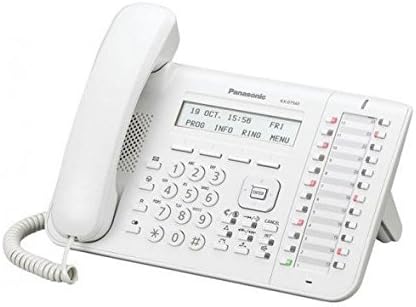
Image Description: Two images of the Panasonic KX-DT543x telephone. The first shows a direct front view, highlighting the display, keypad, and programmable buttons. The second image provides an angled perspective, showcasing the ergonomic design and the stand.
Setup
Package Contents
Before proceeding with the setup, ensure all items are present:
- Panasonic KX-DT543x Telephone Unit
- Handset
- Handset Cord
- Line Cord
- AC Adapter (Power Supply)
Connecting the Telephone
- Connect the Handset: Plug one end of the coiled handset cord into the handset and the other end into the handset jack on the telephone unit.
- Connect the Line Cord: Plug one end of the line cord into the digital extension port on the telephone unit (typically labeled "LINE" or "EXT") and the other end into the corresponding digital extension port on your PBX system or wall jack.
- Connect the AC Adapter: Plug the AC adapter into the power jack on the telephone unit (typically labeled "DC IN" or "POWER"). Then, plug the other end of the AC adapter into a standard electrical outlet.
- Initial Power-On: Once connected, the telephone will power on automatically. The LCD display will illuminate, and the phone will begin its initialization sequence. Follow any on-screen prompts for initial setup if they appear.
Operating Instructions
Making and Receiving Calls
- To Make a Call: Lift the handset, press the Speaker button, or press an available line button. Dial the desired number.
- To Receive a Call: Lift the handset, press the Speaker button, or press the flashing line button.
- To End a Call: Replace the handset, or press the Speaker button again if using speakerphone.
Using Programmable Keys
The 24 programmable keys can be customized for various functions such as speed dial, line access, or feature activation. Consult your system administrator for specific programming details for your office environment.
Speakerphone Function
To use the speakerphone, press the Speaker button. You can then speak and listen without lifting the handset. Press the Speaker button again to end the call or switch to the handset.
Headset Operation
The KX-DT543x features an Electric Hook Switch (EHS) port, compatible with Plantronics wireless headsets. Connect your compatible headset to the EHS port. Refer to your headset's manual for specific pairing and usage instructions. This allows for hands-free communication and mobility.
LCD Display and Navigation
The 3-line graphical LCD displays call information, menu options, and system status. Use the navigation keys (up, down, left, right, and enter) located below the display to scroll through menus and select options. Soft keys directly below the display provide context-sensitive functions.
Multi-Line Operation
This telephone supports multi-line operation, allowing you to manage multiple calls simultaneously. Use the dedicated line buttons to switch between active calls or place a call on hold.
Maintenance
Cleaning the Telephone
- Wipe the telephone unit and handset with a soft, dry cloth.
- For stubborn dirt, slightly dampen the cloth with water or a mild, non-abrasive cleaner.
- Do not use strong cleaning agents, abrasive pads, or solvents, as these can damage the surface.
- Ensure no liquid enters the openings of the telephone.
General Care
- Keep the telephone away from direct sunlight, heat sources, and excessive moisture.
- Avoid dropping the telephone or subjecting it to strong impacts.
- Do not attempt to disassemble the telephone; refer servicing to qualified personnel.
Troubleshooting
This section addresses common issues you might encounter with your Panasonic KX-DT543x telephone.
No Dial Tone
- Check Connections: Ensure the line cord is securely plugged into both the telephone unit and the wall jack/PBX port.
- Power Supply: Verify that the AC adapter is properly connected and the power outlet is functional.
- System Status: Confirm with your system administrator that the digital extension line is active and operational.
Display is Blank or Unresponsive
- Power Cycle: Disconnect the AC adapter from the telephone, wait 10 seconds, then reconnect it.
- Power Source: Check the power outlet and AC adapter for any damage or malfunction.
Cannot Hear or Be Heard
- Volume Adjustment: Adjust the handset, speaker, or headset volume using the dedicated volume buttons.
- Handset/Headset Connection: Ensure the handset cord or headset is securely plugged in.
- Mute Function: Check if the mute function is accidentally activated.
Programmable Keys Not Working
- System Configuration: Programmable keys are typically configured by your system administrator. Contact them to verify the key assignments and system settings.
Specifications
The following are the technical specifications for the Panasonic KX-DT543x Executive Digital Proprietary Telephone:
| Feature | Specification |
|---|---|
| Model Number | KX-DT543x |
| Brand | Panasonic |
| Display | 3-line Graphical LCD with backlighting |
| Programmable Keys | 24 |
| Speakerphone | Full Duplex |
| Headset Port | Electric Hook Switch (EHS) - Plantronics compatible |
| Power Source | Corded Electric |
| Dimensions (L x W x H) | 20 x 9 x 15 cm |
| Weight | 0.9 Kilograms |
| Multiline Operation | Supported |
| Answering System Type | Digital |
Note: The specification for "Telephone type" as "Cordless" in some listings appears to be an error, as this model is a Digital Proprietary Telephone designed for corded connection to a PBX system.
Warranty and Support
For information regarding the warranty period and terms for your Panasonic KX-DT543x telephone, please refer to the warranty card included with your purchase or visit the official Panasonic website for your region.
For technical support, service, or further inquiries, please contact your Panasonic dealer or the Panasonic customer support center. Contact details can typically be found on the Panasonic official website or in your product documentation.
You can also visit the Panasonic Store on Amazon for additional product information.


