1. Introduction
The DuroMax XP15000E is a robust gas-powered portable generator designed to provide reliable power for household essentials, large appliances, and central A/C systems during outages, or for use at job sites and RV trips. It features a powerful 713cc V-Twin engine, delivering 12,000 running watts and up to 15,000 starting watts. This manual provides essential information for the safe and efficient operation and maintenance of your generator.
Key Features:
- 15,000 starting watts and 12,000 running watts for comprehensive power.
- Equipped with a 713cc V-Twin engine for reliable performance.
- Features an extra-large fuel tank for extended runtime.
- Includes a digital multimeter displaying voltage, frequency, and hours run.
- Multiple outlets: 4x 120V household GFCI, 1x 120V 30A twist lock, 1x 240V 30A, and 1x 240V 50A.
- Constructed with a heavy-duty all-metal frame for durability.
- No-flat tires for easy portability across various terrains.
- 100% Copper Windings for enhanced durability and heat dissipation.
- Approved for use in all 50 states by EPA and CARB.
- Integrated CO Sensor for automatic shutdown in unsafe carbon monoxide levels.

2. Safety Information
WARNING: Operating this generator can expose you to chemicals including engine exhaust, carbon monoxide, phthalates, and lead, which are known to the State of California to cause cancer and birth defects or other reproductive harm. For more information go to P65Warnings.ca.gov.
- Always operate the generator outdoors in a well-ventilated area to prevent carbon monoxide poisoning.
- Ensure proper grounding of the generator before operation.
- Keep children and pets away from the generator during operation.
- Do not operate the generator in rain or wet conditions.
- Always turn off the engine and allow it to cool before refueling.
- Store fuel in an approved container in a well-ventilated area away from ignition sources.
- Regularly check for loose connections, damaged wires, or fuel leaks.
- Wear appropriate personal protective equipment (PPE) when operating or maintaining the generator.
3. Setup and Assembly
Before operating your DuroMax XP15000E generator, proper assembly and initial setup are crucial for safe and efficient performance. The generator comes with a wheel and handle kit for easy mobility.
3.1 Attaching Wheels and Handles:
- Carefully unpack the generator and all accessories from the box.
- Attach the no-flat wheels to the generator frame using the provided hardware. Ensure they are securely fastened.
- Install the foldable handles to the designated mounting points on the frame. These handles aid in maneuvering the heavy unit.

3.2 Adding Engine Oil:
The engine is shipped without oil. You must add the recommended amount of SAE 10W-30 oil before the first start. Use the provided oil funnel for convenience.
- Locate the oil fill cap/dipstick on the engine.
- Remove the cap and, using the oil funnel, slowly pour SAE 10W-30 oil into the engine until it reaches the upper mark on the dipstick. Do not overfill.
- Replace the oil fill cap securely.
3.3 Fueling the Generator:
The XP15000E operates on gasoline. Ensure the generator is turned off and cooled before adding fuel.
- Open the fuel cap on top of the fuel tank.
- Carefully pour fresh, unleaded gasoline (minimum 87 octane) into the tank. The tank capacity is 10.6 gallons.
- Do not overfill the tank. Leave some space for fuel expansion.
- Securely close the fuel cap.
4. Operation
Follow these steps to safely start and operate your DuroMax XP15000E generator.
4.1 Starting the Generator:
- Ensure the generator is placed on a level surface outdoors, away from windows and doors.
- Turn the fuel valve to the "ON" position.
- If starting a cold engine, pull the choke lever to the "CHOKE" position. For a warm engine, set it to "RUN".
- Turn the engine switch to the "ON" position.
- Press and hold the "ENGINE START/STOP" button for a few seconds until the engine starts.
- Once the engine starts, slowly move the choke lever to the "RUN" position.

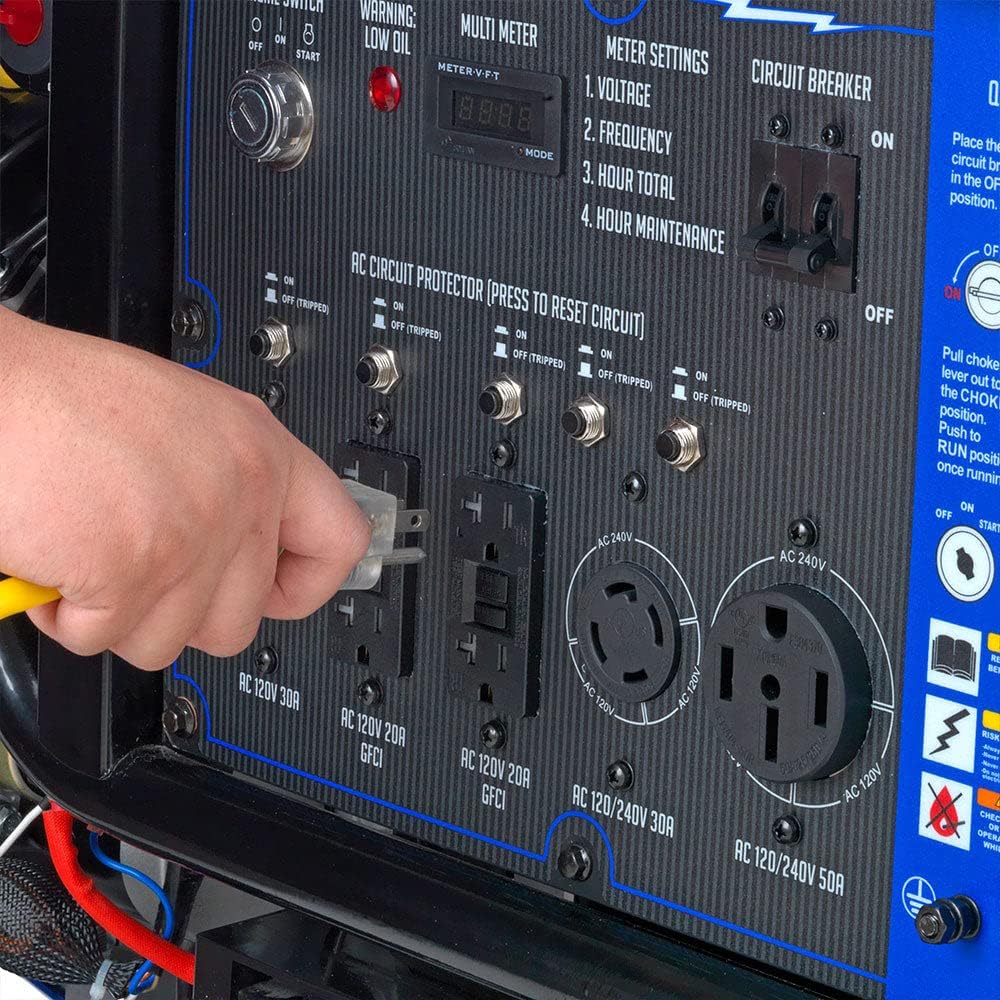
4.2 Connecting Electrical Loads:
After the generator is running stably, you can connect your electrical devices.
- Ensure all circuit breakers on the control panel are in the "OFF" position before connecting devices.
- Plug in your electrical devices or transfer switch cord into the appropriate outlets on the control panel.
- Flip the corresponding circuit breakers to the "ON" position one by one, allowing the generator to stabilize with each new load.
- Monitor the digital multimeter for voltage and frequency readings to ensure stable power output.
4.3 Stopping the Generator:
- Turn off all connected electrical devices.
- Flip all circuit breakers on the control panel to the "OFF" position.
- Turn the engine switch to the "OFF" position.
- Turn the fuel valve to the "OFF" position.
5. Maintenance
Regular maintenance ensures the longevity and reliable operation of your DuroMax XP15000E generator. Always refer to the owner's manual for detailed maintenance schedules and procedures.
5.1 Engine Oil:
- Check oil level before each use.
- Change engine oil after the first 20 hours of operation, then every 100 hours or annually, whichever comes first.
- Use SAE 10W-30 oil.
5.2 Air Filter:
- Inspect the air filter every 50 hours or monthly.
- Clean or replace the air filter as needed, especially in dusty conditions.
5.3 Spark Plug:
- Inspect the spark plug every 100 hours or annually.
- Clean or replace the spark plug if it is fouled or damaged.
5.4 Fuel System:
- Drain the fuel tank and carburetor if storing the generator for more than 30 days.
- Use a fuel stabilizer if storing gasoline in the tank for extended periods.
6. Troubleshooting
This section provides solutions to common issues you might encounter with your generator. For more complex problems, consult a qualified service technician.
| Problem | Possible Cause | Solution |
|---|---|---|
| Engine will not start | No fuel; Low oil level; Spark plug issue; Choke position incorrect; Battery low. | Add fuel; Fill oil to correct level; Clean/replace spark plug; Adjust choke; Charge/replace battery. |
| No power output | Circuit breakers tripped; Overload; Loose connections. | Reset circuit breakers; Reduce load; Check and secure connections. |
| Engine runs rough | Stale fuel; Clogged air filter; Incorrect choke setting. | Drain and replace with fresh fuel; Clean/replace air filter; Adjust choke. |
| CO Sensor shutdown | High carbon monoxide levels detected. | Move generator to a well-ventilated outdoor area immediately. Allow to cool before restarting. |
7. Specifications
| Feature | Detail |
|---|---|
| Brand | DuroMax |
| Model Number | XP15000E |
| Running Wattage | 12500 Watts |
| Starting Wattage | 15000 Watts |
| Fuel Type | Gasoline |
| Engine Type | 4-Cycle Oil-Cooled Spark-Ignition |
| Engine Displacement | 713 Cubic Centimeters |
| Tank Volume | 10.6 Gallons |
| Voltage | 240 Volts |
| Total Power Outlets | 7 |
| Item Weight | 349 Pounds |
| Product Dimensions | 33"L x 30"W x 35"H |
| Special Features | CO Sensor, Electric Start, Foldable Handle, Hour Meter, Low Oil Shutdown, Portable |
8. Warranty and Support
DuroMax Power Equipment stands behind its products. For warranty information, technical assistance, or service inquiries, please contact DuroMax customer support.
- Manufacturer: DuroMax
- Customer Support: Refer to the official DuroMax website or the included owner's manual for contact details.
- Online Store: Visit the DuroMax Store on Amazon for product information and accessories.


