
Introduction
This manual provides detailed instructions for the safe and proper installation, operation, and maintenance of your Barkan 3400W White Full Motion TV Wall Mount. This mount is designed for both flat and curved screens ranging from 13 to 65 inches and supports TVs weighing up to 88 lbs (40 kg). Please read all instructions carefully before beginning installation.
Safety Information
Important Safety Warnings:
- Ensure the mounting surface can safely support the combined weight of the mount and your television.
- Always use appropriate tools and follow all drilling and mounting instructions.
- Child safety is paramount. Ensure the TV is securely mounted to prevent tip-over accidents. All Barkan TV mounts include a Fall Proof system to prevent screen disengagement.
- If you are unsure about any part of the installation, consult a qualified professional.
What's in the Box
- 3400W Mount
- Assembly Instructions
- Wall screws and anchors
- Mounting hardware (various TV screws, metal washers, plastic spacers)
Required Tools
The following tools are required for installation:
- Drill (with 1/4"-6mm, 3/8"-10mm, and 5/32"-4mm bits)
- Level
- Safety Glasses
- Stud Finder
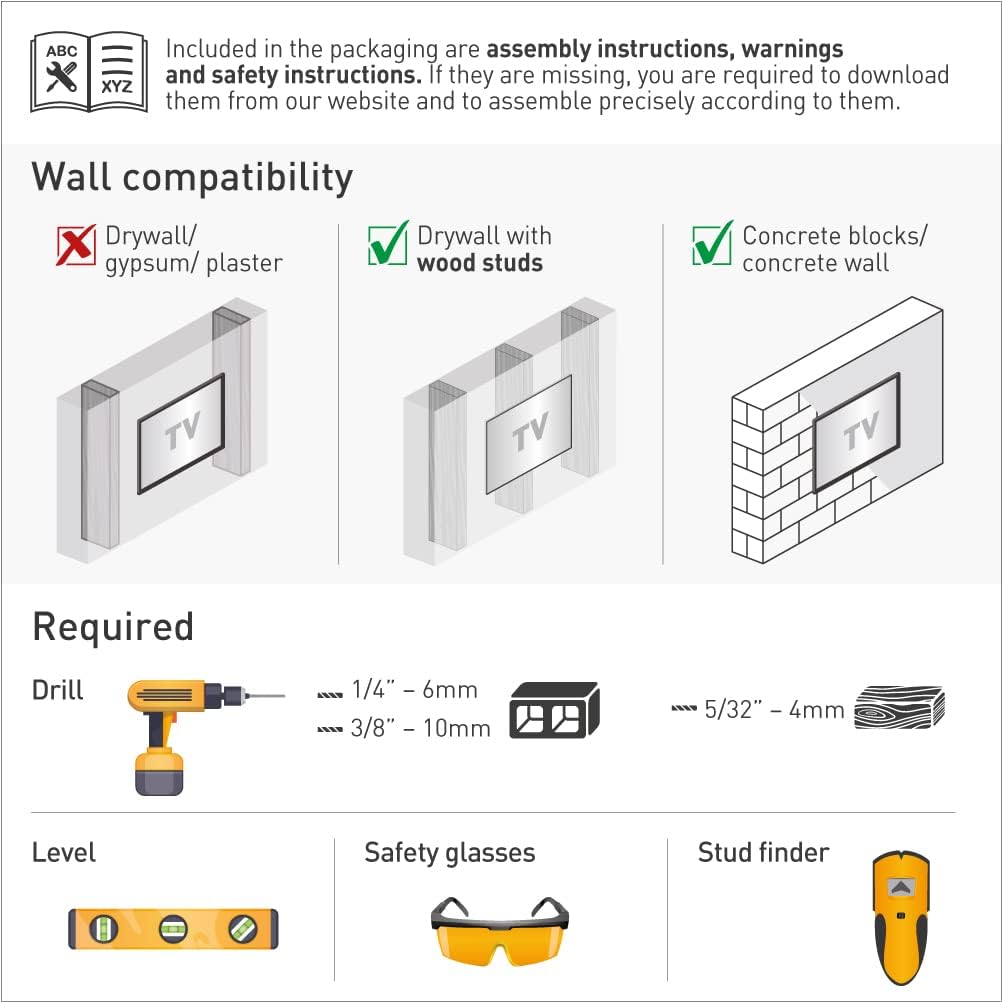
Image: This image displays the essential tools needed for installing the Barkan TV wall mount, including a drill, level, safety glasses, and a stud finder.
Wall Compatibility
This mount is compatible with:
- Drywall with wood studs
- Concrete blocks / Concrete wall
Not compatible with: Drywall/gypsum/plaster without wood studs.
Image: This image illustrates the types of walls suitable for mounting, specifically highlighting drywall with wood studs and concrete walls as compatible options.
Setup and Installation
Follow these steps for a self, easy, and fast assembly:
- Attach the Adapters to the TV: Connect the TV plate and adapters to the rear side of your television using the provided screws and washers. Ensure a secure fit.
- Install the Bracket on the Wall: Locate a suitable mounting position on a compatible wall (wood stud or concrete). Use a drilling template for accuracy. Securely fasten the wall bracket.
- Snap the TV onto the Bracket: Carefully lift the TV and snap it onto the installed wall bracket. Ensure the Fall Proof system engages correctly.

Image: This image visually guides you through the three main steps of installing your Barkan TV mount: attaching the plate to the TV, mounting the bracket to the wall, and finally, securing the TV onto the bracket.
Backscreen Connection Positioning
The mount accommodates various VESA standard (Bracket Mounting Holes Patterns) and non-VESA configurations up to 400x400mm. The four adapters can move in two dimensions to firmly hug the screen, even for TVs with unique back structures (bumps, indentations, or nonstandard connection-hole patterns).

Image: This image displays eight common backscreen connection patterns and how the mount's adapters can be configured to fit them. If your TV's pattern is not shown, please contact Barkan support.
Compatibility with Flat and Curved Screens
The patented design of this mount allows it to fit both flat and curved TVs, including those with special structures on their backs. The ball and socket mechanism enables the adapters to adjust and securely fit the screen without the need for additional spacers.

Image: This diagram illustrates the mount's versatility, showing its secure fit on both flat and curved screen televisions, thanks to its patented design.
Hardware Kit
The Barkan hardware kit includes a variety of components for secure installation:
- Wall Mounting: Barkan's wall screws and wall anchors.
- TV Mounting Screws: M8, M6, and M4 screws.
- Other: Metal washers and plastic spacers.
TV screws are compatible with 90% of popular TVs. If your screen requires different screen-connection screws, please purchase them from your local hardware store or contact Barkan support.

Image: This image details the high-quality hardware included in the Barkan kit, showing various screws, anchors, washers, and spacers for a secure and adaptable installation.
Installation Video
Video: This official video from Barkan USA Inc. showcases the full motion functionality of the TV wall mount, demonstrating its ability to fold, rotate, swivel, and tilt, providing flexible viewing angles for 29-65 inch flat and curved screens.
Operating the Mount
The Barkan 3400W mount offers four movements for optimal viewing flexibility:
- Rotate: The double arm rotates 180° near the wall.
- Fold: The arm can fold 360°.
- Swivel: The screen connection plate swivels 180°.
- Tilt: A tool-free tilt adjustment from 0° to 15°.
Touch & Move: Easily rotate, swivel, or tilt the TV by gently pushing or pulling it to your desired angle. This allows for a perfect point of view from various locations in a room.
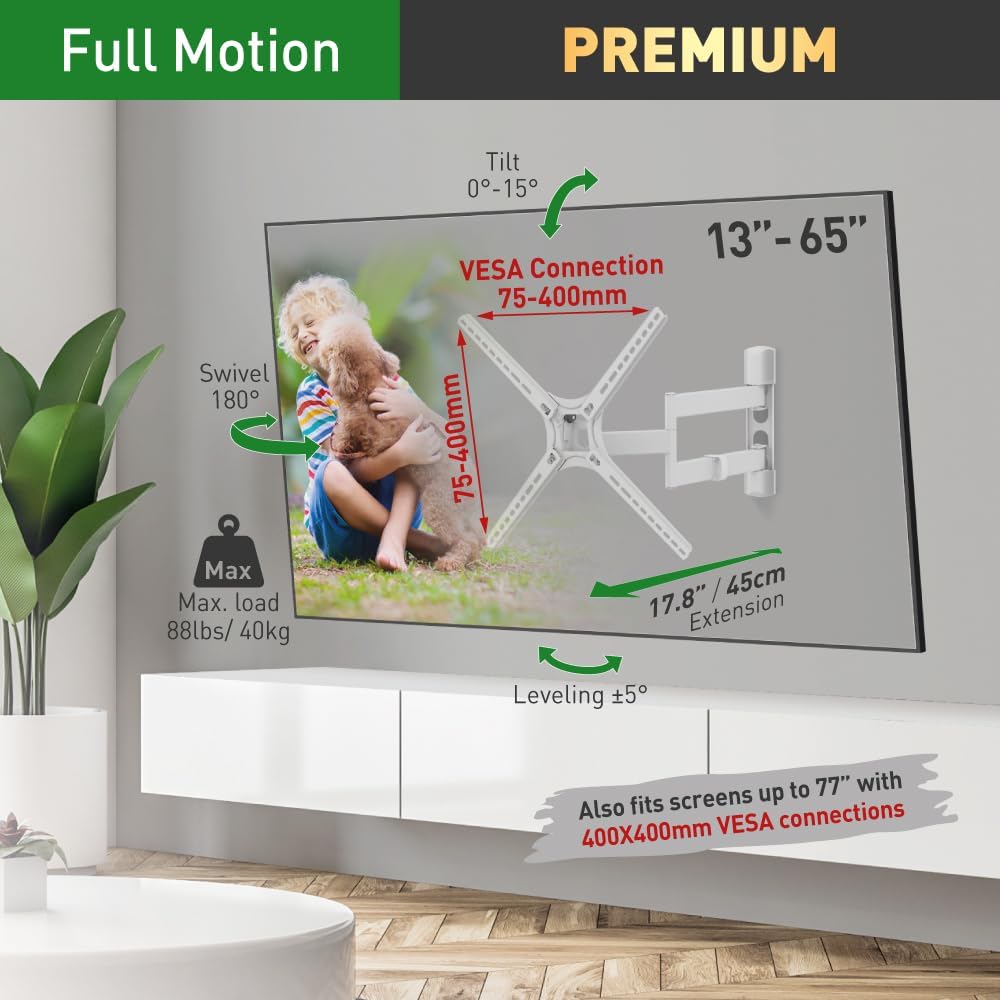
Image: This image illustrates the full range of motion of the Barkan TV wall mount, including tilt from 0-15 degrees, 180-degree swivel, and 17.8 inch extension from the wall. It also highlights VESA compatibility from 75-400mm and a maximum load capacity of 88 lbs (40 kg).
Determining Swivel Angle
The optimal viewing experience is achieved when your line of sight is perpendicular (90°) to the screen. The maximum swivel angle will vary based on your TV size:
- Up to 32" TV: 90° swivel
- 55" TV: 40° swivel
- 65" TV: 33° swivel

Image: This diagram explains how to determine the maximum swivel angle for optimal viewing, ensuring a perpendicular line of sight. It shows examples for TVs up to 32 inches (90° swivel), 55 inches (40° swivel), and 65 inches (33° swivel).
Maintenance
To ensure the longevity and proper function of your Barkan TV wall mount:
- Periodically check all screws and connections to ensure they remain tight and secure.
- Clean the mount with a soft, dry cloth. Avoid abrasive cleaners or solvents.
- Ensure cables are managed properly to prevent strain or damage during movement.
Troubleshooting
If you encounter any issues with your Barkan TV wall mount, consider the following:
- Mount feels loose: Re-check all wall and TV mounting screws and tighten if necessary.
- Difficulty moving the TV: Ensure no cables are snagged or obstructing movement. The mount is designed for smooth operation; excessive force should not be needed.
- TV not level: Use the built-in screen leveling mechanism to adjust the screen's horizontal position.
For further assistance, please visit the Barkan website for FAQs, video demonstrations, or contact their customer service team.
Specifications
| Product Dimensions | 11.38 x 9.41 x 3.07 inches |
| Item Weight | 6.79 pounds |
| Item Model Number | 3400W |
| Mounting Type | Wall Mount |
| Movement Type | Articulating (Fold, Rotate, Swivel, Tilt) |
| Brand | Barkan |
| Material | Metal |
| Color | White |
| Compatible Devices | Television (13-65 inches) |
| Maximum Tilt Angle | 15 Degrees |
| VESA Compatibility | 100x100, 100x200, 200x100, 200x200, 300x300, 300x400, 400x300, 400x400mm and non VESA up to 400x400mm |
| Maximum Load Capacity | 88 lbs (40 kg) |

Image: This detailed diagram provides all key dimensions and specifications for the Barkan TV wall mount, including VESA compatibility, tilt range, swivel, leveling, and adjustable distance from the wall.
Warranty and Support
The Barkan 3400W TV Wall Mount comes with a Lifetime Limited Warranty. Barkan Mounts has been developing and manufacturing TV mounts since 1988, focusing on high-quality and innovative designs.
For any questions, assistance, or to find more information, manuals, and FAQs, please visit the official Barkan website. Their customer service experts are available to help.


