
Pure Evoke H6
Pure Evoke H6 Digital Radio User Manual
Model: Evoke H6 | Brand: Pure
Keywords: Pure, Radio, Evoke, H6, DAB+, DAB, FM, stereo, Bluetooth, Sleep Timer, Alarm, Snooze, digital radio, user manual, instructions, B075TJZ4TS
Introduction
This manual provides comprehensive instructions for the setup, operation, and maintenance of your Pure Evoke H6 Digital Radio. Designed for high-quality audio and versatile connectivity, the Evoke H6 offers DAB+, DAB, and FM radio reception, along with Bluetooth streaming capabilities. Please read this manual carefully to ensure optimal performance and longevity of your device.
What's in the Box
Upon unboxing your Pure Evoke H6, please ensure all the following components are present:
- Pure Evoke H6 Digital Radio Unit
- Power Adapter
- Quick Start Guide
- User Manual (this document)

Image: Front view of the Pure Evoke H6 Digital Radio. The radio features a walnut wood finish, two large speaker grilles, a central color display, and various control buttons and knobs.
Product Overview
The Pure Evoke H6 is a high-quality digital radio designed for an enhanced listening experience. Key features include:
- DAB+, DAB, and FM Radio: Access a wide range of digital and analog radio stations.
- Bluetooth Connectivity: Stream audio wirelessly from your smartphone, tablet, or laptop.
- 2.8-inch TFT Color Display: A bright and clear screen for station information, track details, and menu navigation.
- Stereo Sound: Delivers rich, immersive audio quality.
- Headphone Output: For private listening.
- Auxiliary Input: Connect external audio devices via a 3.5mm cable.
- Alarm, Sleep Timer, and Snooze Functions: Integrated features for daily convenience.

Image: The Pure Evoke H6 radio positioned on a kitchen counter, demonstrating its compact and stylish design in a home environment.
Setup
1. Power Connection
- Unpack the Pure Evoke H6 and place it on a stable, flat surface.
- Extend the telescopic antenna fully for optimal reception.
- Connect the provided power adapter to the '12V DC 2.4A' input port on the rear of the radio.
- Plug the power adapter into a wall outlet.
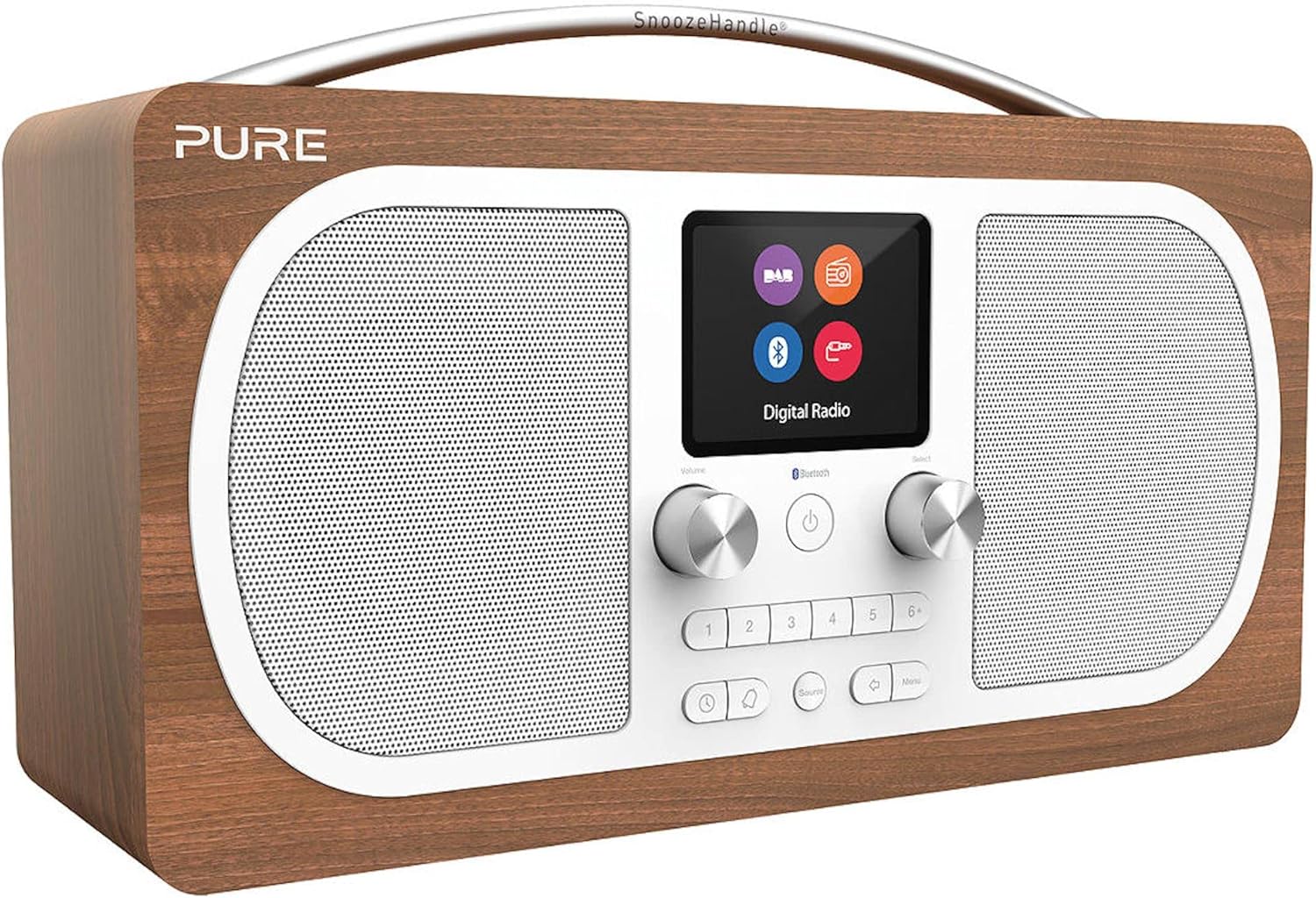
Image: Rear view of the Pure Evoke H6, highlighting the power input, auxiliary input, headphone jack, and the telescopic antenna.
2. Initial Power On and Scan
- Press the Power button (usually a central button with a circle and vertical line) to turn on the radio.
- The radio will typically perform an automatic scan for DAB+ and DAB stations upon first use. This may take a few minutes.
- Once the scan is complete, the radio will display a list of available stations.
Operating Instructions
1. Switching Modes (DAB+, FM, Bluetooth, Aux In)
Press the Source button (often labeled with an icon resembling an arrow pointing into a circle or "Source") to cycle through the available modes: DAB+, FM, Bluetooth, and Aux In.
2. DAB+ / DAB Radio
- Ensure the radio is in DAB+ mode.
- Use the Select knob or navigation buttons to browse the list of available stations.
- Press the Select knob to confirm your station choice.
- To perform a full scan for new stations, navigate to the DAB menu and select "Full Scan".
3. FM Radio
- Switch to FM mode using the Source button.
- Use the Select knob to manually tune to a frequency, or press and hold the Select knob to auto-scan for the next available station.
4. Bluetooth Pairing
- Switch to Bluetooth mode using the Source button. The display will show "Pairing" or "Waiting for connection".
- On your Bluetooth-enabled device (smartphone, tablet, etc.), go to its Bluetooth settings.
- Select "Pure Evoke H6" from the list of available devices.
- Once connected, the radio display will confirm the connection, and you can now stream audio from your device.
5. Auxiliary Input (Aux In)
- Switch to Aux In mode using the Source button.
- Connect your external audio device (e.g., MP3 player) to the 'Aux In' port on the rear of the radio using a 3.5mm audio cable.
- Audio from your external device will now play through the Evoke H6 speakers.
6. Setting Alarms and Timers
- Access the main menu by pressing the Menu button.
- Navigate to "Alarms" or "Timers" using the Select knob.
- Follow the on-screen prompts to set alarm times, snooze duration, and sleep timer settings.
Maintenance
To ensure the longevity and optimal performance of your Pure Evoke H6, please follow these maintenance guidelines:
- Cleaning: Use a soft, dry, lint-free cloth to clean the radio's surfaces. Do not use abrasive cleaners, waxes, or solvents.
- Liquid Exposure: Keep the radio away from liquids. If liquid spills on the unit, immediately unplug it and allow it to dry completely before re-using.
- Ventilation: Ensure the ventilation openings are not blocked. Do not place the radio on soft surfaces that may block airflow.
- Temperature: Avoid exposing the radio to extreme temperatures (hot or cold) or high humidity.
- Antenna Care: Handle the telescopic antenna gently to prevent damage.
Troubleshooting
If you encounter issues with your Pure Evoke H6, please refer to the following common problems and solutions:
| Problem | Possible Cause / Solution |
|---|---|
| No power / Radio does not turn on. |
|
| Poor radio reception (DAB/FM). |
|
| Bluetooth device cannot pair. |
|
| No sound from Aux In. |
|
Specifications
| Feature | Detail |
|---|---|
| Model Number | Evoke H6 |
| Dimensions (W x D x H) | 30.5 cm x 12.8 cm x 18 cm |
| Weight | 2.12 kg |
| Display | 2.8-inch TFT Color Display (approx. 8 cm) |
| Radio Tuner | DAB+, DAB, FM |
| Connectivity | Bluetooth, 3.5mm Aux-in, 3.5mm Headphone output |
| Power Source | AC Power Adapter (12V DC 2.4A), Compatible with optional battery pack (up to 50 hours battery life) |
| Special Features | Stereo Sound, Alarm, Sleep Timer, Snooze |
| Color | Walnut |

Image: Diagram showing the dimensions of the Pure Evoke H6 radio: 30.5cm width, 12.8cm depth, and 18cm height.
Warranty and Support
For warranty information and technical support, please refer to the official Pure website or contact their customer service. Keep your proof of purchase for warranty claims.
Official Pure Website: www.pure.com
Related documentsEvoke H6


Ask a question about this manual
Ask about setup, troubleshooting, compatibility, parts, safety, or missing instructions. Manuals+ will review the question and use this page’s manual context to help answer it.