
HUAWEI HL1289-BP
HUAWEI HL1289 USB Type C Cable User Manual
Model: HL1289-BP
Introduction
This user manual provides comprehensive instructions for the HUAWEI HL1289 USB Type C Cable. Designed for super-fast charging and efficient data transfer, this cable is compatible with a wide range of USB-C enabled devices, including popular Samsung Galaxy and LG smartphone models. Please read this manual carefully to ensure proper usage and to maximize the performance and longevity of your cable.
Product Overview and Features
The HUAWEI HL1289 USB Type C Cable is engineered for high performance and reliability. Key features include:
- USB Type C Connector: Reversible design for easy connection.
- 5A Super-fast Charging: Supports rapid power delivery to compatible devices.
- USB 3.1 Data Transfer: Enables high-speed data synchronization between devices.
- Durable Construction: Designed for everyday use.
- Wide Compatibility: Works with various smartphones and devices featuring a USB-C port.

Image 1: The HUAWEI HL1289 USB Type C Cable, illustrating its USB-A and USB-C connectors. The USB-A end is typically for connecting to a power adapter or computer, while the USB-C end connects to the mobile device. The cable is white and features a round shape.
Package Contents
Your package should contain the following items:
- 2 x HUAWEI HL1289 USB Type C Cables
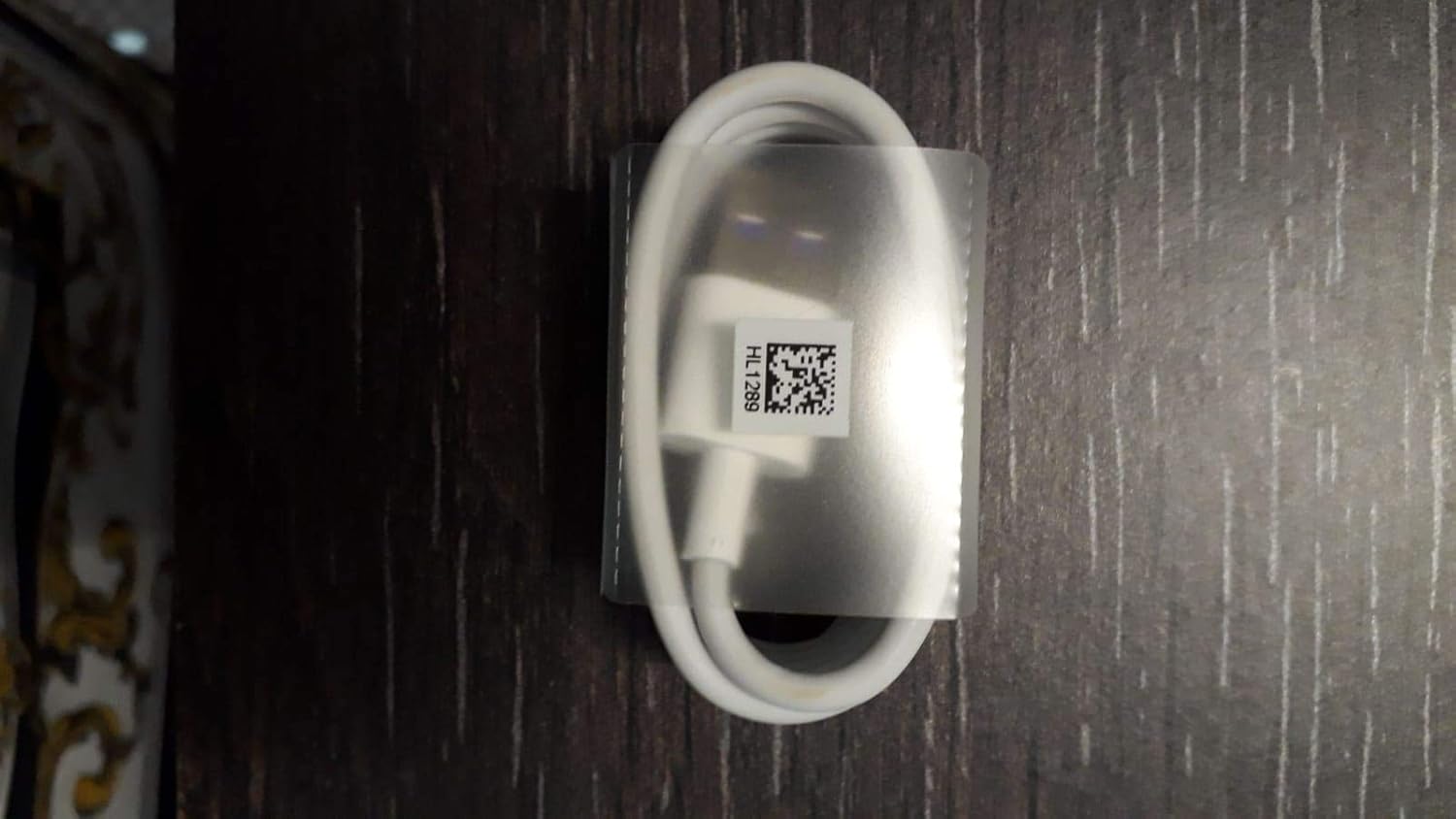
Image 2: One of the HUAWEI HL1289 USB Type C Cables, neatly coiled and secured within its transparent plastic packaging. A label with "HL1289" and a QR code is visible on the packaging, confirming the model number.
Setup
Setting up your HUAWEI HL1289 USB Type C Cable is straightforward:
- For Charging:
- Connect the USB-A end of the cable to a compatible USB wall adapter, car charger, or power bank. For super-fast charging, ensure your power source supports the required voltage and amperage (e.g., 5A).
- Connect the USB Type C end of the cable to the charging port of your smartphone or other USB-C enabled device.
- Verify that your device indicates it is charging. If your device supports super-fast charging, it should display a corresponding indicator.
- For Data Transfer:
- Connect the USB-A end of the cable to an available USB port on your computer (PC or Mac).
- Connect the USB Type C end of the cable to the USB-C port on your smartphone or other USB-C enabled device.
- Your computer should recognize the connected device. You may need to select "File Transfer" or "MTP" mode on your device's notification panel to enable data access.
Operating Instructions
Once connected, the cable operates automatically for charging and data transfer. No additional software or drivers are typically required for standard operation.
- Charging: The cable will deliver power to your device based on the capabilities of both the power source and the device. For optimal charging speed, use a power adapter that supports the device's fast charging protocols.
- Data Transfer: When connected to a computer, you can access your device's storage to transfer files, photos, and videos. The data transfer rate is up to 0.48 Gigabits Per Second (USB 3.1 standard).
Maintenance
To ensure the longevity and optimal performance of your HUAWEI HL1289 USB Type C Cable, follow these maintenance guidelines:
- Handle with Care: Avoid bending the cable sharply, especially near the connectors, as this can damage internal wires.
- Store Properly: When not in use, coil the cable loosely. Avoid tangling or knotting the cable.
- Keep Clean: Use a soft, dry cloth to wipe the cable and connectors if they become dirty. Do not use liquid cleaners or abrasive materials.
- Avoid Extreme Conditions: Do not expose the cable to extreme temperatures, direct sunlight for prolonged periods, or excessive moisture. This cable is designed for indoor usage.
- Inspect Regularly: Periodically check the cable and connectors for any signs of wear, fraying, or damage. Discontinue use if damage is observed.
Troubleshooting
If you encounter issues with your HUAWEI HL1289 USB Type C Cable, try the following troubleshooting steps:
| Problem | Possible Cause | Solution |
|---|---|---|
| Device not charging. | Loose connection, faulty power source, incompatible device. | Ensure both ends of the cable are securely connected. Try a different power adapter or USB port. Test the cable with another compatible device. |
| Slow charging speed. | Power source does not support fast charging, device limitation, background apps. | Use a power adapter that supports your device's fast charging protocol. Close unnecessary background applications on your device. Ensure the cable is genuine and undamaged. |
| Data transfer not working. | Device not in data transfer mode, faulty USB port on computer, driver issues. | On your device, select "File Transfer" or "MTP" from the USB connection options in the notification panel. Try a different USB port on your computer. Ensure your computer has the necessary drivers for your device. |
| Cable appears damaged. | Physical wear and tear. | Discontinue use immediately to prevent potential damage to your devices. Replace the cable. |
Specifications
| Feature | Detail |
|---|---|
| Brand | HUAWEI |
| Model Number | HL1289-BP |
| Connector Type | USB Type C (Male-to-Male) |
| Cable Type | USB |
| Special Features | Data Transfer, Fast Charging |
| Compatible Devices | Smartphones (e.g., LG V, S9+, Samsung Galaxy S10, S9, S8, Note 8, LG V20, G5, G6) |
| Recommended Uses | Charging and data transfer for USB-C compatible devices |
| Color | White |
| Data Transfer Rate | 0.48 Gigabits Per Second |
| Shape | Round |
| Number of Pins | 24 |
| Unit Count | 2 Count |
| Item Weight | 1.12 ounces (0.07 Pounds) |
| Indoor/Outdoor Usage | Indoor |
| Product Dimensions | 0.94 x 2.68 x 3.78 inches (packaging) |
| GTIN | 05055370934252 |
| Date First Available | April 13, 2017 |
Warranty Information
HUAWEI products are manufactured to high quality standards. For specific warranty terms and conditions applicable to your region and purchase, please refer to the warranty card included with your product or visit the official HUAWEI support website. Typically, warranty covers defects in materials and workmanship under normal use.
Support
For further assistance, technical support, or inquiries regarding your HUAWEI HL1289 USB Type C Cable, please contact HUAWEI customer service through their official channels. You can typically find contact information on the HUAWEI official website or through the retailer where you purchased the product.
Please have your product model number (HL1289-BP) and proof of purchase ready when contacting support.
Related documentsHL1289-BP


Ask a question about this manual
Ask about setup, troubleshooting, compatibility, parts, safety, or missing instructions. Manuals+ will review the question and use this page’s manual context to help answer it.