
1. Introduction
This manual provides essential information for the safe and effective operation, maintenance, and troubleshooting of your Dewalt DCG405P2 18 Volt 125 mm Cordless Angle Grinder. The DCG405P2 is engineered for grinding and cutting tasks, as well as for use with wire brushes. It features a powerful brushless motor, epoxy resin armoured windings for dust protection, and an optimized cooling system for extended tool life. For your safety, the tool incorporates an electronic brake and clutch, along with overload and restart protection. Please read this manual thoroughly before first use and keep it for future reference.
2. Package Contents
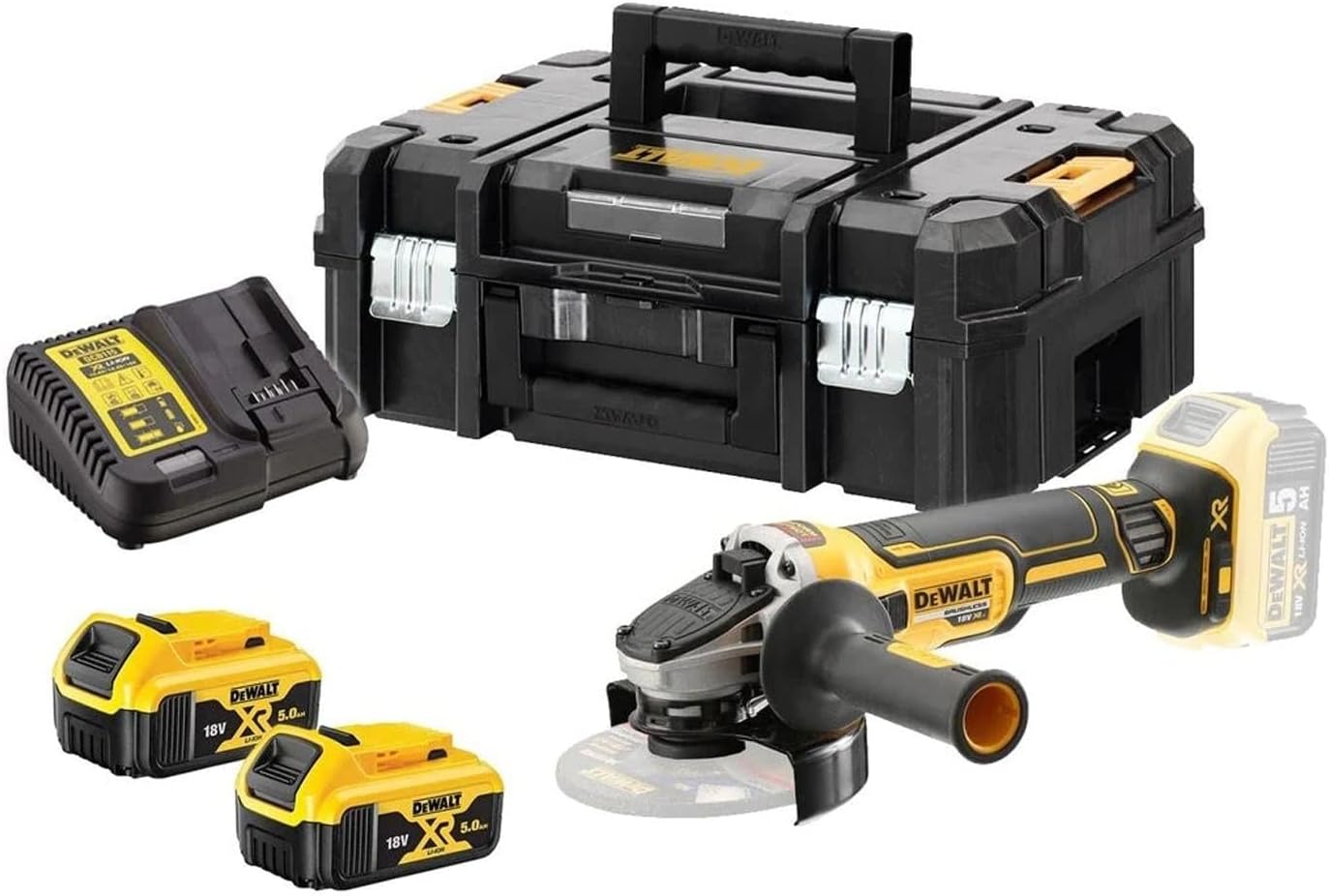
Carefully unpack your Dewalt DCG405P2 and verify that all items listed below are present and undamaged:
- 1 x 18 Volt Cordless Angle Grinder (DCG405P2)
- 1 x Protective Guard
- 2 x 5.0 Ah Li-ion Batteries
- 1 x Quick Charger
- 1 x Additional Side Handle
- 1 x Quick Release Nut
- 1 x T STAK Box II

3. Safety Instructions
Always adhere to general power tool safety guidelines and the specific instructions provided in this manual to prevent injury and damage. Keep your work area clean and well-lit. Do not operate power tools in explosive atmospheres, such as in the presence of flammable liquids, gases, or dust.
Personal Safety
- Always wear appropriate personal protective equipment (PPE), including safety glasses, hearing protection, gloves, and a dust mask.
- Dress properly. Do not wear loose clothing or jewelry. Keep your hair, clothing, and gloves away from moving parts.
- Stay alert, watch what you are doing, and use common sense when operating a power tool.
Tool-Specific Safety Features
- Electronic Brake: The electronic brake stops the grinding disc in less than 2 seconds, significantly reducing the risk of injury after the trigger is released.
- Electronic Clutch: In the event of a disc jam or blockage, the electronic clutch will automatically shut off the device, protecting both the user from kickback and the tool from damage.
- Overload Protection: This feature prevents motor damage by automatically reducing power or shutting down the tool if it becomes overloaded.
- Restart Protection: The tool will not automatically restart after a power interruption (e.g., battery removal and re-insertion) if the switch is in the 'ON' position. The switch must be cycled to 'OFF' and then 'ON' to restart.
4. Setup
4.1 Battery Charging
Before first use, fully charge the Li-ion batteries using the supplied quick charger. Insert the battery into the charger until it clicks into place. The charger's indicator lights will show the charging status. All 18 Volt XR and 54 Volt XR Flexvolt batteries of any Ah class are compatible with this grinder.
4.2 Attaching the Protective Guard
The DCG405P2 features tool-free guard quick adjustment. Position the protective guard to ensure maximum safety for the specific application, directing sparks away from your body and flammable materials. Ensure it is securely locked in place before operation.
4.3 Installing the Grinding/Cutting Disc
Ensure the tool is switched off and the battery is removed before installing or changing discs. Use only discs rated for the grinder's maximum RPM and appropriate for the material being worked on. Place the inner flange on the spindle, then the disc, followed by the quick release nut. Tighten the quick release nut firmly by hand. Do not overtighten.
5. Operating Instructions
5.1 Starting and Stopping
- To Start: Ensure the battery is fully inserted. Grip the tool firmly with both hands. Depress the trigger switch.
- To Stop: Release the trigger switch. The electronic brake will rapidly stop the disc.
5.2 Grinding and Cutting Techniques
Always allow the disc to reach full speed before contacting the workpiece. Apply light, consistent pressure. For grinding, use the edge of the disc at an angle of approximately 15-30 degrees to the workpiece. For cutting, hold the grinder perpendicular to the workpiece, ensuring the cut is straight and stable. Avoid excessive pressure, which can lead to overheating, reduced performance, and premature disc wear.


6. Maintenance
Regular maintenance ensures optimal performance and extends the life of your tool. Always disconnect the battery before performing any maintenance.
- Cleaning: Regularly clean the ventilation slots and housing with a soft brush or compressed air to prevent dust buildup, especially around the motor. The epoxy resin armoured windings protect the motor from abrasive dust particles, but general cleanliness is still important.
- Disc Inspection: Before each use, inspect the grinding or cutting disc for cracks, chips, or excessive wear. Replace damaged or worn discs immediately.
- Battery Care: Store batteries in a cool, dry place. Do not store fully discharged batteries for extended periods. Charge them periodically if not in use.
- General Inspection: Periodically check all screws and fasteners for tightness. Ensure the protective guard moves freely and locks securely.
7. Troubleshooting
This section addresses common issues you might encounter with your angle grinder. For problems not listed here, contact DEWALT customer support.
| Problem | Possible Cause | Solution |
|---|---|---|
| Tool does not start | Battery not charged or improperly inserted; Restart protection engaged. | Ensure battery is fully charged and correctly inserted. If restart protection is active, cycle the switch to 'OFF' then 'ON'. |
| Tool stops during operation | Overload protection activated; Electronic clutch engaged due to disc jam. | Reduce pressure on the tool. If disc is jammed, release trigger, clear obstruction, then restart. |
| Excessive vibration | Worn or damaged disc; Improperly mounted disc. | Inspect and replace disc if necessary. Ensure disc is correctly seated and quick release nut is tightened. |
| Reduced performance/overheating | Blocked ventilation slots; Excessive continuous use. | Clean ventilation slots. Allow tool to cool down during prolonged use. |
8. Specifications
Detailed technical specifications for the Dewalt DCG405P2 Cordless Angle Grinder:
| Feature | Specification |
|---|---|
| Model Number | DCG405P2-QW |
| Voltage | 18 Volts |
| Output Power | 800 Watts (Nominal) / 1000 Watts (Max) |
| No-Load Speed | 9,000 RPM |
| Disc Diameter | 125 mm (5 inches) |
| Spindle Thread | M14 |
| Item Weight | 1.74 Kilograms (3.83 pounds) |
| Dimensions (L x W x H) | 17.32" x 13.78" x 6.3" |
| Battery Type | Lithium Ion |
| Sound Level | 44 dB (Operating) |
| Motor Type | Brushless |
9. Warranty and Support
Your Dewalt DCG405P2 Cordless Angle Grinder is covered by a Manufacturer Guarantee. For specific warranty terms, registration, or to make a claim, please refer to the documentation included with your product or visit the official DEWALT website.
For additional support, product information, or to explore other DEWALT products, please visit the official DEWALT Store:


