
RGBZONE FB5012
RGBZONE 3-PIN LED Controller Instruction Manual
Model: FB5012 | Brand: RGBZONE
1. Product Overview
The RGBZONE 3-PIN LED Controller is designed for controlling Dream Color LED light strips such as WS2811, WS2812, and WS2812B. It features an RF wireless remote control, offering over 300 color modes including rainbow, wave, breathing, strobing, gradual change, color cycle, comet, static, fading, and chasing effects. Both color-changing speed and brightness are adjustable. This mini controller supports DC 5V~24V input and is compatible with 3-PIN single signal IC chip LED products. It automatically saves user settings when powered off.

Image: RGBZONE 3-PIN LED Controller and its RF remote control.
2. Package Contents
Please verify that all items listed below are included in your package:
- 1 x RF Remote Control
- 1 x RF LED Controller
- 1 x User Manual

Image: Contents of the product package, including the remote, controller, and user manual.
3. Product Features
- Wide Compatibility: Supports WS2811, WS2812B, and WS2812 LED lights. Note: Not compatible with SK6812 RGBW or regular RGB LEDs without a driver IC.
- Extensive Color Modes: Over 300 dynamic color modes, including various patterns like rainbow, wave, breathing, strobing, gradual change, color cycle, comet, static, fading, and chasing.
- Adjustable Settings: Color-changing speed (10 levels) and brightness (32 levels) are fully adjustable to suit your preferences.
- RF Wireless Control: Features a 360° RF remote control with a long working distance of 32-98 feet (10-30 meters), even through walls, doors, and cabinets, offering more accurate and farther control than infrared remotes.
- Plug and Play: Comes with a 3-pin JST connector and DC female connector for easy installation without soldering.
- Memory Function: Automatically saves the last used settings when power is turned off.
- Adjustable Pixel Control: Supports setting controlled pixel numbers, with a maximum of 2048 pixels (factory default is 300 pixels). Recommended for up to 300 pixels (approx. 5 meters of light strip).
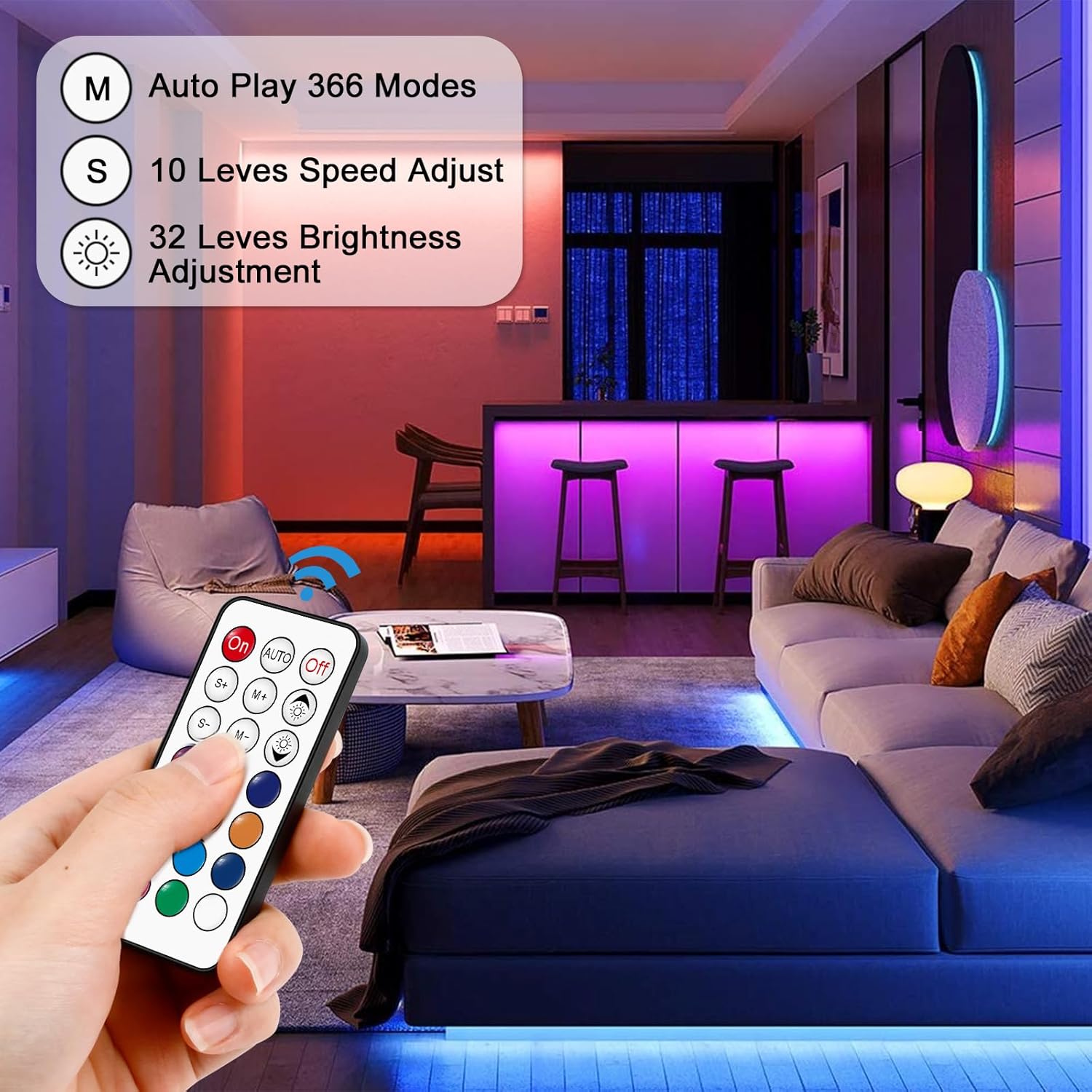
Image: Demonstrates the 360° RF wireless remote control in a living room setting, highlighting its range and ease of use.

Image: Visual representation of the remote's capabilities, including 366 auto play modes, 10 speed levels, and 32 brightness adjustment levels.
4. Setup
4.1. Connecting the Controller
Follow these steps to connect your LED controller to the light strip and power supply:
- Connect the 3-PIN connector from the controller to your compatible LED light strip. Ensure the pins align correctly.
- Connect the DC female connector of the controller to a suitable DC power supply (not included). The input voltage of the power supply must match the voltage requirements of your LED light strip (e.g., 5V for 5V strips).

Image: Step-by-step diagram illustrating the connection of the RF remote controller to an LED strip and power supply.
4.2. Remote Control Battery Installation
The remote control contains a coin cell battery (CR2025, 3V). If the remote is not responding, you may need to remove the plastic insulation sheet or replace the battery.

Image: Detailed instructions on how to remove and replace the CR2025 3V coin cell battery in the remote control.
5. Operating Instructions
The 21-key RF remote control allows for full customization of your LED light strip. Below is a guide to its functions:
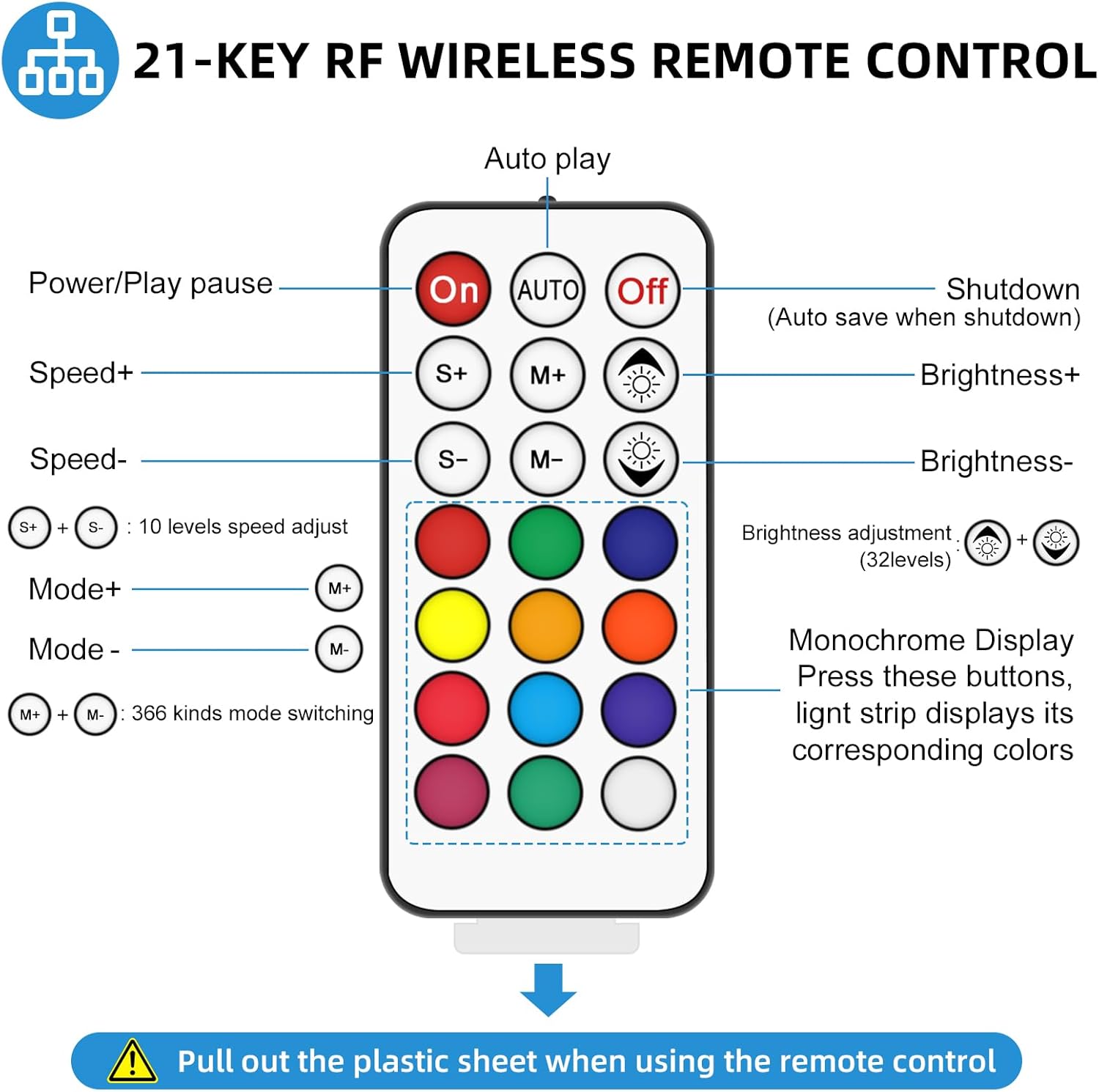
Image: Diagram illustrating the functions of each button on the 21-key RF wireless remote control.
- On/Off: Power on/off the LED strip. Settings are saved automatically upon shutdown.
- AUTO: Activates auto-play mode, cycling through 366 different lighting effects.
- S+/S-: Adjusts the speed of dynamic modes (10 levels).
- M+/M-: Cycles through the 366 available lighting modes.
- Brightness+/Brightness-: Adjusts the brightness of the LED strip (32 levels).
- Color Buttons (Red, Green, Blue, Yellow, Cyan, Purple, White, etc.): Press these buttons for monochrome display; the light strip will show its corresponding color.
Video: Demonstration of various lighting effects and color changes using the RF remote control on an LED strip. This video showcases the dynamic capabilities of the controller.
6. Adjusting Color Order (RGB/GRB/BRG, etc.)
If the colors displayed by your LED strip do not match the colors selected on the remote (e.g., pressing Green results in Red light), you need to adjust the color order. This is not a product defect.
- Connect the LED strip and power supply.
- Press the Off button on the remote to turn off the LED strip.
- Press the AUTO button to enter the setup menu. The first three lights of the LED strip will display the current RGB sequence.
- Press the Blue color button (or the upper right color button) to adjust the RGB sequence until the first three lights of the strip display Red, Green, and Blue in that order.
- Press the Off button again to save the new setting.

Image: Visual guide for correcting color order discrepancies between the remote and the LED strip.
7. Pairing Setup (1-to-1 Matching)
By default, one remote can control multiple receivers. If you wish to set up a 1-to-1 pairing (where only one specific remote controls one specific controller), follow these instructions:
- To enable 1-to-1 matching: Press and hold the On button for 5 seconds. After this, only this remote control will be able to control the paired receiver.
- To cancel 1-to-1 matching: Press and hold the Off button for 5 seconds. This will revert the controller to its factory default setting, allowing all compatible remote controls to operate it.

Image: Guide on how to set up or cancel 1-to-1 pairing between the RF remote and the LED controller.
8. Power Supply Considerations
The controller operates with a DC 5V~24V input. However, it does not regulate the output voltage. It is crucial to select a power supply that matches the voltage requirements of your specific LED light strips.
- Input Voltage = Output Voltage: For example, if you are using a DC5V WS2812B LED strip, you must use a DC5V power supply. Using a 12V or 24V power supply with a 5V strip will damage the LED strip.
- Power Limits: The controller itself can handle power up to 30W at 5V, 72W at 12V, and 144W at 24V. If your light strips exceed these power ratings, it is essential to provide a separate power supply for the light strips or use amplifiers to prevent controller overload and damage.

Image: Explains the importance of matching the power supply voltage to the LED strip and ensuring the power of the strip does not exceed the controller's capacity.
9. Troubleshooting
| Problem | Possible Cause | Solution |
|---|---|---|
| LED strip colors do not match remote (e.g., Green button shows Red). | Incorrect color order setting. | Refer to Section 6: Adjusting Color Order. |
| Remote control is not working. | 1. Remote battery issue (plastic sheet, low battery). 2. Obstructions between remote and controller. 3. Remote not paired (if 1-to-1 matching is enabled). | 1. Ensure plastic insulation sheet is removed. Replace CR2025 battery if needed. 2. Ensure clear line of sight or reduce distance. RF remote has a range of 32-98ft, but large obstructions can interfere. 3. Refer to Section 7: Pairing Setup. |
| Controller becomes very hot during use. | Overload due to high power consumption of LED strips. | Ensure the total power consumption of your LED strips is within the controller's specified limits. If exceeding, provide a separate power supply for the light strips or use amplifiers. |
| LED strip is not lighting up. | 1. Incorrect voltage power supply. 2. Loose connections. 3. Incompatible LED strip type. | 1. Verify power supply voltage matches LED strip voltage (e.g., 5V strip needs 5V supply). 2. Check all connections (3-PIN and DC connector) are secure. 3. Confirm your LED strip is WS2811, WS2812, or WS2812B. |

Image: Illustrates potential reasons for remote control malfunction, such as obstructions affecting RF signal range.
Video: Demonstrates the mounting method for the light strip and controller. This can be helpful for ensuring proper installation and avoiding common issues.
10. Specifications
| Attribute | Value |
|---|---|
| Brand | RGBZONE |
| Model Number | FB5012 |
| Item Weight | 0.95 ounces |
| Product Dimensions | 3.39 x 1.57 x 0.01 inches |
| Input Voltage | DC 5V~24V |
| Maximum Compatible Wattage | 144 Watts (at 24V) |
| Compatible Devices | Devices with 3-PIN Single signal IC chip LED products (WS2811, WS2812B) |
| Control Type | RF Wireless Remote Control |
| Remote Control Battery | 1 x CR2025 (3V) |
| Max Number of Control Pixels | 2048 pixels (Factory default: 300 pixels) |
| Remote Control Distance | 32-98 feet (10-30 meters) |
| Material | Plastic |
| Specific Uses | Indoor use only |
11. Warranty and Support
For warranty information or technical support regarding your RGBZONE 3-PIN LED Controller, please refer to the contact details provided in the packaging or visit the official RGBZONE website. Keep your purchase receipt as proof of purchase for any warranty claims.
Ask a question about this manual
Ask about setup, troubleshooting, compatibility, parts, safety, or missing instructions. Manuals+ will review the question and use this page’s manual context to help answer it.