
1. Introduction and Overview
The Makita DC18RE Rapid Optimum Charger is designed for efficient charging of both Makita 18V LXT and 12V max CXT Lithium-Ion slide-style batteries. This charger incorporates advanced features to optimize battery life and charging speed, including a built-in fan for cooling and communication with the battery's internal chip to manage current, voltage, and temperature.
This manual provides essential information for the safe and effective use of your DC18RE charger, covering setup, operation, maintenance, and troubleshooting.

Figure 1: Makita DC18RE Rapid Optimum Charger. This image displays the charger unit with its two battery slots, one for LXT and one for CXT batteries, and the indicator panel.
2. Safety Information
Always observe the following safety precautions when using the charger to prevent electric shock, fire, or serious injury.
- Read all instructions and warning labels on the charger, battery, and product using the battery before use.
- Do not charge batteries in the presence of flammable liquids or gases.
- Do not expose the charger to rain or wet conditions. Water entering the charger will increase the risk of electric shock.
- Use only Makita genuine batteries with this charger. Use of other batteries may result in bursting, personal injury, and damage.
- Do not abuse the cord. Never carry the charger by the cord or yank it to disconnect from an outlet.
- Do not operate the charger if it has received a sharp blow, been dropped, or otherwise damaged.
- Do not disassemble the charger. Take it to a qualified service person when service or repair is required.
- Unplug the charger from the outlet before attempting any maintenance or cleaning.
- This appliance is not intended for use by persons (including children) with reduced physical, sensory or mental capabilities, or lack of experience and knowledge, unless they have been given supervision or instruction concerning use of the appliance by a person responsible for their safety.
3. Product Features
The DC18RE charger offers several key features for efficient and reliable battery charging:
- Dual Compatibility: Charges both Makita 18V LXT and 12V max CXT Lithium-Ion slide-style batteries.
- Rapid Charging: Engineered for fast charging times, optimizing workflow.
- Built-in Cooling Fan: Actively cools the battery during charging by forcing air through the battery's air vents, contributing to faster charging and extended battery life.
- Optimized Battery Life: The charger communicates with the battery's built-in chip to control current, voltage, and temperature, enhancing overall battery longevity.
- Sequential Charging: Charges one battery at a time when two batteries are inserted. Once the first battery is fully charged, it automatically begins charging the second.
Approximate Charging Times:
| Battery Type | Capacity | Charging Time (approx.) |
|---|---|---|
| 18V LXT Lithium-Ion | 2.0Ah | 25 minutes |
| 18V LXT Lithium-Ion | 3.0Ah | 30 minutes |
| 18V LXT Lithium-Ion | 4.0Ah | 40 minutes |
| 18V LXT Lithium-Ion | 5.0Ah | 45 minutes |
| 18V LXT Lithium-Ion | 6.0Ah | 55 minutes |
| 12V max CXT Lithium-Ion | 2.0Ah | 30 minutes |
| 12V max CXT Lithium-Ion | 4.0Ah | 60 minutes |
4. Setup
- Power Connection: Plug the charger's power cord into a standard AC power outlet (120V AC, 60Hz). The charger is designed for use with standard household electrical power.
- Placement: Place the charger on a stable, flat surface in a well-ventilated area, away from direct sunlight and heat sources. Ensure there is sufficient space around the charger for proper airflow, especially for the cooling fan.
- Battery Insertion:
- Identify the correct battery slot for your battery type (LXT for 18V, CXT for 12V max).
- Slide the battery into the designated slot on the charger until it clicks into place. Ensure the battery is fully seated.

Figure 2: Makita DC18RE charger with an 18V LXT battery inserted in the left slot and a 12V max CXT battery inserted in the right slot, demonstrating proper battery placement.
5. Operating Instructions
Charging Process:
- Once a battery is properly inserted, the charger will automatically begin the charging process.
- The charger performs a diagnostic check on the battery. If the battery is too hot or too cold, charging may be delayed until the battery reaches an optimal temperature.
- The built-in fan will activate to cool the battery during charging.
- If two batteries are inserted, the charger will charge them sequentially. The 18V LXT battery slot typically takes priority if both are inserted simultaneously, but this can vary. Once the first battery is fully charged, the charger will automatically switch to the second battery.
- Upon completion of charging, remove the battery from the charger.
Indicator Lights:
The DC18RE charger features indicator lights to communicate the battery status and charging progress. Refer to the diagram below for a visual guide.
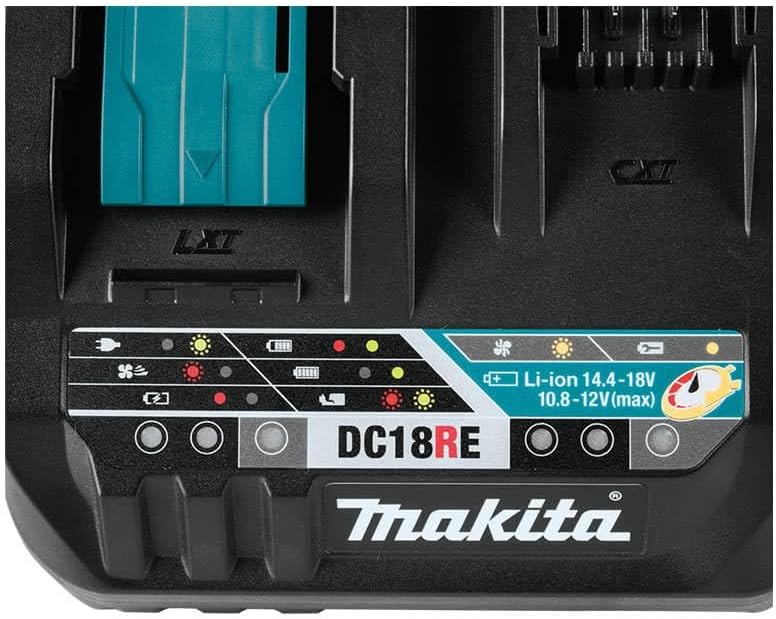
Figure 3: Close-up view of the Makita DC18RE charger's indicator panel, showing various LED lights for charging status, battery condition, and fan operation.
- Solid Green Light: Charging complete.
- Flashing Green Light: Charging in progress.
- Solid Red Light: Battery is too hot or too cold, or there is a problem with the battery. Charging will begin once the battery reaches an appropriate temperature, or if a fault is detected, it will remain red.
- Flashing Red Light: Battery is defective or charger malfunction.
- Solid Yellow Light: Maintenance charging (for certain battery types or conditions).
- Flashing Yellow Light: Cooling fan error or battery temperature warning.
6. Maintenance
Regular maintenance ensures optimal performance and longevity of your charger.
- Cleaning: Disconnect the charger from the power outlet before cleaning. Use a dry cloth to wipe dust and debris from the charger's exterior. Do not use water or chemical cleaners. Keep the ventilation openings clear of obstructions.
- Storage: Store the charger in a dry, indoor location where the temperature is stable and within recommended operating ranges. Avoid extreme temperatures and high humidity.
- Inspection: Periodically inspect the power cord for any signs of damage (cuts, fraying). If damaged, have it replaced by a qualified service technician.
7. Troubleshooting
If you encounter issues with your charger, refer to the following common troubleshooting steps:
| Problem | Possible Cause | Solution |
|---|---|---|
| Charger not operating (no lights) | No power to the charger. | Check if the power cord is securely plugged into the outlet and the charger. Test the outlet with another device. |
| Battery not charging (Solid Red Light) | Battery is too hot or too cold. | Allow the battery to cool down or warm up to room temperature before attempting to charge again. |
| Battery not charging (Flashing Red Light) | Defective battery or charger malfunction. | Try charging a different, known-good battery. If the issue persists, the charger or battery may require service. |
| Fan not operating (Flashing Yellow Light) | Fan error or obstruction. | Ensure the fan vents are clear. If the issue persists, contact Makita service. |
| Slow charging | Environmental conditions or battery age. | Ensure the charger is in a well-ventilated area. Older batteries may charge slower. |
If these steps do not resolve the issue, contact Makita customer support or an authorized service center.
8. Specifications
| Specification | Detail |
|---|---|
| Manufacturer | Makita |
| Model Number | DC18RE |
| Input Voltage | 120V AC, 60Hz (Standard for US market) |
| Output Voltage | 18 Volts (DC) for LXT, 10.8-12 Volts (DC) for CXT |
| Compatible Battery Types | Makita 18V LXT Lithium-Ion, Makita 12V max CXT Lithium-Ion |
| Charging System | Rapid Optimum Charging, Sequential |
| Cooling System | Built-in fan |
| Item Weight | 2.65 pounds |
| Product Dimensions | 5.25 x 9.67 x 10.71 inches |
| Certifications | UL, FCC |
| Included Components | Charger only |
9. Warranty and Support
The Makita DC18RE Rapid Optimum Charger comes with a 3-year limited warranty from the date of purchase. This warranty covers defects in materials and workmanship under normal use.
For warranty claims, technical support, or service inquiries, please contact Makita customer service or visit their official website. Keep your proof of purchase for warranty validation.
Makita Official Website: www.makitatools.com


