
DoHonest DW4310
FHD 1080P Digital Wireless Backup Camera and 7'' DVR Monitor Instruction Manual
Brand: DoHonest | Model: DW4310
1. Introduction and Overview
Thank you for choosing the DoHonest FHD 1080P Digital Wireless Backup Camera and 7'' DVR Monitor. This system is designed to enhance driving safety and convenience for various vehicles, including trailers, trucks, RVs, and 5th wheels. With its high-definition display, robust wireless signal, and versatile features, it provides a clear and reliable view of your surroundings, whether you are backing up, changing lanes, or monitoring your cargo.
This manual provides detailed instructions for setting up, operating, and maintaining your new backup camera system. Please read it thoroughly before installation and use to ensure optimal performance and safety.
2. Package Contents
Verify that all items listed below are included in your package:

Image: All components included in the DoHonest FHD 1080P Digital Wireless Backup Camera and 7'' DVR Monitor kit.
- 7 Inch Monitor
- Wireless Backup Camera
- Windshield Bracket
- Power Cord (x2)
- Cigarette Lighter Adapter
- Test Wire
- Antenna (x3)
- Other Installation Accessories
- User Manual
3. Product Features
- FHD 1080P High-Definition Video: Provides clear and sharp images for enhanced visibility.
- 7-inch DVR Monitor: Large display for easy viewing, with built-in DVR for recording.
- Digital Wireless Signal: Ensures stable and interference-free transmission up to 320ft, even at high speeds.
- IP69K Waterproof Camera: Designed to withstand harsh weather conditions, including extreme temperatures (-22°F to 176°F), rain, and splashes.
- 170° Wide Viewing Angle: Offers a broad perspective of the rear or front of your vehicle, minimizing blind spots.
- Loop Recording: Automatically overwrites unblocked video when the memory card is full, ensuring continuous recording. Supports up to 32GB SD card (maximum 128GB).
- Capacitive Touch Panel: Light touch operation for advanced settings and quick response.
- Dual/Quad Split Screen Support: Allows connection of up to four cameras for simultaneous multi-directional viewing.
- Optional Guide Lines: Customizable parking guide lines for precise maneuvering.
- Image Flip Function: Adjust the image view (normal, mirror, flip vertically, flip horizontally) to suit various installation needs.
- Wide Voltage Compatibility: Camera supports up to 60V, working voltage 12-24V.

Image: The DoHonest 7-inch DVR monitor and wireless backup camera, showcasing the main components of the system.

Image: Highlights the advantages of the S21 RV Backup Camera, including unique dual antenna design for stable signal up to 320ft, 4-channel support for multiple cameras, and durable metal construction.

Image: Illustrates the IP69K waterproof rating of the camera, its 170-degree wide view, and wide voltage compatibility (12-24V).
4. Setup and Installation
The DoHonest wireless backup camera system is designed for easy installation. Follow these steps for a successful setup:
4.1 Camera Installation
The camera can be installed at the rear of your vehicle. For optimal performance, ensure the antenna is positioned vertically for the best signal transmission.

Image: The wireless backup camera mounted on the rear of an RV, demonstrating its easy installation.
Powering the Camera:
- General Installation: Connect the camera's power cable to your vehicle's reverse light (DC 12V) for backup-only use, or to running lights for continuous monitoring while driving.
- Furrion Pre-wired Installation: If your RV is pre-wired for a Furrion camera, use the provided adapter plate and power adapter cable. This allows for a quick and seamless connection to the existing wiring. Ensure the running lights are on for the camera to receive power and transmit a signal.

Image: A diagram illustrating the strong wireless signal range of the system, capable of transmitting up to 320 feet between the camera and monitor.
4.2 Monitor Installation
The 7-inch monitor can be mounted in two primary ways:
- On Dashboard: Use the dashboard mount with 3M adhesive for a secure placement.
- On Windshield: Utilize the suction cup windshield bracket for flexible positioning.
Connect the monitor's power cable to your vehicle's cigarette lighter adapter. The adapter includes an on/off button for convenient power control.
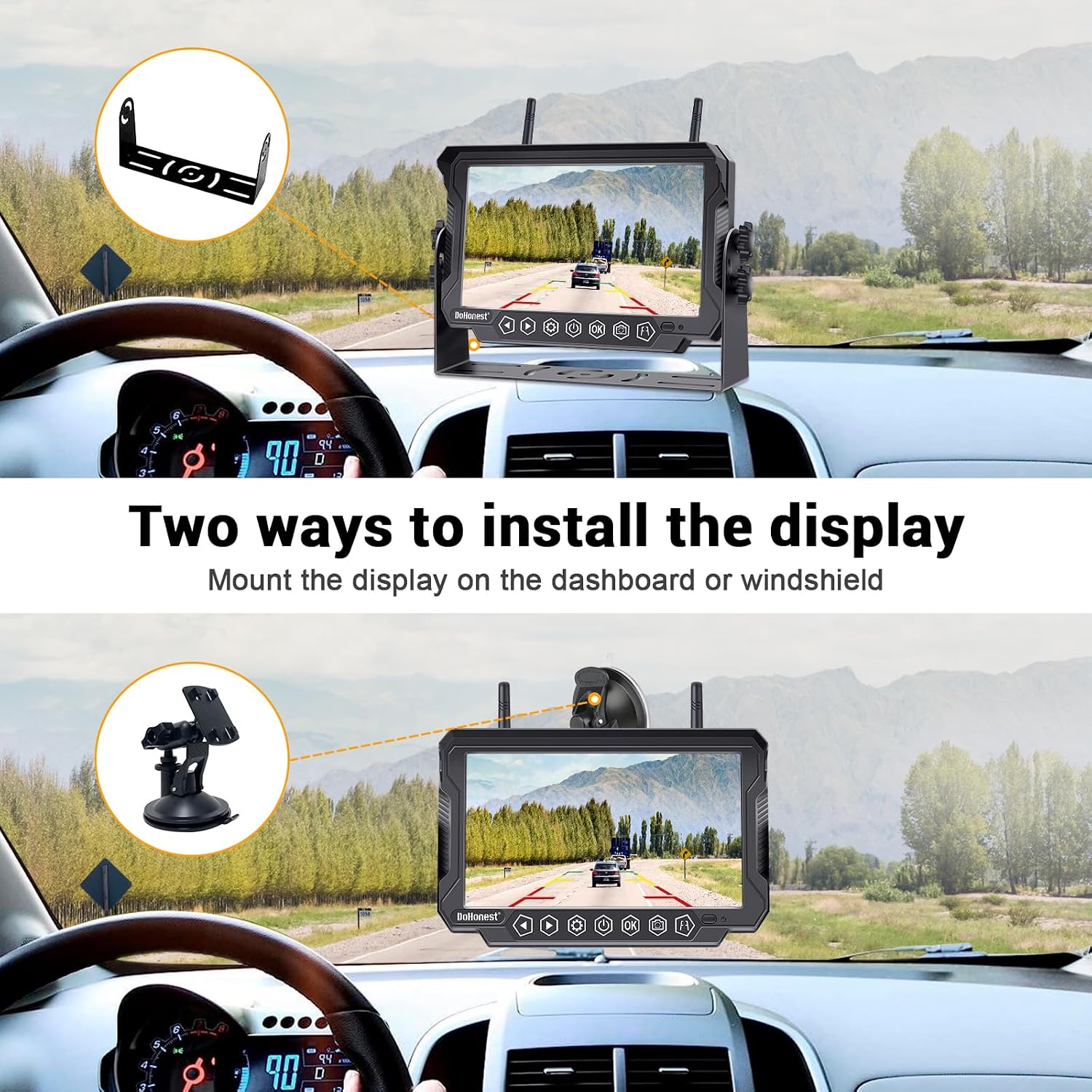
Image: Demonstrates two common installation methods for the monitor: mounted on the dashboard and attached to the windshield.
4.3 Initial Pairing (if needed)
The system is typically pre-paired from the factory. If you experience a 'No Signal' message after ensuring power connections, you may need to re-pair the camera and monitor. Refer to the 'Troubleshooting' section or the detailed user manual for specific pairing instructions.
5. Operating Instructions
5.1 Powering On/Off
Press the red button on the cigarette lighter adapter to turn the monitor on or off. The monitor will display the camera feed once a signal is received.
5.2 Adjusting Display Settings
Use the touch buttons on the monitor to adjust settings such as brightness, contrast, and HUE for optimal viewing clarity.

Image: The 7-inch monitor featuring a capacitive touch panel for easy operation and access to advanced settings.
5.3 Guide Lines
The system offers optional guide lines to assist with parking and reversing. These lines can be adjusted for width and height to match your vehicle's dimensions and preferences.

Image: A visual representation of the optional guide lines, showing how they can be adjusted for different parking scenarios.
5.4 Multi-Camera Views (Split/Quad Screen)
If you have multiple cameras connected, the monitor supports full screen, split screen (two cameras), and quad screen (four cameras) views. This allows for comprehensive monitoring of different areas around your vehicle.

Image: The monitor showcasing its capability to display full screen, split screen, and quad screen views when multiple cameras are connected.
5.5 Loop Recording
The built-in DVR continuously records footage. When the memory card is full, the system automatically overwrites the oldest unblocked video segments. Ensure a compatible SD card (up to 128GB) is inserted for recording functionality.

Image: Details the loop recording feature, indicating continuous recording and automatic overwriting of old footage when the memory card is full.
5.6 Image Flip
The image flip function allows you to adjust the orientation of the camera feed to suit various mounting positions. Options include normal, mirror, inverted front image, and inverted mirror image.

Image: Displays the various image flip options available on the monitor, including normal, mirror, inverted front, and inverted mirror views.
5.7 Official Product Videos
For visual guidance on operation and features, please refer to the official product videos:
Video: Overview of the RV Backup Camera Wireless HD 1080P 7 Inch DVR Monitor Kit, demonstrating its features and benefits for RV users.
Video: Detailed demonstration of the DoHonest Wireless RV Backup Camera's 7 Inch Touch Key Monitor, highlighting its touch interface and various display modes.
6. Maintenance
Proper maintenance ensures the longevity and optimal performance of your DoHonest backup camera system.
- Cleaning: Regularly wipe the camera lens and monitor screen with a soft, damp cloth. Avoid using harsh chemicals or abrasive materials that could damage the surfaces. The camera's IP69K rating allows for easy cleaning with water.
- Connections: Periodically check all cable connections to ensure they are secure and free from corrosion or damage.
- Storage: If storing the system for an extended period, disconnect it from power and store it in a cool, dry place away from direct sunlight and extreme temperatures.
7. Troubleshooting
If you encounter issues with your system, refer to the following common troubleshooting steps:
- 'No Signal' on Monitor:
- Ensure the camera is receiving power. If connected to running lights, confirm your vehicle's lights are on.
- Check all power connections for both the camera and monitor.
- Verify the camera's antenna is securely attached and positioned correctly.
- If the issue persists, try re-pairing the camera and monitor. Consult the full user manual for detailed pairing instructions.
- Video Lag or Intermittent Signal:
- Ensure the camera and monitor antennas are fully extended and unobstructed.
- Minimize interference from other wireless devices.
- Check the distance between the camera and monitor; while rated for 320ft, extreme distances or heavy obstructions can affect signal quality.
- Poor Picture Quality:
- Clean the camera lens and monitor screen.
- Adjust the brightness, contrast, and HUE settings on the monitor.
- Ensure the camera is not exposed to direct, harsh light sources that could cause glare.
For further assistance, please contact DoHonest customer support.
8. Specifications
| Feature | Specification |
|---|---|
| Product Dimensions | 3.94 x 3.15 x 1.97 inches |
| Item Weight | 2.72 pounds |
| Model Number | DW4310 |
| Screen Size | 7 Inches |
| Display Technology | LCD |
| Video Capture Resolution | 1080p |
| Voltage | 24 Volts |
| Optical Sensor Technology | CMOS |
| Lux Rating | 1.5 Lux |
| Waterproof Rating | IP69K |
9. Warranty and Support
The DoHonest FHD 1080P Digital Wireless Backup Camera and 7'' DVR Monitor is backed by a 2-year warranty, as indicated by customer reviews. This warranty covers defects in materials and workmanship under normal use.
For warranty claims, technical support, or any questions regarding your product, please contact DoHonest customer service directly. You can typically find contact information on the manufacturer's website or through your purchase platform.
Ask a question about this manual
Ask about setup, troubleshooting, compatibility, parts, safety, or missing instructions. Manuals+ will review the question and use this page’s manual context to help answer it.