
MICMOL AA-900
Smart LED Aquarium Light User Manual
Model: AA-900 | Brand: MICMOL
1. Introduction
Thank you for choosing the MICMOL Aqua Air AA-900 Smart LED Aquarium Light. This advanced lighting system is designed to provide optimal illumination for saltwater marine coral reef fish tanks, featuring a programmable timer, full spectrum output, and smart control capabilities. This manual provides detailed instructions for installation, operation, maintenance, and troubleshooting to ensure the best performance and longevity of your device.
Key Features:
- Ultra-thin 11mm (0.4") design for a sleek aesthetic.
- Super bright LEDs with true HD full spectrum across 7 bands.
- Smart Controller with timer functions, including sunrise, sunset, and lightning simulation.
- 3 independent channels with 6 programmable timer points for intensity adjustment.
- Adjustable super brackets suitable for rimmed and rimless tanks from 35" to 54" (885mm to 1385mm).
- UL, Rosh, CE, SAA certified power adapter for safety and efficiency.
2. Safety Information
Please read all safety instructions carefully before operating the device. Failure to follow these instructions may result in electric shock, fire, or serious injury.
- Always unplug the light from the power outlet before performing any maintenance, cleaning, or installation.
- Do not operate the light if the power cord or plug is damaged.
- Ensure the light is securely mounted to prevent it from falling into the aquarium.
- This product is designed for indoor use only. Do not expose to rain or water spray.
- Keep out of reach of children.
- Do not attempt to disassemble or modify the light unit or controller. Refer all servicing to qualified personnel.
- Ensure your hands are dry when handling the power plug or controller.
3. Package Contents
Carefully unpack the box and ensure all items listed below are present and in good condition. If any items are missing or damaged, please contact customer support.
- MICMOL Aqua Air AA-900 LED Light Unit
- Smart Controller
- Adjustable Mounting Brackets (2 pcs)
- Power Adapter (UL, Rosh, CE, SAA certified)
- User Manual

All components of the MICMOL Aqua Air AA-900 package laid out, including the LED light unit, smart controller, power adapter, mounting brackets, and instruction manual.
4. Setup and Installation
4.1 Mounting the Light
The Aqua Air AA-900 comes with adjustable brackets designed for easy installation on both rimmed and rimless aquariums. The brackets can accommodate tank sizes from 35 inches (885mm) to 54 inches (1385mm).
- Attach the adjustable mounting brackets to the ends of the LED light unit using the provided screws. Ensure they are securely fastened.
- Place the light unit with attached brackets onto the edges of your aquarium. Adjust the brackets to fit the width of your tank, ensuring the light is centered and stable.
- Tighten any adjustment screws on the brackets to firmly secure the light in place.

Diagram showing the dimensions of the Aqua Air AA-900 light unit and its adjustable brackets, indicating a length of 33.8 inches and an adjustable range of 35 to 46 inches for tank size.

The Aqua Air AA-900 LED light mounted on a 48-inch aquarium, demonstrating its fit and appearance.
4.2 Connecting the System
- Connect the output cable from the LED light unit to the input port on the Smart Controller.
- Connect the power adapter to the Smart Controller's power input port.
- Plug the power adapter into a suitable electrical outlet. Ensure the outlet is protected by a Ground Fault Circuit Interrupter (GFCI) for aquarium safety.
5. Operating Instructions
5.1 Smart Controller Overview
The Smart Controller allows you to program and manage your aquarium light settings. It features a small display and touch-sensitive buttons for navigation.
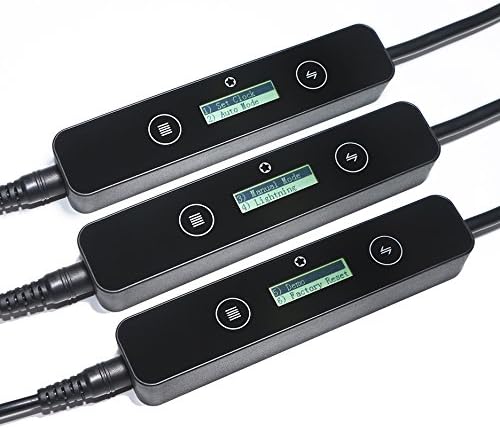
Close-up view of three MICMOL smart controllers, displaying their screens with options like 'Set Clock', 'Auto Mode', 'Manual Mode', and 'Lightning'.
Common menu options include:
- Set Clock: Adjust the current time on the controller.
- Auto Mode: Program automated light cycles (sunrise, sunset, etc.).
- Manual Mode: Manually adjust light intensity and channels.
- Lightning: Activate a lightning simulation effect.
- Demo: Run a demonstration of light effects.
- Factory Reset: Restore the controller to its default settings.
5.2 Programming Light Cycles (Auto Mode)
The AA-900 features 3 independent channels and 6 programmable timer points, allowing for precise control over your aquarium's lighting environment.
- Navigate to the "Auto Mode" setting on the Smart Controller.
- Set the desired start and end times for your light cycle.
- For each of the 6 timer points, adjust the intensity for each of the 3 channels (e.g., White, Blue, Special). This allows you to simulate sunrise, midday peak, sunset, and moonlight phases.
- Save your settings. The light will now follow your programmed schedule daily.
5.3 Full Spectrum and LED Array
The AA-900 utilizes a full spectrum LED array to provide optimal light for marine life. It includes various LED types to achieve a balanced spectrum.
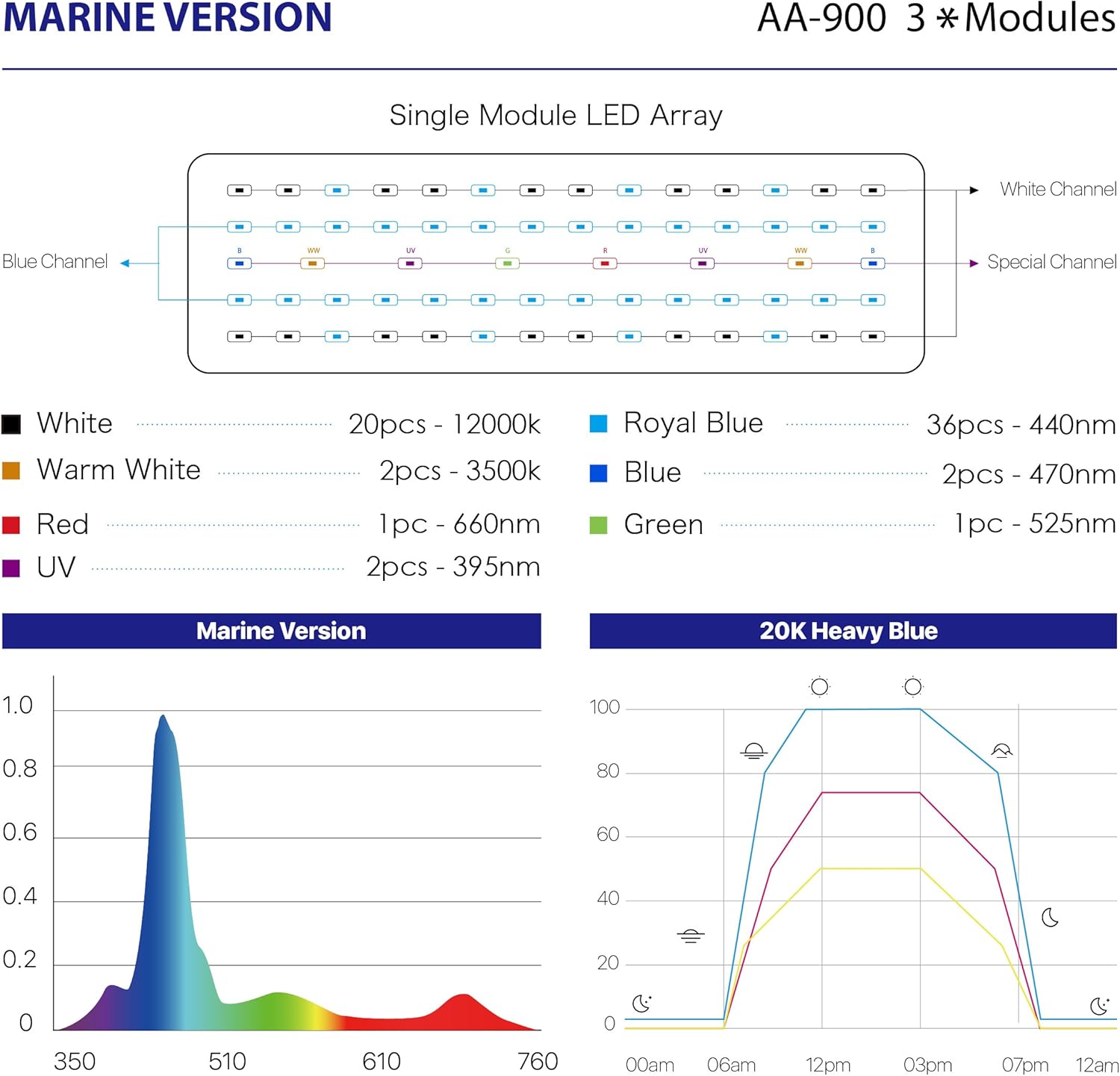
Detailed diagram of the Aqua Air AA-900 LED array showing white, warm white, red, UV, royal blue, blue, and green channels, along with a spectral distribution graph and a 20K Heavy Blue light cycle graph.
The LED array typically includes:
- White LEDs (e.g., 12000K)
- Warm White LEDs (e.g., 3500K)
- Red LEDs (e.g., 660nm)
- UV LEDs (e.g., 395nm)
- Royal Blue LEDs (e.g., 440nm)
- Blue LEDs (e.g., 470nm)
- Green LEDs (e.g., 525nm)
6. Maintenance
Regular maintenance will help ensure the longevity and optimal performance of your MICMOL Aqua Air AA-900 light.
- Cleaning: Periodically wipe the LED lens and the light housing with a soft, damp cloth to remove salt creep, dust, or water spots. Ensure the light is unplugged before cleaning. Do not use abrasive cleaners or solvents.
- Ventilation: Ensure the light unit's cooling fins are free from obstructions to allow for proper heat dissipation.
- Cable Inspection: Regularly inspect the power cord and controller cables for any signs of damage, fraying, or kinks. Replace if necessary.
7. Troubleshooting
If you encounter issues with your Aqua Air AA-900 light, refer to the table below for common problems and solutions.
| Problem | Possible Cause | Solution |
|---|---|---|
| Light does not turn on. | No power, loose connection, faulty power adapter. | Check power outlet, ensure all cables are securely connected. Test with another outlet if possible. Contact support if adapter is suspected faulty. |
| Light intensity is too low/high. | Incorrect manual setting or auto mode programming. | Adjust intensity in Manual Mode or re-program timer points in Auto Mode. |
| Light cycle is not following schedule. | Controller clock is incorrect, Auto Mode not activated, or programming error. | Verify controller clock is set correctly. Ensure Auto Mode is selected. Review and correct programmed timer points. |
| Some LEDs are not lighting up. | Individual LED failure or channel issue. | This may indicate a hardware issue. Contact customer support for assistance. |
8. Specifications
| Feature | Detail |
|---|---|
| Model | AA-900 |
| Wattage | 72 watts |
| Product Dimensions | 11.8 x 0.62 x 5.9 inches (Light Unit) |
| Item Weight | 3.96 pounds (1.8 Kilograms) |
| Shade Material | Aluminum |
| Switch Type | Touch (on controller) |
| Light Source Type | LED |
| Number of Light Sources | 209 |
| Control Method | Touch (Smart Controller) |
| Water Resistance Level | Water Resistant (Light Unit) |
| Installation Type | Hanging / Tank-mounted (Adjustable Brackets) |
| Voltage | 120 Volts (AC) |
| UPC | 614993914161 |
| Tank Size Suitability | 35" ~ 54" (885mm ~ 1385mm) |
| Manufacturer | MicMol Limited |
| First Available Date | May 4, 2017 |
9. Warranty and Support
9.1 Limited Warranty
The MICMOL Aqua Air AA-900 Smart LED Aquarium Light comes with a One-Year Limited Warranty from the date of purchase. This warranty covers defects in materials and workmanship under normal use. It does not cover damage caused by misuse, accident, unauthorized modification, or improper installation.
9.2 Customer Support
For technical assistance, warranty claims, or any questions regarding your MICMOL product, please contact MicMol Limited customer support. Please have your product model number (AA-900) and proof of purchase ready when contacting support.
Related documentsAA-900


Ask a question about this manual
Ask about setup, troubleshooting, compatibility, parts, safety, or missing instructions. Manuals+ will review the question and use this page’s manual context to help answer it.