
Introduction
The MICMOL Aqua Air AA-300 is a smart LED aquarium light designed for freshwater planted tanks. It features a slim unibody design, a programmable smart controller, and a full spectrum LED array to support plant growth and enhance the visual appeal of your aquarium. This manual provides instructions for installation, operation, and maintenance of your Aqua Air AA-300 light.
What's in the Box
Verify that all components are present before proceeding with installation:
- 1 x G2 Aqua Air 300 Lighting Fixture (AA-300 / 24W)
- 1 x Smart Controller
- 1 x Super Bracket
- 1 x US Standard Power Cord
- 1 x Power Adapter
- 1 x Tool Set
- 1 x Printed Instructions
Product Features
- All-aluminum modeled body design
- High-quality 0.5 watt SMD LEDs
- 11mm super thin unibody
- Adjustable super bracket installing system (suitable for tank sizes 325mm to 565mm / 12.5" to 22")
- Water-resistant cooling system
- UL approval power supply
- Smart Controller with timer, sunrise, sunset, and lightning effects
- 3 independently adjustable LED channels
Setup
1. Bracket Installation
Attach the adjustable super bracket to the lighting fixture. The bracket is designed to fit both rimmed and rimless aquariums. Adjust the bracket arms to securely rest on the edges of your aquarium. The bracket supports tank lengths from 12.5 inches (325mm) to 22 inches (565mm).

Image: Dimensions of the Aqua Air AA-300 light and adjustable bracket.
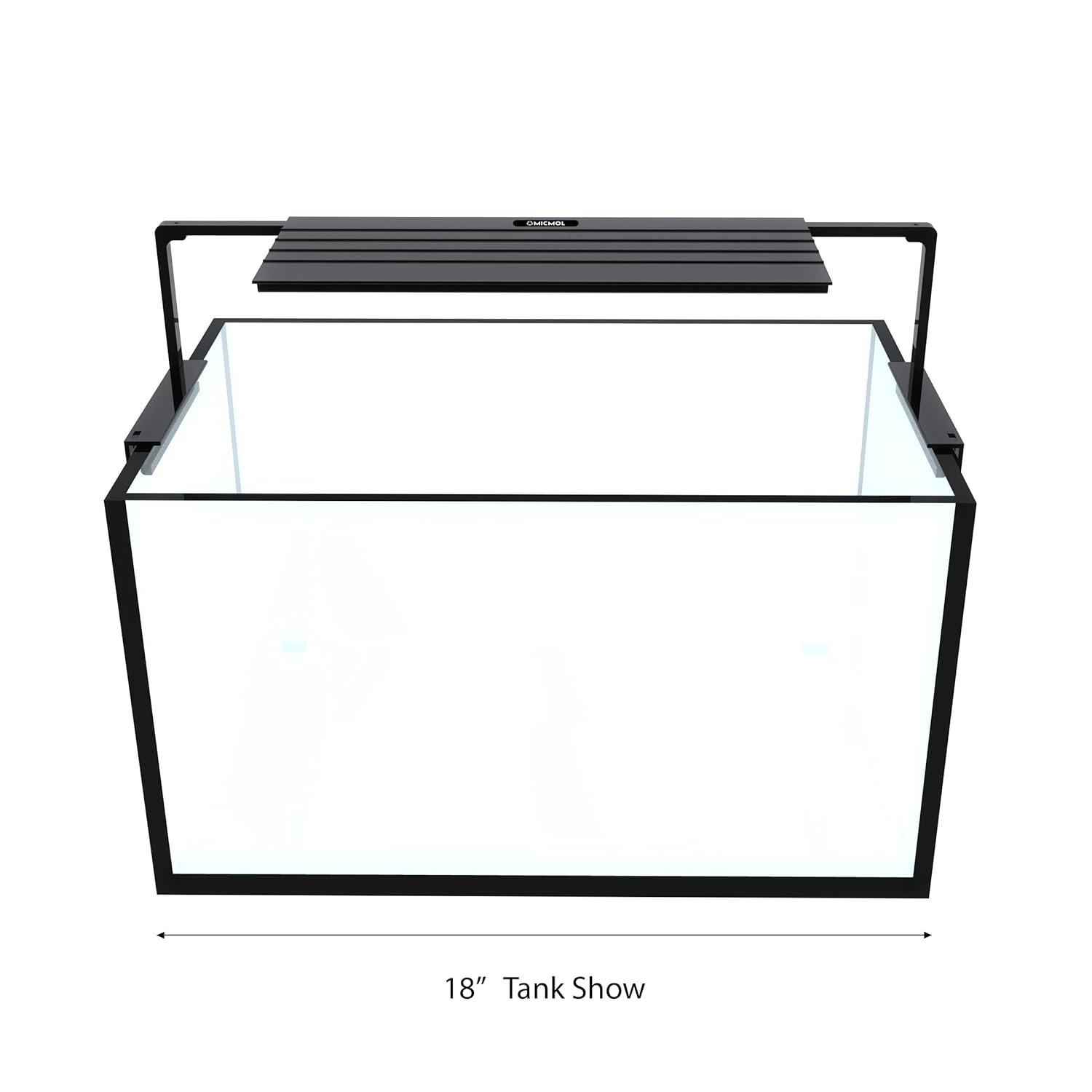
Image: Aqua Air AA-300 light installed on an 18-inch aquarium.
2. Connecting the Smart Controller and Power
- Connect the lighting fixture cable to the Smart Controller.
- Connect the power adapter to the Smart Controller.
- Plug the US Standard Power Cord into the power adapter, then into a suitable electrical outlet.

Image: Aqua Air AA-300 light fixture with smart controller and power adapter connected.
Operating Instructions
Smart Controller Functions
The Smart Controller allows you to program various settings for your Aqua Air AA-300 light. It features a small display and touch switches for navigation.
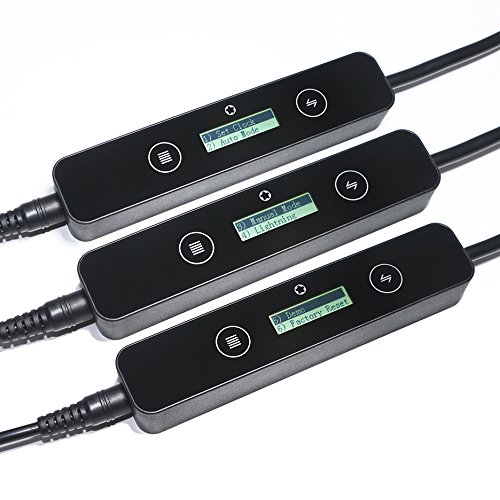
Image: Close-up of the Smart Controller interface showing various menu options.
- Clock: Set the current time for accurate timer functions.
- Timer: Program on/off times and intensity levels for each of the three LED channels at up to 6 different points throughout the day. This allows for simulating natural sunrise and sunset cycles.
- LED Channels: The light features 3 independent LED channels:
- Channel 1 (CN 1): Primarily White LEDs (28pcs White - 6500K).
- Channel 2 (CN 2): White and Royal Blue LEDs (20pcs White - 6500K, 8pcs Royal Blue - 440nm).
- Channel 3 (CN 3): Special LEDs (2pcs Blue - 470nm, 2pcs Warm White - 3500K, 2pcs UV - 395nm, 1pc Red - 660nm, 1pc Green - 525nm).
- Special Effects: Includes pre-programmed effects such as sunrise, sunset, and thunderstorms.
- Demo: Use the 'demo' function to quickly preview all programmed settings and effects in a 1-minute cycle.
- Factory Reset: This option resets all settings on the Smart Controller to their default factory values. Use this if you encounter programming issues or wish to start fresh.

Image: LED array configuration and spectral output for the Planted Version.
Maintenance
- Cleaning: Regularly wipe the light fixture and controller with a soft, dry cloth to remove dust and water spots. Ensure the unit is unplugged before cleaning. Do not use abrasive cleaners or solvents.
- Connections: Periodically check all cable connections to ensure they are secure and free from corrosion or damage.
- Ventilation: Ensure the light fixture has adequate airflow around it to facilitate cooling. Do not obstruct the cooling system.
Troubleshooting
- Light does not turn on: Check all power connections. Ensure the power adapter is securely plugged into both the controller and the wall outlet. Verify the outlet is functional.
- Controller display is blank or unresponsive: Unplug the power adapter for 30 seconds, then plug it back in. If the issue persists, perform a 'Factory Reset' if accessible, or contact support.
- Timer settings are incorrect or reset: Ensure the clock is set correctly. If the clock frequently resets to midnight, there may be a software malfunction with the controller. Try a 'Factory Reset'. If the problem continues, contact customer support.
- LEDs are not all illuminating: Check the LED channel settings on the Smart Controller to ensure all channels are set to an appropriate intensity. If individual LEDs are out, contact support for warranty service.
Specifications
| Specification | Detail |
|---|---|
| Model Number | AA-300 (G2-AA-300-P) |
| Power | 24W |
| Dimensions (Light Fixture) | 280 x 126 x 11 mm (11 x 5 x 0.4 inches) |
| Weight | 0.6 kg (1.3 lbs) |
| Material | Aluminum |
| Switch Type | Touch |
| Adjustable Bracket Range | 325mm ~ 565mm (12.5" ~ 22") |
| LED Configuration (Planted) | Channel 1: 28x White (6500K) Channel 2: 20x White (6500K), 8x Royal Blue (440nm) Channel 3: 2x Blue (470nm), 2x Warm White (3500K), 2x UV (395nm), 1x Red (660nm), 1x Green (525nm) |
Warranty
The MICMOL Aqua Air AA-300 Smart LED Aquarium Light comes with a One-Year Limited Warranty from the date of purchase. This warranty covers defects in materials and workmanship under normal use. It does not cover damage caused by misuse, accident, unauthorized modification, or improper installation. Please retain your proof of purchase for warranty claims.
Support
For technical assistance, troubleshooting beyond this manual, or warranty inquiries, please contact MICMOL customer support. Refer to the contact information provided with your product packaging or visit the official MICMOL website for support details.


