
1byone 471NA-0007
Contents
1byone Nostalgic Wooden Turntable Wireless Vinyl Record Player
Model: 471NA-0007
Product Overview
The 1byone Nostalgic Wooden Turntable is a versatile audio system designed to bring vintage aesthetics and modern functionality to your home. It combines a classic record player with AM/FM radio, CD player, cassette player, USB MP3 recording, AUX input, and wireless connectivity, offering a comprehensive solution for enjoying various audio formats.

Image: Front view of the 1byone Nostalgic Wooden Turntable with its lid open, showcasing the turntable, control panel, and wooden finish.
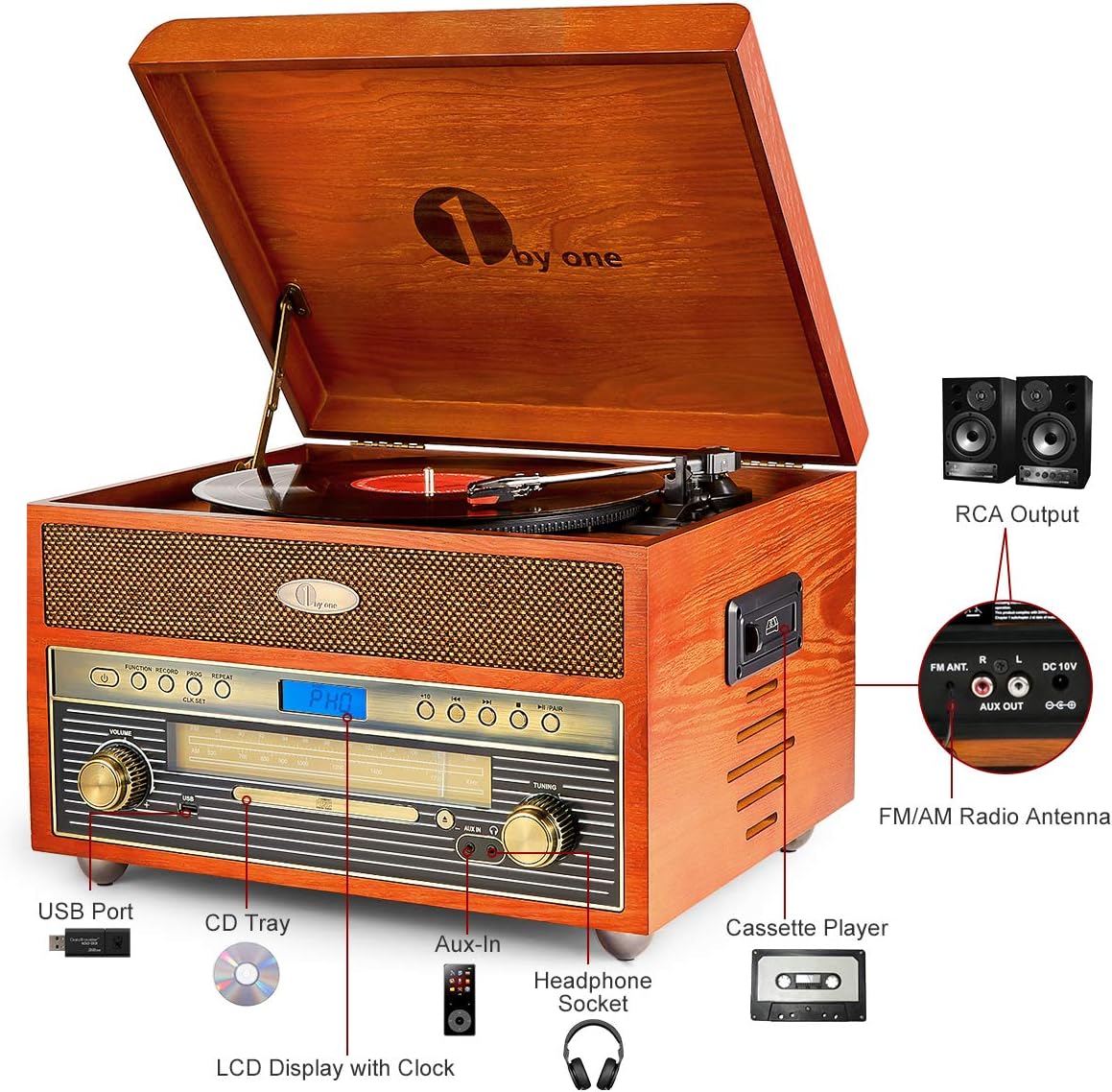
Image: Diagram of the 1byone Turntable with various components labeled, including USB Port, CD Tray, Aux-In, Headphone Socket, Cassette Player, RCA Output, and FM/AM Radio Antenna connection.
Safety Information
Please read all safety instructions carefully before using this appliance.
- This appliance can be used by children aged from 8 years and above and persons with reduced physical, sensory or mental capabilities or lack of experience and knowledge if they have been given supervision or instruction concerning use of the appliance in a safe way and understand the hazards involved.
- Children shall not play with the appliance.
- Cleaning and user maintenance shall not be made by children without supervision.
- This appliance must be used only for the purpose for which it has been developed, and in the manner described in the instructions for use. Any improper use can be dangerous.
Setup Guide
1. Unpacking and Placement
Carefully remove the unit from its packaging. Place the turntable on a stable, flat surface away from direct sunlight, heat sources, and excessive dust or moisture. Ensure adequate ventilation around the unit.
2. Power Connection
Connect the supplied power adapter to the DC 15V input jack on the rear of the unit. Plug the adapter into a standard wall outlet.
3. FM/AM Radio Antenna Connection
For optimal radio reception, connect the included FM/AM antenna to the corresponding jacks on the rear panel. Extend the FM wire antenna fully for better FM reception. For AM, position the loop antenna for best signal.
4. External Speaker Connection (Optional)
If you wish to connect external speakers, use RCA cables (not included) to connect the RCA Output jacks on the rear of the turntable to the audio input of your external amplifier or powered speakers. Ensure correct left (L) and right (R) channel connections.

Image: Rear view of the 1byone Turntable showing the RCA Output and power input, along with a front view highlighting USB Playback, AUX-In, and Headphone Jack.
Operating Instructions
General Controls
- Power On/Off: Press the Power button to turn the unit on or off.
- Function Selection: Use the Function button to cycle through different modes: PHONO (Vinyl), CD, USB, TAPE (Cassette), FM, AM, AUX, and BT (Bluetooth). The selected mode will be displayed on the LCD screen.
- Volume Control: Rotate the Volume knob to adjust the audio output level.
- Tuning: Use the Tuning knob to manually tune AM/FM radio stations.
1. Turntable Operation (PHONO Mode)
- Lift the dust cover.
- Place a vinyl record on the turntable platter.
- Select the appropriate speed (33, 45, or 78 RPM) using the speed selector switch located on the turntable deck. For 45 RPM records, place the included 45 RPM adapter on the center spindle.
- Release the tone arm from its rest.
- Lift the tone arm using the cueing lever.
- Carefully position the stylus over the desired starting groove of the record.
- Lower the tone arm slowly using the cueing lever. The record will begin to play.
- At the end of the record, the turntable will automatically stop spinning if the Auto-Stop function is enabled. Lift the tone arm, return it to its rest, and secure it.

Image: Illustration showing different vinyl record sizes (7, 10, and 12 inches) and their corresponding diameters in centimeters, indicating the turntable's compatibility with various record types.
2. CD Player Operation (CD Mode)
- Press the Function button to select CD mode.
- Insert a CD into the CD tray located on the front panel.
- The unit will automatically read the CD and begin playback.
- Use the Play/Pause, Skip Forward, and Skip Backward buttons for control.
3. Cassette Player Operation (TAPE Mode)
- Press the Function button to select TAPE mode.
- Insert a cassette tape into the cassette slot on the side of the unit.
- The tape will begin playing automatically.
- Note: This unit typically plays tapes on one side only and may not have fast forward/rewind controls.
4. AM/FM Radio Operation (AM/FM Mode)
- Press the Function button to select FM or AM mode.
- Rotate the Tuning knob to find your desired radio station. The frequency will be displayed on the analog dial.
5. Wireless Connection (BT Mode)
- Press the Function button to select BT (Bluetooth) mode. The LCD display will show "BT" and flash, indicating it's in pairing mode.
- On your wireless device (smartphone, tablet, etc.), enable Bluetooth and search for "1byone BS012" or similar.
- Select the unit from the list to pair. Once connected, the "BT" indicator will stop flashing.
- You can now play audio from your wireless device through the turntable's speakers.
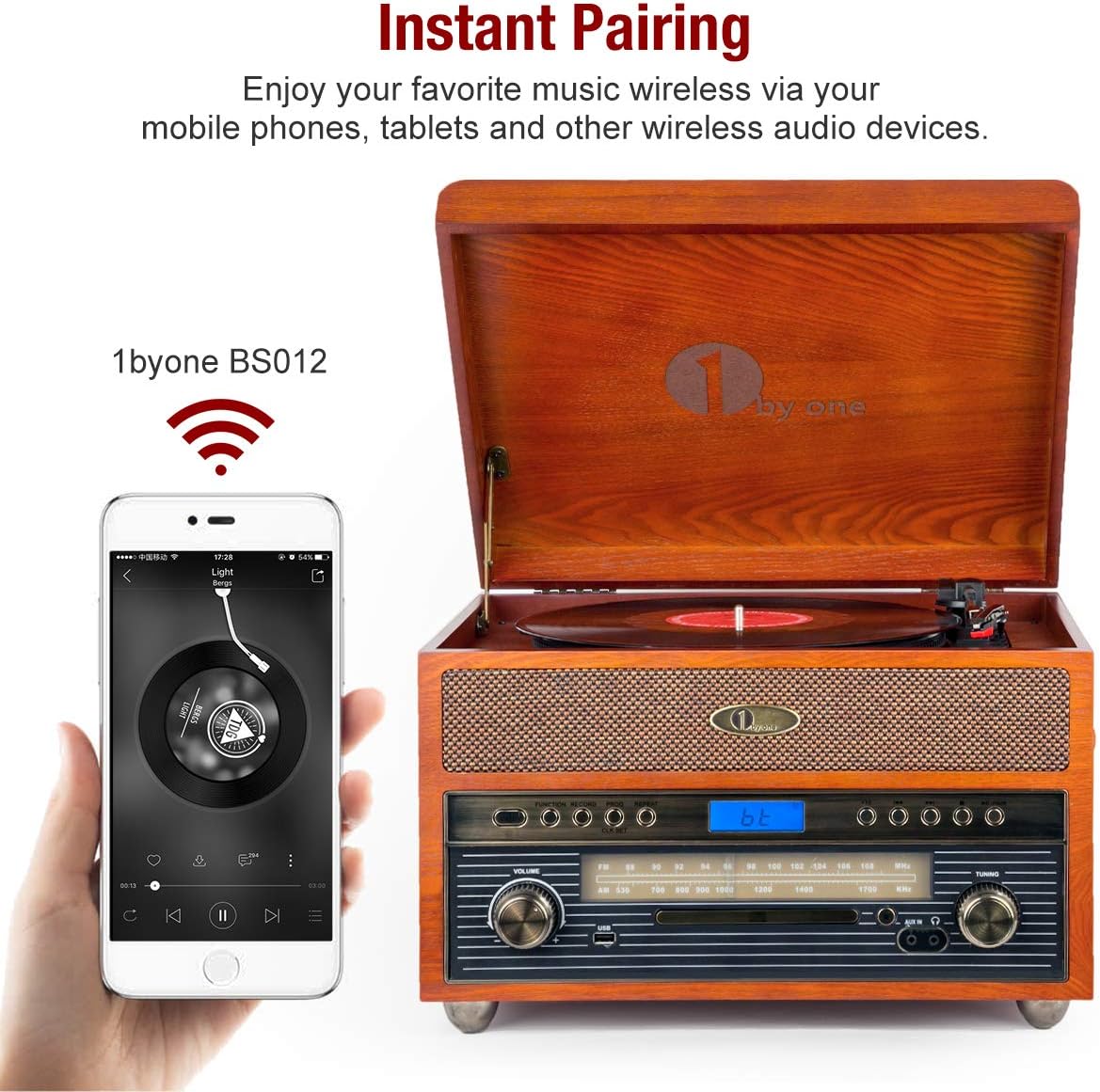
Image: A smartphone displaying a music player interface next to the 1byone Turntable, with a wireless signal icon indicating successful Bluetooth pairing.
6. USB Playback (USB Mode)
- Insert a USB flash drive containing MP3 files into the USB port on the front panel.
- Press the Function button to select USB mode.
- The unit will automatically detect and play the MP3 files.
- Use the Play/Pause, Skip Forward, and Skip Backward buttons for navigation.
7. MP3 Recording to USB
This unit allows you to record audio from Vinyl, CD, Cassette, or AUX input directly to a USB flash drive in MP3 format.
- Insert a USB flash drive into the USB port.
- Select the desired source mode (PHONO, CD, TAPE, or AUX).
- Start playback of the source audio (e.g., start playing a vinyl record).
- Press the "RECORD" button (usually indicated by a red dot or "REC"). The unit will begin recording the audio to the USB drive.
- Press the "RECORD" button again to stop recording. The recorded file will be saved on the USB drive.

Image: Diagram illustrating the process of recording audio from Vinyl, CD, Cassette, or Aux In sources and transforming it into MP3 format files saved onto a USB flash drive.
8. AUX Input (AUX Mode)
- Connect an external audio device (e.g., smartphone, MP3 player) to the AUX-In jack on the front panel using a 3.5mm audio cable (not included).
- Press the Function button to select AUX mode.
- Play audio from your connected device. The sound will be output through the turntable's speakers.
9. Headphone Use
Connect headphones (not included) to the Headphone Jack on the front panel for private listening. The internal speakers will be muted when headphones are connected.
Maintenance
- Cleaning the Unit: Wipe the exterior of the unit with a soft, dry cloth. Do not use abrasive cleaners, waxes, or solvents.
- Dust Cover: Keep the dust cover closed when not in use to protect the turntable and stylus from dust.
- Stylus Care: Handle the stylus carefully. Clean the stylus periodically with a soft brush, brushing from back to front.
- Record Care: Keep records clean and free of dust. Store them vertically in their sleeves to prevent warping.
- CD/Cassette Care: Handle CDs by their edges. Keep cassettes in their cases when not in use.
Troubleshooting
| Problem | Possible Cause | Solution |
|---|---|---|
| No power | Power cord not connected; Power outlet not active | Ensure power cord is securely plugged in; Try a different outlet |
| No sound | Volume too low; Incorrect function mode; Headphones connected; External speakers not connected/powered | Increase volume; Select correct function mode; Disconnect headphones; Check external speaker connections and power |
| Turntable not spinning or playing | Speed setting incorrect; Tone arm not lowered; Auto-stop engaged prematurely | Check RPM speed; Lower tone arm with cueing lever; Adjust auto-stop switch if available (refer to specific model features) |
| Poor radio reception | Antenna not properly extended/positioned; Weak signal | Adjust antenna position; Try moving the unit to a different location |
| Bluetooth not connecting | Unit not in pairing mode; Device too far; Bluetooth disabled on device | Ensure unit is in BT pairing mode; Move device closer; Enable Bluetooth on your device |
Specifications
- Model Number: 471NA-0007
- Product Dimensions: 16.73 x 13.58 x 11.81 inches
- Item Weight: 18.48 pounds (8.4 Kilograms)
- Material: Wood
- Color: Yellow (referring to the wood tone)
- Connectivity Technology: Wired, Wireless (Bluetooth)
- Maximum Rotational Speed: 78 RPM (supports 33, 45, 78 RPM)
- Power Output (Phono): 2W*2 RMS
- Power Output (USB/CD/Cassette): 5W*2 RMS
- On-mode power consumption: 10 watts
- Compatible Devices: Speaker, Headphone, Personal Computer, Smartphone, Tablets, MP3 Player
Warranty and Support
For warranty information, technical support, or service inquiries, please refer to the official 1byone website or contact their customer service department. A detailed User Manual in PDF format is also available for download:
You can also visit the 1byone Store on Amazon for more product information and support resources: 1byone Store
Documents and downloads
Ask a question about this manual
Ask about setup, troubleshooting, compatibility, parts, safety, or missing instructions. Manuals+ will review the question and use this page’s manual context to help answer it.