Introduction
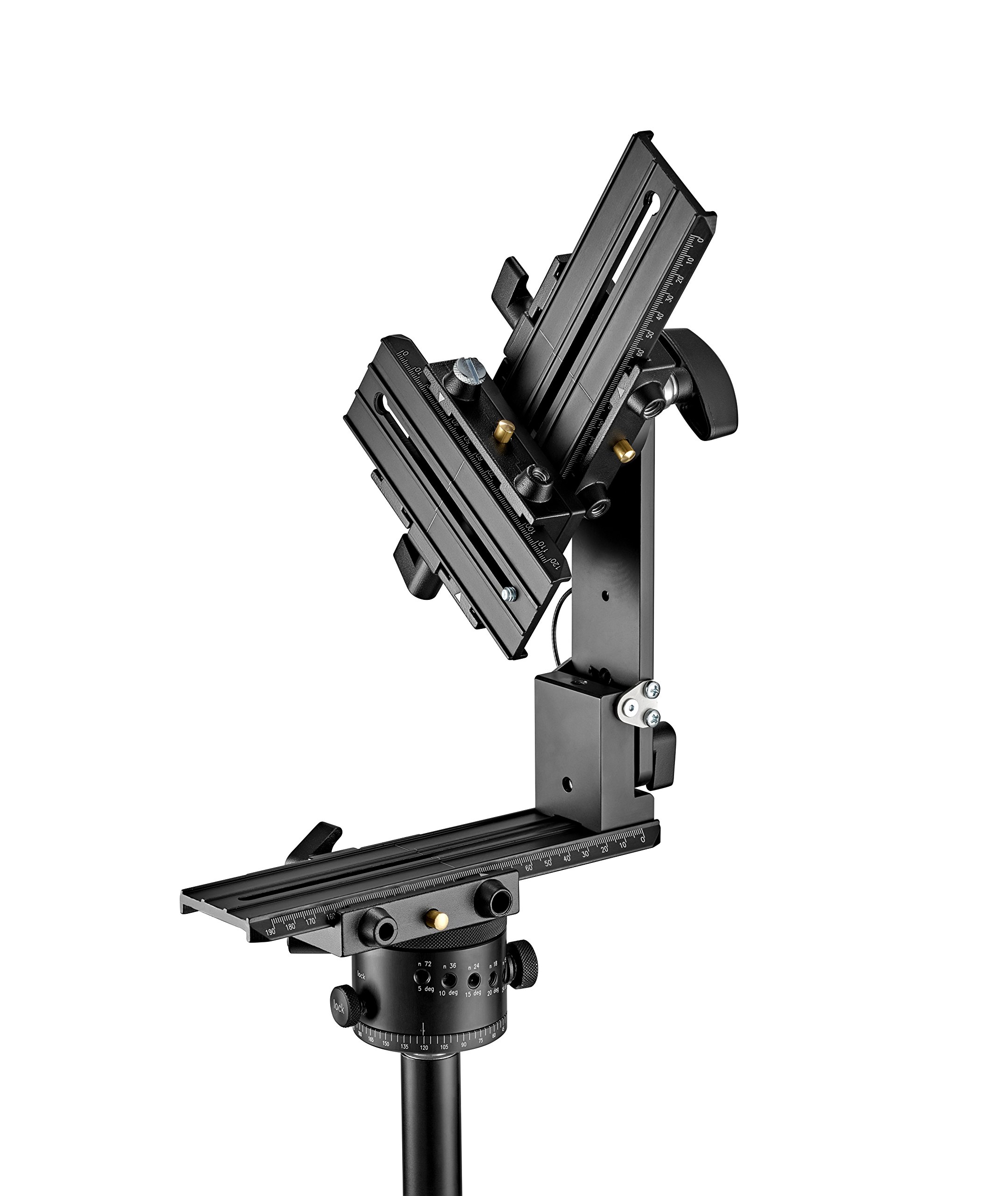
The Manfrotto MHPANOVR VR Panoramic Head is an essential tool designed for capturing high-quality 360-degree photos and videos. Engineered to support professional DSLR cameras with a payload capacity of up to 4 kg, this panoramic head facilitates precise camera positioning for seamless virtual reality content creation.
Its design incorporates sliding plates for accurate camera placement along the panoramic rotation axis and a separate sliding plate for front/rear tilt axis rotation. This allows the camera to rotate around its horizontal and vertical axes, ensuring the nodal point of the camera/lens system is maintained. This precision minimizes the need for extensive post-production and software correction, enabling the creation of accurate VR environments.
The head features clear markings on all plates and rotation index guides, simplifying the process of identifying and replicating nodal point positions. For transport, the vertical bracket can be unlocked and rotated 90 degrees, reducing the head's footprint and protecting its sliding mechanisms. The product includes an additional set of sliding plates.
Package Contents
- Manfrotto MHPANOVR VR Panoramic Head
- Additional set of sliding plates
Setup
- Mounting the Panoramic Head: Securely attach the Manfrotto MHPANOVR VR Panoramic Head to a stable tripod using its standard mounting thread. Ensure it is firmly tightened to prevent any movement during operation.
- Attaching the Camera: Mount your DSLR camera onto the camera plate of the panoramic head. Use the provided screws to ensure a secure connection.
- Adjusting the Nodal Point:
The most critical step for panoramic photography is setting the nodal point (also known as the no-parallax point). This is the point in the lens where light rays converge, and rotating the camera around this point eliminates parallax errors in stitched panoramas.
- Utilize the sliding plates to adjust the camera's position horizontally along the panoramic rotation axis.
- Adjust the sliding plate that rotates around the front/rear tilt axis to position the camera vertically.
- Refer to your camera lens manufacturer's guidelines or online resources for specific nodal point identification methods for your equipment. Once identified, note the markings on the head for easy re-positioning.
- Balancing the Setup: Ensure your camera and lens combination is balanced on the panoramic head to prevent strain on the head and tripod, and to allow for smooth rotation.
Operating Instructions
- Pre-Shot Checklist:
- Confirm the panoramic head is securely mounted and the camera is attached.
- Verify the nodal point is correctly set for your camera and lens.
- Ensure all locking mechanisms are appropriately tightened or loosened for desired movement.
- Capturing Panoramic Shots:
- Rotate the camera horizontally using the panoramic rotation axis. The clear index markings assist in consistent angular steps between shots.
- For multi-row panoramas or spherical panoramas, utilize the tilt axis to capture images at different vertical angles.
- Overlap each shot sufficiently (typically 20-30%) to allow for seamless stitching in post-production software.
- Maintain consistent exposure and white balance settings across all images in a panorama sequence.
- Post-Production: The precise alignment offered by the MHPANOVR head significantly reduces the effort required in post-production software for stitching images into a complete 360-degree panorama.

Maintenance
- Cleaning: Use a soft, dry cloth to wipe down the panoramic head after each use. For stubborn dirt, a slightly damp cloth can be used, followed by immediate drying. Avoid abrasive cleaners or solvents.
- Lubrication: The moving parts are designed for smooth operation. Do not apply external lubricants unless specifically instructed by Manfrotto support.
- Storage: When not in use, store the panoramic head in a clean, dry environment, preferably in its original packaging or a protective bag. For transport, rotate the vertical bracket 90 degrees to protect the sliding plates.
- Inspection: Periodically inspect all screws, knobs, and moving parts for any signs of wear or damage. Ensure all connections remain secure.
Troubleshooting
| Problem | Possible Cause | Solution |
|---|---|---|
| Stitched panoramas show parallax errors. | Nodal point not correctly set. | Re-adjust the camera's position on the sliding plates to accurately align with the nodal point of your lens. Refer to the "Adjusting the Nodal Point" section. |
| Camera movement is not smooth. | Locking mechanisms are too tight or dirt/debris on sliding surfaces. | Loosen locking knobs slightly. Clean sliding surfaces with a soft, dry cloth. Ensure the head is not overloaded. |
| Head feels unstable. | Improper mounting to tripod or loose camera attachment. | Ensure the panoramic head is securely fastened to the tripod. Verify the camera is tightly mounted to the head's plate. Check tripod stability. |
Specifications
- Brand: Manfrotto
- Model Name: MHPANOVR
- Item Model Number: MHPANOVR
- Product Dimensions: 27 x 14 x 33 cm
- Item Weight: 2.43 kg
- Weight Limit: 4 kg
- Material: Aluminum
- Color: Black
- Compatible Devices: Camera
- Special Feature: Hands-free operation (implies stable setup)
- Tripod Head Type: Panoramic Heads
Warranty Information
Manfrotto products are covered by a standard limited warranty. For detailed information regarding warranty terms, conditions, and registration, please refer to the official Manfrotto website or the warranty card included with your product. Keep your proof of purchase for warranty claims.
Support
For technical assistance, spare parts, or further inquiries, please visit the official Manfrotto support website. You can find FAQs, user manuals, and contact information for customer service in your region.
Manfrotto Official Website: www.manfrotto.com


