
Introduction
Thank you for purchasing the DUFA VANDERROHE Chrono Watch, model DF-9021-J1. This timepiece combines classic design with modern functionality, featuring a precise quartz movement, chronograph, and day-date display. This manual provides detailed instructions for setting up, operating, and maintaining your watch to ensure its longevity and optimal performance. Please read this manual thoroughly before using your watch.
Setup
1. Initial Inspection
Upon unboxing, inspect your watch for any visible damage. Ensure all components, including the watch, box, and documentation (instruction manual and warranty card), are present.
2. Setting the Time
- Pull the crown (middle knob) out to position 2. The second hand will stop.
- Turn the crown to set the hour and minute hands to the desired time. Ensure you distinguish between AM and PM if setting the date later.
- Push the crown back into position 0 to start the watch.
3. Setting the Date and Day
- Pull the crown out to position 1.
- Turn the crown clockwise to adjust the date.
- Turn the crown counter-clockwise to adjust the day.
- Once the correct date and day are set, push the crown back into position 0.
- Note: Avoid setting the date and day between 9 PM and 3 AM, as this may interfere with the automatic date change mechanism. If adjustment is needed during this period, first set the time outside this range, adjust the date/day, then reset the time.
4. Adjusting the Strap
The watch features a leather strap with a buckle clasp. Adjust the strap by selecting the appropriate hole for a comfortable fit on your wrist. It should be snug but not too tight, allowing for proper circulation.
Operating Instructions
Chronograph Function
Your DUFA VANDERROHE Chrono watch is equipped with a chronograph (stopwatch) function. The chronograph is operated using the two pushers located on either side of the crown.
- Start: Press the top pusher (A) to start the chronograph. The chronograph second hand will begin to move.
- Stop: Press the top pusher (A) again to stop the chronograph. The elapsed time will be displayed.
- Reset: After stopping the chronograph, press the bottom pusher (B) to reset all chronograph hands to their zero positions.
- Split Time (if applicable): Some chronographs allow for split time measurement. Refer to specific movement details if this function is present. For this model, standard start/stop/reset is provided.

Image: Side view of the watch, highlighting the crown and chronograph pushers. The top pusher (A) is used to start and stop the chronograph, while the bottom pusher (B) is used to reset it.
Maintenance
1. Cleaning
- Wipe the watch case and crystal regularly with a soft, dry cloth to remove dust and fingerprints.
- For the leather strap, avoid prolonged exposure to water, direct sunlight, and harsh chemicals. Clean with a specialized leather cleaner if necessary, following product instructions.
2. Water Resistance (30 Meters / 3 ATM)
Your watch is water-resistant up to 30 meters (3 ATM), suitable for daily life activities such as hand washing or light rain. It is not suitable for swimming, showering, diving, or any water sports. Always ensure the crown is fully pushed in to maintain water resistance.
3. Battery Replacement
This watch uses a quartz movement powered by a battery. When the watch stops or the second hand starts skipping (indicating low battery), it's time for a battery replacement. We recommend having the battery replaced by a qualified watchmaker or service center to ensure proper sealing and maintain water resistance.
4. Storage
When not wearing your watch, store it in a cool, dry place away from direct sunlight, extreme temperatures, and strong magnetic fields. The original watch box is ideal for storage.
Troubleshooting
| Problem | Possible Cause | Solution |
|---|---|---|
| Watch not running | Depleted battery | Replace the battery at a qualified service center. |
| Incorrect time/date | Time/date not set correctly or crown is not fully pushed in. | Refer to the "Setting the Time" and "Setting the Date and Day" sections. Ensure the crown is fully pushed to position 0. |
| Chronograph hands not resetting to zero | Requires calibration. | Consult a professional watchmaker for adjustment. |
| Condensation inside the crystal | Loss of water resistance due to impact or improper crown sealing. | Immediately take the watch to a service center to prevent further damage. |
If you encounter issues not listed here or if the suggested solutions do not resolve the problem, please contact DUFA customer support or a certified watch repair specialist.
Specifications
| Model Number | DF-9021-J1 |
| Brand | DUFA |
| Movement | Quartz |
| Display Type | Analog |
| Case Material | Stainless Steel |
| Case Diameter | 38 mm |
| Case Thickness | 12 mm |
| Band Material | Leather (Calf Leather) |
| Band Width | 18 mm |
| Band Color | Black |
| Dial Color | Black |
| Windshield Material | Mineral Glass |
| Water Resistance | 30 meters (3 ATM) / Daily life waterproof |
| Special Features | Chronograph, Day-Date Display |
| Product Weight | 52.5 g |
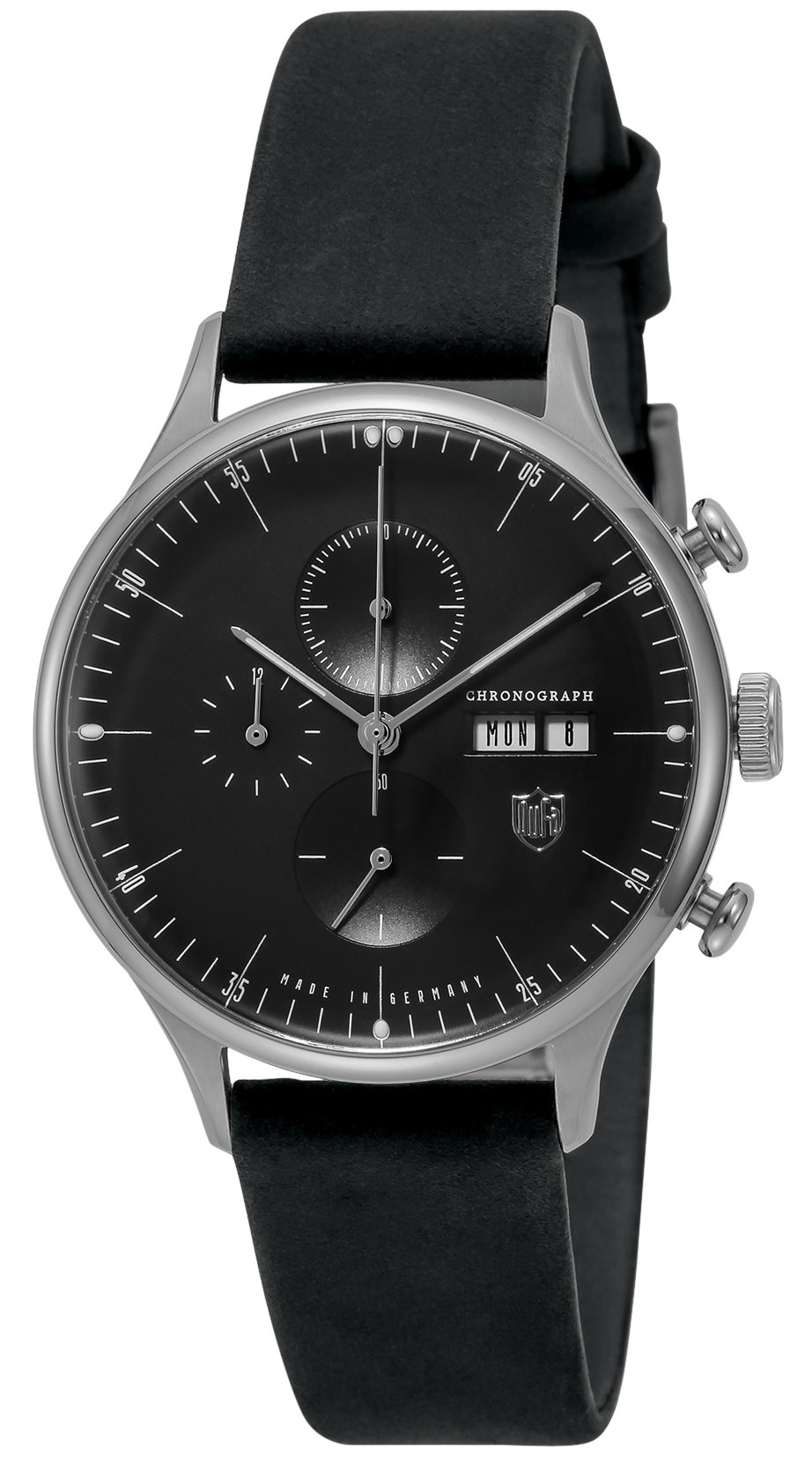
Image: Front view of the DUFA VANDERROHE Chrono Watch DF-9021-J1, showcasing its black dial, chronograph sub-dials, and day-date display.

Image: Back view of the watch, showing the stainless steel case back engraved with "DUFA", "MADE IN GERMANY", "3 ATM", and "STAINLESS STEEL".

Image: The DUFA VANDERROHE Chrono Watch DF-9021-J1 displayed on a wrist model, illustrating its size and appearance when worn.
Warranty and Support
Warranty Information
Your DUFA VANDERROHE Chrono Watch DF-9021-J1 comes with a 2-year warranty from the date of purchase. This warranty covers manufacturing defects in materials and workmanship under normal use. It does not cover damage resulting from accidents, improper use, unauthorized repairs, or normal wear and tear (e.g., battery, strap, crystal damage). Please retain your proof of purchase and the warranty card included with your watch.
Customer Support
For warranty claims, service, or any questions regarding your DUFA watch, please contact your authorized DUFA retailer or the official DUFA customer service. Contact details can typically be found on the DUFA official website or on your warranty card.