
Kaiser MSA-9908BT
Kaiser MSA-9908BT Bluetooth Amplified Speaker
Instruction Manual
Important Safety Information
Please read and understand all safety instructions before using this product. Keep these instructions for future reference.
- Do not expose the speaker to rain or moisture to prevent fire or electric shock.
- Do not block any ventilation openings. Install in accordance with the manufacturer's instructions.
- Protect the power cord from being walked on or pinched, particularly at plugs, convenience receptacles, and the point where they exit from the apparatus.
- Only use attachments/accessories specified by the manufacturer.
- Unplug this apparatus during lightning storms or when unused for long periods of time.
- Refer all servicing to qualified service personnel. Servicing is required when the apparatus has been damaged in any way.
- Do not open the speaker enclosure. There are no user-serviceable parts inside.
Package Contents
Verify that all items listed below are included in your package:
- Kaiser MSA-9908BT Amplified Speaker
- 1 x Wired Microphone
- 1 x Remote Control
- 1 x Power Adapter/Charging Cable

Image showing the Kaiser MSA-9908BT speaker along with its included wired microphone, remote control, and power cable.
Product Overview
Familiarize yourself with the main components and controls of your Kaiser MSA-9908BT speaker.
Front View

The front of the speaker features a protective metal grille with the Kaiser logo at the bottom.
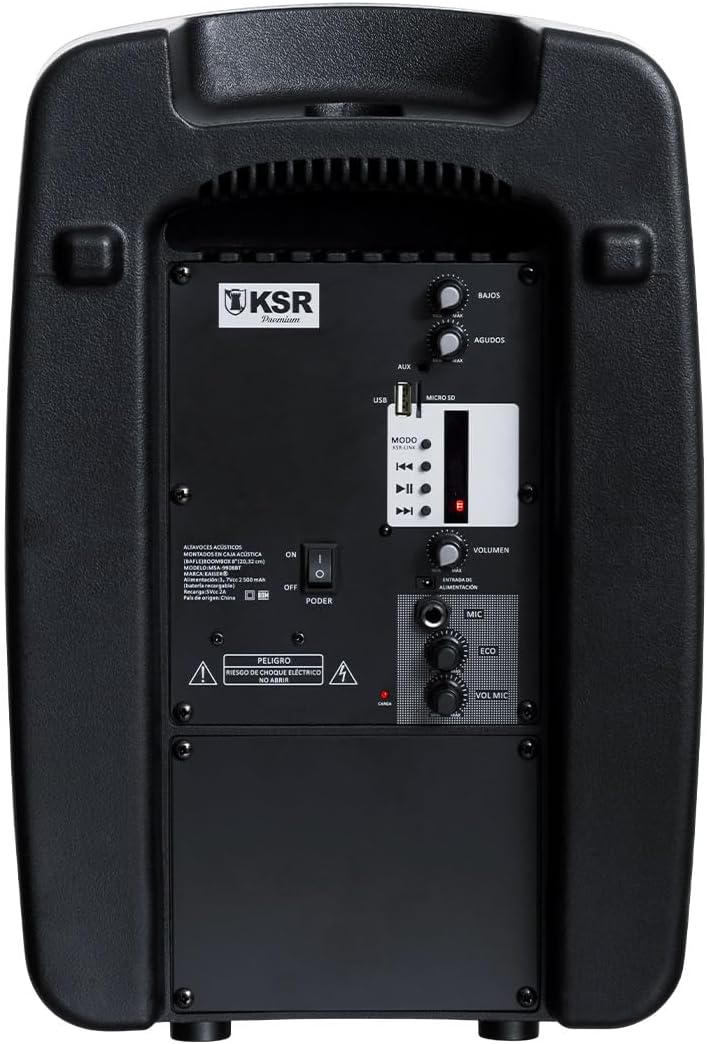
Rear Panel Controls and Ports

Detailed view of the rear control panel, including audio inputs, volume controls, and media playback options.
- BASS / AGUDOS (Treble) Knobs: Adjust bass and treble levels.
- USB Port: For USB flash drive playback.
- MICRO SD Slot: For Micro SD card playback.
- AUX Input: 3.5mm auxiliary input for external audio devices.
- MODE Button: Switches between input modes (Bluetooth, USB, Micro SD, FM).
- Playback Controls: Play/Pause, Previous Track, Next Track.
- VOLUMEN Knob: Master volume control for the speaker.
- MIC Input (6.3mm): For connecting the wired microphone.
- ECO Knob: Adjusts the echo effect for the microphone.
- VOL MIC Knob: Adjusts the microphone volume independently.
- POWER Switch: Turns the speaker On or Off.
- Charging Port: For connecting the power adapter to charge the internal battery.
Setup
Initial Charging
Before first use, it is recommended to fully charge the speaker's internal battery. This typically takes approximately 4 hours.
- Connect the provided power adapter to the charging port on the rear panel of the speaker.
- Plug the adapter into a standard electrical outlet.
- The charging indicator light (usually red) will illuminate during charging and may change color or turn off when fully charged.
- A full charge provides approximately 6 hours of playback time.

The rear panel showing the charging port and an important reminder to charge the unit for 4 hours before initial use.
Powering On/Off
- To turn on the speaker, slide the POWER switch on the rear panel to the 'ON' position.
- To turn off the speaker, slide the POWER switch to the 'OFF' position.
Operating Instructions
Bluetooth Connectivity
- Turn on the Kaiser MSA-9908BT speaker. It will automatically enter Bluetooth pairing mode, indicated by a flashing light or an audible prompt.
- On your smartphone, tablet, or other Bluetooth-enabled device, enable Bluetooth and search for available devices.
- Select "MSA-9908BT" from the list of found devices.
- Once successfully paired, the speaker will provide an audible confirmation, and the Bluetooth indicator light will become solid.
- You can now play audio from your device through the speaker.
USB / Micro SD Playback
- Insert a USB flash drive into the USB Port or a Micro SD card into the MICRO SD Slot on the rear panel. Ensure the media contains compatible audio files (e.g., MP3).
- The speaker should automatically switch to USB or Micro SD mode and begin playing audio. If not, press the MODE button to select the correct input.
- Use the Play/Pause, Previous Track, and Next Track buttons on the speaker or remote control to manage playback.
FM Radio Operation
- Press the MODE button repeatedly until you select FM radio mode.
- The speaker will automatically scan and save available FM stations.
- Use the Previous Track and Next Track buttons to navigate between saved stations.
Using the Wired Microphone
- Connect the wired microphone to the MIC Input (6.3mm) on the rear panel.
- Adjust the microphone volume using the VOL MIC knob.
- Use the ECO knob to add or reduce the echo effect for the microphone.

Detail of the 6.3mm microphone input jack and its dedicated volume and echo controls.
Remote Control Functions
The included remote control provides convenient access to various functions:

The remote control allows for convenient operation of playback, volume, and mode selection.
- PLAY/PAUSE: Start or pause playback.
- PREV/NEXT: Skip to the previous or next track/station.
- VOL-/VOL+: Decrease or increase the master volume.
- CH-/CH+: Change FM radio channels.
- EQ: Cycle through equalizer presets.
- MODE: Switch between input sources (Bluetooth, USB, Micro SD, FM, AUX).
- Numeric Buttons (0-9): For direct track selection or FM frequency input.
Maintenance
- Cleaning: Use a soft, dry cloth to clean the exterior of the speaker. Do not use abrasive cleaners, waxes, or solvents.
- Battery Care: To prolong battery life, avoid fully discharging the battery frequently. If storing the speaker for an extended period, charge it to about 50% every few months.
- Storage: Store the speaker in a cool, dry place away from direct sunlight and extreme temperatures.
Troubleshooting
| Problem | Possible Cause | Solution |
|---|---|---|
| Speaker does not turn on. | Battery is depleted; Power switch is off. | Charge the speaker for at least 4 hours. Ensure the POWER switch is in the 'ON' position. |
| No sound from speaker. | Volume is too low; Incorrect input mode; Device not connected. | Increase the VOLUMEN knob. Press MODE to select the correct input. Ensure your device is properly connected (Bluetooth paired, USB/SD inserted). |
| Bluetooth pairing fails. | Speaker not in pairing mode; Device too far; Interference. | Ensure speaker is in Bluetooth mode. Move device closer to speaker. Turn off other Bluetooth devices. Try restarting both speaker and device. |
| Microphone not working. | Microphone not connected; VOL MIC knob is low. | Ensure microphone is fully plugged into the 6.3mm MIC input. Increase the VOL MIC knob. |
| Poor FM radio reception. | Weak signal; Environmental interference. | Reposition the speaker to improve reception. Extend any external antenna if available. |
Specifications
| Feature | Detail |
|---|---|
| Model | MSA-9908BT |
| Brand | Kaiser |
| Power Output (RMS) | 30W RMS |
| Speaker Size | 8 inches |
| Connectivity | Bluetooth, USB, Micro SD, AUX (3.5mm), Wired Microphone (6.3mm) |
| Battery Life | Up to 6 hours |
| Charging Time | Approx. 4 hours |
| Dimensions (D x W x H) | 33 x 27 x 48 cm (approx. 13 x 10.6 x 18.9 inches) |
| Weight | 5.4 kg (approx. 11.9 lbs) |
| Material | Plastic |
| Included Components | Speaker, Wired Microphone, Remote Control, Power Adapter |
The speaker's dimensions are approximately 38.5 cm (height), 25.5 cm (width), and 20.5 cm (depth).
Warranty and Support
This product is covered by a limited warranty provided by Kaiser. For specific warranty terms and conditions, please refer to the documentation included with your purchase or visit the official Kaiser website.
For technical support, troubleshooting assistance, or warranty claims, please contact Kaiser customer service through their official channels. Keep your purchase receipt as proof of purchase.
- Online Support: Visit the Kaiser official website for FAQs and support resources.
- Customer Service: Refer to your product packaging or the Kaiser website for contact information.
Related documentsMSA-9908BT


Ask a question about this manual
Ask about setup, troubleshooting, compatibility, parts, safety, or missing instructions. Manuals+ will review the question and use this page’s manual context to help answer it.