Introduction
This manual provides detailed instructions for the proper setup, operation, and maintenance of your BAOFENG BF-888S Two-Way Radios. Please read this manual thoroughly before using the product to ensure safe and efficient communication.

Image: A set of six BAOFENG BF-888S two-way radios, each with its charging base and earpiece, ready for use.
1. Setup and Assembly
1.1 Unboxing and Package Contents
Carefully unpack all items and verify the contents against the list below:
- 6 x BAOFENG BF-888S Two-Way Radios
- 6 x Earpieces
- 6 x 3.7V 1500mAh Li-ion Batteries
- 6 x SMA-Female Antennas
- 6 x Belt Clips
- 6 x User Manuals
- 6 x Desktop Chargers (with US charging stand)
- 6 x Wrist Straps

Image: An organized display of all components included in the BAOFENG BF-888S package, showing the radios, batteries, chargers, antennas, earpieces, belt clips, and wrist straps.
1.2 Battery Installation
- Ensure the radio is powered off.
- Align the battery pack with the grooves on the back of the radio.
- Slide the battery pack upwards until it clicks into place.
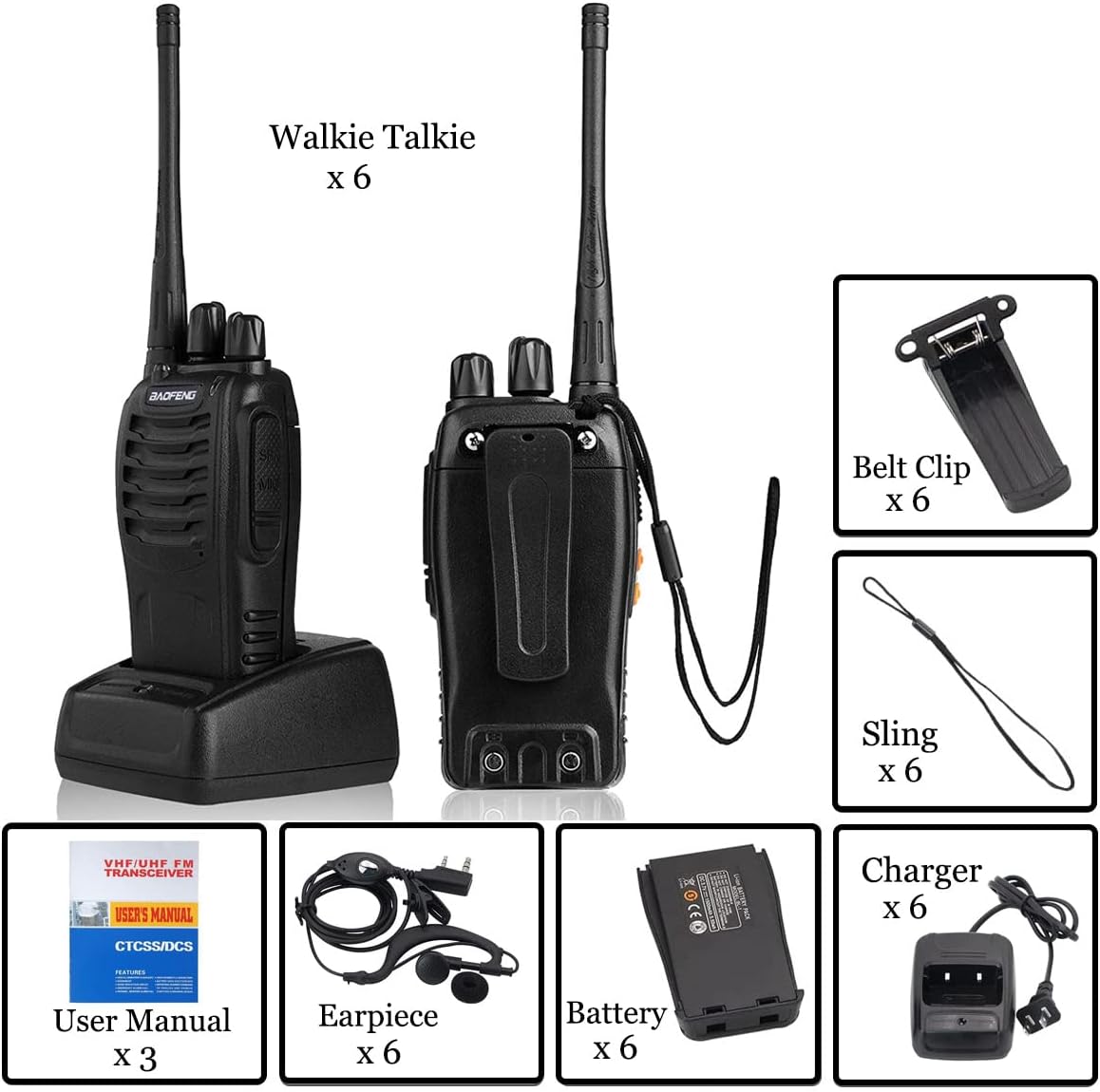
Image: A detailed view of the BAOFENG BF-888S radio with its battery removed, illustrating the battery compartment and how the battery connects.
1.3 Charging the Battery
Before first use, fully charge the battery. A full charge typically takes 4-5 hours.
- Connect the charging stand to a power outlet using the provided US charging adapter.
- Place the radio (with battery installed) into the charging stand.
- The LED indicator on the charger will show the charging status (usually red for charging, green for fully charged).

Image: A BAOFENG BF-888S radio placed in its charging cradle, alongside a separate battery and its own charging cradle, demonstrating the two charging methods.
1.4 Antenna Attachment
Screw the SMA-Female antenna clockwise onto the connector at the top of the radio until it is finger-tight. Do not overtighten.
1.5 Earpiece and Belt Clip Attachment
- Earpiece: Insert the K-type headphone plug (3.5mm and 2.5mm plugs) into the SP/MIC jacks on the side of the radio.
- Belt Clip: Attach the belt clip to the designated screws on the back of the radio for convenient carrying.

Image: A detailed view of the included earpiece, showing its K-type dual-pin connector for the radio.
2. Operating Instructions
2.1 Radio Components Overview

Image: A labeled diagram highlighting the key components of the BAOFENG BF-888S radio, such as the antenna, channel switch, power/volume control, PTT button, and speaker.
- Integrated Sensitive Antenna: For transmitting and receiving signals.
- Channel Switch: Rotary knob to select one of 16 preset channels.
- Power Switch/Volume Control: Rotary knob to turn the radio on/off and adjust volume.
- LED Indicator: Illuminates for transmit (red) or receive (green).
- PTT (Push-To-Talk) Button: Press and hold to transmit, release to receive.
- MONI (Monitor) Button: Press to temporarily disable squelch and listen for weak signals.
- Flashlight Button: Activates the built-in LED flashlight.
- SP/MIC Jacks: For connecting earpieces or external microphones.
- Clear Speaker: Outputs received audio.
- Built-in Microphone: For transmitting your voice.
2.2 Power On/Off and Volume Adjustment
Rotate the Power Switch/Volume Control knob clockwise to turn the radio on. Continue rotating clockwise to increase the volume. Rotate counter-clockwise to decrease volume and turn off the radio.
2.3 Channel Selection
Rotate the Channel Switch knob to select one of the 16 available channels. A voice prompt will announce the selected channel number.
2.4 Transmitting and Receiving
- To transmit, press and hold the PTT button. Speak clearly into the microphone. The LED indicator will glow red.
- Release the PTT button to stop transmitting and return to receive mode. The LED indicator will glow green when receiving a signal.
- Ensure all radios are on the same channel for communication.
2.5 Monitor Function
Press the MONI button to temporarily open the squelch. This allows you to listen to weak signals that might otherwise be blocked by the squelch setting. Release the button to return to normal squelch operation.
2.6 Flashlight Operation
Press the Flashlight Button to turn the integrated LED flashlight on or off. This feature is useful in low-light conditions.

Image: The BAOFENG BF-888S radio demonstrating its integrated LED flashlight function.
2.7 Low Battery Alert
When the battery level is low, the radio will automatically broadcast a low battery alert, indicating that it needs to be recharged soon.
2.8 Channel Programming (Advanced)
The BAOFENG BF-888S radios are programmable. The frequency of each channel can be customized within the UHF frequency range. Additionally, you can program any of the 50 CTCSS (Continuous Tone-Coded Squelch System) audio tones and 105 CDCSS (Continuous Digital-Coded Squelch System) audio codes on each programmed channel. Programming requires specific software and a programming cable (not included with standard package) and should only be performed by experienced users or qualified technicians. The FCC ID for this device is 2AJGM-BF888S.
3. Maintenance
3.1 Battery Care
- Always use the original BAOFENG 1500mAh Li-ion battery and charger.
- Avoid overcharging or completely draining the battery to prolong its lifespan.
- Store batteries in a cool, dry place when not in use.
- If the radio will not be used for an extended period, remove the battery.
3.2 Cleaning
Clean the radio's exterior with a soft, damp cloth. Do not use harsh chemicals or abrasive cleaners. Ensure the radio is powered off and the battery is removed before cleaning.
3.3 Storage
Store the radios in a dry, dust-free environment away from direct sunlight and extreme temperatures. Remove batteries if storing for long periods.
3.4 Water Resistance
The BAOFENG BF-888S features a water-repellent design. While it can withstand splashes and light rain, it is not fully waterproof. Avoid submerging the radio in water.

Image: A BAOFENG BF-888S radio positioned in a rugged, damp setting, highlighting its water-repellent construction.
4. Troubleshooting
| Problem | Possible Cause | Solution |
|---|---|---|
| Radio does not power on. | Battery not installed correctly or discharged. | Ensure battery is securely installed. Charge the battery fully. |
| Cannot transmit or receive. | Incorrect channel selected, out of range, or antenna not attached. | Verify both radios are on the same channel. Check antenna connection. Move closer to the other radio. |
| Poor audio quality or static. | Weak signal, interference, or volume too low/high. | Adjust volume. Move to an area with fewer obstructions. Use the MONI button to check for weak signals. |
| Battery drains quickly. | Frequent transmission, old battery, or improper charging. | Reduce transmission time. Ensure battery is fully charged. Consider replacing old batteries. |
5. Specifications
| Feature | Detail |
|---|---|
| Brand | BAOFENG |
| Model Number | BF-888S |
| FCC ID | 2AJGM-BF888S |
| Number of Channels | 16 |
| Frequency Range | UHF (Programmable) |
| Battery | 3.7V 1500mAh Lithium Ion (included) |
| Charging Time | Approximately 4-5 hours |
| Sustainable Use Time | Approximately 8-12 hours (depending on usage) |
| Talking Range Maximum | Up to 5 kilometers (in open areas) |
| Product Dimensions | 1.22 x 2.19 x 8.39 inches |
| Item Weight | Approximately 4.36 pounds (for the 6-pack) |
| Special Features | Automatic Squelch, Battery Saver Mode, Emergency Alarm, Integrated Flashlight, Noise Reduction, Water Repellent |

Image: A visual representation of the BAOFENG BF-888S radio's dimensions and various detailed views of its physical features.
6. Warranty and Support
BAOFENG products are designed for reliability and performance. For any quality issues with your walkie-talkies, please contact the seller, Winshope, directly. They offer a 100% satisfactory shopping experience, including options for free replacement or refund.
For technical support or further inquiries, refer to the contact information provided with your purchase or visit the official BAOFENG website.


