
Panasonic FY-17C8
Contents
Panasonic FY-17C8 Ceiling-Mounted Ventilation Fan User Manual
Model: FY-17C8
1. Introduction
Thank you for purchasing the Panasonic FY-17C8 Ceiling-Mounted Ventilation Fan. This product is designed to provide efficient and quiet ventilation for your indoor spaces, such as bathrooms, toilets, and washrooms. It features a louver set type for easy integration into your ceiling. This manual provides essential information for safe installation, operation, and maintenance of your ventilation fan.

Figure 1: Panasonic FY-17C8 Ceiling-Mounted Ventilation Fan, front view with louver.
2. Safety Information
Please read all safety instructions carefully before installation and use. Failure to follow these instructions may result in electric shock, fire, injury, or property damage.
- Professional Installation: Installation and electrical wiring must be performed by a qualified electrician in accordance with all applicable codes and standards.
- Power Supply: Ensure the power supply voltage matches the specifications of the unit (100V AC). Disconnect power at the circuit breaker before installation, maintenance, or repair.
- Moisture: Do not install in locations where water may directly spray onto the unit. Ensure proper sealing to prevent water ingress.
- Obstructions: Do not insert fingers or objects into the fan blades or air inlet/outlet. Keep children away from the unit.
- Cleaning: Always disconnect power before cleaning. Use a soft, damp cloth; do not use abrasive cleaners or solvents.
- Damage: If the unit is damaged, do not operate it. Contact qualified service personnel for repair.
3. Package Contents
Verify that all items are present in the package:
- Ventilation Fan Main Unit (Model: FY-17C8)
- Louver Set
- Installation Manual (this document)
4. Setup and Installation
Installation should only be performed by a qualified professional. Ensure the ceiling opening dimensions are correct before proceeding.
- Prepare the Opening: Create a ceiling opening according to the dimensions provided in the diagram. Ensure there is sufficient space above the ceiling for the fan body and ductwork.
- Mount the Fan Body: Securely mount the fan body to the ceiling structure using appropriate fasteners. Refer to the detailed dimension diagram for mounting bracket positions.
- Connect Ductwork: Connect the ventilation duct to the fan's exhaust port. Ensure a tight seal to prevent air leakage.
- Electrical Connection: With the power OFF at the circuit breaker, connect the electrical wiring to the terminal block on the fan unit. Ensure proper grounding.
- Install Louver: Attach the louver to the fan body. Ensure it clicks securely into place.
- Test Operation: Restore power and test the fan's operation.
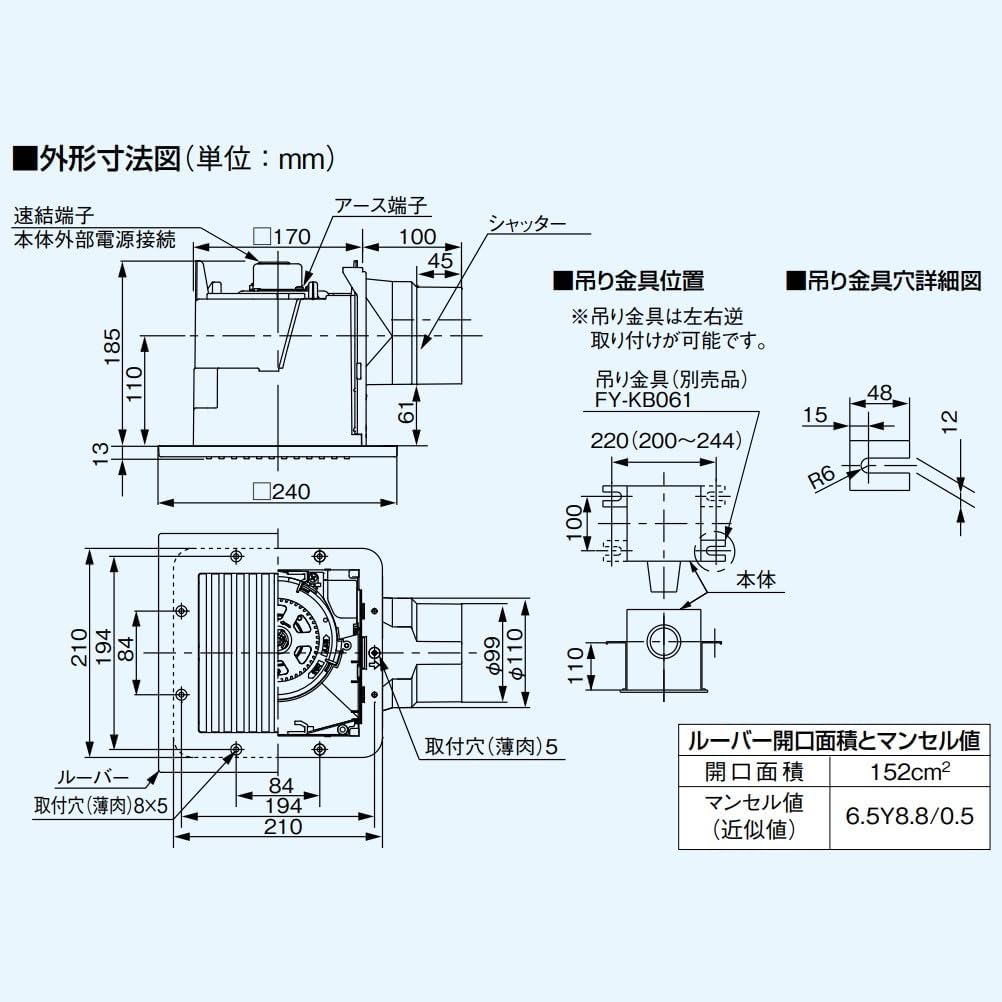
Figure 2: Detailed dimension diagram for installation (dimensions in mm).

Figure 3: Product shown for scale, indicating its compact size for ceiling integration.
5. Operating Instructions
The Panasonic FY-17C8 is designed for simple and efficient operation.
- Power On/Off: The fan is typically controlled by a dedicated wall switch. Flip the switch to turn the fan ON or OFF.
- "Patto Ventilation Switch": This feature allows for quick ventilation when needed. Consult your electrician or the switch manufacturer's instructions for specific operation if a dedicated "Patto" switch is installed.
- Timer Function: The unit supports a 15-stage timer setting for energy-saving operation, allowing the fan to run at strong speed only for the required duration. This function is typically controlled via an external timer switch (sold separately or integrated into the wall switch). Refer to the timer switch's manual for programming instructions.
6. Maintenance
Regular cleaning ensures optimal performance and longevity of your ventilation fan. Always disconnect power before performing any maintenance.
- Louver Cleaning:
- Gently pull down the louver to detach it from the fan body.
- Wipe the louver with a soft cloth dampened with mild detergent. Do not use abrasive cleaners.
- Rinse with clean water and dry thoroughly before reattaching.
- Fan Body Cleaning:
- With the louver removed, carefully wipe any dust from the accessible parts of the fan body and blades using a dry or slightly damp cloth.
- Do not spray water directly into the fan motor or electrical components.
- Reassembly: Once all parts are clean and dry, reattach the louver by aligning it and pushing it gently until it clicks into place.
7. Troubleshooting
If you experience issues with your ventilation fan, refer to the following common problems and solutions:
| Problem | Possible Cause | Solution |
|---|---|---|
| Fan does not turn on. | No power supply. Loose wiring. Faulty switch. | Check circuit breaker. Ensure switch is ON. Consult a qualified electrician to check wiring and switch. |
| Fan is noisy. | Dust accumulation on blades. Loose mounting. Obstruction in duct. | Clean fan blades and louver. Ensure fan is securely mounted. Check ductwork for obstructions. |
| Poor ventilation. | Blocked air intake/exhaust. Dirty louver/fan blades. Incorrect fan size for room. | Clear any blockages. Clean louver and fan blades. Ensure proper room ventilation design. |
If the problem persists after trying these solutions, please contact qualified service personnel.
8. Specifications
Technical specifications for the Panasonic FY-17C8 Ceiling-Mounted Ventilation Fan:
| Brand | Panasonic |
| Model Number | FY-17C8 |
| Type | Ceiling-Mounted Ventilation Fan |
| Color | White |
| Power Source | AC |
| Voltage | 100 Volts |
| Product Dimensions (D x W x H) | 24 x 18.5 x 21 cm (approx. 9.4 x 7.3 x 8.3 inches) |
| Item Weight | 1314 grams (approx. 2.9 lbs) |
| Recommended Use | Ventilation (Kitchen, Bathroom, Toilet, Washroom) |
| Mounting Type | Flush Mount |
| Special Features | Ceiling-embedded type, Low noise design, High-efficiency motor |
| Number of Speeds | 15 (Timer settings) |
| Indoor/Outdoor Use | Indoor |
9. Warranty and Support
This Panasonic product comes with a manufacturer's warranty. Please refer to the warranty card included with your purchase for specific terms and conditions, including warranty period and coverage details. For technical support, service, or warranty claims, please contact Panasonic customer service in your region. Keep your proof of purchase for warranty validation.
For further assistance, you may visit the official Panasonic website or contact their customer support line.
Ask a question about this manual
Ask about setup, troubleshooting, compatibility, parts, safety, or missing instructions. Manuals+ will review the question and use this page’s manual context to help answer it.