
1. Introduction
This manual provides detailed instructions for the LGIDTECH FUT007 Mi.Light CCT WW+CW 4-Zone Remote Controller. This 2.4GHz RF remote is designed to control Mi.Light/MiBoxer Color Temperature Adjustable LED Lamps and LED Strip Light Controllers such as FUT035 and FUT036. It offers convenient wireless control over brightness and color temperature for up to four distinct zones.
2. Safety Information
- Do not expose the remote controller to moisture or extreme temperatures.
- Keep out of reach of children.
- Use only the specified battery type (AAA).
- Dispose of used batteries responsibly according to local regulations.
- Avoid dropping or subjecting the remote to severe impact.
3. Package Contents
The package includes the following items:
- 1 x LGIDTECH FUT007 Mi.Light CCT WW+CW 4-Zone Remote Controller
- Note: AAA batteries are not included and must be purchased separately.
4. Product Overview
The FUT007 remote controller features an intuitive button layout for easy operation of your compatible LED lights.

Figure 4.1: Front view of the LGIDTECH FUT007 remote controller, showing its white casing and black control ring.
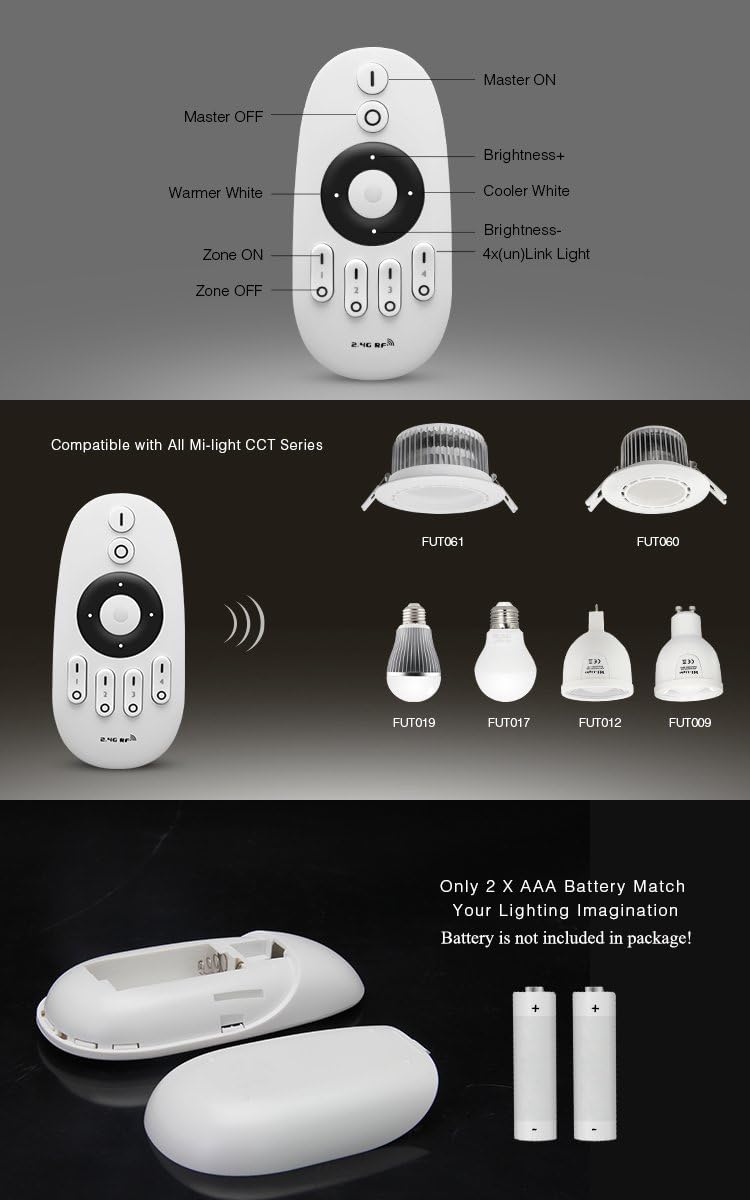
Figure 4.2: Detailed diagram illustrating the function of each button on the FUT007 remote and examples of compatible Mi.Light CCT series products.
Button Functions:
- Master ON (I): Turns all linked lights ON.
- Master OFF (O): Turns all linked lights OFF.
- Brightness+ (Up Arrow on Ring): Increases the brightness of the selected zone(s).
- Brightness- (Down Arrow on Ring): Decreases the brightness of the selected zone(s).
- Warmer White (Left Arrow on Ring): Adjusts the color temperature towards warmer white.
- Cooler White (Right Arrow on Ring): Adjusts the color temperature towards cooler white.
- Zone ON (I for Zones 1-4): Turns ON the specific zone.
- Zone OFF (O for Zones 1-4): Turns OFF the specific zone.
5. Setup
5.1 Battery Installation
The FUT007 remote controller requires two (2) AAA batteries (not included).
- Open the battery compartment cover on the back of the remote.
- Insert two AAA batteries, ensuring correct polarity (+ and -).
- Close the battery compartment cover securely.
Figure 5.1: Illustration of the battery compartment and how to insert AAA batteries into the remote controller.
5.2 Pairing the Remote with Lamps/Controllers
It is essential to pair the remote with your lamps or controllers before use. The remote can control up to 4 groups of Mi.Light WW/CW series lamps, with any quantity of lamps per group within a 30-meter range.
- Ensure the lamp or controller you wish to pair is powered off.
- Turn on the power to the lamp/controller.
- Within 3 seconds of powering on, press the "Zone ON" (I) button for the desired zone (1-4) on the remote three times.
- The lamp/controller should flash three times slowly, indicating successful pairing.
- If pairing fails, turn off the lamp/controller, wait 10 seconds, and repeat the process.
To unpair a lamp/controller from a zone:
- Ensure the lamp or controller is powered off.
- Turn on the power to the lamp/controller.
- Within 3 seconds of powering on, press the "Zone ON" (I) button for the desired zone (1-4) on the remote five times.
- The lamp/controller should flash ten times quickly, indicating successful unpairing.
6. Operating Instructions
Once paired, the FUT007 remote allows for comprehensive control of your lighting system within a 30-meter range.

Figure 6.1: Visual representation of the remote's brightness and color temperature adjustment capabilities, along with its 2.4GHz wireless transmission range.
6.1 Master Control
- To turn all linked lamps ON, press the Master ON (I) button.
- To turn all linked lamps OFF, press the Master OFF (O) button.
- For night light mode for all lamps, long press the Master OFF (O) button.
6.2 Zone Control
The remote supports controlling up to four independent zones.
- To select a specific zone, press its corresponding Zone ON (I) button (1-4).
- To turn a specific zone OFF, press its corresponding Zone OFF (O) button (1-4).
- For night light mode for a specific zone, long press the Zone OFF (O) button for that zone.
6.3 Brightness Adjustment
After selecting a zone or all lamps (via Master ON), use the central control ring:
- Press the Up Arrow on the control ring to increase brightness.
- Press the Down Arrow on the control ring to decrease brightness.
6.4 Color Temperature Adjustment
After selecting a zone or all lamps, use the central control ring:
- Press the Left Arrow on the control ring to adjust towards warmer white.
- Press the Right Arrow on the control ring to adjust towards cooler white.
7. Compatibility
The LGIDTECH FUT007 remote controller is specifically designed to work with Mi.Light CCT WW/CW series LED bulbs and strip controllers. Compatible models include, but are not limited to:
- LED Bulbs: FUT017, FUT019
- LED Strip Controllers: FUT035, FUT036
Figure 7.1: Visual examples of compatible Mi.Light CCT series bulbs and controllers that can be operated with the FUT007 remote.
8. Maintenance
8.1 Battery Replacement
When the remote's control range decreases or it becomes unresponsive, it's likely time to replace the batteries. Follow the battery installation steps in Section 5.1.
- Always use new AAA batteries.
- Consider using rechargeable AAA batteries for environmental benefits.
- Do not mix old and new batteries, or different types of batteries.
8.2 Cleaning
Wipe the remote with a soft, dry cloth. Do not use abrasive cleaners or immerse the remote in water.
9. Troubleshooting
| Problem | Possible Cause | Solution |
|---|---|---|
| Remote not responding to lamps. | Batteries are low or dead. Remote is not paired with the lamp/controller. Lamp/controller is out of range. | Replace batteries. Re-pair the remote following instructions in Section 5.2. Move closer to the lamp/controller (within 30m). |
| Lamps flash unexpectedly. | Interference from other 2.4GHz devices. | Try to minimize other 2.4GHz device usage nearby or change their channels if possible. |
| Cannot adjust brightness or color temperature. | Incorrect zone selected. Lamp/controller does not support CCT or dimming. | Ensure the correct zone is selected or use Master ON. Verify that your lamp/controller is a Mi.Light CCT WW/CW series model. |
10. Specifications
| Feature | Detail |
|---|---|
| Product Name | 2.4GHz 4 Zone RF CCT Remote Controller |
| Model Number | FUT007 (also referred to as FT007) |
| Brand | LGIDTECH / Mi.Light |
| Voltage | DC 3V |
| Power Source | 2 x AAA Batteries (not included) |
| Standby Power Consumption | 20uA |
| Control Distance | 30m (approx. 98 feet) |
| Control Method | 2.4GHz RF Wireless |
| Controller Type | 4-Zone |
| Dimensions (W x H) | 4.33" x 0.85" (110mm x 21.5mm) |
| Item Weight | 1.44 ounces |
| Material | Plastic |
| Indoor/Outdoor Usage | Indoor |
11. Warranty and Support
Specific warranty details for the LGIDTECH FUT007 remote controller are not provided in this manual. For warranty claims, technical support, or further inquiries, please contact the retailer or manufacturer directly through their official support channels.
You may visit the LGIDTECH Store for more information: LGIDTECH Store on Amazon