
1. Introduction
This manual provides detailed instructions for the proper use and maintenance of your LUITON CS two-way radios. Please read this manual thoroughly before operating the device to ensure optimal performance and safety. The LUITON CS two-way radios are designed for reliable communication in various environments.
2. Package Contents
Upon opening the package, verify that all items listed below are present and in good condition:
- 6 x LUITON CS Two-Way Radios
- 6 x Air Acoustic Tube Headset Earpieces
- 6 x Rechargeable Batteries
- 6 x Antennas
- 6 x Wrist Straps
- 6 x Charging Docks
- 1 x USB Programming Cable
- 1 x Programming CD
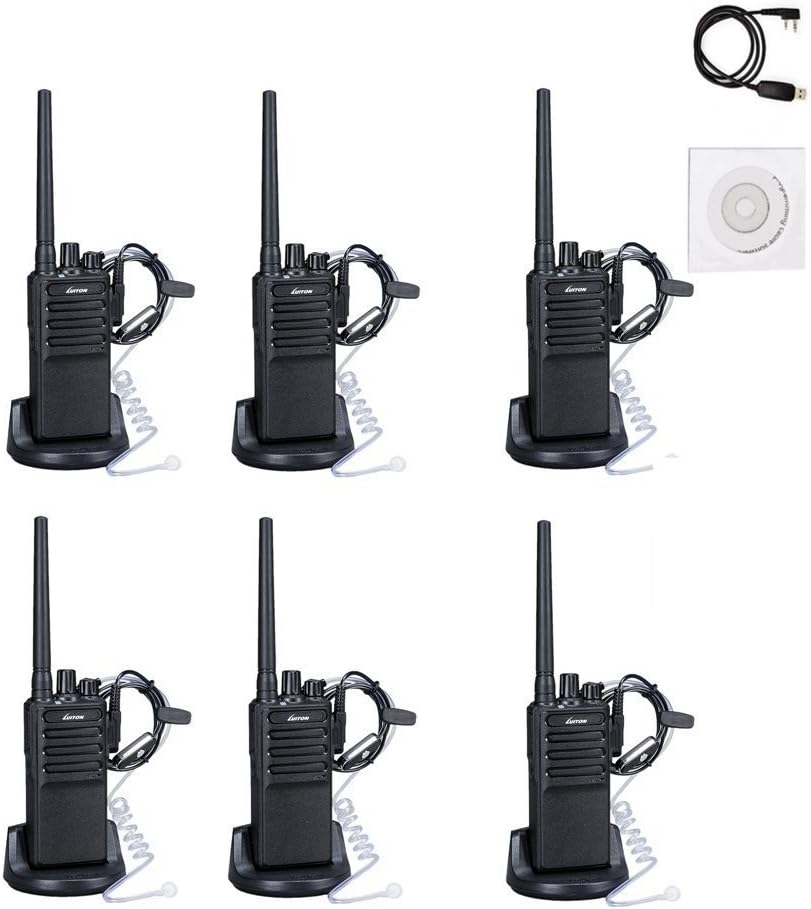
Image: Overview of the LUITON CS 6-pack contents, including radios, earpieces, charging bases, and accessories.
3. Product Features
- 16 Preset Channels: Allows for communication across various groups or frequencies.
- Voice Scrambler: Enhances communication privacy.
- Long Range Communication: Up to 3.6 miles under optimal conditions.
- Earpieces Included: Provides hands-free operation and discreet communication.
- Portable Design: Slim body with anti-slip pattern and belt clip for easy carrying.
- Rechargeable Battery: 1500mAh battery supports extended operation with low battery alarm.
- Programming Capability: Supports programming via cable and software for customized settings.
4. Setup Guide
4.1. Attaching the Antenna
- Align the threaded end of the antenna with the antenna connector on top of the radio.
- Gently screw the antenna clockwise until it is firmly seated. Do not overtighten.

Image: Front and side view of two LUITON CS radios, illustrating the antenna attachment point.
4.2. Installing the Battery
- Ensure the radio is powered off.
- Align the battery pack with the grooves on the back of the radio.
- Slide the battery pack upwards until it clicks into place.
- To remove, press the release latch (if present) and slide the battery downwards.
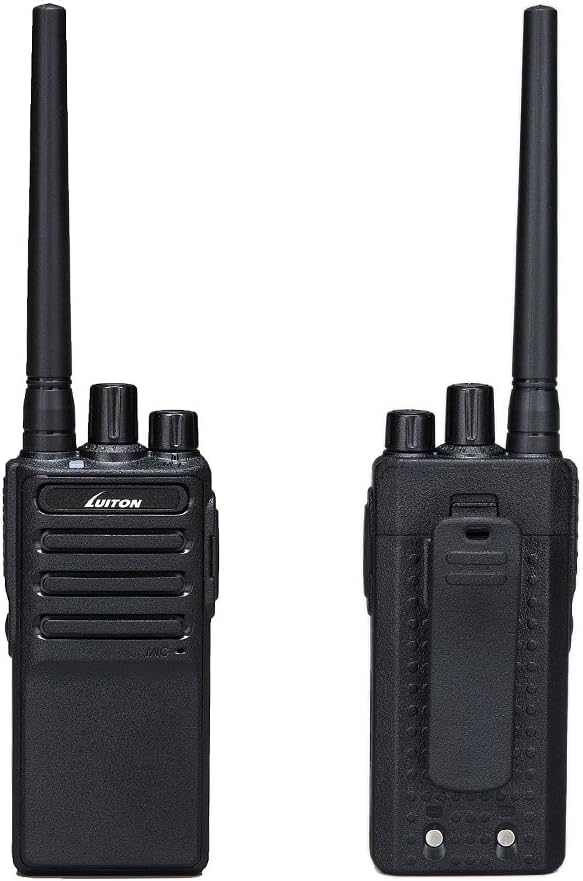
Image: Front and rear views of the LUITON CS radio, highlighting the battery area and belt clip.
4.3. Charging the Battery
- Place the radio with the battery installed into the charging dock, or place the battery directly into the charging dock.
- Connect the charging dock to a power source.
- A red light indicates charging is in progress.
- A green light indicates the battery is fully charged.
- Charging typically takes 3-5 hours.

Image: Charging status indicators for the LUITON CS radio and its battery, showing red for charging and green for fully charged.
4.4. Attaching the Earpiece
- Locate the earpiece jack on the side of the radio.
- Insert the earpiece plug firmly into the jack.
- Ensure the earpiece is securely connected for proper audio transmission and reception.
5. Operating Instructions
5.1. Powering On/Off and Volume Control
- Power On: Rotate the Power/Volume Knob clockwise until you hear a click. The radio will emit a tone.
- Power Off: Rotate the Power/Volume Knob counter-clockwise until you hear a click.
- Volume Adjustment: Rotate the Power/Volume Knob clockwise to increase volume and counter-clockwise to decrease volume.
5.2. Selecting a Channel
- Rotate the Channel Selector Knob (usually the top-most knob) to select one of the 16 available channels.
- Ensure all radios intended for communication are set to the same channel.
5.3. Transmitting and Receiving
- To Transmit: Press and hold the Push-to-Talk (PTT) button located on the side of the radio. Speak clearly into the microphone (or earpiece microphone if attached). Release the PTT button to stop transmitting.
- To Receive: Ensure the PTT button is not pressed. The radio will automatically receive transmissions on the selected channel.
5.4. Voice Scrambler Function
The LUITON CS radios feature a voice scrambler for enhanced privacy. This function is typically enabled or disabled via programming software. When active, it encrypts your voice transmission, making it unintelligible to other radios not using the same scrambler setting. Consult the programming software manual for details on activating and configuring this feature.
5.5. Programming the Radio
The radio's channels, frequencies, and advanced features (like voice scrambler, squelch level, etc.) can be customized using the provided programming cable and software. Refer to the programming software's specific instructions for detailed steps. A CD containing the software is typically included.
6. Maintenance
6.1. Cleaning
- Wipe the radio's surface with a soft, damp cloth.
- Do not use harsh chemicals, solvents, or abrasive cleaners.
- Ensure the radio is dry before use or charging.
6.2. Battery Care
- Charge the battery fully before first use.
- Avoid overcharging or completely draining the battery to prolong its lifespan.
- Store batteries in a cool, dry place when not in use.
- If the battery is not used for an extended period, charge it periodically (e.g., every 3 months) to maintain its capacity.

Image: Battery performance metrics for the LUITON CS radio, showing estimated standby, typical, and continuous use times, along with charging duration.
6.3. General Care
- Do not expose the radio to extreme temperatures, direct sunlight, or excessive moisture. While water-resistant, it is not fully waterproof.
- Avoid dropping the radio or subjecting it to strong impacts.
- Keep the antenna and earpiece connections clean and free of debris.
7. Troubleshooting
| Problem | Possible Cause | Solution |
|---|---|---|
| Radio does not power on. | Battery is low or not installed correctly. | Charge the battery or re-install it securely. |
| Cannot transmit or receive. | Incorrect channel selected; out of range; antenna loose. | Verify channel setting; move closer to other radios; check antenna connection. |
| Poor audio quality / Static. | Weak signal; interference; volume too low/high; earpiece connection loose. | Move to an open area; adjust volume; re-seat earpiece. |
| Battery drains quickly. | Old battery; continuous transmission; extreme temperatures. | Replace battery if old; minimize continuous PTT use; operate in moderate temperatures. |
| Voice scrambler not working. | Not enabled or incorrectly programmed. | Verify scrambler settings using programming software. |
8. Technical Specifications
| Category | Specification |
|---|---|
| General | |
| Memory Channels | 16 Groups |
| Operation Voltage | DC 3.7V |
| Frequency Stability | ±2.5ppm |
| Operation Temperature | -20℃ to +50℃ |
| Mode of Operation | Simplex |
| Antenna Impedance | 50Ω |
| Frequency Range | 400 - 470 MHz |
| Talking Range Maximum | 3.6 Miles (approx. 5.8 km) |
| Battery Capacity | 1500mAh |
| Water Resistance Level | Water Resistant |
| Transmitter | |
| RF Power | <5W |
| Maximum Deviation (W/N) | ≤5KHz/≤2.5KHz |
| Spurious Emission | ≤7.5uW |
| Adjacent Channel Power | ≤-65dB/≤-60dB |
| SNR (W/N) | ≥-45dB/≥-40dB |
| QT/DQT (W/N) | 0.7±0.1KHz/0.4±0.1KHz |
| Modulation Sensitivity | 8—12mV |
| Transmission Current | ≤1.2A |
| Receiver | |
| Sensitivity | -122dBm (12dB SINAD) |
| Audio Power | 0.4W (8R Load) |
| Audio Distortion | ≤10% |
| Intermediation (W/N) | ≥65dB/≥60dB |
| Adjacent Channel Selectivity (W/N) | ≥65dB/≥60dB |
| Clutter Suppression | ≥65dB |
| Receiver Current | ≤380mA |
9. Warranty and Support
For warranty information and customer support, please refer to the documentation provided with your purchase or contact LUITON customer service directly. Details regarding specific warranty periods and support channels are typically available on the manufacturer's official website or through your retailer.
For programming assistance or technical inquiries, please consult the programming software manual or contact LUITON support.


