
1. Introduction
This manual provides essential information for the safe and efficient operation, maintenance, and troubleshooting of your V-Guard VIC 05 Induction Cooktop. Please read these instructions thoroughly before using the appliance and retain them for future reference.
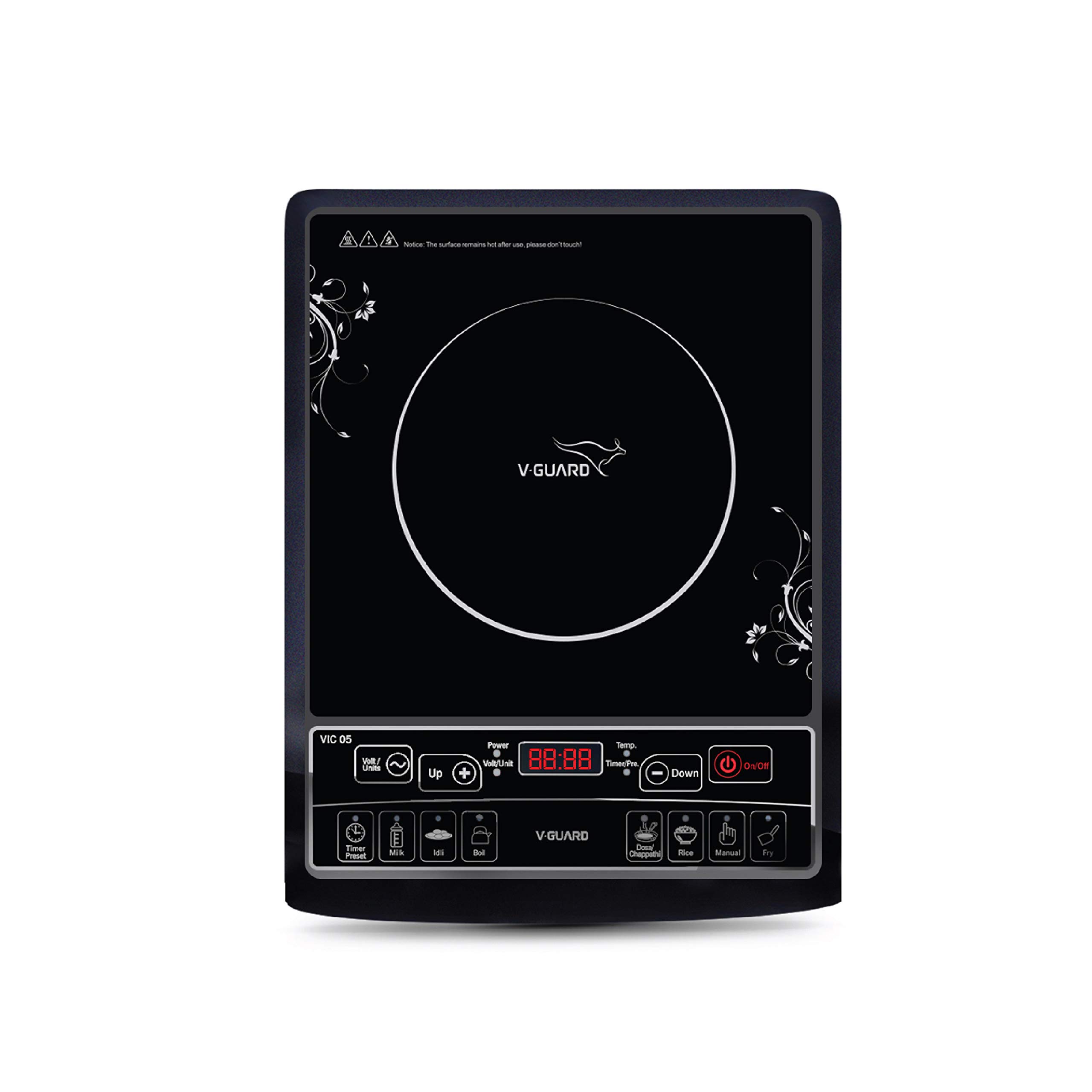
Front view of the V-Guard VIC 05 Induction Cooktop, illustrating its compact design and key dimensions: 29.5 cm width, 35.8 cm length, and 6 cm height.
2. Safety Instructions
To prevent personal injury or property damage, always observe basic safety precautions when using electrical appliances. This cooktop generates heat and electromagnetic fields; improper use can be hazardous.
- Electrical Safety: Ensure the power supply matches the cooktop's requirements. Do not use damaged cords or plugs. Avoid operating the cooktop with wet hands.
- Cookware Compatibility: Use only induction-compatible cookware (ferromagnetic material). Non-compatible cookware will not heat.
- Placement: Place the cooktop on a stable, flat, heat-resistant surface. Ensure adequate ventilation around the unit. Do not block air vents.
- Heat Warning: The ceramic plate will be hot after cooking. Do not touch the hot surface immediately. Keep children away from the appliance during and after use.
- Foreign Objects: Do not place metallic objects like knives, forks, spoons, or lids on the cooktop surface as they can become hot.
- Cleaning: Disconnect from power before cleaning. Do not immerse the cooktop in water or any other liquid.
- Supervision: Never leave the cooktop unattended during operation.
3. Product Features
The V-Guard VIC 05 Induction Cooktop is designed for efficient and convenient cooking with the following key features:
- High/low voltage cut-off for protection against power fluctuations.
- Timer function for up to 4 hours, allowing precise cooking control.
- 7 pre-set cooking functions for various dishes.
- Lightweight design for easy portability and storage.
- Fast and efficient heating for quicker meal preparation.
4. Setup
- Unpacking: Carefully remove the cooktop from its packaging. Retain packaging materials for future transport or storage.
- Placement: Place the cooktop on a dry, stable, and heat-resistant surface. Ensure there is at least 10-15 cm of clear space around all sides for proper ventilation. Do not place near water sources or heat-sensitive materials.
- Power Connection: Plug the power cord into a grounded electrical outlet that matches the voltage specifications of the cooktop.
- Initial Cleaning: Wipe the ceramic surface with a soft, damp cloth before first use.
5. Operating Instructions
Familiarize yourself with the control panel for optimal use of your induction cooktop.

A detailed view of the V-Guard VIC 05 Induction Cooktop's control panel, highlighting the 5 preset cooking functions (Milk, Idli, Boil, Dosa/Chappathi, Rice, Fry) and the Up/Down buttons for adjusting power/temperature settings.
- Power On/Off: Press the On/Off button to turn the cooktop on. The display will illuminate. Press again to turn off.
- Placing Cookware: Place induction-compatible cookware centrally on the cooking zone before selecting a function. The cooktop will not operate without suitable cookware.
- Selecting Cooking Functions:
- Manual Mode: After turning on, the cooktop typically defaults to a manual power setting. Use the Up and Down buttons to adjust the power level (or temperature, depending on the mode).
- Preset Functions: Press the desired preset button (e.g., Milk, Idli, Boil, Dosa/Chappathi, Rice, Fry). The cooktop will automatically adjust to a pre-programmed power and time setting for that function.
- Timer Function:

Close-up of the V-Guard VIC 05 Induction Cooktop's control panel, focusing on the Timer/Preset button and the digital display for time and power indications.
- While cooking, press the Timer/Preset button. The display will show a time value.
- Use the Up and Down buttons to set the desired cooking time (up to 4 hours).
- The cooktop will automatically switch off once the set time has elapsed.
- Voltage/Unit Display: Press the Volt/Units button to view the current voltage or energy consumption.
- After Cooking: Press the On/Off button to turn off the cooktop. Remove cookware and allow the surface to cool before cleaning.
6. Maintenance and Cleaning
Regular cleaning ensures the longevity and optimal performance of your V-Guard VIC 05 Induction Cooktop.
- Before Cleaning: Always unplug the cooktop from the power outlet and allow it to cool completely.
- Ceramic Surface: Wipe the ceramic glass surface with a soft, damp cloth and mild detergent. For stubborn stains, use a non-abrasive ceramic cooktop cleaner. Rinse with a clean, damp cloth and dry thoroughly.
- Control Panel: Wipe the control panel with a soft, damp cloth. Do not use excessive water.
- Exterior: Clean the exterior casing with a soft, damp cloth.
- Avoid: Do not use abrasive cleaners, scouring pads, or harsh chemicals as they can scratch or damage the surface. Do not immerse the cooktop in water.
7. Troubleshooting
If you encounter issues with your V-Guard VIC 05 Induction Cooktop, refer to the following common problems and solutions:
| Problem | Possible Cause | Solution |
|---|---|---|
| Cooktop does not turn on. | No power supply; power cord not plugged in; fuse blown. | Check power outlet and plug connection. Check household fuse/circuit breaker. |
| Cookware is not heating. | Cookware is not induction-compatible; cookware is too small or too large; cookware not centered. | Use induction-compatible cookware. Ensure cookware base covers at least 80% of the cooking zone. Center the cookware. |
| Display shows an error code (e.g., E0, E1). | Specific error condition (e.g., overheating, sensor fault, no cookware). | Refer to the specific error code in the full manual (if available) or contact customer support. Often, turning off and on again, or ensuring proper cookware/ventilation, resolves temporary errors. |
| Unusual noise during operation. | Normal fan operation; vibration from cookware. | A low humming sound from the cooling fan is normal. Some cookware may vibrate slightly. If the noise is excessive or unusual, contact support. |
If the problem persists after attempting these solutions, please contact V-Guard customer support.
8. Specifications
| Specification | Detail |
|---|---|
| Model | VIC 05 |
| Brand | V-Guard |
| Item Weight | 2 kg 100 g |
| Heating Elements | 1 |
| Controls Type | Push Button |
9. Warranty and Support
For warranty information, service requests, or technical assistance, please refer to the warranty card included with your product or visit the official V-Guard website. Ensure you have your product model number (VIC 05) and purchase details available when contacting support.