
1. Introduction
This manual provides essential information for the safe and efficient use of your HAEGER Ultra Steam 2800 Iron. Please read these instructions carefully before first use and retain them for future reference.

Image 1: The HAEGER Ultra Steam 2800 Iron, showcasing its ergonomic design and ceramic soleplate.
2. Safety Instructions
- Always ensure the voltage indicated on the rating label corresponds to your mains voltage.
- Do not immerse the iron, power cord, or plug in water or other liquids.
- Keep the iron out of reach of children when it is switched on or cooling down.
- Never leave the iron unattended when connected to the mains supply.
- Unplug the iron from the power outlet before filling or emptying the water tank, and when not in use.
- Do not operate the iron with a damaged cord or plug, or if the iron has been dropped or damaged.
- Place the iron on a stable, heat-resistant surface when resting.
3. Product Components
Familiarize yourself with the different parts of your HAEGER Ultra Steam 2800 Iron:
- Ceramic Soleplate
- Water Spray Nozzle
- Water Filling Inlet
- Steam Regulator Dial
- Temperature Control Dial
- Steam Burst Button
- Water Spray Button
- Self Clean Button
- Power Cord
- Water Tank (360ml capacity)

Image 2: An infographic detailing the key features and specifications of the HAEGER Ultra Steam 2800 Iron, including anti-scale, self-clean, steam burst, anti-drip, steam regulator, vertical steam, power cord length, water tank capacity, and wattage.
4. Setup and First Use
- Unpacking: Carefully remove the iron from its packaging. Retain the packaging for storage or future transport.
- Initial Cleaning: Before first use, wipe the soleplate with a soft, damp cloth to remove any manufacturing residues.
- Filling the Water Tank:
- Ensure the iron is unplugged.
- Open the water filling inlet cover.
- Fill the water tank (360ml capacity) with clean tap water up to the MAX mark. Do not overfill.
- Close the water filling inlet cover securely.
- First Heating: Plug the iron into a suitable power outlet. Set the temperature dial to the maximum setting. Allow the iron to heat up for a few minutes. A slight odor or smoke may occur during the first heating; this is normal and will dissipate.

Image 3: The HAEGER Ultra Steam 2800 Iron shown in its retail packaging, indicating the product as it would appear upon unboxing.
5. Operating Instructions
The HAEGER Ultra Steam 2800 Iron offers various functions for effective ironing:
- Temperature Selection:
- Turn the temperature control dial to select the appropriate temperature for your fabric type. Refer to garment care labels.
- The indicator light will illuminate while the iron is heating and turn off when the selected temperature is reached.
- Dry Ironing:
- Ensure the steam regulator is set to the "0" (no steam) position.
- Select the desired temperature and wait for the indicator light to turn off.
- Proceed with ironing.
- Steam Ironing:
- Fill the water tank as described in Section 4.
- Set the temperature dial to the steam zone (usually marked with three dots or a steam symbol) for optimal steam generation.
- Once the indicator light turns off, adjust the steam regulator to the desired steam level (up to 45g/min continuous steam).
- The Anti-Drip System prevents water droplets from staining fabrics at lower temperatures.
- Steam Burst (80g):
- Press the steam burst button (often labeled "Power Zone" or with a steam cloud symbol) for an extra powerful shot of steam (80g).
- This is effective for stubborn creases. Allow a few seconds between bursts.
- Vertical Steam:
- Hold the iron vertically, close to the garment (e.g., hanging clothes, curtains).
- Press the steam burst button to release vertical steam, helping to remove wrinkles without direct contact.
- Water Spray:
- Press the water spray button to lightly moisten fabrics, aiding in wrinkle removal.

Image 4: Close-up view of the steam burst ("Power Zone") and water spray buttons, located on the handle of the iron.

Image 5: The HAEGER Ultra Steam 2800 Iron resting on a stack of neatly ironed garments, demonstrating its practical application.
6. Maintenance and Cleaning
Regular maintenance ensures optimal performance and extends the life of your iron.
- After Each Use:
- Unplug the iron and allow it to cool completely.
- Empty any remaining water from the tank.
- Wipe the soleplate and exterior with a soft, damp cloth. Do not use abrasive cleaners.
- Self Clean System:
- The iron features a Self Clean System to remove impurities from the soleplate and steam vents.
- Fill the water tank to the MAX level.
- Set the temperature to maximum and allow the iron to heat up until the indicator light turns off.
- Unplug the iron. Hold it horizontally over a sink.
- Press and hold the "Self Clean" button (Image 6). Hot water and steam will flush out mineral deposits and impurities from the steam vents.
- Gently shake the iron back and forth. Release the button when the tank is empty.
- Allow the iron to cool, then wipe the soleplate with a damp cloth.
- Anti-Calc System:
- The integrated Anti-Calc System helps filter limescale, reducing mineral buildup and prolonging the iron's life. This system operates automatically during use.
- Soleplate Care:
- The ceramic soleplate (Image 7) provides smooth gliding. Avoid contact with metal objects to prevent scratches.
- For stubborn stains on the soleplate, use a specialized iron soleplate cleaner, following its instructions.

Image 6: Close-up of the "Self Clean" button, indicating its location for activating the self-cleaning function.
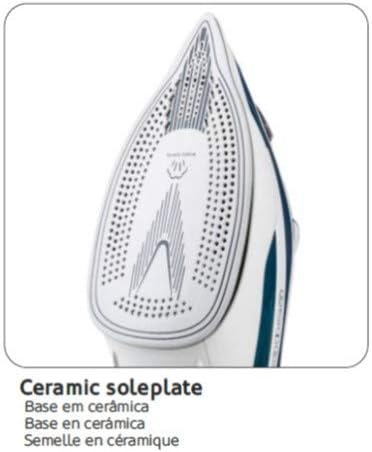
Image 7: Detailed view of the ceramic soleplate, highlighting its design for even heat distribution and smooth gliding.
7. Troubleshooting
If you encounter issues with your iron, refer to the following common problems and solutions:
| Problem | Possible Cause | Solution |
|---|---|---|
| Iron does not heat up. | Not plugged in; power outage; faulty outlet; temperature dial set to OFF. | Check power connection; test outlet with another appliance; turn temperature dial to a setting. |
| No steam or insufficient steam. | Water tank empty; temperature too low for steam; steam regulator set to OFF; steam vents clogged. | Fill water tank; set temperature to steam zone; adjust steam regulator; perform Self Clean. |
| Water leaking from soleplate. | Temperature too low for steam (Anti-Drip System limit); water tank overfilled; iron left horizontal too long with steam on. | Increase temperature; do not overfill; ensure iron is vertical when not actively ironing. |
| White flakes coming from soleplate. | Limescale buildup. | Perform the Self Clean function. |
If the problem persists after trying these solutions, please contact customer support.
8. Specifications
| Feature | Detail |
|---|---|
| Brand | HAEGER |
| Model Name | Ultra Steam 2800 |
| Model Number | SI-280.012B (also SI280012A) |
| Power/Wattage | 2800 Watts |
| Soleplate Material | Ceramic |
| Water Tank Capacity | 360 Milliliters |
| Continuous Steam Output | Up to 45g/min |
| Steam Burst Output | 80g |
| Power Cord Length | 2.2 meters |
| Special Features | Anti-Calc System, Anti-Drip System, Self Clean System, Vertical Steam, Lightweight, Ergonomic |
| Product Dimensions | 1 x 1 x 1 cm (approximate, as per source) |
| Item Weight | 1.5 Kilograms |
9. Warranty and Support
Your HAEGER Ultra Steam 2800 Iron is designed for reliability and performance. For warranty information, please refer to the warranty card included with your purchase or contact the retailer where the product was purchased.
For technical support, spare parts, or service inquiries, please contact HAEGER customer service through their official website or the contact details provided in your product documentation.
