
Betopper LPC007
BETOPPER DJ Lights DMX Sound Activated User Manual
Model: LPC007
Brand: Betopper
Introduction
The BETOPPER LPC007 LED Par Light is a versatile and powerful stage lighting fixture designed for various applications including churches, concerts, weddings, parties, bars, and general stage lighting. Featuring 54 x 3W RGB 3-in-1 LED beads, it delivers super bright and uniform light output with a 26-degree optical angle. This manual provides detailed instructions for the proper setup, operation, and maintenance of your BETOPPER LED Par Light.

Figure 1: Front view of the BETOPPER LPC007 LED Par Light.
What's in the Box
Upon opening the package, please verify that all components are present and in good condition:
- LPC007 LED Par Light x1
- Installation Brackets x2
- Screws x2
- User Manual x1

Figure 2: Included components: LED Par Light, mounting brackets, screws, and user manual.
Setup and Installation
The BETOPPER LPC007 LED Par Light is designed for easy installation and can be mounted on a truss, wall, or simply placed on the ground. The included brackets allow for quick setup and adjustment of the lighting angle.
Physical Installation
- Attach the two mounting brackets to the sides of the light fixture using the provided screws.
- Determine your desired mounting location (truss, wall, or floor).
- Securely fasten the light using appropriate hardware for your chosen surface. Ensure the light is stable and will not fall.
- Adjust the angle of the light by loosening the side knobs on the brackets, tilting the fixture, and then tightening the knobs firmly.

Figure 3: The light can be mounted on a stand, truss, or placed on the floor.
Power Connection
Connect the power cable to a standard electrical outlet. The unit operates on AC 90-240V, 50/60Hz. The power input connector is a standard IEC connector.
DMX Connection (Optional)
For DMX control, connect a DMX cable from your DMX controller to the DMX IN port on the light. If linking multiple lights, connect the DMX OUT of the first light to the DMX IN of the next, and so on.
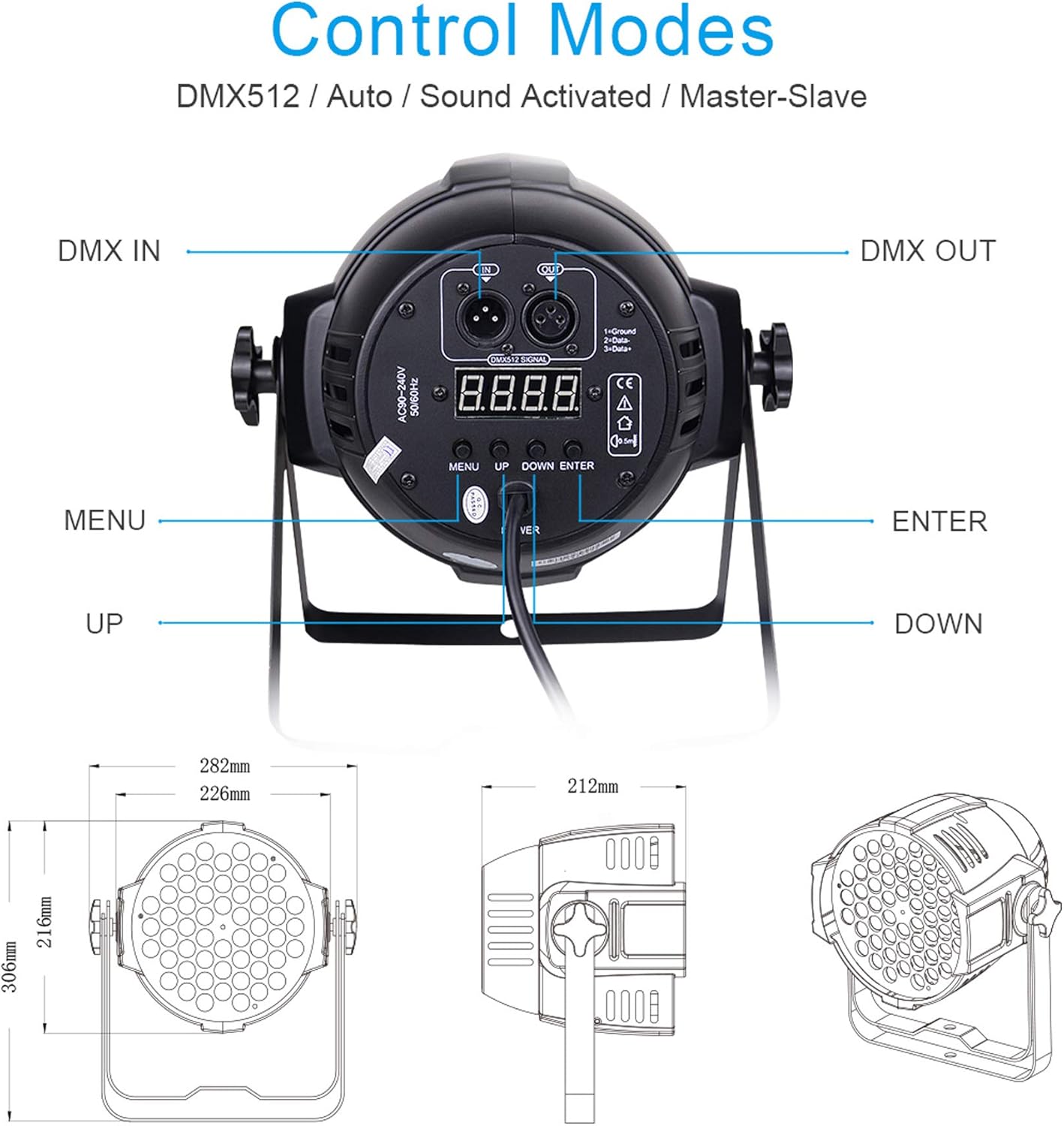
Figure 4: Rear panel with DMX IN/OUT, display, and control buttons.
Operating Modes
The BETOPPER LPC007 offers multiple operating modes to suit various lighting needs. Use the control panel on the rear of the unit to navigate through the modes.
- Static Color: Select a single, fixed color (Red, Green, Blue, or mixed colors).
- Color Mixing: Blend Red, Green, and Blue LEDs to create a wide spectrum of colors.
- Jump: Colors change abruptly from one to another.
- Strobe: The light flashes rapidly, creating a pulsating effect.
- Fade: Colors smoothly transition from one to another.
- Auto: The light runs through pre-programmed sequences automatically.
- Sound Activated: The lighting style changes automatically in response to music or sound detected by the built-in HD microphone.
- Master-Slave: Connect multiple lights to synchronize their operation. One light acts as the master, controlling the others.
- DMX (3/7-CH): For professional control using a DMX controller. This mode allows precise control over individual light parameters such as color, intensity, and effects.

Figure 5: Multiple lights can be linked for synchronized effects using Master-Slave or DMX modes.
Video 1: Demonstration of various lighting effects and modes of the BETOPPER Stage Par Lights, including color transitions, strobe, and sound activation.

Figure 6: Example of multiple lights displaying various colors simultaneously.
Maintenance
To ensure the longevity and optimal performance of your BETOPPER LED Par Light, regular maintenance is recommended.
- Cleaning: Periodically clean the lens and exterior of the fixture with a soft, dry cloth. Avoid using abrasive cleaners or solvents.
- Cooling System: The light features a built-in cooling fan for excellent heat dissipation. Ensure the fan vents are not obstructed to maintain proper airflow.
- Inspection: Regularly inspect power cables and DMX cables for any signs of damage. Replace damaged cables immediately.

Figure 7: The integrated cooling fan ensures stable operation and extends product lifespan.
Troubleshooting
If you encounter issues with your BETOPPER LED Par Light, refer to the following common problems and solutions:
- No Power: Ensure the power cable is securely connected to both the light and a working power outlet. Check the power source.
- No Light Output: Verify the selected operating mode. If in DMX mode, ensure the DMX signal is present and the address is correctly set.
- Incorrect Color/Effect: In DMX mode, check your DMX controller settings and the light's DMX address. In other modes, cycle through the settings using the control panel.
- Unresponsive Controls: Power cycle the unit by unplugging and re-plugging it. If the issue persists, contact customer support.
- Overheating: Ensure the cooling fan vents are clear of obstructions. Operate the light within the recommended temperature range (-20°C to 40°C).
Specifications
| Feature | Detail |
|---|---|
| Model Number | LPC007 |
| Light Source Type | LED |
| Number of Light Sources | 54 |
| LED Wattage | 3 Watts per LED |
| Total Wattage | 180 Watts (Max Compatible) |
| Brightness | 10000 Lumens |
| Beam Angle | 26 Degrees |
| Color | RGB (Red, Green, Blue) |
| Material | Aluminum |
| Product Dimensions | 6"L x 6.6"W x 7.9"H (approx. 9.25" x 9.25" x 11.61" including bracket) |
| Item Weight | 4.4 pounds (2 Kilograms) |
| Power Source | Corded Electric |
| Operating Temperature | -20°C to 40°C |
| Lifespan | 50,000 hours |
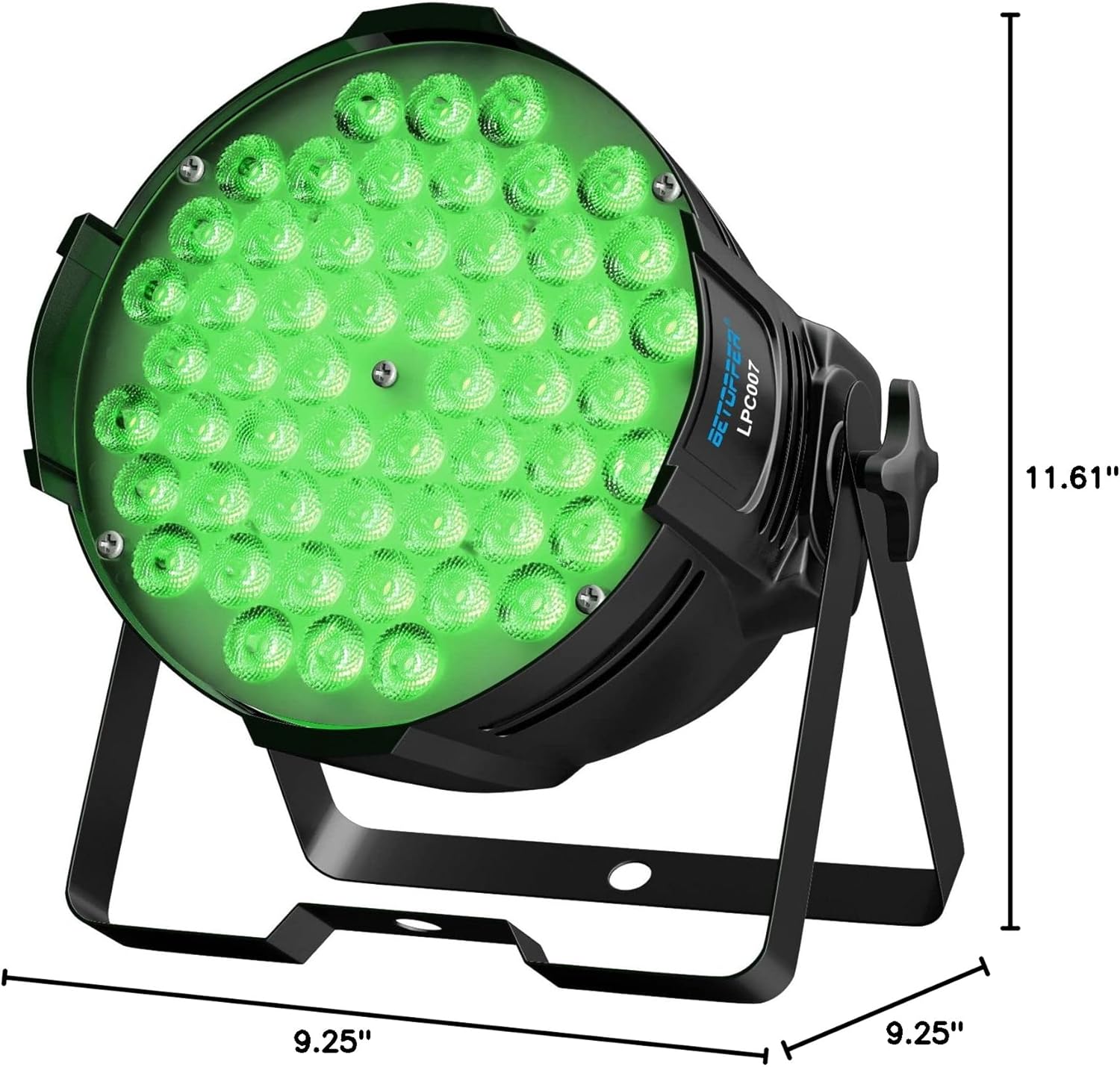
Figure 8: Detailed dimensions of the LPC007 LED Par Light.

Figure 9: Illumination (lux) at various distances and beam angle of 26 degrees.
Warranty and Support
BETOPPER offers comprehensive support for its products:
- Warranty: The product comes with a 1-year warranty from the date of purchase.
- Returns/Refunds: Enjoy worry-free after-sale services with free return/refund options within 30 days of purchase.
- Technical Support: Lifetime professional technical support is available for all BETOPPER products.
- User Manual (PDF): A downloadable PDF version of the user manual is available for your convenience. Download PDF Manual
For any inquiries or assistance, please contact BETOPPER customer service through the official channels provided at the point of purchase or on the manufacturer's website.
Related documentsLPC007


Ask a question about this manual
Ask about setup, troubleshooting, compatibility, parts, safety, or missing instructions. Manuals+ will review the question and use this page’s manual context to help answer it.