
Product Overview
The HUAHAT U912WF Tire Pressure Monitor System (TPMS) is designed to provide real-time monitoring of your vehicle's tire pressure and temperature. This system enhances driving safety by alerting you to abnormal tire conditions.
It consists of a main monitor unit and four external RF sensors. The monitor displays real-time data and provides audible and visual alerts for pressure or temperature deviations.

Image: The U912 TPMS monitor unit shown alongside the four external sensors, illustrating the complete system components.
Package Contents
Before installation, please verify that all components are present:
- 1 x U912WF Monitor Unit
- 4 x External RF Sensors
- 1 x Charger & Power Line (for monitor)
- 1 x Spanner (for sensor installation)
- 4 x Theftproof Nuts
- Fuses (as supplied)

Image: A visual representation of all items included in the U912 TPMS package, including the monitor, sensors, power cable, spanner, and anti-theft nuts.
Setup and Installation
Monitor Installation
- Identify a suitable blind hole or dashboard location in your Toyota vehicle for the monitor. Ensure the placement does not obstruct your vision while driving.
- Connect the monitor to the vehicle's ACC power source using the supplied charger and power line.
- Secure the monitor in its chosen location.

Image: The U912 TPMS monitor integrated into a car's dashboard, demonstrating a typical installation location.
Sensor Installation (External Sensors)
- Remove the original valve cap from each tire.
- Screw on a theftproof nut onto the valve stem.
- Screw on an external sensor onto the valve stem. Ensure it is tightened securely.
- Use the provided spanner to tighten the theftproof nut against the sensor to prevent theft.
- Repeat for all four tires.
Note: The sensors are designed to automatically activate when the vehicle reaches approximately 20 km/h (12.4 mph) and will shut down after 10 minutes of the vehicle being stationary to conserve battery life.
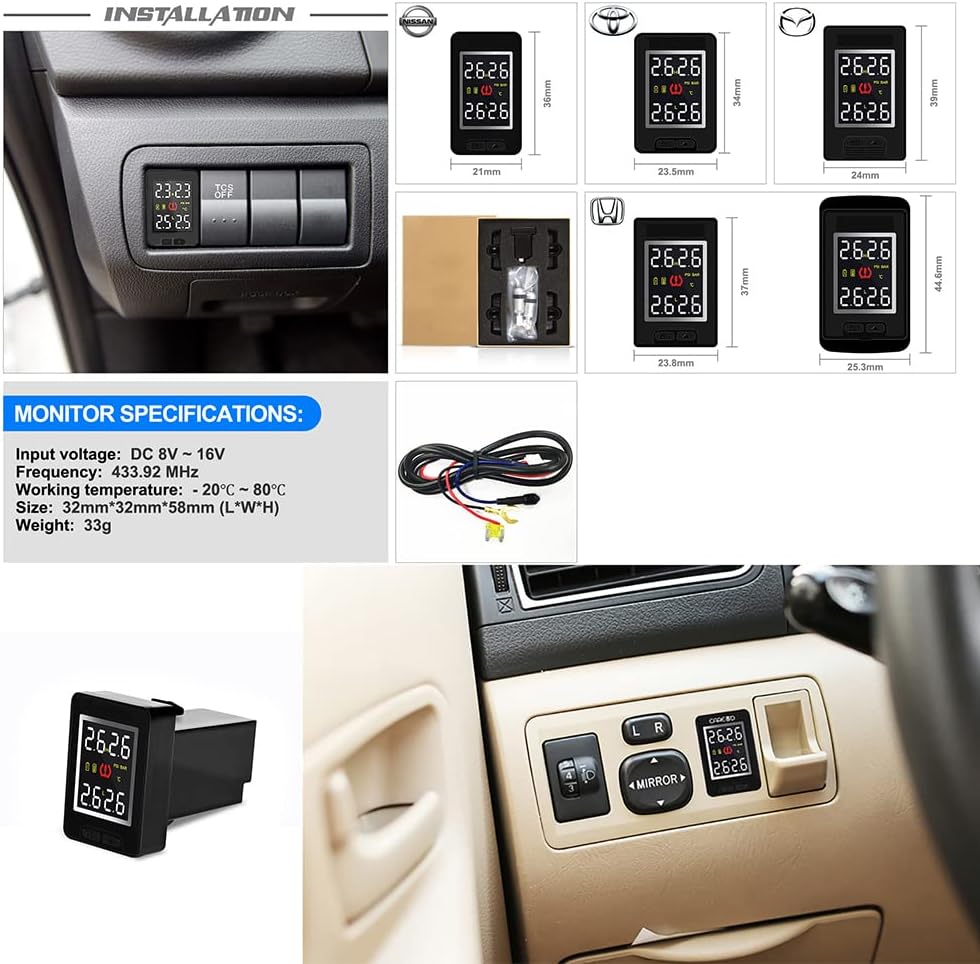
Image: A diagram showing various monitor sizes for different car models and a detailed view of the monitor's specifications and wiring for installation.
Operating Instructions
Real-Time Monitoring
Once installed and the vehicle is in motion, the monitor will display the real-time pressure and temperature for each tire. The display shows both high (H) and low (L) pressure readings, along with temperature in Celsius.

Image: A close-up view of the U912 TPMS monitor's display, showing real-time tire pressure and temperature readings, along with alert icons.
Alert System
The system is pre-configured with factory default alert thresholds. In case of abnormal tire pressure or temperature, the monitor will:
- Emit audible beeps.
- Flash relevant indicators on the display.
These alert thresholds can be customized by the user. Refer to the specific settings menu on the device for adjustment instructions (not detailed in provided data).

Image: An infographic highlighting key features of the U912 TPMS, including real-time monitoring, temperature display, strong anti-interference ability, abnormal alarm prompts, and wireless sensor reception.
Battery Management
The monitor unit is powered via the ACC connection. The battery icon on the display will flash when recharging and will show full when fully charged.
The external sensors are designed for a 5-year battery life. They conserve power by entering a sleep mode when the vehicle is stationary for 10 minutes and wake up automatically when motion is detected.
Maintenance
- Cleaning: Wipe the monitor display with a soft, dry cloth. Avoid abrasive cleaners or solvents.
- Sensor Check: Periodically check that the external sensors are securely tightened on the valve stems.
- Battery Life: The external sensors have a 5-year battery life. Sensor batteries are not user-replaceable for external sensors. If a sensor fails after this period, it may need replacement.
- Monitor Power: Ensure the monitor is consistently receiving power from the vehicle's ACC to maintain operation and charge its internal battery.
Troubleshooting
| Problem | Possible Cause | Solution |
|---|---|---|
| Monitor not turning on. | No power from ACC; loose connection. | Check power cable connection to ACC. Ensure vehicle ignition is on. |
| No tire data displayed. | Sensors not activated; vehicle stationary; sensor battery low/dead; signal interference. | Drive the vehicle above 20 km/h to activate sensors. Check sensor installation. If distance exceeds 26 ft, a repeater may be needed. |
| Inaccurate readings. | Sensor not properly installed; external factors. | Re-tighten sensors. Compare with a reliable tire gauge. |
| Constant alerts. | Tire pressure/temperature genuinely abnormal; alert thresholds set too sensitive. | Check tire pressure/temperature manually. Adjust alert thresholds if necessary (refer to device settings). |
Specifications
| Feature | Detail |
|---|---|
| Model Number | U912WF |
| Brand | HUAHAT HuaHat |
| Measurement Accuracy (Pressure) | ±1.5% |
| Measurement Accuracy (Temperature) | ±2°C |
| Pressure Range | 0~116 psi |
| Sensor Signal Coverage | Up to 26 ft |
| Sensor Battery Life | 5 years (external sensors) |
| Monitor Input Voltage | DC 8V ~ 16V |
| Working Temperature | -20°C ~ 80°C |
| Material | Plastic (Exterior: Plastic PP) |
| Item Weight | 1.16 Ounces |
| Package Dimensions | 7.88 x 5.12 x 1.97 inches |
| Country of Origin | China |
| Date First Available | September 7, 2017 |
Warranty and Support
For warranty information and technical support, please contact HUAHAT HuaHat directly through their official channels. Details regarding specific warranty periods and claim procedures are typically provided with your purchase documentation or on the manufacturer's website.
As per product information, the external sensors are designed for a 5-year battery life. For any issues or inquiries, please retain your proof of purchase.
You can visit the HUAHAT HuaHat Store on Amazon for more information or to contact support.