
1. Introduction
This manual provides detailed instructions for the installation, operation, and maintenance of the Walfront CCM6Ds-B Reversible PWM DC Motor Controller. This high-performance controller is designed for precise speed regulation and direction control of DC motors, suitable for a wide range of industrial and hobby applications.

Walfront brand logo and product illustration.
2. Product Features
- DC motor speed regulation by Pulse Width Modulation (PWM) with a wide adjustment range.
- High-performance speed regulator switch for enhanced adaptability.
- Easy-to-use reversible speed regulator switch with three positions: Forward, Off, and Reverse.
- Equipped with two built-in 80A current relays for robust and reliable motor control.
- Wide input voltage range from 10V DC to 50V, supporting continuous current up to 30A and instantaneous current peaks of 40A.
3. Specifications
| Specification | Value |
|---|---|
| Manufacturer | Walfront |
| Manufacturer Reference | Walfrontphsb142ydt |
| ASIN | B075FW28NG |
| Country of Origin | China |
| Operating Voltage | 10V - 50V DC (Nominal 24 Volts) |
| Current Rating | 30A (Continuous), 40A (Instantaneous Max) |
| Operating Mode | ON-OFF |
| Switch Type | Push Button (Note: Product features describe a 3-position reversible switch) |
| Contact Type | Normally Open |
| Connector Type | Screw-in |
| Terminal | Screw |
| Material | Metal Plastic |
| Circuit Type | 1 Way |
| Dimensions (approx.) | 110mm x 90mm x 36mm (4.33in x 3.54in x 1.42in) |

Product dimensions in millimeters.

Product dimensions in inches.
4. Setup and Installation
Before installation, ensure the power supply is disconnected. This controller requires a DC power source within the 10V to 50V range. Proper wiring is crucial for safe and effective operation.
4.1 Wiring Diagram
The controller features clearly labeled screw terminals for power input and motor output. The external potentiometer and direction switch connect via a ribbon cable to dedicated ports on the main board.

Main product view showing connections.

Detailed view of the terminal block.
- Power Connection: Connect your DC power supply to the 'POWER' terminals. Ensure correct polarity: '+' to positive, '-' to negative. The input voltage must be between 10V and 50V DC.
- Motor Connection: Connect your DC motor to the 'MOTOR' terminals. The polarity here will determine the initial direction of rotation. You can reverse it using the direction switch.
- Control Connections: The potentiometer (speed control knob) and the 3-position direction switch are pre-wired with ribbon cables. Connect these cables to their corresponding ports on the controller board. Ensure they are securely seated.
4.2 Mounting
The controller unit is housed in a metal casing with mounting holes. Secure the unit in a stable, well-ventilated location, away from excessive heat, moisture, and vibrations. Ensure adequate space for wiring and heat dissipation.

Internal components of the controller.

Detailed view of internal wiring and relays.
5. Operating Instructions
Once the controller is properly installed and wired, you can begin operation.

Potentiometer and direction switch.
- Power On: Apply power to the controller.
- Direction Control: Use the 3-position toggle switch to select the motor's direction:
- Position 'I' (or 'Forward'): Motor rotates in one direction.
- Center Position ('O' or 'Off'): Motor stops.
- Position 'II' (or 'Reverse'): Motor rotates in the opposite direction.
- Speed Control: Rotate the potentiometer knob to adjust the motor speed. Turning the knob clockwise typically increases speed, while turning it counter-clockwise decreases speed.
- Power Off: To stop operation, set the direction switch to the 'Off' position and then disconnect the power supply.
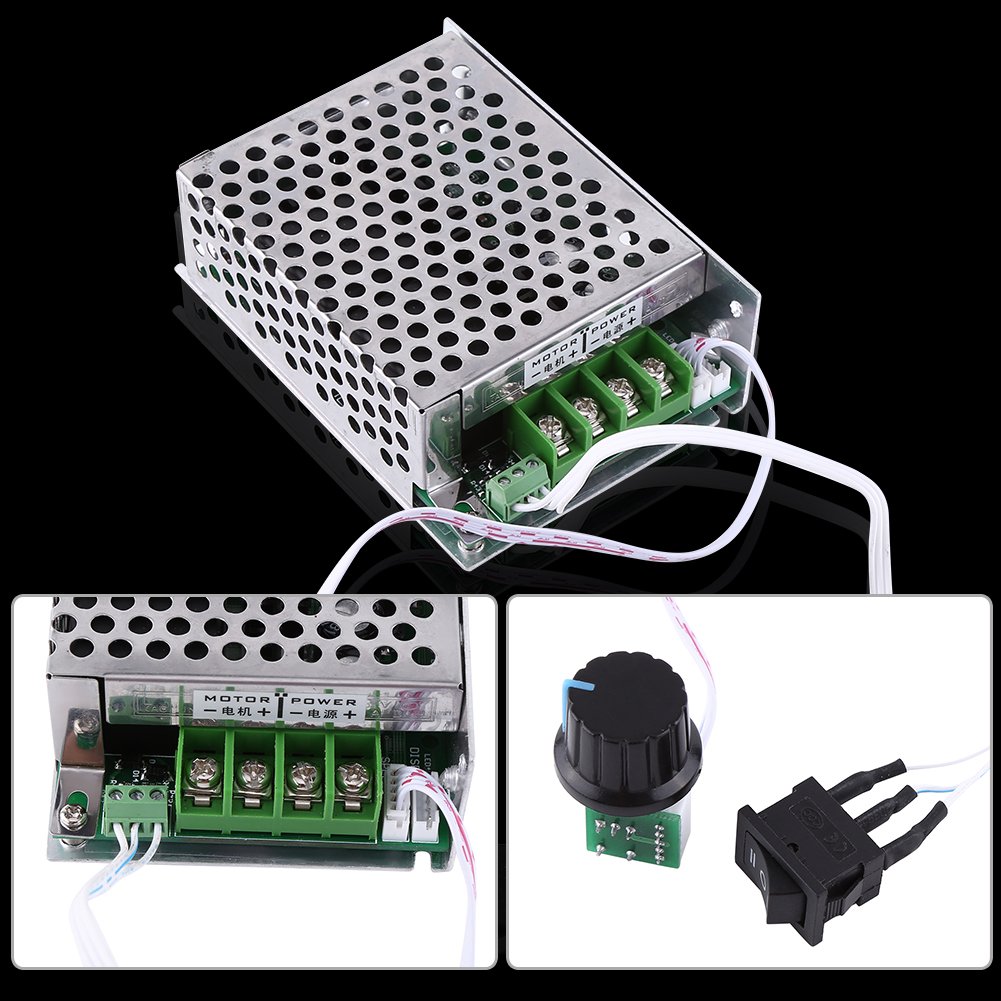
Controller and control components.

Multiple views of the product.
6. Maintenance
The CCM6Ds-B motor controller is designed for durability and requires minimal maintenance. However, regular checks can prolong its lifespan and ensure optimal performance.
- Cleaning: Keep the controller free from dust and debris. Use a soft, dry cloth for cleaning. Do not use liquid cleaners or solvents.
- Connection Checks: Periodically inspect all wiring connections to ensure they are secure and free from corrosion. Loose connections can lead to poor performance or damage.
- Ventilation: Ensure that the controller's ventilation holes are not obstructed to prevent overheating.
- Environmental Conditions: Operate the controller within its specified temperature and humidity ranges. Avoid exposure to extreme conditions.
7. Troubleshooting
If you encounter issues with your CCM6Ds-B motor controller, refer to the following common problems and solutions:
| Problem | Possible Cause | Solution |
|---|---|---|
| Motor does not run | No power supply Loose wiring connections Direction switch in 'Off' position Faulty motor | Check power source and connections Secure all wiring Set direction switch to 'Forward' or 'Reverse' Test motor independently |
| Motor runs intermittently | Loose connections Overheating Inadequate power supply | Check and secure all wiring Ensure proper ventilation; reduce load if necessary Verify power supply voltage and current capacity |
| Motor speed cannot be adjusted | Faulty potentiometer Incorrect wiring of potentiometer | Inspect potentiometer and its connections Verify potentiometer wiring according to diagram |
| Motor runs in wrong direction | Incorrect motor polarity Direction switch setting | Reverse motor wire connections at the 'MOTOR' terminals Adjust direction switch to desired setting |
8. Application Scenarios
The Walfront CCM6Ds-B motor controller is versatile and can be used in various applications requiring precise DC motor speed and direction control.

Examples of product application areas.
- Industrial Control Equipment
- Smart Home Devices
- Agricultural Breeding Equipment
- Brush Motor Applications
- Construction Machinery
- Medical Machines
9. Warranty and Support
For warranty information or technical support, please refer to the purchase platform or contact Walfront customer service directly. Keep your purchase receipt as proof of purchase.

