
CREWORKS DUC-1003-00
Creworks Ultrasonic Cleaner 3L User Manual
Model: DUC-1003-00
Important Safety Information
Please read all instructions carefully before operating the Creworks Ultrasonic Cleaner. Failure to follow these safety guidelines may result in electric shock, fire, or serious injury.
- Do not disassemble the unit. Refer all servicing to qualified personnel.
- Do not use the unit unattended. Always supervise operation.
- Always use sufficient fluid in the tank. Do not operate the unit dry.
- Unplug the unit before filling or draining the tank.
- Keep the unit away from water and moisture. Do not immerse the main unit in water.
- Ensure the power supply matches the unit's requirements.
- Do not touch the power plug with wet hands.
- Keep out of reach of children.
- Avoid using flammable, explosive, or corrosive cleaning solutions.
- Do not place items directly on the bottom of the tank; always use the provided basket.
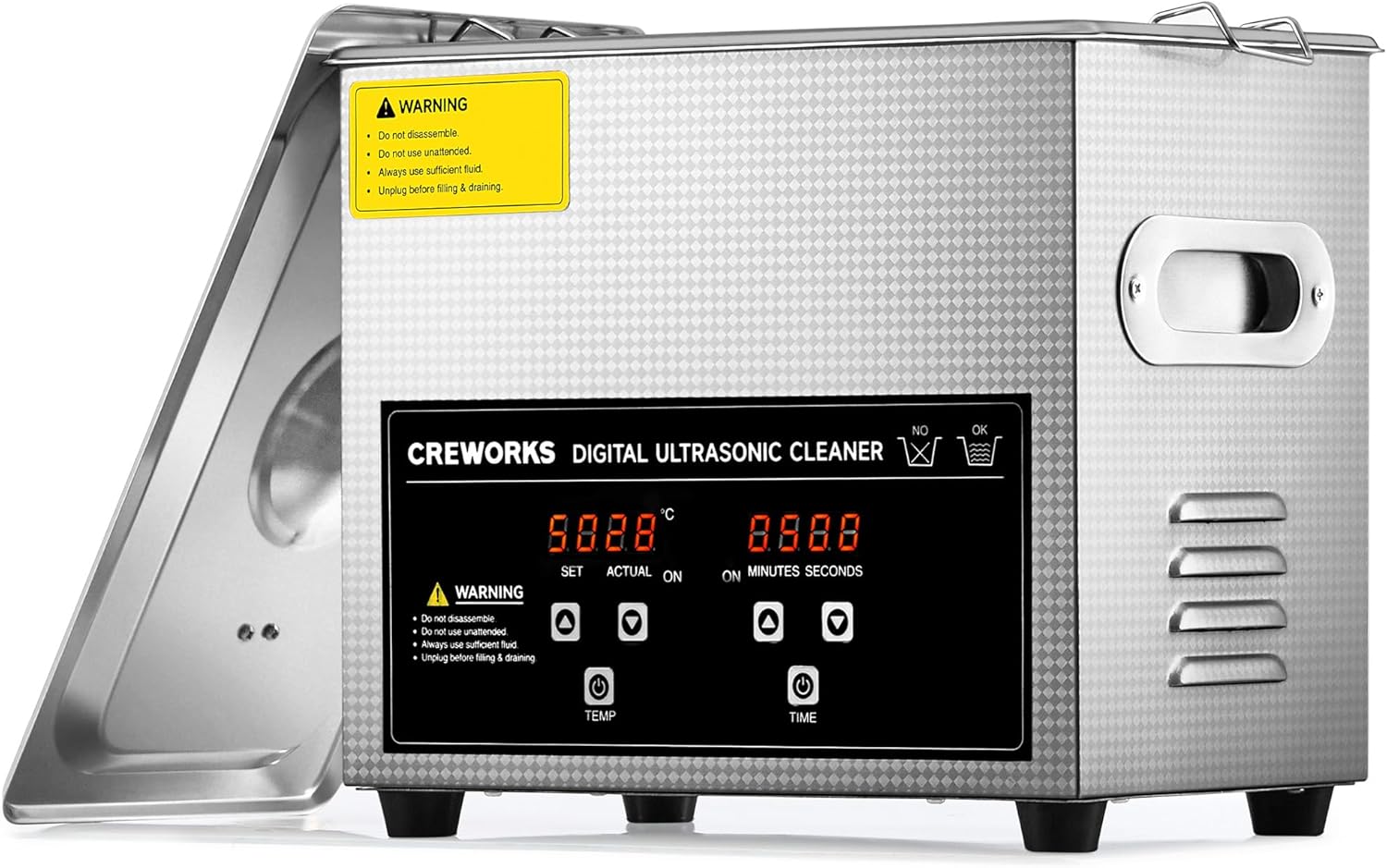
Figure 1: Front view of the Creworks Ultrasonic Cleaner, highlighting the warning labels on the unit.
Product Overview
The Creworks 3L Ultrasonic Cleaner is designed for efficient and thorough cleaning of various items using ultrasonic cavitation technology. It features a durable stainless steel tank, digital controls for temperature and time, and a built-in heater.
Key Features:
- Powerful Cleaning: 120W ultrasonic power and 100W heater for effective cleaning.
- Digital Control Panel: Intuitive interface for setting cleaning time (up to 30 minutes) and temperature (20-80°C).
- Versatile Application: Suitable for jewelry, glasses, makeup sponges, retainers, and more.
- Durable Construction: Built with food-grade 304 stainless steel tank and basket for long-lasting use.
- Convenient Design: Inset handles for easy transport and a built-in drain valve for simple cleanup.

Figure 2: The ultrasonic cleaner offers a solution to common cleaning challenges like harmful chemicals, endless scrubbing, scratched surfaces, tight corners, and time-consuming tasks.

Figure 3: Illustration of the powerful 40 kHz ultrasonic cavitation process: liquid molecules form, expand, and burst, effectively removing stains.
Setup and Installation
- Unpacking: Carefully remove the ultrasonic cleaner from its packaging. Inspect the unit for any signs of damage during transit. Retain the packaging for future storage or transport.
- Placement: Place the unit on a stable, flat, and dry surface. Ensure there is adequate ventilation around the unit and that it is not near any heat sources or flammable materials.
- Power Connection: Ensure the power switch is in the "OFF" position. Plug the power cord into a grounded electrical outlet that matches the voltage requirements specified on the unit's label.
- Filling the Tank:
- Ensure the unit is unplugged.
- Fill the stainless steel tank with an appropriate cleaning solution. The solution level should be between the "MIN" and "MAX" fill lines. Do not overfill or underfill.
- For general cleaning, tap water is often sufficient. For enhanced cleaning, a small amount of non-foaming, non-corrosive ultrasonic cleaning solution can be added.
- Inserting the Basket: Place the cleaning basket into the tank. Items to be cleaned should be placed inside this basket to prevent direct contact with the tank bottom and to facilitate easy removal.
Operating Instructions
Follow these steps to operate your Creworks Ultrasonic Cleaner:
- Power On: Plug in the unit and press the power button. The digital display will illuminate.
- Set Temperature (Optional):
- Press the TEMP button.
- Use the UP and DOWN arrows to set the desired temperature between 20°C and 80°C (68°F and 176°F).
- The heater will begin warming the solution. The "ACTUAL" temperature will be displayed.
- Set Cleaning Time:
- Press the TIME button.
- Use the UP and DOWN arrows to set the desired cleaning duration, from 1 to 30 minutes.
- Start Cleaning: Once temperature and time are set, the unit will automatically begin the ultrasonic cleaning process. The timer will count down.
- End of Cycle: The unit will automatically stop when the set time has elapsed. A beep may sound to indicate completion.
- Remove Items: Unplug the unit. Carefully remove the cleaning basket from the tank. Rinse the cleaned items under clean water and dry them thoroughly.
- Power Off: Press the power button to turn off the unit, then unplug it from the wall socket.

Figure 4: The intuitive control panel allows for easy adjustment of temperature and time settings for optimal cleaning.

Figure 5: Examples of the visible cleaning effect on various items after using the ultrasonic cleaner.

Figure 6: The compact and versatile design allows for thorough cleaning of intricate surfaces and tight corners on a wide range of items.
Maintenance and Care
Proper maintenance ensures the longevity and optimal performance of your ultrasonic cleaner.
- Draining the Tank: After each use, or when the cleaning solution becomes visibly dirty, unplug the unit and drain the tank using the built-in drain valve.
- Cleaning the Tank: Rinse the stainless steel tank with clean water. Wipe the interior and exterior of the unit with a soft, damp cloth. Do not use abrasive cleaners or immerse the main unit in water.
- Storage: Store the unit in a cool, dry place away from direct sunlight and extreme temperatures. Ensure the tank is completely dry before storage.
- Solution Replacement: Regularly replace the cleaning solution to maintain cleaning effectiveness and prevent residue buildup.

Figure 7: The tank is constructed from food-grade 304 stainless steel, ensuring durability, corrosion resistance, and a thickness of 0.04 inches for long-lasting use.
Troubleshooting
If you encounter issues with your Creworks Ultrasonic Cleaner, refer to the following common problems and solutions:
| Problem | Possible Cause | Solution |
|---|---|---|
| Unit does not power on. | No power supply; loose connection; power button not pressed. | Check power cord connection. Ensure outlet is functional. Press power button firmly. |
| No ultrasonic sound/action. | Insufficient water level; unit not started; faulty transducer. | Ensure water level is between MIN/MAX. Verify timer is set and unit is running. If problem persists, contact support. |
| Poor cleaning results. | Incorrect cleaning solution; insufficient cleaning time/temperature; heavily soiled items. | Use appropriate cleaning solution. Increase cleaning time or temperature. Pre-rinse heavily soiled items. |
| Unit is noisy. | Normal operation sound; items touching tank bottom. | A slight buzzing sound is normal during ultrasonic operation. Ensure items are in the basket and not touching the tank bottom. |
If the problem persists after trying these solutions, please contact Creworks customer support.
Specifications
| Feature | Detail |
|---|---|
| Model Number | DUC-1003-00 |
| Tank Volume | 3 Liters (0.8 Gallons) |
| Ultrasonic Power | 120W |
| Heating Power | 100W |
| Ultrasonic Frequency | 40 kHz |
| Temperature Range | 20-80°C (68-176°F) |
| Timer Range | 1-30 minutes |
| Tank Material | Food-Grade 304 Stainless Steel |
| Product Dimensions (L x W x H) | 34.29 x 19.3 x 30 cm (13.5 x 7.6 x 11.81 inches) |
| Item Weight | 3.36 kg |
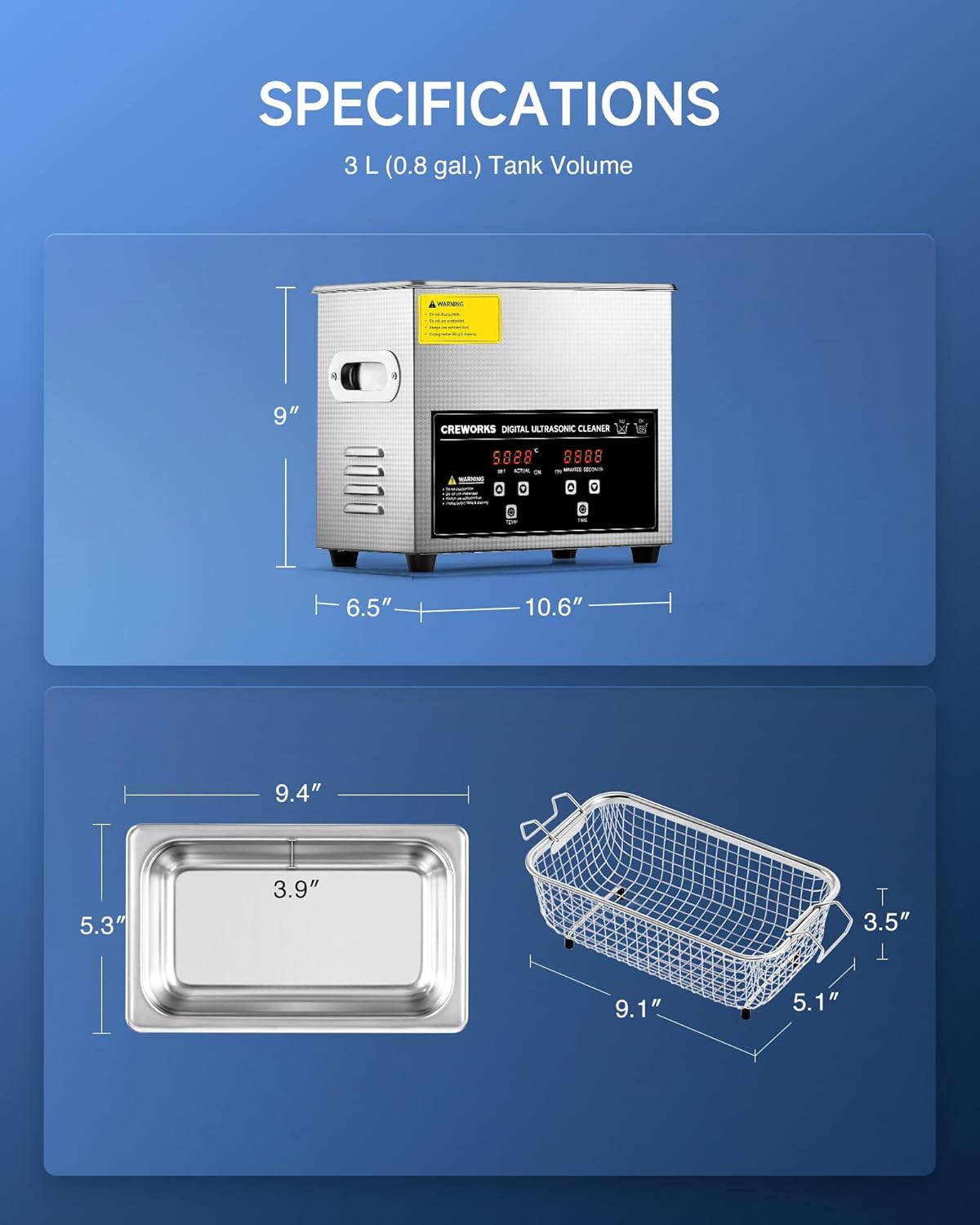
Figure 8: Detailed dimensions of the Creworks Ultrasonic Cleaner and its 3L tank and basket.

Figure 9: Feature comparison highlighting the superior specifications of the Creworks cleaner.
Warranty and Support
For warranty information, technical support, or service inquiries, please contact Creworks customer service. Keep your purchase receipt as proof of purchase.
Contact Information: Refer to the contact details provided with your product packaging or visit the official Creworks website.
Online Resources: For additional resources, FAQs, and product updates, please visit www.creworks.com (Note: This is a placeholder URL, please refer to actual product documentation for correct website.)
Related documentsDUC-1003-00


Ask a question about this manual
Ask about setup, troubleshooting, compatibility, parts, safety, or missing instructions. Manuals+ will review the question and use this page’s manual context to help answer it.