
1. Introduction and Overview
The Aircast Cryo Cuff Knee Cold Therapy Machine Cooler provides an integrated approach to cold therapy, delivering chilled water directly into an anatomically designed cryo/cuff. This non-motorized, gravity-fed system offers both cold and focal compression, aiming to provide maximum cryotherapy while minimizing the risk of tissue damage. It is designed for universal fit, allowing use on either the left or right leg.
This system is ideal for post-operative recovery, trauma, athletic training rooms, and home use, offering a convenient solution for managing swelling and discomfort.
2. Safety Information
- Consult your healthcare professional before using this device, especially if you have circulatory issues, diabetes, or nerve damage.
- Do not apply the cuff directly to broken skin.
- Monitor skin condition regularly during use to prevent frostbite or skin irritation.
- Do not over-tighten the cuff, as this may restrict circulation.
- Keep the cooler and its contents out of reach of children and pets.
3. Package Contents
Your Aircast Cryo Cuff Knee Cold Therapy System typically includes:
- Cryo/Cuff Cooler Unit
- Knee Cryo/Cuff Wrap
- Connecting Hose Assembly
- Insulating Disk for Cooler

Image: The complete Aircast Cryo Cuff Knee Cold Therapy System, showing the blue cooler, the knee cuff, and the connecting hose.
4. Setup Instructions
- Connect the Hose: Screw the connecting hose onto the outlet port at the bottom of the cooler unit. Ensure it is snug to prevent leaks.
- Prepare the Cooler: Remove the lid and the insulating disk from the cooler.
- Add Ice and Water: Fill the cooler with ice up to the indicated line. Then, add cold water up to the water fill line (H2O mark) inside the cooler.
- Replace Insulating Disk and Lid: Place the insulating disk back on top of the ice and water. Securely close the cooler lid, ensuring it is tightly screwed on.
- Apply the Cuff: Wrap the knee cryo/cuff around your knee. Use the attached straps to secure it firmly but comfortably with the Velcro fasteners. Ensure the cuff covers the desired area for therapy.
- Connect Cuff to Hose: Connect the free end of the hose to the connector on the knee cuff. It should click securely into place.

Image: A close-up view of the cooler's interior, showing the water fill line (H2O mark).
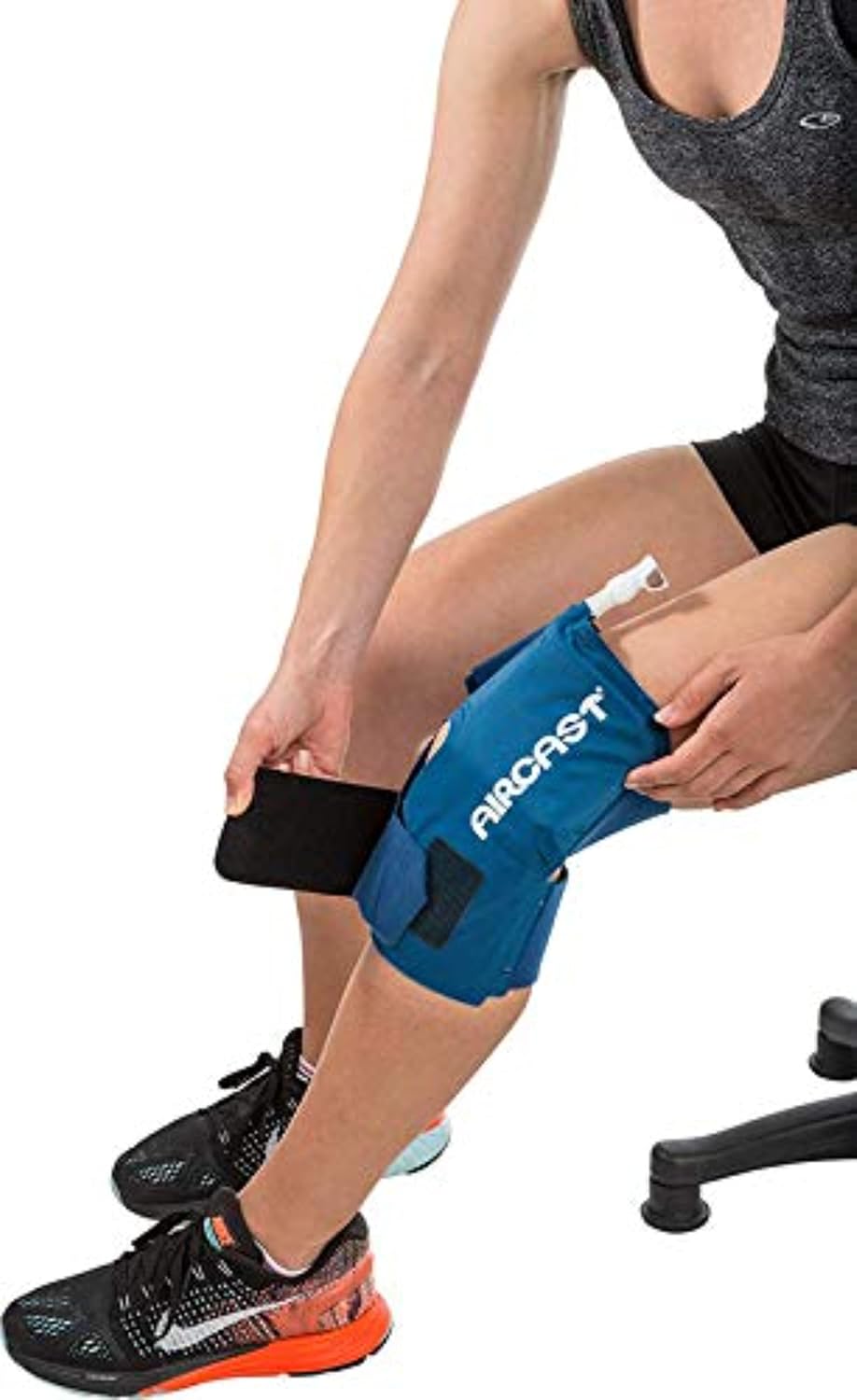
Image: A person adjusting the Velcro straps of the Aircast Cryo Cuff on their knee for a secure fit.

Image: A person connecting the blue hose to the white connector on the Aircast Cryo Cuff Knee.
Setup Video Tutorial:
Video: This video demonstrates the basic steps for setting up the Aircast Cryo Cuff system, including connecting the hose and preparing the cooler.
5. Operating Instructions
- Fill the Cuff: Open the air vent on the cooler lid. Elevate the cooler unit above the level of your knee. Gravity will cause the cold water to flow from the cooler into the cuff, filling it. Allow the cuff to fill completely.
- Begin Therapy: Once the cuff is filled, close the air vent on the cooler lid. You can then disconnect the hose from the cuff by pressing the white tab on the connector and pulling. The cuff will remain inflated and cold.
- Duration of Therapy: Follow your healthcare professional's recommendations for the duration and frequency of cold therapy sessions.
- Drain Water Back to Cooler: To return the water from the cuff to the cooler, reconnect the hose to the cuff. Place the cooler unit below the level of your knee. Open the air vent on the cooler lid. The water will drain back into the cooler. Once drained, close the air vent and disconnect the hose.

Image: A person using the Aircast Cryo Cuff system, with the cooler elevated above the knee cuff to allow water flow.
Operation Video Tutorial:
Video: A detailed tutorial on how to use the Aircast Cryo Cuff Cold Therapy Machine, covering filling the cuff, applying cold therapy, and draining the water.
6. Maintenance
Periodically clean the cuff, tube, and cooler. This can be done by adding a few ounces of liquid soap to hot water in the cooler, then circulating the soapy water through the system. Rinse thoroughly with clean water.
7. Troubleshooting
- Cuff not filling or draining: Ensure the cooler is properly elevated (for filling) or lowered (for draining) relative to the cuff. Check that the air vent on the cooler lid is open when filling or draining. Verify all hose connections are secure.
- Leaks: Check all connection points (hose to cooler, hose to cuff) for tightness. Ensure the cooler lid is securely closed.
- Insufficient cold: Ensure there is enough ice in the cooler and that the water level is correct.
8. Specifications
| Brand | AIRCAST |
| Model Number | SG_B075FF137V_US |
| UPC | 078928180418 |
| Product Dimensions | 4 x 4 x 1 inches; 3 Pounds |
| Use For | Knee |
| Age Range | Adult |
9. Warranty and Support
For warranty information or product support, please refer to the documentation included with your purchase or contact the manufacturer, Aircast, directly. Contact details can typically be found on the product packaging or the official Aircast website.


