
1. Introduction
This manual provides instructions for the safe and effective use of the Godox VING V860IIF TTL Li-Ion Flash Kit, designed for Fujifilm cameras. Please read this manual thoroughly before operation to ensure proper functionality and to prevent damage to the product or camera.
2. Product Overview
The Godox VING V860IIF is a high-performance TTL speedlight featuring a built-in 2.4GHz X wireless radio system and a powerful Li-Ion battery for extended use and fast recycle times.
2.1 Key Features
- Built-in 2.4GHz X wireless radio system.
- Compatible with Fujifilm ADI / P-TTL systems.
- Guide number: 197-feet at ISO 100 and 200mm.
- Zoom range: 20-200mm (14mm with wide panel).
- Flash head tilts from -7 to 90 degrees and rotates 180 degrees horizontally.
- Wireless master/slave TTL functionality.
- Recycle time: 1.5 seconds at full power.
- Supports High-speed sync, 1st and 2nd curtain sync.
- Powered by a rechargeable Li-Ion battery pack (VB-18).
2.2 Components
The Godox VING V860IIF kit includes the following items:
- Godox VING V860IIF TTL Li-Ion Flash Unit
- VB-18 Li-Ion Battery Pack
- VC-18 Battery Charger and Cable
- Mini Stand
- Protective Case

Figure 1: Godox VING V860IIF Flash unit with its VB-18 Li-Ion battery pack.
3. Setup
3.1 Battery Installation
- Locate the battery compartment on the side of the flash unit.
- Slide the battery compartment cover open.
- Insert the VB-18 Li-Ion battery pack, ensuring the contacts align correctly.
- Close the battery compartment cover until it clicks securely.

Figure 2: Side view of the flash with the VB-18 battery inserted.

Figure 3: Side view of the flash with the battery compartment open, showing the contacts.
3.2 Mounting the Flash to a Camera
- Ensure the flash is powered off.
- Slide the flash's mounting foot into the camera's hot shoe.
- Rotate the locking ring on the flash foot clockwise until it is securely tightened. Do not overtighten.
4. Operating Instructions
4.1 Power On/Off
To power on the flash, slide the ON/OFF switch to the 'ON' position. To power off, slide it to 'OFF'.

Figure 4: Front view of the flash control panel, showing buttons and display.
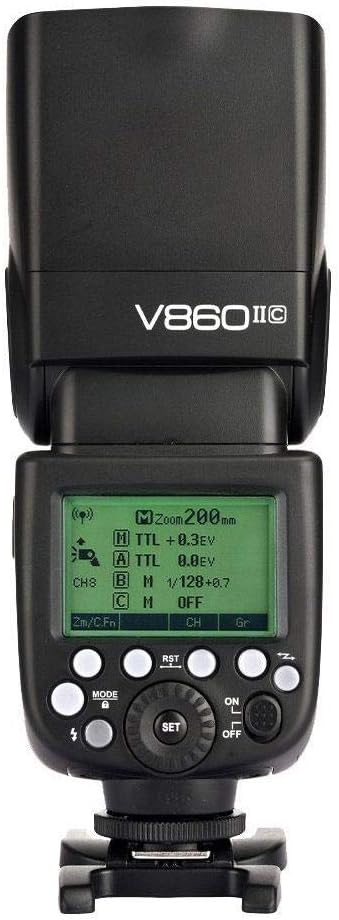
Figure 5: Front view of the flash control panel with a green display, indicating various settings.
4.2 Flash Modes
Press the MODE button to cycle through available flash modes: TTL, Manual (M), and Multi (Stroboscopic).
- TTL Mode: Automatic flash exposure control.
- Manual Mode (M): Allows manual adjustment of flash output from 1/1 to 1/128 power.
- Multi Mode: Fires a series of rapid flashes for stroboscopic effects.
4.3 Wireless Operation (2.4G X System)
The V860IIF features a built-in Godox 2.4G wireless X system, enabling master and slave functionality for off-camera flash control. This system offers stable output and a transmission distance of up to 100 meters.

Figure 6: Illustration of the V860IIF operating as a master unit triggering other slave flashes, and as a slave unit being triggered by a master.

Figure 7: Multiple V860IIF flash units demonstrating the 2.4G wireless X system, alongside a wireless trigger.
4.4 Advanced Functions
The flash supports various advanced functions:
- High-Speed Sync (HSS): Allows flash synchronization at shutter speeds faster than the camera's native sync speed.
- First Curtain Sync: Flash fires immediately after the shutter opens.
- Second Curtain Sync: Flash fires just before the shutter closes, creating a light trail behind moving subjects.
- Flash Exposure Compensation (FEC): Adjusts the flash output relative to the camera's metered exposure.
- Modeling Flash: Fires a continuous flash to preview lighting effects.

Figure 8: Visual examples demonstrating the effects of High-Speed Sync, Front Curtain Sync, Rear Curtain Sync, Multi Flash, and Flash Exposure Compensation.
5. Maintenance
5.1 Battery Charging
Use the provided VC-18 Battery Charger and cable to recharge the VB-18 Li-Ion battery pack. Connect the charger to a power source and insert the battery. The charger's indicator light will show charging status.
5.2 Cleaning
Wipe the flash unit with a soft, dry cloth. For stubborn dirt, use a slightly damp cloth and then dry thoroughly. Avoid using solvents or abrasive cleaners.
5.3 Storage
When not in use for extended periods, remove the battery from the flash unit. Store the flash in its protective case in a cool, dry place, away from direct sunlight and extreme temperatures.
6. Troubleshooting
- Flash not firing: Check if the flash is powered on, battery is charged and correctly inserted, and the flash is securely mounted to the camera's hot shoe. Verify camera and flash settings are compatible.
- Slow recycle time: Ensure the battery is fully charged. Recycle time increases with higher power output settings.
- Inconsistent exposure: Check flash exposure compensation settings on both the flash and camera. Ensure the flash head is correctly aimed and not obstructed.
- Wireless communication issues: Verify both master and slave units are set to the same channel and group. Ensure they are within the effective range and there are no significant obstructions.
7. Specifications
| Brand | GODOX |
| Model Number | 4332083373 |
| Compatible Mountings | Fujifilm |
| Product Dimensions | 9.3 x 8.1 x 3.1 inches |
| Item Weight | 1.21 pounds |
| Batteries | 1 Lithium Ion battery required (included) |
| Battery Life | 1 year (estimated) |
| Flash Sync Speed | 1/250s (standard) |
| Camera Flash Type | Slave |
8. Warranty and Support
This product comes with a Limited 1-Year Warranty. For warranty claims or technical support, please refer to the contact information provided with your purchase documentation or visit the official Godox website.