
1. Introduction
The Godox VC-18 charger is specifically designed for recharging the Godox VB18 Li-ion battery packs used with Godox VING V860II series camera flashes. This charger provides a reliable and efficient way to power your flash units. It supports both AC power and car charging for versatile use.
Important Compatibility Note: This charger is compatible with Godox VING V860II-C, V860II-N, V860II-S, V860II-O, and V860II-F series flashes. It is not compatible with V860III series or V850III series batteries and chargers (e.g., VC26 charger).
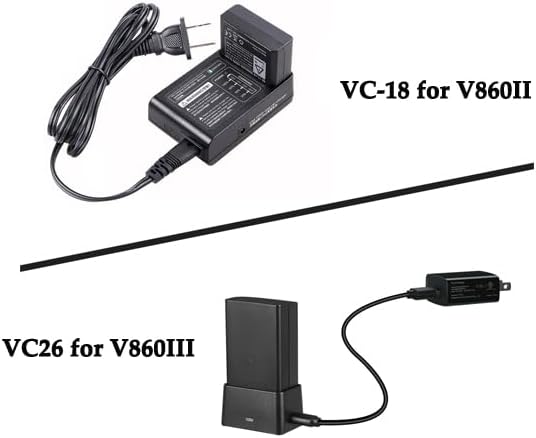
Image 1.1: Comparison showing the VC-18 for V860II and VC26 for V860III, highlighting compatibility differences.
2. Safety Information
- Read this instruction manual thoroughly before using the charger for the first time.
- Use only the supplied charger with specified battery packs. Failure to do so will invalidate the charger warranty and may cause damage.
- Do not expose the charger to rain or moisture.
- Do not disassemble or modify the charger.
- Keep out of reach of children.
- Unplug the charger from the power source when not in use or before cleaning.
3. Product Overview
The Godox VC-18 charger is a compact unit designed for convenience and portability. It features a dedicated slot for the VB18 Li-ion battery and clear charging indicators.

Image 3.1: The Godox VC-18 charger, power cable, and retail box.
Components:
- Battery Slot: For inserting the VB18 Li-ion battery.
- Charging Indicators (LEDs): Display charging status (20%, 50%, 80%, 100%).
- Errors Indicator (LED): Illuminates if a charging error occurs.
- AC Power Input: For connecting the AC power cable.
- Car Charger Input: For connecting a VING-only car charger cable (sold separately).

Image 3.2: Detailed view of the battery slot and charging indicators on the VC-18 charger.

Image 3.3: Side view of the VC-18 charger, indicating the input for a VING-only car charger.
4. Setup
4.1 Connecting to AC Power:
- Insert the AC power cable into the AC input port on the charger.
- Plug the other end of the AC power cable into a standard wall outlet (100-240V, 50/60Hz).
- The charger is now ready for use.

Image 4.1: The VC-18 charger with the AC power cable connected.
4.2 Connecting to Car Power (Optional):
- Obtain a compatible VING-only car charger cable (not included with standard package).
- Insert the car charger cable into the dedicated car charger input port on the side of the VC-18 charger.
- Plug the other end of the car charger cable into your vehicle's 12V accessory outlet.
5. Operating Instructions
5.1 Charging a VB18 Li-ion Battery:
- Ensure the VC-18 charger is connected to a power source (AC or car power).
- Carefully insert the Godox VB18 Li-ion battery into the battery slot on the charger, ensuring proper orientation.
- The charging indicator LEDs will illuminate to show the current charge level.
- Charging typically takes approximately 2.5 hours for a fully depleted battery.
- Once all four charging indicator LEDs (20%, 50%, 80%, 100%) are steadily lit, the battery is fully charged.
- Remove the battery from the charger once charging is complete.

Image 5.1: The VC-18 charger with a VB18 battery inserted, showing the charging progress indicators.
5.2 Charging Indicators:
- Flashing LEDs: Indicate active charging. The LEDs will flash sequentially to show progress.
- Solid LEDs: Indicate the corresponding charge level has been reached. When all four LEDs are solid, the battery is fully charged.
- 'ERRORS' LED: If this LED flashes, it indicates a charging error. Refer to the troubleshooting section.
6. Maintenance
- Keep the charger clean and free from dust. Use a soft, dry cloth for cleaning.
- Avoid dropping the charger or subjecting it to strong impacts.
- Store the charger in a cool, dry place when not in use.
- Do not use harsh chemicals or abrasive cleaners on the charger.
7. Troubleshooting
| Problem | Possible Cause | Solution |
|---|---|---|
| Charger not powering on. | No power supply; loose connection. | Check if the power cable is securely connected to both the charger and the wall outlet. Try a different outlet. |
| Battery not charging / 'ERRORS' LED flashing. | Battery not inserted correctly; incompatible battery; faulty battery; charger malfunction. | Ensure the VB18 battery is inserted correctly. Verify the battery is a compatible VB18 model. Try another compatible battery if available. If the issue persists, the battery or charger may be faulty. |
| Slow charging. | Power source issue; battery condition. | Ensure the power source is stable. Battery performance can degrade over time. |
8. Specifications
| Feature | Detail |
|---|---|
| Model | VC-18 |
| Input | AC 100-240V, 50/60Hz, 0.3A |
| Output | 12.6V / 0.85A |
| Compatible Battery | Godox VB18 Li-ion Battery Pack (for VING V860II series) |
| Charging Time | Approx. 2.5 hours (for AV charging) |
| Dimensions | Not specified in provided data, typically compact. |
| Weight | 170 Grams |
9. Warranty and Support
For warranty information, technical support, or service inquiries, please refer to the warranty card included with your product or visit the official Godox website. Keep your purchase receipt as proof of purchase.
Official Godox Website: http://www.godox.com/CN/

