
1. Introduction
This manual provides comprehensive instructions for the safe and efficient use of your Epson EP-306 A4 Inkjet Printer. Please read this manual thoroughly before operating the printer and keep it for future reference. The Epson EP-306 is a single-function A4 inkjet printer designed for high-quality document and photo printing, featuring both wired and wireless LAN connectivity and a 6-color dye ink system.
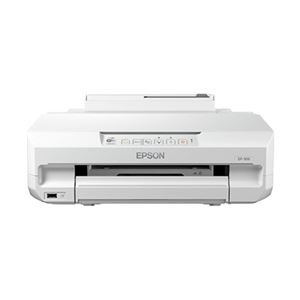
Figure 1: Front view of the Epson EP-306 A4 Inkjet Printer.
2. Safety Information
Observe the following safety precautions to prevent injury or damage to the printer.
- Always place the printer on a stable, level surface.
- Do not block ventilation openings.
- Use only the power cord supplied with the printer.
- Do not disassemble or attempt to repair the printer yourself. Refer to qualified service personnel.
- Keep ink cartridges out of reach of children.
- Avoid spilling liquids on the printer.
3. Package Contents
Verify that all items are included in the package:
- Epson EP-306 Printer
- Set of 6 Ink Cartridges (Black, Cyan, Magenta, Yellow, Light Cyan, Light Magenta)
- Power Cable
- Setup Guide
- Software CD-ROM (Drivers, Utilities)
4. Setup
4.1 Unpacking
- Remove the printer from its packaging.
- Remove all protective tapes and packing materials from the printer.
4.2 Power Connection
- Connect the power cable to the printer's power input.
- Plug the other end of the power cable into a grounded electrical outlet.
- Press the power button to turn on the printer.
4.3 Ink Cartridge Installation
- Open the printer cover.
- Wait for the print head to move to the replacement position.
- Unpack each ink cartridge and remove the yellow tape.
- Insert each cartridge into its corresponding slot until it clicks into place.
- Close the printer cover. The printer will begin initializing the ink system.
4.4 Paper Loading
- Open the paper support and pull out the extension.
- Slide the edge guides to their outermost positions.
- Load paper into the sheet feeder, print side up.
- Slide the edge guides against the paper stack.
4.5 Software Installation
- Insert the Software CD-ROM into your computer's CD/DVD drive.
- Follow the on-screen instructions to install the printer drivers and utility software.
- If you do not have a CD/DVD drive, download the latest drivers from the official Epson support website.
4.6 Network Connection (Wired/Wireless LAN)
The EP-306 supports both wired (Ethernet) and wireless (Wi-Fi) connections.
4.6.1 Wireless LAN Setup
- Use the printer's control panel to select Wi-Fi setup.
- Choose your Wi-Fi network (SSID) from the list.
- Enter the network password (WPA/WPA2 key) if prompted.
- Alternatively, use WPS (Wi-Fi Protected Setup) by pressing the WPS button on your router and then on the printer within two minutes.
4.6.2 Wired LAN Setup
- Connect an Ethernet cable from your router or network hub to the printer's LAN port.
- The printer will automatically obtain an IP address.
5. Operating Instructions
5.1 Basic Printing from a Computer
- Open the document or image you wish to print on your computer.
- Select Print from the application's File menu.
- Choose Epson EP-306 as your printer.
- Adjust print settings such as paper size, media type, and print quality as needed.
- Click Print.
5.2 Printing from a Mobile Device (Epson iPrint)
- Download and install the Epson iPrint app from your device's app store.
- Ensure your mobile device is connected to the same Wi-Fi network as the printer.
- Open the Epson iPrint app and select your EP-306 printer.
- Choose the document or photo you want to print from within the app.
- Adjust settings and tap Print.
6. Maintenance
6.1 Ink Cartridge Replacement
Replace ink cartridges when the ink level indicator on the control panel or software shows a cartridge is empty.
- Ensure the printer is turned on.
- Open the printer cover.
- Press the empty ink cartridge to release it, then lift it out.
- Unpack a new cartridge, remove the yellow tape, and insert it into the correct slot until it clicks.
- Close the printer cover.
6.2 Print Head Cleaning
Perform print head cleaning if print quality declines, such as missing lines or incorrect colors.
- Access the printer utility software on your computer.
- Select Head Cleaning and follow the on-screen instructions.
- Alternatively, use the printer's control panel to initiate head cleaning. Refer to the on-screen menu.
6.3 Nozzle Check
Perform a nozzle check to determine if the print head nozzles are clogged.
- Access the printer utility software on your computer.
- Select Nozzle Check and print the pattern.
- If the pattern has gaps, perform a print head cleaning.
7. Troubleshooting
7.1 Printer Not Responding
- Check if the printer is powered on.
- Verify that the power cable is securely connected.
- Ensure the USB cable (if used) or network connection is secure.
- Restart both the printer and your computer/mobile device.
7.2 Poor Print Quality
- Perform a nozzle check and then a print head cleaning if necessary.
- Check ink levels and replace any empty cartridges.
- Ensure you are using the correct paper type and print settings for your document.
7.3 Paper Jams
- Turn off the printer and unplug the power cable.
- Carefully remove any jammed paper from the input tray, output tray, or inside the printer.
- Ensure paper is loaded correctly and not exceeding the maximum capacity.
8. Specifications
| Feature | Specification |
|---|---|
| Model Name | EP-306 |
| Printing Technology | Inkjet |
| Printer Output | Color |
| Connectivity Technology | Wi-Fi |
| Features | Single Function Print |
| Product Dimensions (W x D x H) | 42 x 47 x 22 cm |
| Product Weight | 6.27 kg |
| Compatible OS | Windows, Mac OS X |
| Max Resolution | 5760dpi x 1440dpi |
| Ink Type | Dye Ink (6 colors: Black, Cyan, Magenta, Yellow, Light Cyan, Light Magenta) |
| Max Print Size | A4 |
9. Warranty and Support
For warranty information, please refer to the warranty card included with your product or visit the official Epson website. Technical support and driver downloads are also available on the Epson support website.
Epson Official Website: www.epson.com
For service or repairs, contact your local authorized Epson service center.


