1. Introduction
The SunSun JDP-10000 is a controllable DC variable water pump designed for use in both marine and freshwater environments, including aquariums and ponds. This pump offers adjustable flow rates and can be operated either submerged or externally, providing versatility for various circulation needs. Its intelligent controller allows for precise adjustments and includes a convenient pause mode for feeding.
2. Safety Instructions
- Always disconnect the power supply before performing any maintenance, installation, or cleaning.
- Ensure the pump is fully submerged in water when used in submersible mode.
- When operating the pump externally, it is crucial to pour water into the pump before starting it to prevent dry running and damage.
- Do not operate the pump if the power cord or plug is damaged.
- Keep the controller and power adapter away from water to prevent electrical hazards.
- This appliance is not intended for use by persons (including children) with reduced physical, sensory or mental capabilities, or lack of experience and knowledge, unless they have been given supervision or instruction concerning use of the appliance by a person responsible for their safety.
3. Package Contents
Please check the package to ensure all components are present and undamaged:

This image displays the main components of the JDP-10000 pump system, including the pump (1), various outlet adapters (2), the intelligent controller (3), and the power adapter (4).
- JDP-10000 Water Pump Unit
- Intelligent Controller
- Power Adapter
- Various Outlet Adapters/Hose Connectors
4. Setup and Installation
Follow these steps to properly install your SunSun JDP-10000 water pump:

This diagram illustrates how to connect the various parts of the JDP-10000 pump system. The controller connects to the pump via a three-wire connection, and the adapter connector powers the system.
- Connect the Pump to the Controller: Securely attach the three-wire connection cable from the pump to the corresponding port on the intelligent controller.
- Connect the Controller to the Power Adapter: Plug the controller's power input cable into the adapter connector.
- Attach Outlet Adapters: Select the appropriate hose adapter for your plumbing setup and securely attach it to the pump's outlet.
- Position the Pump:
- For Submersible Use: Place the pump entirely underwater in your aquarium or pond.
- For External Use: Position the pump outside the water source. Before powering on, ensure the pump housing is filled with water to prevent dry running.
- Connect to Power: Plug the power adapter into a suitable electrical outlet.
5. Operating Instructions
The JDP-10000 pump features an intelligent control panel for adjusting flow and utilizing special modes.

The intelligent controller features two settings for pause time (15 minutes and 60 minutes) and five stalls to adjust the flow rate of the pump.
5.1. Adjusting Flow Rate
The controller allows you to adjust the pump's flow rate through 5 distinct stalls. Use the '+' and '-' buttons on the controller to increase or decrease the flow intensity. The current stall setting is indicated by the illuminated numbers (1-5) on the control panel.
5.2. Pause/Feed Mode
The pump includes a convenient pause mode, ideal for feeding fish or performing short maintenance tasks without fully shutting down the pump. Press the 'Pause' button (often indicated by a '||' symbol) to activate this mode. You can typically select between a 15-minute or 60-minute pause duration. The pump will automatically resume operation after the selected time has elapsed.
5.3. Memory Function
The intelligent controller is equipped with a memory function. This feature ensures that the pump will restart with the last used settings (flow rate and mode) after any power interruption or manual restart, eliminating the need to reconfigure settings each time.
6. Maintenance
Regular maintenance ensures optimal performance and longevity of your pump.
The top image highlights the pump's removable shell, designed for effective filtration and to prevent small fish from entering. The bottom image shows the shock absorption supports on the pump's base, which help to reduce shaking and noise during operation.
- Disconnect Power: Always unplug the pump from the power source before any maintenance.
- Clean the Removable Shell: The pump features a removable shell designed for effective filtration and to prevent debris or small aquatic life from entering the impeller. Regularly remove and clean this shell to ensure unrestricted water flow.
- Inspect Impeller: Carefully remove the impeller cover and inspect the impeller for any debris, blockages, or wear. Clean the impeller and its housing with a soft brush and clean water.
- Check Connections: Ensure all hose connections are secure and free of leaks.
- Clean Pump Housing: Wipe down the exterior of the pump with a damp cloth.
- Reassemble: After cleaning, reassemble all components securely and reconnect the pump to power.
7. Troubleshooting
If you encounter issues with your JDP-10000 pump, try the following steps:
- Pump Not Starting:
- Check if the power adapter is securely plugged into the wall outlet and the controller.
- Ensure the controller is properly connected to the pump.
- Verify there is power to the outlet.
- Reduced Flow Rate:
- Disconnect power and check the pump's intake and impeller for blockages (e.g., debris, algae).
- Ensure the outlet hose is not kinked or obstructed.
- Check the controller's flow rate setting; increase if necessary.
- Unusual Noise/Vibration:
- Disconnect power and inspect the impeller for foreign objects or damage.
- Ensure the pump is placed on a stable surface. The pump includes shock absorption supports to help reduce noise and shaking.
- If used externally, ensure the pump is primed with water.
- Controller Not Responding:
- Disconnect and reconnect the power to reset the controller.
- Ensure the controller is dry and free from water damage.
If problems persist after following these troubleshooting steps, please contact SunSun customer support or your retailer for further assistance.
8. Specifications
Detailed specifications for the SunSun JDP-10000 pump:

This table provides detailed performance specifications for the JDP-10000 model, including power consumption, maximum head, flow rate in GPH, compatible hose adapter sizes, and overall product weight across its five adjustable stall settings.
| Specification | Detail |
|---|---|
| Model Number | JDP-10000 |
| Manufacturer | SUNSUN |
| Voltage | 24 Volts |
| Material | Plastic, Stainless Steel |
| Style | Submersible |
| Product Dimensions | 19.51 x 9.5 x 12.5 cm |
| Item Weight | 2.68 kg (5.91 Pounds) |
| UPC | 843186100320 |
8.1. Hose Adapter Sizes

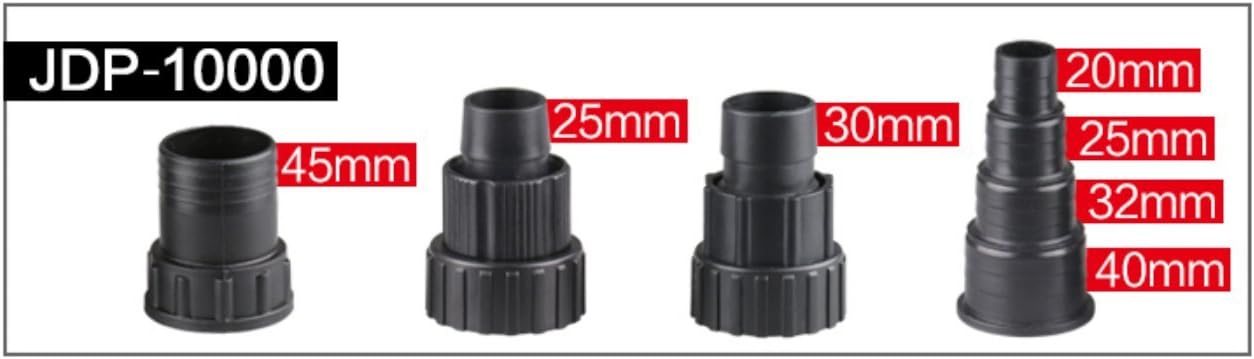
This image illustrates the different hose adapter sizes compatible with the JDP-10000 pump, ranging from 20mm to 45mm, to accommodate various plumbing setups.
The JDP-10000 pump is compatible with various hose adapter sizes, including 20mm, 25mm, 30mm, 32mm, 40mm, and 45mm, allowing for flexible installation with different tubing diameters.
9. Warranty and Support
For warranty information or technical support, please refer to the documentation provided with your purchase or contact the retailer where the product was acquired. You may also visit the official SunSun website for customer service contact details.


