
1. Product Overview
The Skullcandy Hesh 3 Wireless Over-Ear Headphones offer a premium audio experience with the convenience of Bluetooth wireless technology. Designed for extended listening, they feature up to 22 hours of battery life and Rapid Charge technology, providing 4 hours of playback from just a 10-minute charge. The headphones are built with high-end audio drivers and quality materials, ensuring a comfortable and immersive listening experience. Their collapsible design makes them portable and easy to store.

Figure 1: Skullcandy Hesh 3 Wireless Over-Ear Headphones (Gray)
2. What's in the Box
Your Skullcandy Hesh 3 Wireless Over-Ear Headphones package includes the following items:
- Skullcandy Hesh 3 Headphones
- Removable Aux Cable
- Micro USB to USB Charging Cable
3. Setup
3.1 Charging Your Headphones
Before initial use, fully charge your Hesh 3 headphones. Connect the Micro USB end of the charging cable to the headphone's charging port and the USB end to a compatible USB power source (e.g., wall adapter, computer USB port). The LED indicator will show charging status. A full charge provides up to 22 hours of playback. The Rapid Charge feature allows for 4 hours of listening with just a 10-minute charge.
3.2 Powering On/Off
- To Power On: Press and hold the main function button until the LED indicator lights up.
- To Power Off: Press and hold the main function button until the LED indicator turns off.
4. Operating Instructions
4.1 Bluetooth Pairing
- Ensure your Hesh 3 headphones are powered off.
- Press and hold the main function button for 5 seconds until the LED flashes blue and red, indicating pairing mode.
- On your device (smartphone, tablet, computer), enable Bluetooth and search for available devices.
- Select "Hesh 3" from the list of available devices.
- Once connected, the LED on the headphones will turn solid blue.
4.2 Controls
The Hesh 3 headphones feature integrated controls for easy management of your audio and calls:
- Volume Up: Press the '+' button.
- Volume Down: Press the '-' button.
- Play/Pause: Press the main function button once.
- Next Track: Press the main function button twice.
- Previous Track: Press the main function button three times.
- Answer/End Call: Press the main function button once during an incoming call or active call.
- Reject Call: Press and hold the main function button for 2 seconds during an incoming call.
- Activate Voice Assistant: Press the main function button twice when not on a call.
4.3 Wired Listening
You can use the included removable Aux Cable to connect your Hesh 3 headphones to devices without Bluetooth capability or when the battery is depleted. Simply plug one end into the headphone's audio jack and the other into your device's audio output.
5. Key Features
- Bluetooth wireless technology for seamless connectivity.
- Rapid Charge: 10 minutes of charging provides 4 hours of listening; 22 hours of total battery life.
- Noise isolating fit for an immersive audio experience.
- Integrated microphone, call, track, and volume control for convenience.
- Collapsible design for easy portability and storage.
6. Specifications
| Model Name | Hesh 3 |
| Connectivity Technology | Bluetooth |
| Battery Life | Up to 22 Hours |
| Rapid Charge | 10 minutes = 4 hours playback |
| Audio Driver Type | Dynamic Driver |
| Frequency Range | 20Hz - 20KHz |
| Impedance | 32 Ohm |
| Noise Control | Sound Isolation |
| Item Weight | 8 ounces |
| Product Dimensions | 1.69 x 7.32 x 7.79 inches |
7. Maintenance
To ensure the longevity and optimal performance of your Skullcandy Hesh 3 headphones, follow these maintenance guidelines:
- Cleaning: Use a soft, dry cloth to clean the earcups and headband. Avoid using harsh chemicals or abrasive materials.
- Storage: When not in use, store the headphones in a cool, dry place. Utilize their collapsible design to store them compactly and protect them from damage.
- Battery Care: Avoid fully depleting the battery frequently. For long-term storage, charge the headphones to about 50% to preserve battery health.
- Avoid Extreme Conditions: Do not expose the headphones to extreme temperatures, humidity, or direct sunlight.
- Handle with Care: While durable, avoid excessive force when adjusting the headband or folding the headphones to prevent damage to the plastic components.
8. Troubleshooting
| Problem | Solution |
|---|---|
| Headphones not powering on. | Ensure the headphones are charged. Connect them to a power source using the provided Micro USB cable. |
| Cannot pair via Bluetooth. |
|
| No sound or low volume. |
|
| Poor sound quality. |
|
9. Warranty & Support
For detailed warranty information and customer support, please refer to the official Skullcandy resources:
- Official User Guide (PDF): Download Here
- Warranty Information (PDF): Download Here (Note: This document appears to be the same as the user guide, often containing warranty details.)
- Skullcandy Official Website: Visit www.skullcandy.com for the latest support, FAQs, and contact information.
10. Product Media
10.1 Product Images

Figure 2: Top view of the Hesh 3 headphones, highlighting the adjustable headband.

Figure 3: Front view of the Hesh 3 headphones, showcasing the earcup design.
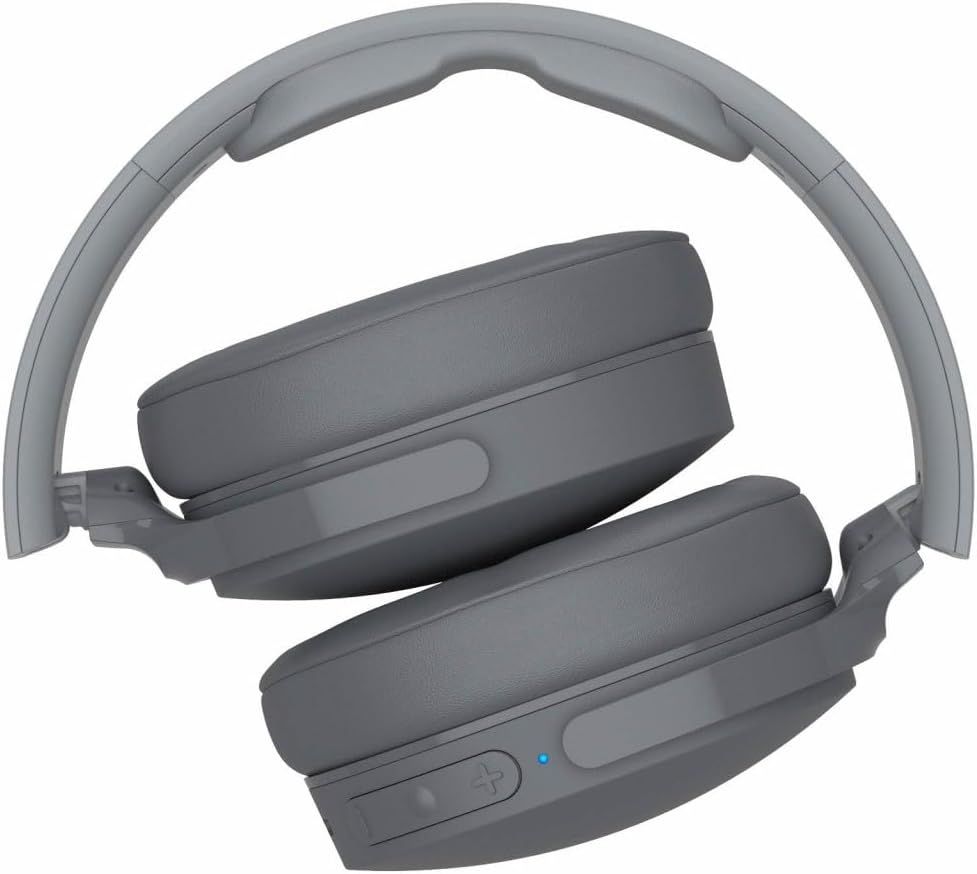
Figure 4: Hesh 3 headphones in their folded position, demonstrating portability.

Figure 5: User enjoying music with Hesh 3 headphones, illustrating comfortable fit during use.
10.2 Official Product Video
Video 1: Official product video for Skullcandy Hesh 3 Wireless Over-Ear Headphones, showcasing key features and design. This video is provided by the seller.
Duration: 0:45


