1. Important Safeguards
When using electrical appliances, basic safety precautions should always be followed to reduce the risk of fire, electric shock, and injury to persons. Read all instructions carefully before operating this appliance.
- Read all instructions before operating the appliance.
- Do not touch hot surfaces. Use handles or knobs.
- To protect against electrical shock, do not immerse cord, plugs, or the appliance in water or other liquid.
- Close supervision is necessary when any appliance is used by or near children.
- Unplug from outlet when not in use and before cleaning. Allow to cool before putting on or taking off parts, and before cleaning the appliance.
- Do not operate any appliance with a damaged cord or plug, or after the appliance malfunctions or has been damaged in any manner.
- The use of accessory attachments not recommended by the appliance manufacturer may cause injuries.
- Do not use outdoors.
- Do not let cord hang over edge of table or counter, or touch hot surfaces.
- Do not place on or near a hot gas or electric burner, or in a heated oven.
- Extreme caution must be used when moving an appliance containing hot oil or other hot liquids.
- Always attach plug to appliance first, then plug cord into the wall outlet. To disconnect, turn any control to 'off', then remove plug from wall outlet.
- Do not use appliance for other than intended use.
2. Product Overview
Features
- Non-Stick Coating: Ensures easy release of waffles and simplifies cleaning.
- Integrated Timer: Allows for precise cooking control.
- Adjustable Temperature Control: For customized browning levels.
- Durable Stainless Steel Construction: Provides longevity and a professional appearance.
- PTFE/PFAS-free Material: For a safer cooking surface.
Components
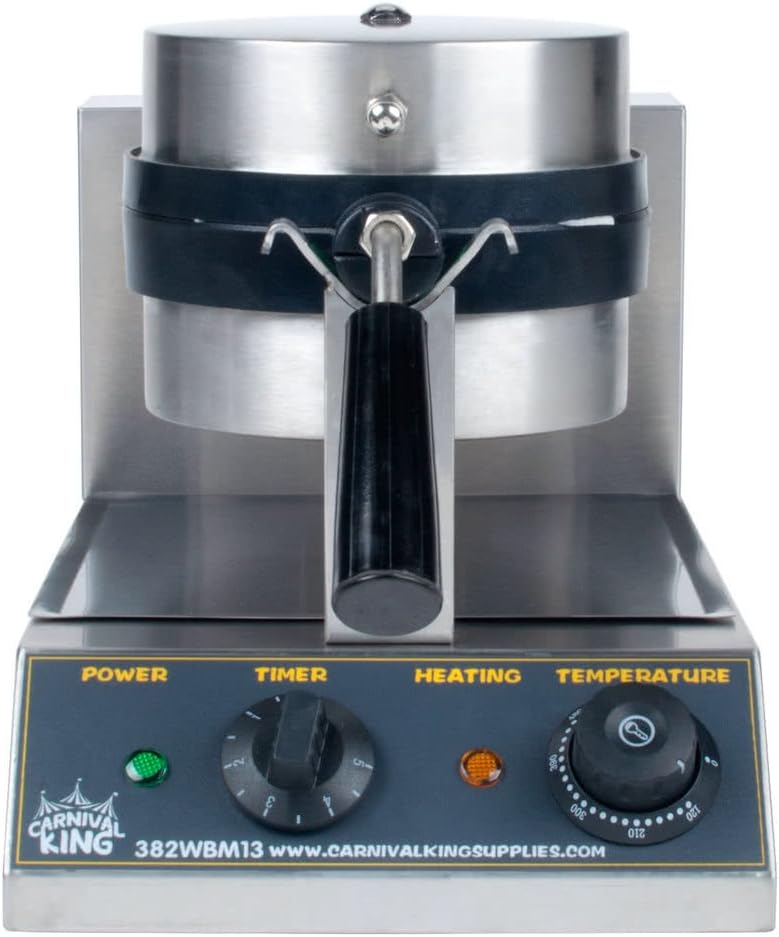
Figure 1: Front View. This image displays the front of the Tabletop King WBM13 Belgian Waffle Maker. Visible components include the main waffle iron unit, the handle for opening and closing, and the control panel at the base. The control panel features indicator lights for 'POWER' (green) and 'HEATING' (orange), a 'TIMER' knob with settings from 0 to 5 minutes, and a 'TEMPERATURE' dial ranging from approximately 100°F to 220°F.

Figure 2: Side View. This image shows the side profile of the Tabletop King WBM13 Belgian Waffle Maker. It highlights the robust stainless steel casing, the rotating waffle plates, and the sturdy base. The design allows for even heat distribution and easy rotation for consistent waffle cooking.
3. Setup
Unpacking
- Carefully remove the waffle maker from its packaging.
- Remove all packing materials, including any protective films or inserts.
- Inspect the appliance for any signs of damage. Do not operate if damaged.
Initial Cleaning
- Before first use, wipe the exterior of the waffle maker with a damp cloth.
- Wipe the non-stick cooking plates with a damp cloth or sponge. Do not use abrasive cleaners or scouring pads.
- Ensure all parts are completely dry before plugging in.
Placement
- Place the waffle maker on a stable, flat, heat-resistant surface.
- Ensure there is adequate ventilation around the appliance.
- Keep the appliance away from walls, curtains, and other heat-sensitive materials.
4. Operating Instructions
Before First Use
- Plug the waffle maker into a 120V AC electrical outlet. The green 'POWER' indicator light will illuminate.
- Set the 'TEMPERATURE' dial to the desired setting (e.g., medium). The orange 'HEATING' indicator light will turn on.
- Allow the waffle maker to preheat for approximately 5-10 minutes, or until the 'HEATING' light turns off, indicating it has reached the set temperature.
- For the first use, it is recommended to lightly brush or spray the non-stick plates with cooking oil, even though they are non-stick. This helps to season the plates.
Making Waffles
- Once preheated, open the waffle maker by lifting the handle.
- Pour the desired amount of waffle batter onto the center of the bottom cooking plate. Do not overfill, as batter will expand.
- Close the waffle maker, ensuring the handle is securely latched.
- Immediately rotate the waffle maker 180 degrees using the handle. This ensures even batter distribution and cooking.
- Set the 'TIMER' knob to your desired cooking time, typically 3-5 minutes depending on your recipe and desired crispness. The timer will count down and emit an audible signal when complete.
- When the timer sounds, rotate the waffle maker back to its original position and open it.
- Carefully remove the cooked waffle using the included spatula or a heat-resistant, non-metallic utensil. Do not use metal utensils, as they can damage the non-stick coating.
- Close the waffle maker to maintain heat for subsequent waffles.
Timer and Temperature Control
- Temperature Dial: Adjusts the heat of the cooking plates. Higher settings result in crispier, darker waffles. Experiment to find your preferred setting.
- Timer Knob: Sets the cooking duration. The timer is a convenience feature and does not automatically turn off the heating elements. Always monitor the cooking process.
5. Cleaning and Maintenance
Proper cleaning and maintenance will extend the life of your Tabletop King WBM13 Waffle Maker.
Daily Cleaning
- Always unplug the appliance and allow it to cool completely before cleaning.
- Wipe the exterior with a damp cloth and mild detergent. Dry thoroughly.
- For the cooking plates, use a damp cloth or sponge to wipe away any batter residue. For stubborn residue, a small amount of cooking oil can be applied to soften it before wiping.
- Never use abrasive cleaners, steel wool, or metal scouring pads, as these will damage the non-stick coating.
- Do not immerse the appliance in water or any other liquid.
Deep Cleaning
- If batter overflows into the drip tray, remove and wash it with warm, soapy water. Rinse and dry completely before reinserting.
- Periodically check for any accumulated grease or batter in crevices and clean with a small brush or toothpick if necessary.
Storage
- Ensure the waffle maker is clean and completely dry before storing.
- Store in a cool, dry place, preferably in its original packaging or covered to protect from dust.
6. Troubleshooting
Review the following common issues and their solutions before contacting customer support.
| Problem | Possible Cause | Solution |
|---|---|---|
| Waffle maker does not heat up. | Not plugged in; power outlet issue; appliance malfunction. | Ensure the unit is securely plugged into a working 120V outlet. Check circuit breaker. If problem persists, contact customer support. |
| Waffles stick to plates. | Plates not seasoned; insufficient oil; batter issue. | Lightly brush or spray cooking oil on plates before each use. Ensure plates are clean. Adjust batter consistency if too thick or thin. |
| Waffles are not evenly cooked. | Uneven batter distribution; insufficient preheating; incorrect rotation. | Ensure batter is poured evenly. Allow full preheating until 'HEATING' light turns off. Remember to rotate the waffle maker 180 degrees immediately after closing. |
| Smoke or odor during first use. | Protective oils burning off. | This is normal for the first few uses. Ensure good ventilation. If excessive or persistent, unplug and contact support. |
7. Specifications
| Feature | Detail |
|---|---|
| Model | WBM13 |
| Brand | TableTop King |
| Voltage | 120 Volts |
| Special Feature | Non-Stick Coating |
| Color | Stainless Steel |
| Material | Non-stick (PTFE/PFAS-free) |
| Included Components | Timer, Spatula |
| Number of Settings | 1 (Temperature Control) |
| UPC | 602008908410 |
| Date First Available | July 21, 2018 |
8. Warranty Information
The Tabletop King WBM13 Non-Stick Belgian Waffle Maker comes with a limited warranty. Please refer to the warranty card included with your product for specific terms, conditions, and duration of coverage. This warranty typically covers defects in materials and workmanship under normal use.
Keep your purchase receipt as proof of purchase for any warranty claims.
9. Customer Support
If you have any questions, concerns, or require assistance with your Tabletop King WBM13 Waffle Maker that are not addressed in this manual, please contact TableTop King customer support.
- For the most current contact information, please visit the official TableTop King website or refer to the contact details provided with your product packaging.
- When contacting support, please have your model number (WBM13) and purchase information readily available.


