
Introduction
The iOttie Easy One Touch Wireless Qi Fast Charge Car Mount Kit combines the convenience of Qi wireless fast charging with the secure Easy One Touch mounting system. This mount is designed for universal compatibility with smartphones ranging from 2.3 to 3.5 inches in width, offering flexible installation options for your dashboard or windshield. It includes a dual USB car charger for simultaneous device charging.

Figure 1: iOttie Easy One Touch Wireless Qi Fast Charge Car Mount Kit.
What's in the Box
Verify that all components are present in your package:
- Easy One Touch Wireless Qi Fast Charge Car Mount
- Dashboard Pad
- Dual USB Car Charger
- Micro USB Cable

Figure 2: All components included in the iOttie Easy One Touch Wireless Qi Fast Charge Car Mount Kit.
Setup Instructions
1. Attaching the Mount to the Cradle
- Unscrew the plastic nut from the ball joint on the mount base.
- Place the nut over the ball joint of the mount cradle.
- Push the ball joint into the receptacle on the back of the mount cradle until it clicks into place.
- Tighten the plastic nut to secure the mount cradle to the base.
2. Mounting the Device
The mount can be installed on either your windshield or dashboard. For dashboard installation, use the included dashboard pad if your surface is textured or uneven. Ensure the surface is clean and dry before application.
Windshield Installation:
- Clean the desired area on your windshield.
- Remove the protective film from the suction cup.
- Press the suction cup firmly against the windshield and push the lever down to lock it in place.
Dashboard Installation:
- Clean the desired flat area on your dashboard.
- Peel off the protective film from the dashboard pad and firmly press it onto the dashboard. Allow 24 hours for the adhesive to cure before attaching the mount.
- Once the pad is secure, remove the protective film from the suction cup of the mount.
- Press the suction cup firmly onto the dashboard pad and push the lever down to lock it in place.
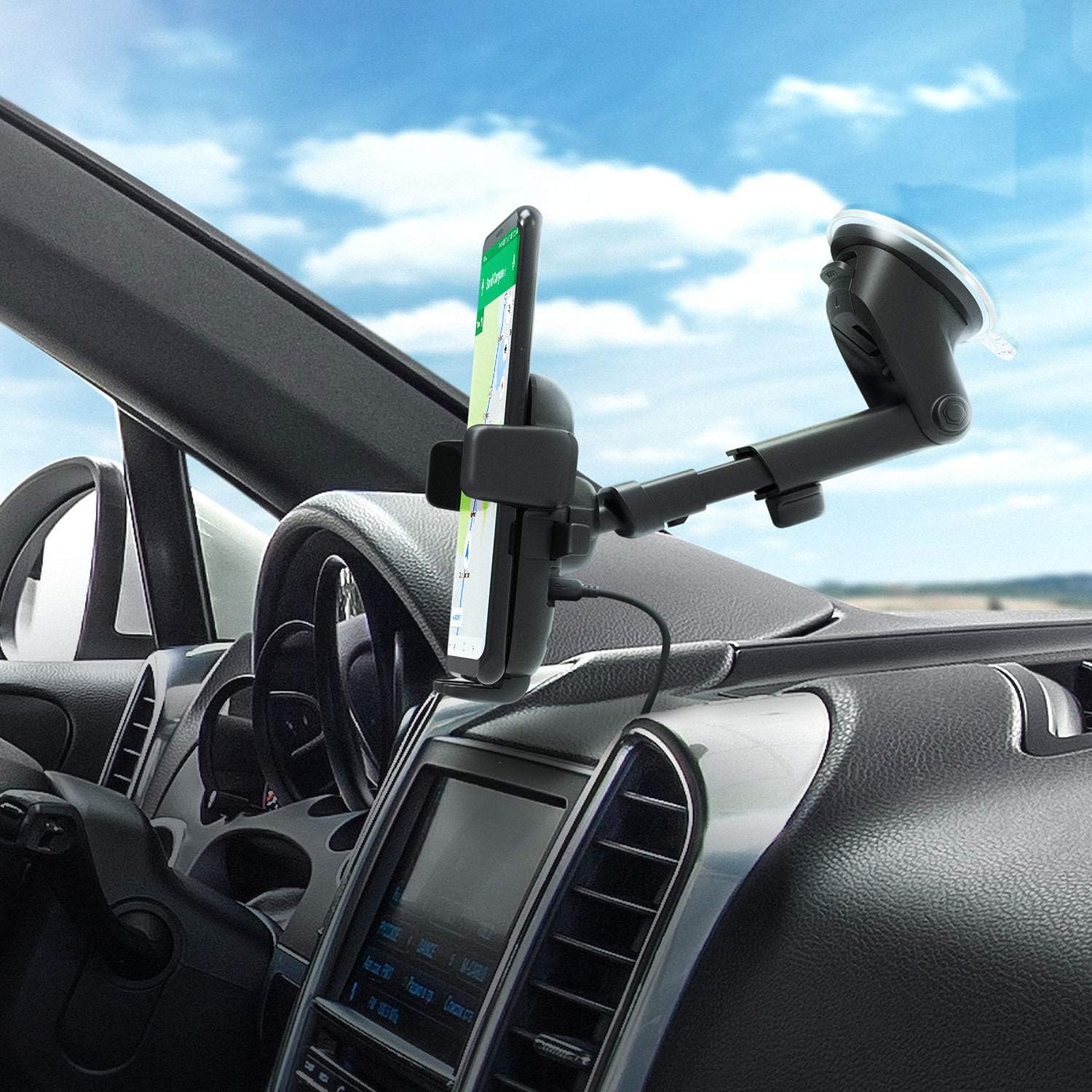
Figure 3: Car mount installed on a dashboard in portrait orientation.

Figure 4: Car mount installed on a dashboard in landscape orientation.
3. Adjusting the Mount
The mount features a telescopic arm that extends up to 8.3 inches and pivots on a 225-degree arc, allowing for optimal viewing angles. Loosen the knob behind the mount to adjust the arm's length and angle, then tighten to secure.

Figure 5: The mount's arm extends and pivots for flexible positioning.
Operating Instructions
1. Inserting and Removing Your Smartphone (Easy One Touch Mechanism)
- To open the arms: Press the release bars located on the sides of the mount cradle. The locking side arms will open.
- To secure your phone: Place your smartphone against the Easy One Touch Trigger button in the center of the mount. The arms will automatically close and secure your device.
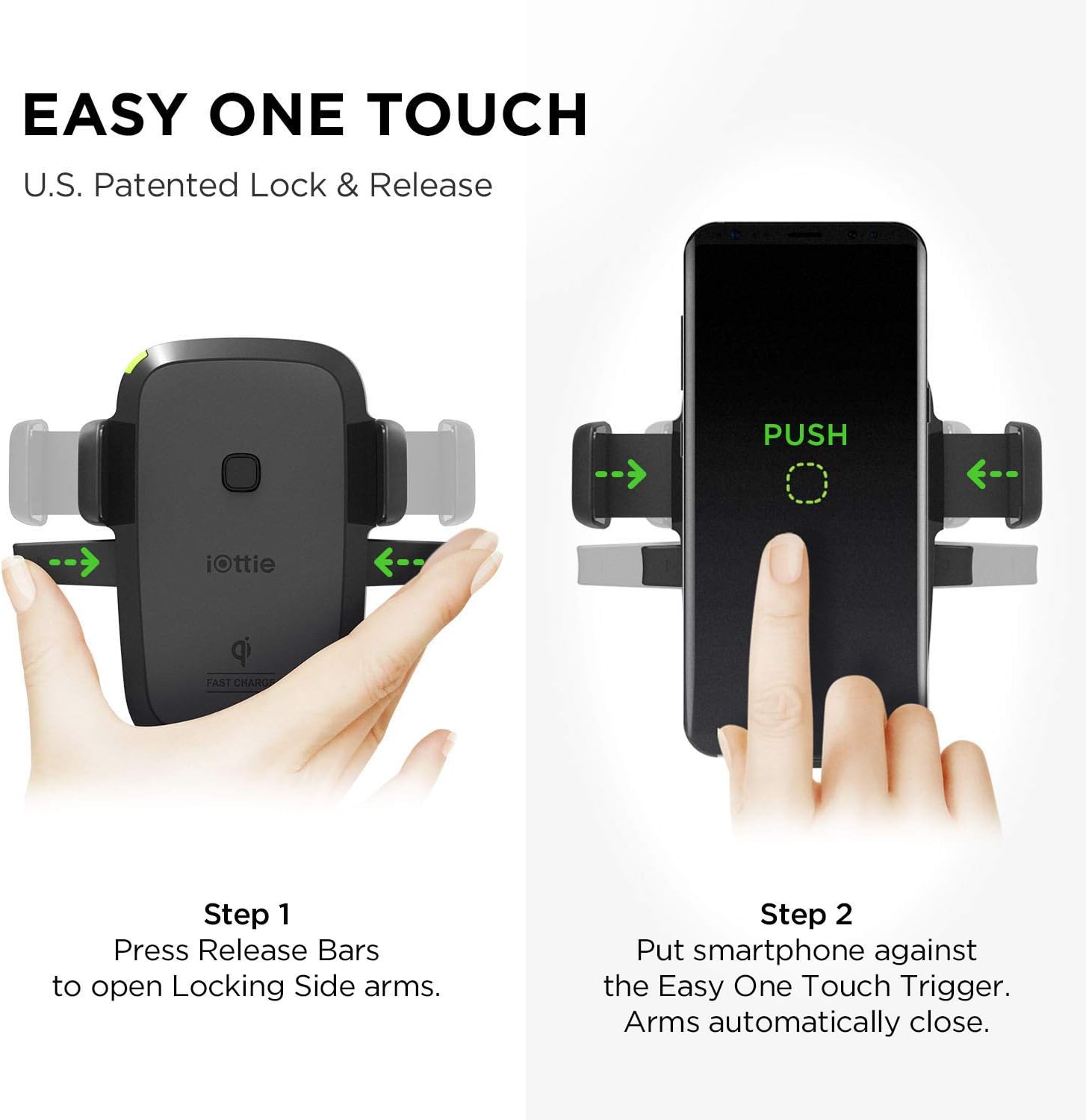
Figure 6: The Easy One Touch mechanism allows for quick phone insertion and removal.
2. Wireless Charging
The mount supports Qi wireless fast charging for compatible devices and standard charging for other Qi-enabled devices. Ensure your phone is centered on the charging pad for optimal performance.
- Green Light: Indicates power is on or the device is charging properly.
- Red Light: Indicates incompatibility with the smartphone or a charging error.

Figure 7: LED indicator for charging status (Green for charging, Red for error).
3. Adjusting Phone Feet
The bottom feet of the mount can be adjusted to accommodate various phone sizes and cases. Loosen the knob behind the mount, then move the feet up, down, or side to side for optimal phone placement and charging alignment.

Figure 8: Adjusting the mount's feet for different phone sizes.
4. Dual USB Car Charger
The included dual USB car charger features a built-in micro USB cable for the Easy One Touch Wireless mount and an additional USB port to charge a second device simultaneously.
Maintenance
To maintain the strong hold of the suction cup, rinse it with warm water and allow it to air dry if it becomes dirty. This will restore its sticky surface.
Troubleshooting
- Charging Issues: Ensure your smartphone is Qi-compatible and properly centered on the charging pad. Check the LED indicator for status. If the red light appears, reposition your phone or check for case interference. Some phone cases may hinder wireless charging.
- Overheating: Wireless charging can generate heat. If your phone overheats, remove it from the charger and allow it to cool. Ensure proper ventilation around the mount.
- Suction Cup Not Sticking: Clean the mounting surface thoroughly. If using on a dashboard, ensure the dashboard pad is securely attached and has cured for 24 hours. Rinse the suction cup with warm water and air dry to restore stickiness.
- Mount Instability: Ensure all knobs and levers are tightened after adjusting the mount's position.
Specifications
- Model Number: HLCRIO134AM
- Product Dimensions: 3.7 x 5.2 x 9.1 inches
- Item Weight: 11.2 ounces
- Compatible Devices: Smartphones (2.3 - 3.5 inches wide)
- Connector Type: Wireless
- Input Voltage: 9 Volts
- Wattage: 27 watts
- Total USB Ports: 2 (on car charger)
- Special Features: Fast Charging, Wireless Charging, Telescopic Arm, One Touch Lock/Release
Official Product Videos
iOttie Easy One Touch Wireless Qi Fast Charge Car Mount Kit Overview
Video 1: This video provides a comprehensive overview of the iOttie Easy One Touch Wireless Qi Fast Charge Car Mount Kit, demonstrating its key features and functionality.
iOttie Easy One Touch 4 Features
Video 2: This video highlights the features of the iOttie Easy One Touch 4, which shares many functionalities with the Wireless Qi Fast Charge Car Mount Kit, including the one-touch mechanism and adjustable arm.
Warranty & Support
For warranty information or technical support, please refer to the official iOttie website or contact their customer service directly. Keep your purchase receipt for warranty claims.


