Product Overview
The Iron Box C14 to C5 Plug Adapter (Model IBX-C145PA) is a high-quality electrical adapter designed to convert a C14 inlet to a C5 outlet. Rated for 10A and 250V, this adapter provides a reliable solution for connecting devices with a C5 plug to power sources with a C14 receptacle. Its fully molded rugged PVC construction ensures durability and longevity.
This adapter is particularly useful for plugging cords in tight spaces, helping to reduce cable strain and improve clearance around equipment.

Image: Front and back view of the Iron Box C14 to C5 Plug Adapter. The top shows the C14 male end, and the bottom shows the C5 female end.
Setup and Connection
The C14 to C5 Plug Adapter is designed for straightforward use. Follow these steps for proper connection:
- Identify the C14 Inlet: Locate the C14 male inlet on your power source or device. This is typically a three-pin rectangular connector.
- Identify the C5 Plug: Locate the C5 female plug on the power cord of the device you wish to connect. This is a three-hole cloverleaf-shaped connector.
- Connect the Adapter: Insert the C14 male end of the adapter firmly into the C14 inlet of your power source.
- Connect the Device: Insert the C5 female end of your device's power cord firmly into the C5 outlet of the adapter.
Ensure all connections are secure to prevent power interruptions. The adapter's design helps in managing cables in confined spaces.
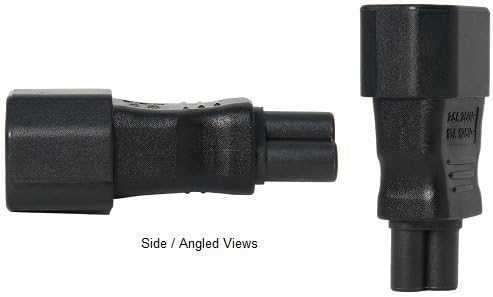
Image: Side and angled views of the C14 to C5 Plug Adapter, illustrating its compact form factor.
Operating Instructions
Once the adapter is securely connected between your power source and device, it operates passively to facilitate the electrical connection. No specific operational steps are required beyond ensuring a proper physical connection.
- Verify that the voltage and current ratings of your device are compatible with the adapter's specifications (10A, 250V).
- Ensure the power source is active before attempting to power on your connected device.
Maintenance
To ensure the longevity and safe operation of your Iron Box C14 to C5 Plug Adapter, follow these simple maintenance guidelines:
- Cleaning: Disconnect the adapter from all power sources before cleaning. Use a dry, soft cloth to wipe the exterior. Do not use liquid cleaners or solvents.
- Storage: Store the adapter in a cool, dry place away from direct sunlight and extreme temperatures when not in use.
- Inspection: Periodically inspect the adapter for any signs of damage, such as cracks, frayed wires, or bent pins. If damage is observed, discontinue use immediately and replace the adapter.
Troubleshooting
If you encounter issues with your C14 to C5 Plug Adapter, consider the following common troubleshooting steps:
| Problem | Possible Cause | Solution |
|---|---|---|
| Device not receiving power. | Loose connection, power source off, or incompatible voltage/current. | Ensure adapter is fully seated in both the power source and the device's cord. Verify the power source is active. Check device and adapter specifications for compatibility. |
| Adapter does not fit. | Incorrect connector type. | Confirm that your power source has a C14 inlet and your device's cord has a C5 plug. This adapter is specifically for C14 to C5 conversion. |
| Adapter feels hot. | Overload or faulty adapter. | Ensure the connected device's power consumption does not exceed the adapter's 10A rating. Discontinue use if overheating persists and replace the adapter. |
Specifications
| Feature | Detail |
|---|---|
| Model Number | IBX-C145PA |
| Connector Type | C14 Male to C5 Female |
| Rated Current | 10 Amperes (10A) |
| Rated Voltage | 250 Volts (250V) |
| Number of Wires | 3 |
| Number of Poles | 3 |
| Color | Black |
| Material | Fully molded rugged PVC |
| Item Weight | 1.6 ounces |
| Manufacturer | Iron Box |
| UPC | 656721937974 |
Warranty and Support
Iron Box is committed to providing high-quality power solutions. While specific warranty details for this product are not provided in this manual, please refer to the product packaging or the official Iron Box website for the most current warranty information.
For technical support, product inquiries, or assistance with troubleshooting beyond the scope of this manual, please contact Iron Box customer service. Contact information can typically be found on the product packaging or on the official Iron Box website (Visit the Iron Box Store on Amazon).


