1. Introduction and Overview
This manual provides essential information for the safe and efficient use of your Samsung RS25J5008SG/EM Side-by-Side Refrigerator. Please read it thoroughly before operating the appliance and retain it for future reference.
Your refrigerator features a Mono Cooling system for uniform temperature distribution, energy-efficient LED lighting, and thoughtfully designed compartments including tempered glass shelves, door bins, and vegetable drawers.

Figure 1: Front view of the Samsung RS25J5008SG/EM Side-by-Side Refrigerator. This image displays the sleek black stainless steel finish and the integrated water and ice dispenser on the freezer door.
2. Safety Information
To reduce the risk of fire, electric shock, or injury when using your refrigerator, follow these basic precautions:
- Ensure the refrigerator is properly grounded.
- Do not use adapters or extension cords.
- Unplug the appliance before cleaning or performing any maintenance.
- Keep ventilation openings clear of obstruction.
- Do not store explosive substances such as aerosol cans with a flammable propellant in this appliance.
- Supervise children to ensure they do not play with the appliance.
3. Setup
3.1 Unpacking
Remove all packaging materials, including tape and protective films. Dispose of packaging responsibly.
3.2 Placement
Place the refrigerator on a flat, stable surface. Ensure adequate clearance around the appliance for proper ventilation. Recommended clearances are 5 cm (2 inches) at the top and sides, and 10 cm (4 inches) at the rear. Avoid direct sunlight or heat sources.
3.3 Leveling
Use the adjustable leveling feet to ensure the refrigerator is level. This prevents vibrations and ensures proper door sealing.
3.4 Power Connection
Plug the power cord into a dedicated 120 Volt, 60 Hz, AC outlet. Do not share the outlet with other appliances.
3.5 Water Line Connection
For the ice maker and water dispenser to function, connect the refrigerator to a cold water supply line. Refer to the detailed instructions in the separate water line installation guide for proper connection to prevent leaks.
4. Operating Instructions
4.1 Initial Cooling
After plugging in, allow the refrigerator to cool for at least 2-3 hours before storing food. The Mono Cooling system will ensure efficient and even cooling throughout both compartments.
4.2 Temperature Control
The temperature controls are located on the exterior dispenser panel. Use the 'Freezer' and 'Fridge' buttons to adjust the desired temperature settings. The recommended freezer temperature is -18°C (0°F) and refrigerator temperature is 3°C (38°F).
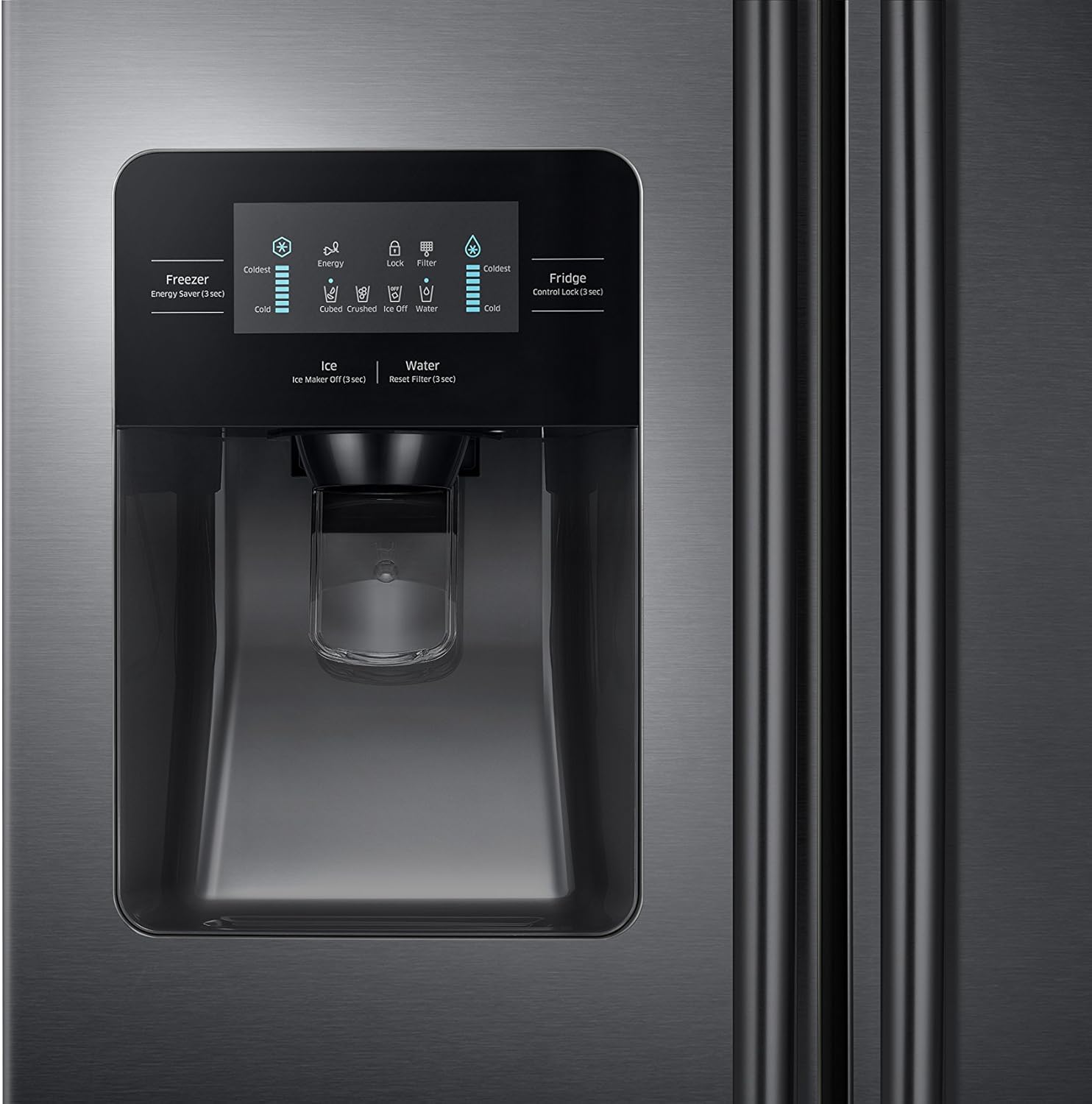
Figure 2: Close-up of the external control panel and water/ice dispenser. This panel allows users to adjust temperatures, select ice type, and dispense water.
4.3 Ice Maker and Water Dispenser
To dispense water, press a glass against the water dispenser lever. To dispense ice, select the desired ice type (cubed or crushed) on the control panel, then press a glass against the ice dispenser lever. Allow 24 hours for the ice maker to produce its first batch of ice after initial setup.
4.4 Internal Storage
Your refrigerator is equipped with tempered glass shelves, door bins designed to open at a 30-degree angle for easy access, and humidity-controlled drawers for fruits and vegetables. Arrange food items to allow for optimal air circulation.

Figure 3: Interior view of the refrigerator with both doors open. This shows the spacious layout, tempered glass shelves, and various storage compartments in both the freezer and fresh food sections.
5. Maintenance
5.1 Cleaning
- Interior: Clean regularly with a mild detergent and warm water. Rinse thoroughly and dry.
- Exterior: Wipe with a soft cloth and a non-abrasive cleaner. For black stainless steel, use a specialized stainless steel cleaner.
- Door Seals: Clean door gaskets with a mild soap solution to ensure a tight seal.
5.2 Water Filter Replacement
The water filter indicator on the control panel will illuminate when it's time to replace the filter, typically every 6 months. Refer to the water filter replacement instructions for your specific model.
5.3 Power Saving Tips
- Avoid opening doors frequently or for extended periods.
- Ensure door seals are clean and intact.
- Allow hot foods to cool before placing them in the refrigerator.
6. Troubleshooting
Before contacting service, review these common issues and solutions:
- Refrigerator not cooling: Check power connection, temperature settings, and ensure doors are fully closed.
- Unusual noises: Some operational noises (e.g., fan, compressor) are normal. Ensure the refrigerator is level and not touching a wall.
- Water dispenser not working: Check if the water supply valve is open and if the water filter is correctly installed.
- Ice maker not producing ice: Ensure the ice maker is turned on and the water line is connected and supplying water.
7. Specifications
| Feature | Specification |
|---|---|
| Brand | Samsung |
| Model Number | RS25J5008SG/EM |
| Color | Black Stainless Steel |
| Dimensions (W x D x H) | 82.5 cm x 91.0 cm x 178.5 cm (32.5 in x 35.8 in x 70.3 in) |
| Weight | 109 kg (240.3 lbs) |
| Capacity (Freezer) | 94 Liters |
| Voltage | 120 Volts |
| Cooling System | Mono Cooling |
| Defrost System | Automatic |
| Number of Doors | 2 |
| Material | Steel (Door material: Black Stainless Steel) |
8. Warranty and Support
Your Samsung refrigerator is covered by a limited warranty. Please refer to the warranty card included with your purchase for specific terms and conditions. For technical support, service requests, or to purchase replacement parts, please visit the official Samsung website or contact Samsung customer service in your region.
Keep your proof of purchase for warranty claims.


