
Introduction
This manual provides essential information for the safe and effective use of your PK Power AC DC Adapter. This adapter is designed to provide external power to compatible Bushnell Trophy Cam Black Night Vision Camera models 119436C, 119446C, and 119456C. Please read these instructions carefully before use and retain them for future reference.
Safety Information
To ensure safe operation and prevent damage, observe the following precautions:
- Voltage Compatibility: Ensure the wall outlet voltage matches the adapter's input specifications (100-240V AC).
- Indoor Use Only: This adapter is intended for indoor use. Do not expose it to rain, moisture, or extreme temperatures.
- Proper Connection: Connect the adapter securely to both the power outlet and the camera. Loose connections can cause overheating or malfunction.
- Avoid Overloading: Do not connect the adapter to devices that exceed its specified output power.
- Cable Care: Do not bend, twist, or pull the power cord excessively. Keep it away from heat sources and sharp objects.
- Disconnection: Always grasp the plug, not the cord, when disconnecting from the power outlet.
- Damage: If the adapter or cord is damaged, discontinue use immediately and contact customer support. Do not attempt to repair it yourself.
- Children and Pets: Keep the adapter and its cord out of reach of children and pets.
Product Overview
The PK Power AC DC Adapter is a compact and reliable power supply designed for specific Bushnell Trophy Cam models. It converts standard AC wall power to the DC power required by your camera.
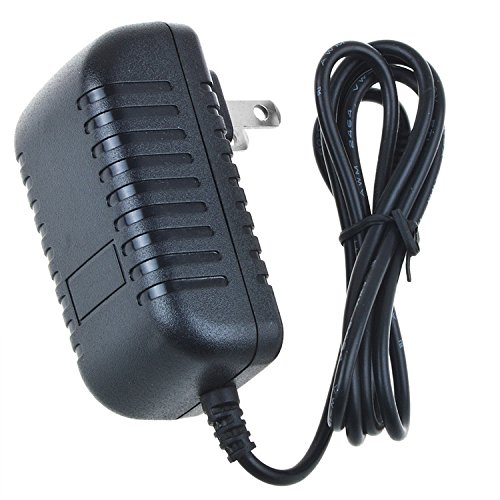
Image 1: PK Power AC DC Adapter with its power cable neatly coiled.

Image 2: PK Power AC DC Adapter with the barrel connector end of the cable visible.
Key Components:
- Adapter Unit: The main body that plugs into the wall outlet.
- Power Cable: Connects the adapter unit to your Bushnell camera.
- Barrel Connector: The small, cylindrical plug at the end of the power cable that inserts into the camera's power input port.
Setup
- Verify Compatibility: Ensure your Bushnell Trophy Cam is one of the compatible models (119436C, 119446C, 119456C).
- Locate Camera Power Port: Identify the external power input port on your Bushnell camera. Refer to your camera's manual if unsure.
- Connect Adapter to Camera: Carefully insert the barrel connector of the PK Power AC DC Adapter into the camera's power input port. Ensure a snug fit.
- Connect Adapter to Power Outlet: Plug the adapter unit into a standard 100-240V AC wall outlet.
- Power On Camera: Once connected, your camera should receive power. Follow your camera's instructions to power it on.
Note: Always connect the adapter to the camera first, then to the wall outlet, to prevent potential electrical surges to the camera.
Operating Instructions
The PK Power AC DC Adapter operates automatically once connected. It provides continuous power to your compatible Bushnell camera, eliminating the need for battery power when an AC outlet is available.
- Continuous Power: The adapter supplies constant power, ideal for extended surveillance or monitoring.
- Battery Bypass: When connected, the camera typically draws power directly from the adapter, preserving internal batteries (if installed).
- Disconnection: To disconnect, first power off your camera (if applicable), then unplug the adapter from the wall outlet, and finally disconnect the barrel connector from the camera.
Maintenance
Proper care ensures the longevity and reliable performance of your adapter:
- Cleaning: Disconnect the adapter from all power sources before cleaning. Use a soft, dry cloth to wipe the exterior. Do not use liquid cleaners or solvents.
- Storage: When not in use, store the adapter in a cool, dry place, away from direct sunlight and extreme temperatures. Coil the cable loosely to prevent damage.
- Inspection: Periodically inspect the adapter and cable for any signs of wear, cuts, or damage. If damage is found, discontinue use.
Troubleshooting
If you encounter issues with your adapter, refer to the following common problems and solutions:
| Problem | Possible Cause | Solution |
|---|---|---|
| Camera not receiving power. |
|
|
| Adapter feels warm. |
|
|
If troubleshooting steps do not resolve the issue, contact PKPOWER customer support.
Specifications
| Brand | PKPOWER |
| Input Voltage | 100-240V AC, 50-60Hz |
| Wattage | 18 Watts |
| Connector Type | Auxiliary (Barrel Connector) |
| Compatible Devices | Bushnell 119436C, 119446C, 119456C Trophy Cam Black Night Vision Cameras |
| Protection Features | OVP (Over Voltage Protection), OCP (Over Current Protection), SCP (Short Circuit Protection) |
| Certifications | CE, FCC, RoHS |
| Color | Black |
Warranty and Support
Warranty: This PK Power AC DC Adapter comes with a 1-year manufacturer's warranty. This warranty covers defects in materials and workmanship under normal use. It does not cover damage caused by misuse, accident, unauthorized modification, or external causes.
Customer Service: For any questions, technical assistance, or warranty claims, please contact PKPOWER customer service. Our friendly and reliable customer service team aims to respond to inquiries within 24 hours.
Refer to your purchase documentation or the seller's information for specific contact details.