1. Introduction
This manual provides detailed instructions for the installation, operation, and maintenance of your Garmin Fusion MS-BB100 Black Box Marine Entertainment System. Please read this manual thoroughly before attempting installation or operation to ensure proper functionality and safety.
The Fusion MS-BB100 is a compact marine entertainment solution designed for vessels with limited helm space. It features a built-in Class-AB amplifier, Multi-Zone technology for two audio zones, and Fusion-Link integration for control via compatible multifunction displays, smart devices, or Garmin watches. The system includes an IPX7-rated wired remote for convenient control at the helm.
2. Safety Information
Always observe the following safety precautions during installation and operation:
- Disconnect power before installation or maintenance.
- Ensure all wiring connections are secure and properly insulated to prevent short circuits.
- Mount the unit in a location that avoids direct exposure to extreme temperatures or excessive vibration.
- The unit is IPX7 rated, meaning it can withstand immersion in 1 meter of water for up to 30 minutes. However, ensure all connections are properly sealed to maintain this rating.
- Refer to local regulations and standards for marine electronics installation.
3. What's in the Box
Verify that all components are present before beginning installation:
- MS-BB100 media black box
- IPX7 wired remote control
- One remote control mounting nut (M56)
- One remote control mounting gasket
- Four 8-gauge mounting screws
- Power and speaker wiring harness
- Auxiliary-in, line-out, and subwoofer-out wiring harness
- 6 ft (2 meter) NMEA 2000® drop cable
- Documentation (this manual)
4. Setup & Installation
4.1 Product Overview
The MS-BB100 is designed for flexible installation, allowing it to be mounted in concealed compartments while the wired remote provides control at the helm.
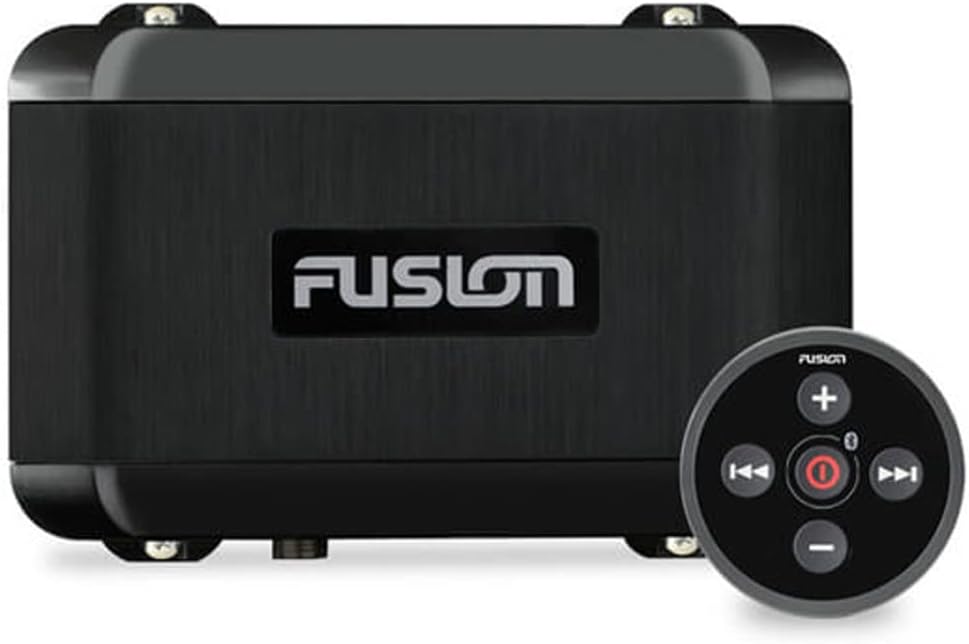
Figure 1: Garmin Fusion MS-BB100 Black Box Marine Entertainment System with wired remote.
4.2 Mounting the Black Box
The compact design allows for installation in out-of-the-way places such as storage lockers, inside helm consoles, and other concealed compartments. Ensure adequate ventilation around the unit.
4.3 Mounting the Wired Remote
The IPX7-rated wired remote can be surface-mounted or back-mounted for a clean, integrated look at the helm. Use the provided mounting nut and gasket to secure the remote.
4.4 Wiring Connections
All harnesses are designed with rubber gaskets to ensure a watertight seal when connected to the main unit.
- Power and Speaker Harness: Connect to your vessel's 12V DC power supply and up to six speakers (4-ohm stable).
- Auxiliary-in, Line-out, and Subwoofer-out Harness: Provides connections for external audio sources, additional amplifiers, and subwoofers.
- NMEA 2000® Drop Cable: Connects the MS-BB100 to your NMEA 2000 network for Fusion-Link control via compatible Garmin multifunction displays (MFDs).
4.5 Product Overview Video
Video 1: A brief overview of the Garmin Fusion MS-BB100 Marine Entertainment System, showcasing its features and components.
5. Operating Instructions
5.1 Basic Controls (Wired Remote)
- Power Button: Press to turn the unit on/off.
- Volume Control: Adjust audio output level.
- Source Selection: Cycle through available audio sources (Bluetooth, DAB, Spotify, Auxiliary).
- Track/Tune: Skip tracks or tune radio stations.
5.2 Multi-Zone Technology
The MS-BB100 supports two independent audio zones. This allows you to adjust the audio levels in different areas of your boat independently. Refer to the Fusion-Link app or your compatible MFD for detailed zone control settings.
5.3 Fusion-Link Integration
Control your audio system directly from compatible Garmin multifunction displays (MFDs), smart devices (via the Fusion-Link app), or Garmin watches. This integration provides seamless control over sources, volume, and zone settings.
5.4 Audio Sources
- Bluetooth: Connect your smartphone or other Bluetooth-enabled device for wireless audio streaming.
- DAB (Digital Audio Broadcasting): Access digital radio stations where available.
- Spotify: Integrated control for Spotify streaming service.
- Auxiliary Input: Connect external audio devices via the auxiliary input harness.
6. Maintenance
Regular maintenance ensures the longevity and optimal performance of your MS-BB100 system:
- Cleaning: Clean the wired remote and exposed surfaces with a soft, damp cloth. Avoid harsh chemicals or abrasive cleaners.
- Connection Checks: Periodically inspect all wiring connections for corrosion or looseness. Ensure rubber gaskets are intact and providing a proper seal.
- Software Updates: Check the Garmin website for any available software updates to ensure your unit has the latest features and performance enhancements.
7. Troubleshooting
If you encounter issues with your MS-BB100, refer to the following common troubleshooting steps:
| Problem | Possible Cause | Solution |
|---|---|---|
| No power to the unit | Loose power connection, blown fuse, low battery voltage. | Check power harness connections. Inspect and replace fuse if necessary. Verify battery voltage. |
| No audio output | Incorrect source selected, speaker wires disconnected, volume too low, amplifier issue. | Select correct audio source. Check speaker wire connections. Increase volume. Ensure external amplifier (if used) is powered on. |
| Bluetooth connectivity issues | Device out of range, interference, pairing mode not active. | Ensure device is within range. Reduce interference sources. Put MS-BB100 and device into pairing mode. |
| Wired remote unresponsive | Loose connection to the black box, remote cable damage. | Check the remote control cable connection to the black box. Inspect cable for damage. |
If problems persist after attempting these solutions, contact Garmin customer support.
8. Specifications
| Feature | Detail |
|---|---|
| Model | MS-BB100 |
| Manufacturer | Garmin |
| Product Dimensions | 3.7 x 6.1 x 2.63 inches |
| Item Weight | 0.009 ounces |
| Water Resistance | IPX7 (Wired Remote) |
| Audio Zones | 2 |
| Amplifier Type | Built-in Class-AB |
| Special Features | Built-In Bluetooth, DAB, Spotify, Fusion-Link Integration, NMEA 2000® Connectivity |
9. Warranty & Support
9.1 Limited Warranty
The Garmin Fusion MS-BB100 comes with a 1-year limited consumer warranty. This warranty covers defects in materials and workmanship under normal use. For full terms and conditions, please refer to the warranty information provided with your product or visit the official Garmin website.
9.2 Customer Support
For technical assistance, troubleshooting, or warranty claims, please contact Garmin customer support:
- Website: www.garmin.com/support
- Phone: Refer to the Garmin website for regional support numbers.


