
1. Introduction
Thank you for choosing the Rowenta RH8133WA 750W Vacuum Cleaner. This manual provides essential information for the safe and efficient operation, maintenance, and troubleshooting of your appliance. Please read it thoroughly before first use and keep it for future reference.
2. Important Safety Instructions
When using an electrical appliance, basic precautions should always be followed, including the following:
- Read all instructions before using the vacuum cleaner.
- Do not leave the appliance unattended when plugged in. Unplug from outlet when not in use and before servicing.
- Do not use outdoors or on wet surfaces.
- Do not allow to be used as a toy. Close attention is necessary when used by or near children.
- Use only as described in this manual. Use only manufacturer's recommended attachments.
- Do not use with a damaged cord or plug. If appliance is not working as it should, has been dropped, damaged, left outdoors, or dropped into water, return it to a service center.
- Do not pull or carry by cord, use cord as a handle, close a door on cord, or pull cord around sharp edges or corners. Do not run appliance over cord. Keep cord away from heated surfaces.
- Do not unplug by pulling on cord. To unplug, grasp the plug, not the cord.
- Do not handle plug or appliance with wet hands.
- Do not put any object into openings. Do not use with any opening blocked; keep free of dust, lint, hair, and anything that may reduce airflow.
- Keep hair, loose clothing, fingers, and all parts of body away from openings and moving parts.
- Do not pick up anything that is burning or smoking, such as cigarettes, matches, or hot ashes.
- Do not use to pick up flammable or combustible liquids, such as gasoline, or use in areas where they may be present.
- Do not pick up toxic material, such as chlorine bleach, ammonia, or drain cleaner.
- Do not use without dust bag and/or filters in place.
- Turn off all controls before unplugging.
- Use extra care when cleaning on stairs.
3. Product Overview
The Rowenta RH8133WA is a 750W stick vacuum cleaner designed for efficient cleaning on all floor types. It features a HEPA filter for improved air quality.
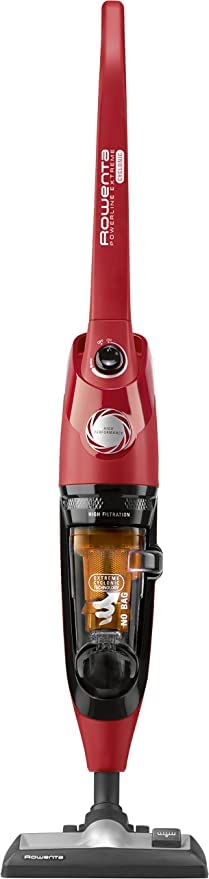
Figure 1: Rowenta RH8133WA 750W Vacuum Cleaner. This image shows the main unit of the vacuum cleaner, highlighting its compact stick design and primary components.
Included Components:
- Main Vacuum Unit
- Dusting Brush
- Mop (attachment)
- Crevice Tool
- Power Cord
4. Setup and Assembly
Follow these steps to assemble your Rowenta RH8133WA vacuum cleaner before first use:
- Unpack Components: Carefully remove all parts from the packaging. Ensure all included components are present.
- Attach Handle: Insert the handle into the main body of the vacuum cleaner until it clicks securely into place.
- Connect Floor Nozzle: Attach the floor nozzle to the bottom of the main unit. Ensure it is firmly connected.
- Install Dust Container/Filter: Verify that the dust container and HEPA filter are correctly installed. Refer to the "Maintenance" section for details on filter installation.
- Power Connection: Unwind the power cord and plug it into a suitable electrical outlet.
5. Operating Instructions
This section guides you through the basic operation of your vacuum cleaner.
5.1 Powering On/Off
- To turn on the vacuum cleaner, press the power button located on the main unit.
- To turn off the vacuum cleaner, press the power button again.
5.2 Adjusting Suction Power
The Rowenta RH8133WA features 2 speed settings for varying cleaning needs.
- Use the lower setting for delicate surfaces or light dust.
- Use the higher setting for deep cleaning carpets or heavily soiled areas.
- Refer to the control panel on the handle for specific adjustment buttons.
5.3 Using Attachments
The vacuum cleaner comes with several attachments for specialized cleaning:
- Dusting Brush: Ideal for cleaning delicate surfaces, furniture, and blinds.
- Crevice Tool: Perfect for reaching tight spaces, corners, and along edges.
- Mop Attachment: Use for wet cleaning hard floors. Ensure the vacuum is unplugged before attaching or detaching. Follow specific instructions for the mop attachment for water filling and cleaning.
To attach an accessory, ensure the vacuum is off and unplugged. Remove the main floor nozzle if necessary, then firmly push the desired accessory onto the end of the wand or directly onto the main unit's suction inlet.
6. Maintenance and Care
Regular maintenance ensures optimal performance and extends the lifespan of your vacuum cleaner. Always unplug the appliance before performing any maintenance.
6.1 Emptying the Dust Container
- Ensure the vacuum cleaner is unplugged.
- Locate the dust container release button, usually near the handle or main body.
- Press the button to detach the dust container.
- Hold the container over a waste bin and open the bottom flap to empty the contents.
- Close the flap and reattach the dust container to the vacuum cleaner until it clicks into place.
Recommendation: Empty the dust container after each use or when it reaches the "MAX" fill line.
6.2 Cleaning the HEPA Filter
The HEPA filter should be cleaned regularly to maintain suction power and air filtration efficiency.
- With the dust container removed, locate the HEPA filter. It is typically inside the dust container or accessible once the container is removed.
- Carefully remove the filter.
- Tap the filter gently over a waste bin to dislodge loose dust.
- If the filter is washable, rinse it under cold running water until the water runs clear. Do not use detergents.
- Allow the filter to air dry completely for at least 24 hours before reinstalling. Do not use a hairdryer or other heating devices.
- Reinstall the dry filter and then the dust container.
Recommendation: Clean the HEPA filter monthly, or more frequently with heavy use. Replace the HEPA filter annually or if it shows signs of damage.
6.3 Cleaning the Exterior
Wipe the exterior surfaces of the vacuum cleaner with a soft, damp cloth. Do not use abrasive cleaners or solvents.
7. Troubleshooting
Before contacting customer service, please refer to the following troubleshooting guide for common issues.
| Problem | Possible Cause | Solution |
|---|---|---|
| Vacuum cleaner does not turn on. | Not plugged in; power outlet fault; damaged cord/plug. | Ensure plug is firmly in outlet. Test outlet with another appliance. Check cord/plug for damage; if damaged, do not use and contact service. |
| Low suction power. | Full dust container; clogged filter; blocked hose/nozzle. | Empty dust container. Clean or replace HEPA filter. Check hose, nozzle, and attachments for blockages and remove them. |
| Unusual noise during operation. | Blockage in brush roll or hose; foreign object inside. | Turn off and unplug. Inspect brush roll and hose for obstructions and remove. If noise persists, contact customer support. |
| Vacuum cleaner overheats and shuts off. | Blocked airflow (full dust container, clogged filter, blockage). | Turn off and unplug. Empty dust container, clean filter, and check for blockages. Allow appliance to cool down for at least 30 minutes before restarting. |
8. Specifications
| Feature | Detail |
|---|---|
| Brand | Rowenta |
| Model Number | RH8133WA |
| Power | 750 Watts |
| Number of Speeds | 2 |
| Filter Type | HEPA Filter |
| Special Feature | HEPA |
| Surface Recommendation | All floors |
| Power Source | Electric Cable |
| Included Components | Dusting brush, Mop, Crevice tool |
| Cordless | No |
| Form Factor | Stick |
9. Warranty and Support
Specific warranty information for the Rowenta RH8133WA vacuum cleaner is typically provided with the product packaging or can be found on the official Rowenta website. Please retain your proof of purchase for warranty claims.
For technical support, spare parts, or service inquiries, please visit the official Rowenta website or contact their customer service department in your region. Contact details are usually available in the product's original documentation or on the manufacturer's website.
Note: Availability of spare parts information is not provided in the product data.


