
Product Overview
The MOTOROLA Talkabout T280 is a rechargeable two-way radio designed for instant communication. It features 22 channels, a maximum talking range of 25 miles under optimal conditions, and weather alert capabilities. The T280 is suitable for various communication needs, including outdoor activities and emergency preparedness.
Key features include:
- 22 FRS channels for communication.
- Rechargeable NiMH battery packs with micro-USB charging.
- Weatherproof design for durability.
- Emergency preparedness features, including weather alerts.

Image: Bottom view of the Motorola T280 radio, featuring the 'Talkabout' branding.
Package Contents
The MOTOROLA Talkabout T280 bundle includes the following items:
- Two (2) T280 Radios
- One (1) Y Cable with Dual Micro-USB Chargers
- Two (2) NiMH Rechargeable Battery Packs
- Two (2) Belt Clips
- One (1) Red Carry Case
- Emergency Preparedness Checklist
Setup
1. Battery Installation
- Ensure the radio is powered off.
- Locate the battery compartment cover on the back of the radio.
- Open the battery compartment cover.
- Insert the NiMH rechargeable battery pack, ensuring correct polarity. The radio also supports 4 AAA alkaline batteries (not included) as an alternative.
- Close the battery compartment cover securely.

Image: Side view of the Motorola T280 radio, illustrating the general area for battery access and the belt clip attachment point.
2. Charging the Batteries
- Connect the Y cable with dual micro-USB chargers to a compatible USB power source.
- Plug the micro-USB connectors into the charging ports located at the bottom of each radio.
- The battery indicator on the radio display will show charging status.
- Allow sufficient time for a full charge before first use (typically 8-10 hours).
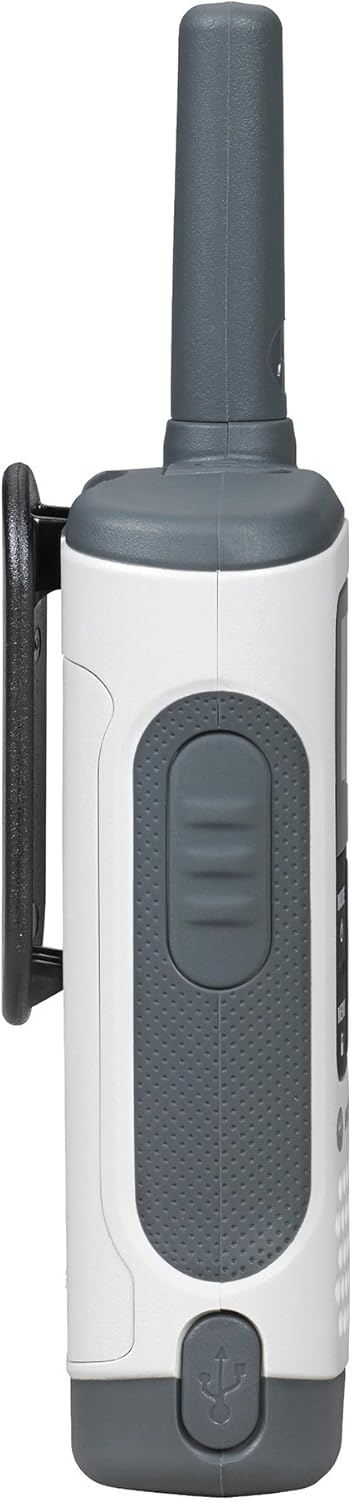
Image: Bottom view of the Motorola T280 radio, highlighting the micro-USB charging port.
3. Attaching the Belt Clip
- Align the belt clip with the grooves on the back of the radio.
- Slide the belt clip downwards until it clicks into place.
- To remove, push the release tab and slide the clip upwards.
Operating Instructions
1. Power On/Off
- To power on: Press and hold the MODE/MENU button until the radio turns on.
- To power off: Press and hold the MODE/MENU button until the radio turns off.

Image: Front view of two Motorola T280 radios, showing the display, MODE/MENU, plus/minus, and monitor buttons.
2. Adjusting Volume
- Use the + (Plus) and - (Minus) buttons to increase or decrease the listening volume.
3. Selecting a Channel
- With the radio on, press the MODE/MENU button once. The channel number will flash.
- Use the + or - buttons to select your desired channel (1-22).
- Press the MODE/MENU button again to confirm the channel selection.
- For optimal communication, ensure all radios in your group are set to the same channel and privacy code.
4. Setting a Privacy Code
Privacy codes help reduce interference from other users. The T280 supports 121 privacy codes (38 CTCSS codes and 83 DCS codes).
- After selecting a channel, press the MODE/MENU button twice. The privacy code number will flash.
- Use the + or - buttons to select your desired privacy code.
- Press the MODE/MENU button again to confirm the privacy code.
5. Transmitting and Receiving
- To transmit: Press and hold the Push-to-Talk (PTT) button located on the side of the radio. Speak clearly into the microphone. Release the PTT button to listen.
- To receive: Ensure the PTT button is not pressed. The radio will automatically receive transmissions on the selected channel and privacy code.
Image: Side view of the Motorola T280 radio, highlighting the Push-to-Talk (PTT) button.
6. Monitor Function
- Press the MON button (often labeled with a 'Z' or 'MON' icon) to temporarily disable the privacy code and listen for activity on the current channel. This is useful for checking for weak signals or if you suspect interference.
7. Weather Alerts
The T280 can receive NOAA weather alerts. Refer to the radio's display for weather channel indicators. In areas with NOAA broadcasts, the radio can alert you to severe weather conditions.
- To activate/deactivate weather alerts, consult the full user manual for specific menu navigation steps.
Maintenance
1. Battery Care
- Always use the provided NiMH rechargeable battery packs or approved AAA alkaline batteries.
- Do not mix old and new batteries, or different types of batteries.
- Remove batteries if the radio will not be used for extended periods.
- Store batteries in a cool, dry place.
2. Cleaning
- Clean the radio with a soft, damp cloth.
- Do not use abrasive cleaners or solvents.
- Ensure the micro-USB charging port is free of debris.
3. Water Resistance
The T280 radio is designed to be waterproof. However, ensure all port covers (e.g., micro-USB charging port, accessory port) are securely closed to maintain its water resistance. Avoid submerging the radio for extended periods or exposing it to high-pressure water jets.

Image: Top view of the Motorola T280 radio, showing the antenna and the covered accessory port.
Troubleshooting
| Problem | Possible Solution |
|---|---|
| Radio does not power on. |
|
| Cannot communicate with other radios. |
|
| Poor audio quality or static. |
|
| Limited range. |
|
Specifications
| Feature | Detail |
|---|---|
| Model Number | T280 |
| Product Dimensions | 6.42 x 2.13 x 1.24 inches |
| Item Weight | 6.4 ounces |
| Number of Channels | 22 |
| Frequency Range | 300 MHz - 3 GHz |
| Talking Range Maximum | 25 Miles (under optimal conditions) |
| Power Source | NiMH Rechargeable Battery Packs (included) or 4 AAA batteries (not included) |
| Voltage | 9.6 Volts (DC) |
| Water Resistance Level | Waterproof |
| Special Features | Rechargeable, Waterproof, Weather Alerts |
Warranty and Support
For warranty information, technical support, and additional resources, please visit the official Motorola Solutions website or contact their customer service department.
You can find more information and products from Motorola Solutions at their official store: Motorola Solutions Store.


