
Introduction
The ALFA Network AWUS036ACS is a high-performance dual-band USB wireless adapter designed to enhance Wi-Fi connectivity for your computer. It supports the latest 802.11ac Wi-Fi technology, offering speeds up to 150Mbps on the 2.4GHz band and up to 433Mbps on the 5GHz band. This adapter features a high-sensitivity external antenna to optimize signal reception and coverage, aiming to eliminate Wi-Fi dead zones for activities like HD video streaming, large file downloads, and web browsing.
Its compact design ensures it does not obstruct other USB ports. The AWUS036ACS is compatible with various operating systems, including Windows, macOS (up to 10.15), and Linux distributions.

Figure 1: The ALFA Network AWUS036ACS USB Wi-Fi Adapter with its external antenna attached.
Package Contents
Verify that your package contains the following items:
- ALFA Network AWUS036ACS USB Wireless Adapter
- High-Sensitivity Dual-Band External Antenna
- Driver/Utility CD (may not be included in all packages or necessary for all OS)
- Quick Installation Guide

Figure 2: Contents of the ALFA Network AWUS036ACS package, including the adapter, antenna, driver CD, and quick guide.
Setup Instructions
1. Physical Connection
- Gently screw the external antenna onto the antenna connector on the ALFA Network AWUS036ACS USB adapter. Ensure it is securely fastened but do not overtighten.
- Insert the ALFA Network AWUS036ACS USB adapter into an available USB 2.0 port on your desktop or laptop computer.
2. Driver Installation
Proper driver installation is crucial for the adapter's functionality. The required drivers vary by operating system.
For Windows (XP/Vista/7/8/8.1/10):
- In most cases, Windows 10 may automatically install the necessary drivers upon connecting the device.
- If automatic installation does not occur, insert the provided Driver/Utility CD into your computer's optical drive and follow the on-screen instructions to install the drivers.
- Alternatively, download the latest drivers from the official ALFA Network support website.
- After installation, a system restart may be required.
For macOS (10.7 to 10.12):
- Install drivers from the provided CD or download them from the official ALFA Network support website.
- Important Note: This adapter does not officially support macOS versions beyond 10.15, nor does it support Apple M1/M2 chipset-based systems. Functionality on these systems is not guaranteed.
For Linux (including Kali Linux):
- Driver installation for Linux distributions often requires manual compilation or specific commands.
- Some distributions, like newer versions of Parrot OS Security, may recognize the adapter automatically.
- For other distributions, including Kali Linux, you may need to locate and install third-party drivers (e.g., for the Realtek RTL8811AU chipset). Refer to community forums or ALFA Network's support resources for specific instructions for your Linux distribution.
- Ensure your system is updated before attempting driver installation.
Operating Instructions
Connecting to a Wi-Fi Network
- After successful driver installation, your operating system should recognize the ALFA Network AWUS036ACS as a wireless network adapter.
- Access your computer's network settings or Wi-Fi icon in the system tray/menu bar.
- Select the desired Wi-Fi network (SSID) from the list of available networks.
- Enter the network security key (password) if prompted.
- The adapter will connect to the network.
Dual-Band Functionality (2.4GHz and 5GHz)
The AWUS036ACS supports both 2.4GHz and 5GHz Wi-Fi bands. Each band offers different characteristics:
- 2.4GHz Band: Offers wider coverage and better penetration through walls and obstacles. It is suitable for general internet browsing, email, and file transfers. This band is more susceptible to interference from other devices.
- 5GHz Band: Provides faster speeds and less interference, ideal for high-bandwidth activities such as online gaming, HD video streaming, and large data transfers. Its range is typically shorter and less effective through obstacles compared to 2.4GHz.

Figure 3: Recommended usage scenarios for 2.4GHz and 5GHz Wi-Fi bands.
Your router may broadcast separate SSIDs for each band (e.g., "MyWiFi_2.4GHz" and "MyWiFi_5GHz"), allowing you to choose which band to connect to based on your needs.
Optimizing Signal and Coverage
The high-sensitivity external antenna of the AWUS036ACS is designed to improve signal strength and coverage. For optimal performance, position the adapter and its antenna to minimize physical obstructions between it and your wireless router.

Figure 4: Comparison of signal coverage between the AWUS036ACS and a standard adapter.
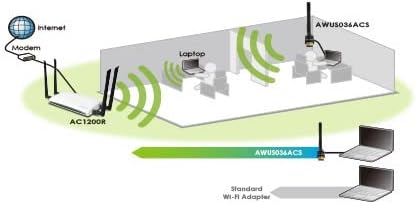
Figure 5: Illustration of extended Wi-Fi range provided by the AWUS036ACS in a typical home or office environment.
Maintenance
- Keep Drivers Updated: Periodically check the ALFA Network official website for the latest driver versions to ensure optimal performance and compatibility.
- Physical Care: Keep the adapter clean and free from dust. Avoid exposing it to extreme temperatures or moisture.
- Secure Connection: Ensure the antenna is always securely attached to the adapter.
Troubleshooting
No Wi-Fi Networks Detected or Adapter Not Working
- Check USB Connection: Ensure the adapter is firmly inserted into a functional USB port. Try a different USB port.
- Driver Installation: Verify that the correct drivers for your operating system have been installed successfully. Check Device Manager (Windows) or System Information (macOS/Linux) to see if the adapter is recognized without errors. Reinstall drivers if necessary.
- Antenna Connection: Confirm the external antenna is properly screwed onto the adapter.
- Operating System Compatibility: Remember that macOS versions beyond 10.15 and M1/M2 chipsets are not officially supported.
- Disable Onboard Wi-Fi: If your computer has a built-in Wi-Fi adapter, try disabling it in your operating system's network settings to prevent conflicts.
Slow Speeds or Intermittent Connection
- Signal Strength: Check the signal strength indicator. If it's low, try repositioning the adapter or moving closer to your Wi-Fi router.
- Band Selection: If possible, connect to the 5GHz band for faster speeds, especially for streaming or gaming, provided you are within good range of the router.
- Interference: Other electronic devices (microwaves, cordless phones, Bluetooth devices) can cause interference, especially on the 2.4GHz band. Try to minimize these sources or switch to 5GHz.
- Router Settings: Ensure your router is configured for optimal performance (e.g., correct channel selection, latest firmware).
Specifications
| Feature | Detail |
|---|---|
| Model Number | AWUS036ACS |
| Brand | ALFA Network |
| Wireless Standard | IEEE 802.11a/b/g/n/ac |
| Frequency Bands | 2.412GHz-2.472GHz; 5.15GHz-5.825GHz (Dual-Band) |
| Data Rate (Max) | Up to 150Mbps (2.4GHz), Up to 433Mbps (5GHz) |
| Interface | USB 2.0 |
| Antenna | 2dBi Dual-Band External Antenna |
| Chipset | RTL8811AU |
| Compatible Operating Systems | Windows 2000, XP, Vista, 7/8/9/10; macOS 10.7-10.12; Linux, Kali Linux (Note: No driver support for macOS beyond 10.15 or M1/M2 chipsets) |
| Product Dimensions | 2.17 x 0.98 x 0.39 inches (Adapter body) |
| Item Weight | 2.39 ounces |
Warranty and Support
For warranty information, please refer to the documentation included with your product or visit the official ALFA Network website. Technical support and driver downloads are also available through the ALFA Network support portal.
- Official Website: www.alfa.com.tw (Please check for the most current URL)
- Support: Refer to the support section on the official website for driver updates, FAQs, and contact information.


