1. Introduction
This manual provides detailed instructions for the installation, operation, and maintenance of your Pioneer DEH-S5100BT in-dash car stereo receiver. This unit features built-in Bluetooth for hands-free calling and audio streaming, a CD player, front USB and auxiliary inputs, AM/FM tuner, and compatibility with Pioneer Smart Sync for enhanced smartphone integration. Please read this manual thoroughly before using your new receiver to ensure proper operation and safety.
2. Safety Information
- Professional Installation Recommended: For optimal performance and safety, it is highly recommended to have this product installed by a qualified professional.
- Avoid Distractions: Do not operate the receiver's controls or view the display while driving. Always keep your eyes on the road.
- Volume Control: Keep the volume at a level that allows you to hear outside traffic and emergency vehicles. Prolonged exposure to high volume levels can cause hearing damage.
- Wiring: Ensure all wiring is correctly connected and insulated to prevent short circuits and damage to the unit or vehicle.
- Power Source: Connect the unit only to a 12V DC power source with a negative ground.
3. Package Contents
Verify that all items are present in the package:
- Pioneer DEH-S5100BT Car Stereo Receiver
- Wiring Harness
- Remote Control (if included)
- Mounting Hardware (screws, trim ring)
- External Microphone for Hands-Free Calling
- User Manual and Warranty Information
4. Installation
The DEH-S5100BT is designed for a 1-DIN (single-DIN) installation slot. Proper installation is crucial for optimal performance and safety. If you are unsure about any step, consult a professional installer.
4.1. Pre-Installation Checks
- Disconnect the vehicle's negative battery terminal before starting installation.
- Ensure you have the correct wiring harness adapter for your vehicle model.
- Check the available space in your dashboard for the unit.
4.2. Mounting the Unit
Slide the mounting sleeve into the dashboard opening. Secure it by bending the tabs outward. Insert the receiver into the mounting sleeve until it locks into place.
4.3. Wiring Connections
Connect the wiring harness to the corresponding wires from your vehicle. Pay close attention to power, ground, speaker, and accessory wires. The unit includes a built-in MOSFET amplifier (14 watts RMS CEA-2006/50 peak x 4 channels).
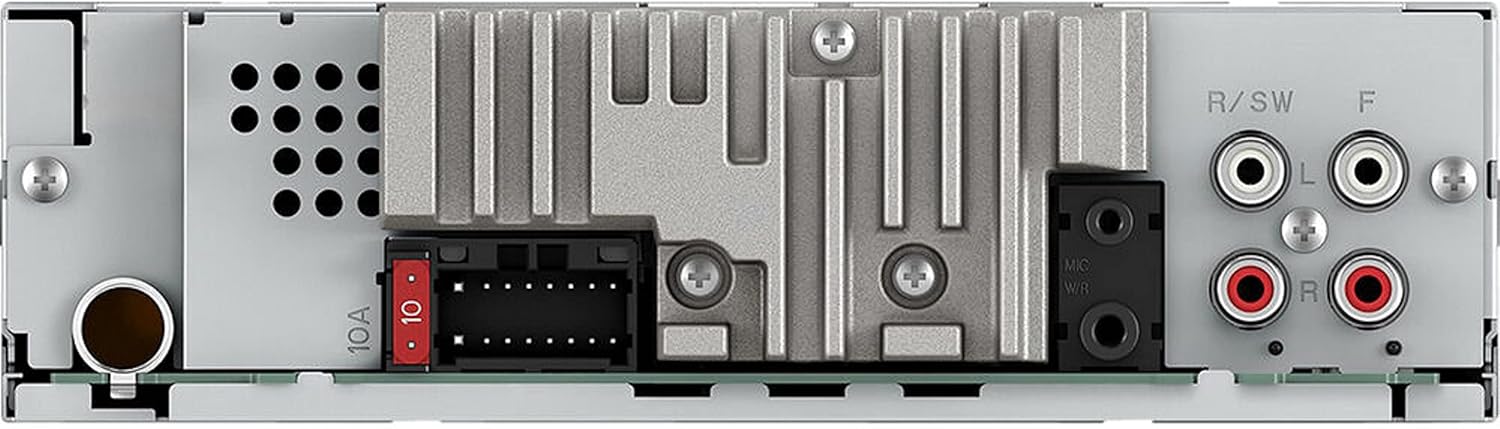
Figure 4.3.1: Rear view of the Pioneer DEH-S5100BT car stereo receiver. This image displays the main wiring harness connector, the antenna input, and the RCA outputs for external amplifiers, providing a visual guide for wiring connections.
Connect the external microphone for hands-free calling to the designated input on the rear of the unit.
5. Basic Operation
Familiarize yourself with the front panel controls for easy operation.

Figure 5.1.1: Front view of the Pioneer DEH-S5100BT car stereo receiver. This image highlights the main display, the central rotary knob for volume and menu navigation, and various control buttons for source selection, track control, and phone functions.
5.1. Power On/Off
Press the SRC/OFF button to turn the unit on. Press and hold the SRC/OFF button to turn the unit off.
5.2. Volume Control
Rotate the large central rotary knob to adjust the volume level.
5.3. Source Selection
Press the SRC/OFF button repeatedly to cycle through available sources: Tuner (AM/FM), CD, USB, AUX, Bluetooth Audio, and Pandora.
6. Bluetooth Connectivity
The DEH-S5100BT features built-in Bluetooth for hands-free calling and wireless audio streaming, including dual phone connection capability.
6.1. Pairing a Bluetooth Device
- Turn on the unit and ensure Bluetooth is enabled on your smartphone.
- On the receiver, navigate to the Bluetooth menu (usually by pressing the SRC button until 'BT Audio' or 'Phone' is selected, then accessing menu settings).
- Select 'Pairing' or 'Device Search'.
- On your smartphone, search for available Bluetooth devices and select 'DEH-S5100BT'.
- Confirm the pairing code on both devices if prompted.
6.2. Hands-Free Calling
Once paired, you can make and receive calls through the receiver. Use the dedicated phone buttons on the unit or the rotary knob to answer/end calls and navigate contacts.
6.3. Bluetooth Audio Streaming
Select 'BT Audio' as the source to stream music from your paired smartphone. Use the receiver's controls to play, pause, skip tracks, and adjust volume.

Figure 6.3.1: Pioneer DEH-S5100BT car stereo receiver displaying its screen while connected wirelessly to two smartphones. This image demonstrates the unit's capability for dual phone connection and its integration with smartphone features via Bluetooth.
7. USB and Auxiliary Input
7.1. USB Connection
Connect a USB storage device to the front USB port. The unit supports various audio formats, including FLAC file playback. Use the receiver's controls to browse folders and tracks.
7.2. Auxiliary Input
Connect an external audio player to the front 3.5mm auxiliary input jack using a stereo mini-plug cable. Select 'AUX' as the source to listen to audio from the connected device.
8. CD Playback
The DEH-S5100BT includes a CD player for audio CDs and MP3/WMA/AAC files recorded on CD-R/RW discs.
8.1. Inserting a CD
Gently insert a CD into the disc slot with the label side up. The unit will automatically load the disc and begin playback.
8.2. Ejecting a CD
Press the EJECT button to remove a CD from the slot.
8.3. Track Navigation
Use the TRACK buttons to skip to the next or previous track. Press and hold to fast forward or rewind.
9. Radio Operation (AM/FM)
The unit features an AM/FM tuner with station presets.
9.1. Tuning
Select 'Tuner' as the source. Use the SEEK buttons to automatically search for strong stations. For manual tuning, access the tuner menu.
9.2. Storing Presets
Tune to your desired station, then press and hold one of the numbered preset buttons (1-6) to save the station to that preset.
10. Pioneer Smart Sync
Pioneer Smart Sync is an application that links your smartphone to the DEH-S5100BT, expanding its features and enhancing your in-car experience. It allows you to integrate your smartphone's maps, messages, and music directly with the receiver.

Figure 10.1.1: Close-up view of the Pioneer DEH-S5100BT's main controls. This image details the 'Navi Key' for launching navigation apps, the 'Rotary Knob' for reading messages aloud, and the 'BASS Boost Key' for activating the Dynamic Bass Enhancer effect, all optimized for use with the Pioneer Smart Sync App.
10.1. Getting Started with Smart Sync
- Download the Pioneer Smart Sync app from the Apple App Store or Google Play Store.
- Connect your smartphone to the DEH-S5100BT via Bluetooth.
- Launch the Pioneer Smart Sync app on your smartphone. The receiver's display will show 'SMART SYNC'.
10.2. Smart Sync Features
- Navigation: Use the dedicated 'Navi Key' on the receiver to quickly launch your preferred navigation app on your smartphone.
- Messaging: The rotary knob can be used to trigger the system to read messages out loud, helping you stay focused on the road.
- Audio Control: Manage music playback from your smartphone directly through the receiver or the app interface.
- Sound Customization: Access advanced audio settings and equalizer controls through the app.
11. Audio Settings
The DEH-S5100BT offers various audio adjustments to optimize your listening experience.
- Equalizer: Access preset EQ curves or customize your own through the audio menu.
- Bass Boost: Use the dedicated BASS button to activate the Dynamic Bass Enhancer effect for enhanced low-frequency response.
- Fader/Balance: Adjust the front/rear and left/right speaker output levels.
- Subwoofer Control: If a subwoofer is connected, adjust its output level and crossover frequency.
12. Troubleshooting
If you encounter issues with your DEH-S5100BT, refer to the following common problems and solutions:
| Problem | Possible Cause | Solution |
|---|---|---|
| No power | Blown fuse; incorrect wiring; vehicle battery issue. | Check vehicle and unit fuses; verify power and ground connections; check vehicle battery. |
| No sound | Incorrect speaker wiring; volume too low; mute activated; incorrect source selected. | Check speaker connections; increase volume; deactivate mute; select correct audio source. |
| Bluetooth not connecting | Bluetooth not enabled on phone/unit; device not paired; interference. | Ensure Bluetooth is on; re-pair the device; move closer to the unit; reset Bluetooth settings. |
| CD error | Dirty or scratched CD; incorrect disc format. | Clean the CD; try a different CD; ensure disc format is supported. |
| Display not working | Loose faceplate connection; unit malfunction. | Remove and reattach the faceplate firmly; if issue persists, contact support. |
13. Specifications
- Model Number: DEH-S5100BT
- Brand: PIONEER
- Connectivity Technology: Bluetooth, USB
- Wireless Technology: Bluetooth
- Compatible Devices: Smartphone, Speaker
- Controller Type: iOS (and Android via Smart Sync)
- Audio Output Mode: Stereo
- Surround Sound Channel Configuration: 4 channel
- Built-in Amplifier: MOSFET (14 watts RMS CEA-2006/50 peak x 4 channels)
- Output Wattage: 200 Watts (Max)
- Supported Internet Services: Pandora
- Control Method: App (Pioneer Smart Sync)
- Supported Formats: CD, MP3, WMA, FLAC (from USB)
- Color: BLACK
- Item Dimensions (D x W x H): 9"D x 10"W x 4.1"H
- Item Weight: 3 Pounds
- UPC: 884938367455
14. Warranty and Support
The Pioneer DEH-S5100BT comes with a 1-year manufacturer's warranty. For warranty claims or technical support, please refer to the contact information provided in the separate warranty document included with your product or visit the official Pioneer website.
For additional resources and frequently asked questions, you may visit the Pioneer Brand Store on Amazon.