
Dayton Audio PC105-4
Contents
Dayton Audio PC105-4 4" Full-Range Poly Cone Driver
Instruction Manual
1. Product Overview
The Dayton Audio PC105-4 is a 4-inch full-range poly cone driver designed to deliver smooth and natural audio response from compact enclosures. Its versatile design makes it suitable for various applications, including line arrays, portable speakers, sound bars, or as a dedicated midrange driver in 3-way speaker systems.
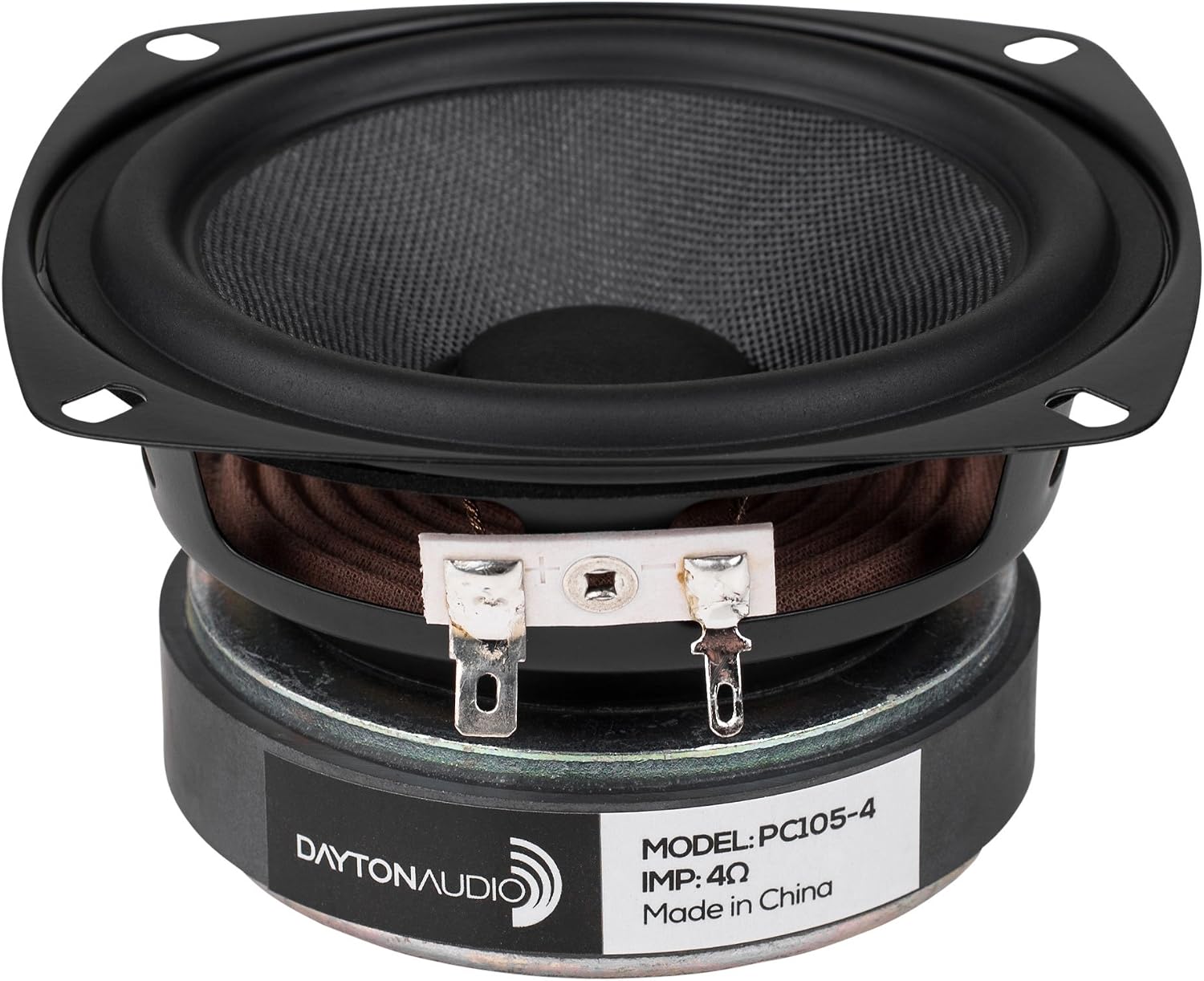
Figure 1.1: Dayton Audio PC105-4 Full-Range Driver. This image displays the speaker driver from a slightly elevated front-side angle, showcasing its black poly cone, metal frame, and the rear magnet structure with terminal connectors.
Key design elements include a poly damped woven glass fiber cone for controlled break-up and smooth roll-off, a copper cap to manage inductance and extend high-frequency response, and a 1-inch vented aluminum voice coil former with a vented pole piece for enhanced power handling. A high-energy ferrite magnet contributes to increased BL (motor strength) for higher efficiency and greater output.
2. Features
- Poly Damped Woven Glass Fiber Cone: Controls cone break-up and provides a smooth roll-off for clear audio reproduction.
- Copper Cap: Manages inductance effectively, extending the high-frequency response for detailed sound.
- 1" Vented Aluminum Voice Coil Former: Combined with a vented pole piece, this design ensures high power handling capabilities.
- High Energy Ferrite Magnet: Increases BL (motor strength) for higher efficiency and greater acoustic output.
- Smooth Full-Range Response: Designed for true full-range reproduction, simplifying speaker system designs.
3. Setup and Installation
Proper installation is crucial for optimal performance and longevity of your Dayton Audio PC105-4 driver. Always ensure power is disconnected from any associated audio equipment before beginning installation.
3.1 Mounting
- Enclosure Preparation: Ensure your speaker enclosure has a precisely cut mounting hole that matches the driver's dimensions. The PC105-4 has a standard 4-inch diameter.
- Gasket/Seal: Apply a suitable gasket or sealing material around the mounting flange of the driver to ensure an airtight seal with the enclosure. This prevents air leaks that can degrade bass response.
- Secure Fastening: Use appropriate screws (not included) to secure the driver firmly to the enclosure. Do not overtighten, as this can damage the driver frame or enclosure.
3.2 Wiring
The PC105-4 features standard spade terminals for electrical connection. Observe correct polarity to ensure proper phase alignment within your speaker system.

Figure 3.1: Rear view of the PC105-4 driver, showing the terminal connectors. The wider terminal is typically positive (+), and the narrower terminal is negative (-).
- Identify Terminals: The driver has two terminals. Typically, the wider terminal is positive (+) and the narrower terminal is negative (-). Refer to any markings on the driver itself for confirmation.
- Connect Speaker Wire: Connect the positive (+) output from your amplifier or crossover to the positive terminal of the driver. Connect the negative (-) output to the negative terminal.
- Secure Connections: Ensure all wire connections are secure and free from short circuits. Loose connections can lead to intermittent sound or damage.
- Crossover Integration (if applicable): If using the PC105-4 as a midrange driver in a multi-way system, connect it through the appropriate band-pass filter of your passive or active crossover network.
4. Operating Guidelines
To ensure the best performance and longevity of your PC105-4 driver, adhere to the following operating guidelines:
- Power Matching: Ensure the amplifier's power output is within the recommended power handling range of the PC105-4. Overpowering can cause damage.
- Avoid Overdriving: Do not operate the driver at excessively high volumes that cause audible distortion. Distortion indicates the driver is being pushed beyond its limits.
- Break-in Period: New drivers may benefit from a break-in period of several hours of moderate-level playback. This allows the suspension components to loosen and reach their optimal compliance.
- Environmental Conditions: Operate the driver in a stable environment, avoiding extreme temperatures, high humidity, or direct exposure to sunlight.
5. Maintenance
The Dayton Audio PC105-4 driver requires minimal maintenance. Following these simple steps will help preserve its performance and appearance:
- Cleaning: Gently wipe the cone and frame with a soft, dry, lint-free cloth. Avoid using harsh chemicals, solvents, or abrasive cleaners, as these can damage the cone material or finish.
- Dust Removal: Use a soft brush or compressed air (at low pressure) to remove dust from the cone and surround. Be careful not to apply direct pressure to the cone.
- Inspection: Periodically inspect the driver for any signs of physical damage, such as tears in the cone or surround, or loose connections.
- Protection: If the driver is exposed, consider using a protective grille to prevent accidental damage to the cone.
6. Troubleshooting
If you experience issues with your Dayton Audio PC105-4 driver, consult the following troubleshooting guide:
| Problem | Possible Cause | Solution |
|---|---|---|
| No Sound | Loose or incorrect wiring; Amplifier off or faulty; Crossover issue. | Check all wiring connections for proper polarity and tightness. Ensure amplifier is powered on and functioning. Verify crossover connections and settings. |
| Distorted Sound | Overdriving the driver; Amplifier clipping; Damaged driver. | Reduce volume level. Check amplifier for signs of clipping (e.g., indicator lights). Inspect driver cone and surround for physical damage. |
| Intermittent Sound | Loose wire connection; Faulty cable. | Check and secure all wiring connections. Test with different speaker cables if possible. |
| Weak or Muffled Sound | Incorrect polarity; Air leak in enclosure. | Verify correct wiring polarity (+ to + and - to -). Check enclosure for any air leaks around the driver mounting or seams. |
7. Specifications
Detailed technical specifications for the Dayton Audio PC105-4 4" Full-Range Poly Cone Driver:
| Specification | Value |
|---|---|
| Model Name | PC105-4 |
| Speaker Type | Full-Range |
| Speaker Size | 4 Inches |
| Woofer Diameter | 4 Inches |
| Material | Aluminum (frame) |
| Product Dimensions | 4.02"D x 2.8"W x 4.02"H |
| Item Weight | 1.6 Pounds |
| Manufacturer | Dayton Audio |
| UPC | 848791004025 |
| Speaker Maximum Output Power | 80 Watts |
| Connectivity Technology | Wired |
| Mounting Type | Flush Mount |
| Audio Driver Type | Dynamic Driver |
| Shape | Round |
8. Warranty and Support
Dayton Audio products are designed for reliability and performance. This product comes with a limited warranty.
8.1 Warranty Information
The Dayton Audio PC105-4 is covered by a Limited Warranty. For specific terms and conditions of the warranty, please refer to the documentation included with your purchase or visit the official Dayton Audio website. This warranty typically covers defects in materials and workmanship under normal use.
8.2 Customer Support
For technical assistance, troubleshooting beyond this manual, or warranty claims, please contact Dayton Audio customer support. You can find contact information and additional resources on the official Dayton Audio website:
Visit the Dayton Audio Store on Amazon
Please have your product model number (PC105-4) and purchase details ready when contacting support.
Ask a question about this manual
Ask about setup, troubleshooting, compatibility, parts, safety, or missing instructions. Manuals+ will review the question and use this page’s manual context to help answer it.